
In the dynamic world of mobile technology, staying abreast of the latest operating system updates is not merely a pursuit of novelty; it’s a critical aspect of digital security, performance optimization, and accessing cutting-edge features. Android, Google’s ubiquitous mobile operating system, powers billions of devices worldwide, making its evolutionary path a central topic for tech enthusiasts, developers, and everyday users alike. This article delves into the current state of Android’s operating system, exploring its latest iteration, the intricate update ecosystem, and what the future holds for this dominant platform.
The Current Android Landscape: Unpacking Android 14
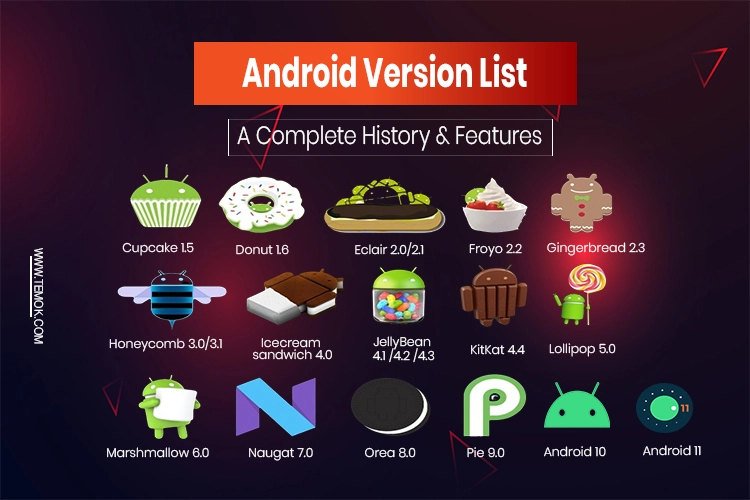
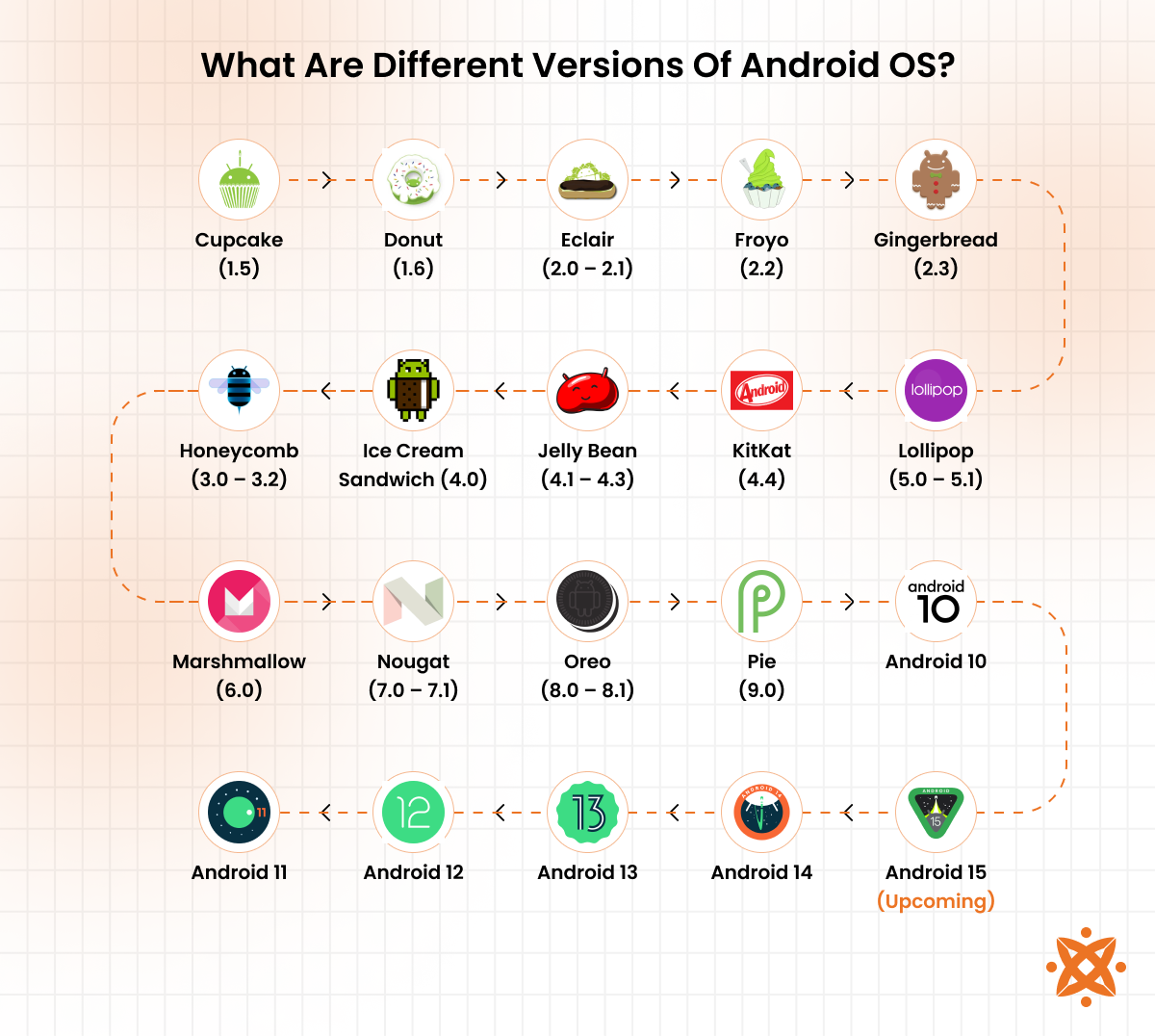
As of its stable release, the latest publicly available version of Android is Android 14, codenamed “Upside Down Cake” during its development phases. Released in October 2023, Android 14 builds upon its predecessors by refining user experience, bolstering privacy and security, and introducing a suite of personalization options that give users more control over their devices than ever before. This iteration is a testament to Google’s continuous commitment to making Android more secure, accessible, and intuitive for its vast user base.
Key Features and Innovations
Android 14 brings a host of enhancements designed to elevate the user experience across multiple fronts:
-
Privacy and Security Enhancements: At the forefront of Android 14’s innovations are significant improvements to user privacy and security. Google has introduced more granular control over app permissions, making it harder for malicious applications to exploit sensitive data. A notable feature is the restriction on installing outdated apps that target older Android API levels, effectively closing a common loophole for malware. Additionally, Android 14 strengthens data sharing permissions, requiring apps to explicitly declare their data-sharing practices and giving users clearer control over what information leaves their device. Improvements to the credential manager offer a unified API for password managers, streamlining the sign-in experience while enhancing security.
-
Customization and Personalization: Android 14 significantly expands customization options, allowing users to truly make their device their own. The lock screen, a primary interaction point, receives a major overhaul with new clock styles, customizable shortcuts, and generative AI wallpapers that leverage on-device AI to create unique backgrounds based on text prompts. This level of personalization extends to monochrome themes, offering a sleek, minimalist aesthetic for those who prefer a less vibrant interface. Users can also set different language preferences for individual apps, a boon for multilingual individuals who use certain apps in specific languages.
-
Productivity and Accessibility: Enhancing daily usability, Android 14 introduces features aimed at boosting productivity and accessibility. Larger fonts can now be scaled up to 200% without breaking text layout, significantly improving readability for users with visual impairments. Improved system performance and battery life optimization ensure a smoother, more efficient experience throughout the day. The Health Connect app, which consolidates health and fitness data from various sources, is now built directly into Android 14, providing a unified and secure platform for managing personal wellness information. The new sharing sheet offers more intuitive suggestions for sharing content, adapting to user behavior over time.
Under the Hood Improvements
Beyond the visible user-facing features, Android 14 packs substantial improvements beneath the surface, crucial for developers and overall system stability:
-
Performance Optimizations: Google continues to optimize the Android Runtime (ART), leading to faster app launch times, improved system responsiveness, and more efficient resource management. These behind-the-scenes enhancements contribute directly to better battery life and a smoother user experience across a wider range of hardware.
-
Security Patches and Updates: Regular security patches are integrated into Android 14, addressing vulnerabilities and fortifying the operating system against emerging threats. The modular design of Android’s update system (Project Mainline) allows Google to push critical security fixes and system component updates directly to devices, independent of full OS updates, ensuring a more agile security posture.
-
Developer-Centric Changes: For developers, Android 14 brings new APIs and tools that enable them to create more robust, performant, and privacy-conscious applications. These include better support for predictive back gestures, improved camera extensions, and streamlined background task management, all contributing to a richer app ecosystem.
The Android Update Cycle: A Complex Ecosystem
While Google releases the latest Android version, its journey to user devices is far from straightforward. Unlike Apple’s singular control over iOS updates, the Android ecosystem is characterized by a multi-faceted distribution model involving various stakeholders. This complexity often leads to significant delays in update availability, creating a fragmented landscape where many devices may not run the absolute latest version.
Google’s Role vs. OEM Customizations
The update process typically begins with Google releasing the new Android version to its own Pixel devices. These phones, designed by Google, serve as the reference standard and receive updates almost immediately after the official launch. For the vast majority of Android users, however, the process involves additional steps:
-
Original Equipment Manufacturers (OEMs): Companies like Samsung, Xiaomi, OnePlus, Oppo, and others take Google’s open-source Android code and customize it extensively. They integrate their proprietary user interfaces (e.g., Samsung’s One UI, Xiaomi’s MIUI, OnePlus’s OxygenOS), add their own features, pre-install their apps, and optimize the OS for their specific hardware. This customization process is time-consuming and resource-intensive, often taking months after Google’s initial release.
-
Carrier Involvement: In many regions, particularly the United States, mobile carriers (e.g., Verizon, AT&T, T-Mobile) also play a role. They often conduct their own testing and certification processes to ensure the updated OS is compatible with their networks and services. This adds another layer of potential delay before an update reaches a user’s device.
-
Device Age and Support Policies: The age of a device significantly impacts its update eligibility. Most OEMs commit to a certain number of major OS updates and security patches for their flagship devices (e.g., 3-5 years for OS updates, 4-7 years for security updates), while budget devices often receive fewer or no major OS upgrades. Once a device reaches its end-of-life for software support, it will no longer receive updates, making it more vulnerable to security threats over time.
Why Updates Matter: Security, Features, and Performance
Despite the complexities, staying updated to the latest Android version, or at least recent versions, is crucial for several compelling reasons:
-
Mitigating Vulnerabilities: Security is perhaps the most critical reason to update. Each Android update, especially major ones, includes patches for newly discovered security vulnerabilities. Running an outdated OS exposes your device to known exploits, making it easier for hackers to access your data, install malware, or take control of your device. Regular security patches help keep your digital life safe.
-
Accessing New Functionalities: Major OS updates often introduce exciting new features, improved user interfaces, and enhanced capabilities. From advanced camera features to new privacy controls, or productivity tools, these functionalities can significantly improve your device’s utility and your overall mobile experience. For example, Android 14’s expanded customization options and stricter privacy controls are only available to users running that specific version.
-
Improved System Stability and Speed: With each iteration, Google and OEMs work to optimize the operating system for better performance and stability. Updates can fix bugs, resolve compatibility issues, and enhance the overall responsiveness of your device. This means faster app loading, smoother multitasking, and a more reliable user experience, breathing new life into older hardware.
How to Check and Update Your Android Device
For many users, the process of checking for and installing updates is straightforward, though it can vary slightly depending on your device’s manufacturer and its software skin. Regularly checking for updates is a good habit to maintain your device’s security and performance.
Step-by-Step Guide
Here’s a general guide on how to check for and install Android updates:
-
Open Settings: Locate and tap the “Settings” icon on your device’s home screen or app drawer.
-
Navigate to System: Scroll down and tap on “System” or “About Phone” (the exact wording may vary). On some devices, it might be under a different category like “Software Update” directly.
-
Find System Update: Look for an option like “System Update,” “Software Update,” or “Wireless Update.” Tap on it.
-
Check for Updates: Your device will then connect to its manufacturer’s servers to check if a new update is available. If an update is found, you’ll see details about the new version, including its size and a summary of new features or bug fixes.
-
Download and Install: If an update is available, you’ll be prompted to download it. Ensure you are connected to a stable Wi-Fi network to avoid incurring mobile data charges and to ensure a smooth download. Once downloaded, you’ll typically be asked to “Install Now” or “Restart and Install.” Your device will then restart and proceed with the installation process, which can take anywhere from 10 to 30 minutes, during which time your phone will be unusable.
Considerations Before Updating
Before initiating a major Android OS update, it’s wise to take a few precautions:
-
Backup Your Data: While updates are generally safe, there’s always a minuscule risk of data loss. It’s highly recommended to back up your important photos, videos, contacts, and other files to cloud storage (Google Drive, Google Photos) or a computer before updating.
-
Sufficient Battery: Ensure your device has at least 50% battery charge, or ideally, keep it plugged in during the update process. A power interruption during installation can corrupt the operating system, potentially “bricking” your device.
-
Wi-Fi Connection: Use a stable Wi-Fi connection for downloading large updates. This is faster and avoids consuming your mobile data allowance.
-
Storage Space: Make sure you have enough free storage space on your device. OS updates can be several gigabytes in size. Your device will usually warn you if space is insufficient.
-
App Compatibility: While modern Android updates are generally backward-compatible, very rarely an older, unmaintained app might encounter issues with a new OS version. Check app reviews or forums if you rely on critical legacy applications.
Looking Ahead: The Future of Android
Android is a platform in perpetual motion, constantly evolving to meet the demands of emerging technologies and user expectations. Even as Android 14 rolls out to more devices, Google is already hard at work on its successor, ensuring that the Android ecosystem remains at the forefront of mobile innovation.
Anticipating Android 15 (Vanilla Ice Cream / V)
As per Google’s alphabetical naming convention during development, the next major iteration is expected to be Android 15, likely carrying the dessert-themed codename “Vanilla Ice Cream” or simply referred to by its letter ‘V’. While official details are scarce in the early stages, industry speculation and developer previews often hint at the direction Google is heading:
-
Enhanced Privacy and Security: This remains a cornerstone of Android development. Expect further refinements to privacy controls, potentially more robust data usage transparency, and advanced security features to combat new forms of cyber threats.
-
Deeper AI Integration: Artificial intelligence is increasingly central to modern smartphones. Android 15 is anticipated to weave AI even more deeply into the OS, from intelligent battery management and personalized suggestions to potentially more sophisticated generative AI features directly on the device.
-
Optimization for Foldables and Large Screens: With the growth of foldable phones and large-screen tablets, Android will continue to optimize its interface and app compatibility for these form factors, offering a more seamless and productive experience across different device types.
-
Satellite Connectivity Improvements: Following the trend of satellite connectivity for emergency services in other mobile operating systems, Android 15 might offer more standardized support and integration for satellite communication capabilities, extending connectivity beyond traditional cellular networks.
-
Cross-Device Continuity: Google is continually striving for better synergy across its ecosystem. Android 15 could bring further improvements in how your phone interacts with Chromebooks, Wear OS watches, Android Auto in cars, and Google Home devices, creating a more cohesive digital experience.
The Broader Android Ecosystem
The future of Android extends beyond the core smartphone OS. Google is building a comprehensive ecosystem that aims to provide a consistent and integrated experience across all your devices:
-
Wear OS: The platform for smartwatches continues to evolve, offering better health tracking, more intelligent notifications, and seamless integration with your Android phone.
-
Android Auto: Bringing the Android experience safely to your car’s infotainment system, with ongoing improvements in navigation, communication, and entertainment.
-
Android TV/Google TV: Transforming your television into a smart entertainment hub, with access to streaming services, apps, and voice control.
-
Google Home/Nest Ecosystem: Central to smart home control, allowing Android devices to interact effortlessly with smart speakers, displays, cameras, and other connected devices.
This interconnected web signifies Google’s vision for Android: not just a smartphone OS, but the foundational technology that powers and connects your entire digital life. The continuous evolution of the core OS ensures that this broader ecosystem remains robust, secure, and feature-rich.
In conclusion, Android 14 represents the pinnacle of Google’s mobile operating system development, offering a blend of enhanced privacy, extensive customization, and refined performance. While the journey of updates from Google to your device can be intricate, the benefits of staying current—security, new features, and improved stability—are undeniable. As we look forward to Android 15 and beyond, the platform promises even greater intelligence, seamless integration, and user empowerment, solidifying its role as the backbone of the mobile world. Regularly checking for and installing available updates remains the best practice for every Android user.
aViewFromTheCave is a participant in the Amazon Services LLC Associates Program, an affiliate advertising program designed to provide a means for sites to earn advertising fees by advertising and linking to Amazon.com. Amazon, the Amazon logo, AmazonSupply, and the AmazonSupply logo are trademarks of Amazon.com, Inc. or its affiliates. As an Amazon Associate we earn affiliate commissions from qualifying purchases.