
For years, the choice between the iPad Air and the iPad Pro was governed by a clear hierarchy: the Air was for the everyday enthusiast, and the Pro was for the creative professional. However, as Apple continues to iterate on its silicon and display technologies, the line between these two devices has blurred significantly. With the introduction of the M4 chip in the Pro and the expansion of the Air into two distinct sizes, the decision-making process for consumers has become more nuanced than ever.
To choose the right device, one must look beyond the aesthetic similarities and dive deep into the underlying hardware, display innovations, and the specific technological workflows each machine is designed to support.
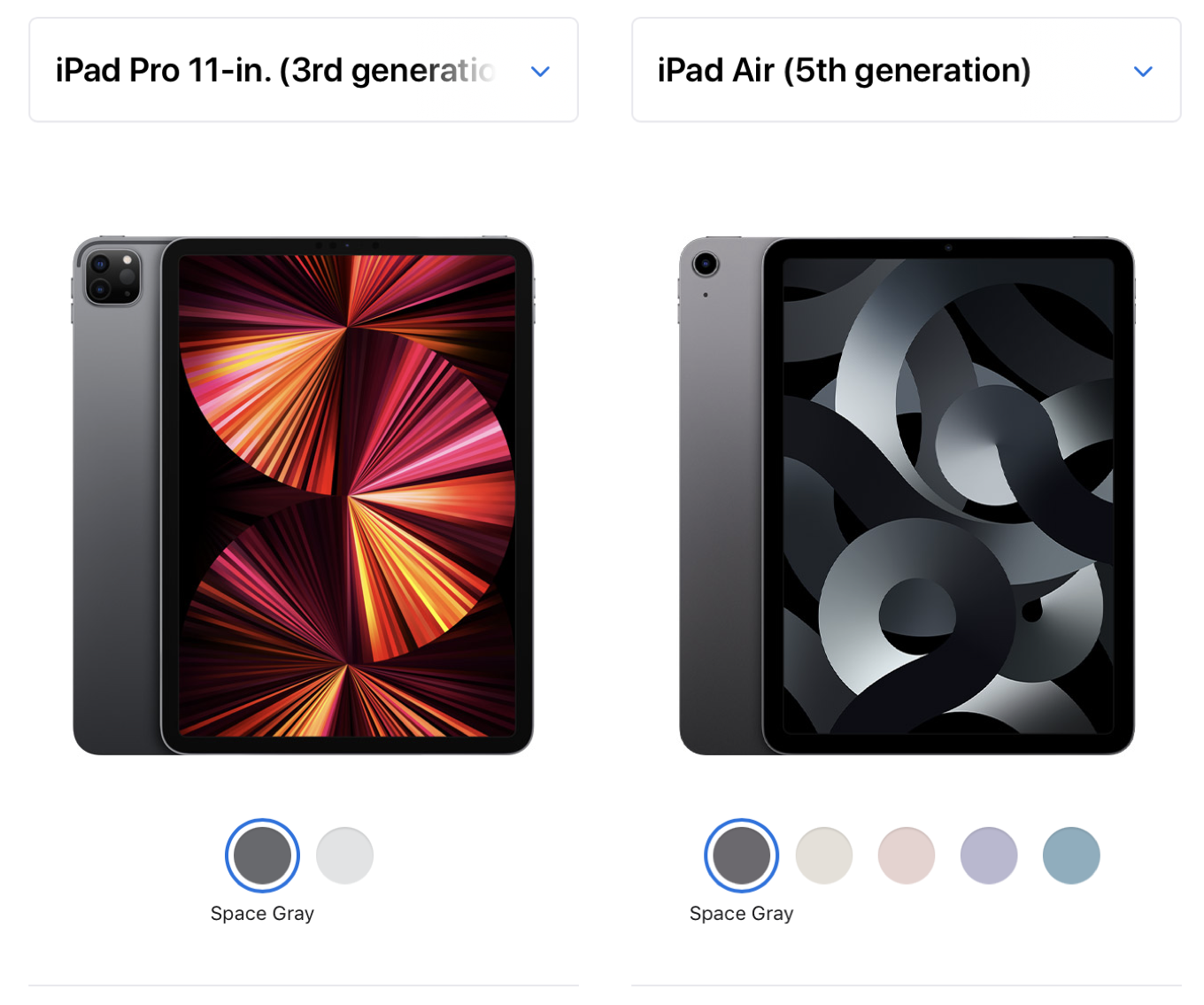
The Core Architectural Differences: M2 vs. M4 Performance
The most fundamental distinction between the current iPad Air and the iPad Pro lies beneath the aluminum chassis. Apple’s transition to its own silicon has revolutionized the tablet market, but it has also created a performance gap that dictates the longevity and capability of each device.
Processing Power and Thermal Efficiency
The iPad Air currently utilizes the M2 chip. While “older” in the context of Apple’s rapid release cycle, the M2 remains a powerhouse by tablet standards. It features an 8-core CPU and a 10-core GPU, providing more than enough bandwidth for multitasking, high-end gaming, and 4K video editing. For the average user—students, office workers, and digital hobbyists—the M2 represents a ceiling they may never actually hit.
In contrast, the new iPad Pro skips the M3 generation entirely and jumps to the M4. Built on a second-generation 3-nanometer process, the M4 is a marvel of thermal efficiency and raw speed. It features a new CPU architecture with up to 10 cores and a 10-core GPU that introduces hardware-accelerated ray tracing and mesh shading to the iPad for the first time. This isn’t just a marginal upgrade; it is a fundamental shift for professionals working in 3D rendering, complex CAD software, or high-frame-rate gaming.
RAM and Storage Tiers
Hardware performance is also tethered to memory. The iPad Air comes standard with 8GB of RAM regardless of the storage capacity you choose. For most iPadOS tasks, this is sufficient. However, the iPad Pro offers a bifurcated memory structure. Models with 256GB or 512GB of storage include 8GB of RAM, but if you opt for the 1TB or 2TB models, the RAM doubles to 16GB. Furthermore, the 1TB and 2TB Pro models feature the full 10-core CPU, whereas the lower storage tiers feature a binned 9-core version. This makes the high-end Pro a vastly different beast in terms of data throughput and long-term software support.
Visual Excellence: Liquid Retina vs. Tandem OLED Display Technology
If the processor is the brain of the iPad, the display is its soul. This is where the most visible—and expensive—differences manifest.
ProMotion and Refresh Rates
The iPad Air utilizes a standard Liquid Retina display. It is a high-quality IPS LCD panel with P3 wide color and True Tone technology. However, it is capped at a 60Hz refresh rate. In the modern tech landscape, where even mid-range smartphones often feature high-refresh displays, the 60Hz limitation on the Air is noticeable during fast scrolling and Apple Pencil use.
The iPad Pro, conversely, features ProMotion technology, allowing for an adaptive refresh rate up to 120Hz. This results in incredibly fluid animations and, crucially for artists, near-zero latency when using the Apple Pencil. The “Pro” experience is defined by this responsiveness; once a user becomes accustomed to 120Hz, returning to the 60Hz of the Air can feel jarringly sluggish.
Tandem OLED and Brightness
With the latest generation, the iPad Pro has introduced “Tandem OLED.” This technology layers two OLED panels on top of one another to achieve staggering brightness levels—1,000 nits for full-screen SDR and HDR content, and up to 1,600 nits of peak brightness for HDR. This solves the traditional OLED problem of low brightness while maintaining perfect blacks and an infinite contrast ratio.
The iPad Air remains on traditional LED backlighting. While it is bright and color-accurate, it lacks the “inky” blacks and high dynamic range of the Pro. For photographers and colorists who require absolute precision in shadow detail and highlights, the Ultra Retina XDR display (Tandem OLED) on the Pro is an essential tool rather than a luxury.

Design, Form Factor, and Hardware Versatility
Both the Air and the Pro now come in two sizes: 11-inch and 13-inch. This was previously a major differentiator, but now that the Air offers a large-screen option, the choice comes down to the quality of the build and the weight of the device.
Portability and Weight Distribution
Interestingly, the “Air” moniker has become somewhat of a misnomer. The new M4 iPad Pro is actually thinner and lighter than the iPad Air. Apple’s engineering on the Pro has reduced the device’s thickness to just 5.1mm (for the 13-inch model), making it the thinnest product the company has ever produced. While the Air is by no means bulky, the Pro feels more like a slate of glass than a piece of hardware, providing a slight edge in ultra-portable workflows.
The Peripheral Ecosystem: Apple Pencil Pro and Magic Keyboard
Both devices support the new Apple Pencil Pro, which introduces haptic feedback and barrel roll capabilities. This parity is a huge win for Air users, as they no longer have to buy the “Pro” tablet just to get the best stylus experience.
However, the keyboard ecosystem remains split. While both support a version of the Magic Keyboard, the iPad Pro utilizes a redesigned version with an aluminum palm rest, a larger glass trackpad with haptic feedback, and a dedicated function row. The iPad Air uses the older, polyurethane Magic Keyboard. While functional, the Pro’s keyboard provides a much more “laptop-like” experience, which is critical for those intending to use their iPad as a primary productivity device.
Advanced Connectivity and Camera Systems
In the tech world, the “Pro” label often translates to better I/O (Input/Output) and superior biometric sensors. This holds true for the iPad lineup.
Thunderbolt 3 vs. Standard USB-C
The iPad Air features a standard USB-C port. While it supports data transfer and external displays, it is limited in bandwidth. The iPad Pro features a Thunderbolt 3 / USB 4 port. For tech-savvy users, this is a major distinction. Thunderbolt allows for much faster data transfer speeds (up to 40Gb/s) and supports more demanding peripherals, such as high-speed external SSDs and 6K resolution displays like the Apple Pro Display XDR. If your workflow involves offloading massive video files or daisy-chaining multiple devices, the Pro is the only viable option.
Face ID vs. Touch ID: The Biometric Shift
The iPad Air continues to use Touch ID integrated into the top power button. It is fast and reliable, but it requires a conscious physical action to unlock the device or authenticate a payment. The iPad Pro utilizes the TrueDepth camera system for Face ID. In a tablet context, Face ID is often superior because it works seamlessly as you wake the device, regardless of how you are holding it. Furthermore, the Pro’s front-facing camera—now moved to the landscape edge on both models—supports Center Stage, but only the Pro includes the LiDAR scanner on the back. This scanner is vital for Augmented Reality (AR) applications and 3D room scanning, features that are absent on the Air.
Defining the Value Proposition: Which Tablet Fits Your Workflow?
Choosing between these two devices ultimately requires an honest assessment of your technical needs versus your budget. The price gap between the Air and the Pro is significant, often enough to cover the cost of essential accessories like the Magic Keyboard or Apple Pencil.
The Student and Generalist Perspective
For the vast majority of users—students taking notes, office workers managing emails, and casual media consumers—the iPad Air is the most logical choice. The M2 chip is powerful enough to last for the next five to seven years of software updates. The lack of a 120Hz OLED screen is a compromise, but it is one that most people will happily make to save hundreds of dollars. The 13-inch Air, in particular, is a game-changer for those who want more screen real estate for multitasking without the “Pro” price tag.

The Pro Creator and High-End Power User
The iPad Pro is intended for those who push their hardware to the limit. If you are a professional illustrator, the 120Hz ProMotion display and Tandem OLED are not just “nice to have”—they are functional requirements that affect the quality of your work. If you are a video editor working with ProRes footage, the M4 chip and Thunderbolt connectivity provide a level of efficiency that the Air cannot match.
Furthermore, the Pro is for the “tech enthusiast” who simply wants the best possible mobile display on the market. The Tandem OLED screen is a landmark achievement in display technology, providing a viewing experience that rivals high-end reference monitors.
In conclusion, while the iPad Air has narrowed the gap by offering larger sizes and powerful M-series silicon, the iPad Pro remains in a league of its own. It is a specialized tool for high-end niches, defined by its industry-leading display, cutting-edge M4 architecture, and superior peripheral support. The Air is the best tablet for most people, but the Pro remains the definitive statement on what a tablet can be.
aViewFromTheCave is a participant in the Amazon Services LLC Associates Program, an affiliate advertising program designed to provide a means for sites to earn advertising fees by advertising and linking to Amazon.com. Amazon, the Amazon logo, AmazonSupply, and the AmazonSupply logo are trademarks of Amazon.com, Inc. or its affiliates. As an Amazon Associate we earn affiliate commissions from qualifying purchases.