
In today’s interconnected digital world, the question of “what is the best virus protection software?” is more pertinent than ever. It’s no longer just about shielding your computer from a simple virus; it’s about building a robust digital fortress against a constantly evolving arsenal of cyber threats. From sophisticated ransomware attacks that lock down your files to insidious phishing scams designed to steal your identity, the dangers lurking online are diverse and relentless. Choosing the right antivirus software isn’t merely a luxury; it’s a fundamental necessity for anyone who uses a computer, smartphone, or tablet. This comprehensive guide will delve into the critical aspects of digital security, help you understand the threat landscape, identify the essential features of top-tier protection, and ultimately empower you to make an informed decision for your digital safety.
Understanding the Evolving Threat Landscape
The term “virus protection” is, in many ways, an antiquated descriptor for the comprehensive digital security solutions required today. While traditional viruses still exist, they represent just one facet of a much broader and more complex threat landscape. Cybercriminals are constantly innovating, developing new methods to exploit vulnerabilities, steal data, and disrupt digital lives.
Beyond Traditional Viruses: Malware, Ransomware, and Phishing
The umbrella term “malware” (malicious software) encompasses a vast array of digital threats far more sophisticated than the viruses of old. This includes ransomware, which encrypts your files and demands payment for their release, often causing immense stress and financial burden. Spyware silently monitors your online activities, recording keystrokes and sensitive information. Adware bombards you with unwanted advertisements, slowing down your system. Rootkits embed themselves deep within your operating system, making them incredibly difficult to detect and remove.
Beyond malicious code, phishing attacks remain a prevalent and dangerous threat. These social engineering tactics trick users into revealing sensitive information by impersonating legitimate entities through emails, text messages, or fake websites. A convincing email from what appears to be your bank or a major online retailer can easily lead unsuspecting individuals to provide their login credentials, credit card details, or other personal data directly to criminals. The human element often remains the weakest link in the security chain, making protection against these psychological ploys crucial.
The Importance of Multi-Layered Protection
Given the diversity of threats, relying on a single defense mechanism is akin to locking only one door in a house with multiple entry points. Effective digital security demands a multi-layered approach. This means having software that not only scans for known threats but also employs behavioral analysis to detect suspicious activities from new, unknown malware. It should integrate seamlessly with your operating system, provide real-time protection, and ideally include features that go beyond simple file scanning.
The goal is to create a series of barriers: one layer might block a malicious download, another might prevent a suspicious program from executing, and yet another might warn you about a phishing website. Should one layer fail, others are there to catch the threat before it compromises your system or data. This redundancy is vital in a world where zero-day exploits (vulnerabilities unknown to software vendors) can emerge at any moment.
Why Built-in Protections Aren’t Always Enough
Modern operating systems, particularly Windows with its Defender suite, have significantly improved their built-in security features. Windows Defender provides a solid baseline of protection, offering real-time scanning, firewall capabilities, and even some ransomware protection. For users with very low-risk online habits, it might suffice.
However, built-in solutions often lack the depth, advanced features, and independent lab test scores of dedicated, third-party antivirus software. Premium antivirus suites typically offer more aggressive detection engines, advanced ransomware rollback features, VPN integration, password managers, dark web monitoring, parental controls, and more sophisticated phishing detection that goes beyond basic browser warnings. They often have dedicated teams constantly monitoring new threats and pushing updates, providing a quicker response to emerging dangers. For comprehensive, peace-of-mind protection, especially for those who engage in online banking, shopping, or handle sensitive information, augmenting or replacing built-in defenses with a specialized solution is highly recommended.
Key Features to Look for in Top Antivirus Software
When evaluating virus protection software, it’s essential to look beyond marketing hype and focus on the core features that deliver genuine security and usability. The “best” software isn’t necessarily the one with the most features, but rather the one that provides robust protection without hindering your system’s performance.
Real-time Scanning and Threat Detection
This is the cornerstone of any effective antivirus solution. Real-time scanning continuously monitors your system for suspicious activity, files, and processes as they occur. It should be capable of detecting and blocking malware before it has a chance to execute or infect your system. Look for software that employs multiple detection methods, including signature-based detection (matching known threats), heuristic analysis (identifying suspicious behavior), and machine learning (predicting new threats). The quicker a threat is identified and neutralized, the less damage it can do.
Firewall and Network Protection
A robust firewall acts as a digital gatekeeper, controlling incoming and outgoing network traffic. While operating systems have built-in firewalls, a dedicated antivirus suite often provides a more advanced and user-friendly interface for managing network connections, blocking unauthorized access, and monitoring network activity for potential threats. This is especially crucial when connecting to public Wi-Fi networks, where your device might be vulnerable to eavesdropping or direct attacks. Network protection extends to preventing intrusions and securing your home network from external threats.
Ransomware Protection and Rollback Features
Given the devastating impact of ransomware, specialized protection against it is a non-negotiable feature. Top-tier software includes behavioral monitoring to detect ransomware-like activity (e.g., rapid encryption of multiple files) and automatically block it. Crucially, many advanced suites also offer a “rollback” or “data recovery” feature, which can revert your files to a pre-encrypted state, even if a ransomware attack manages to slip through initial defenses. This acts as a vital last line of defense against data loss.
Phishing and Web Protection
As social engineering attacks become more sophisticated, effective phishing and web protection are paramount. This feature should actively scan web pages you visit and links you click, identifying and blocking access to known malicious or fraudulent websites. It should also analyze email links and attachments, flagging suspicious content before you interact with it. Some solutions even offer browser extensions that provide real-time warnings and protect you from drive-by downloads or malicious scripts embedded in legitimate-looking sites.
Performance Impact and Usability
The most secure software in the world is useless if it grinds your computer to a halt or is impossible to use. A good antivirus should operate efficiently in the background, consuming minimal system resources. Look for software that has a light footprint and doesn’t significantly impact startup times, application responsiveness, or gaming performance. Equally important is an intuitive and user-friendly interface. You should be able to easily understand the status of your protection, run scans, and adjust settings without needing a degree in cybersecurity.
Privacy Features and Data Protection
Beyond just blocking malware, the best virus protection software often includes features aimed at enhancing your overall digital privacy. This might include a secure VPN (Virtual Private Network) to encrypt your internet traffic and mask your IP address, preventing tracking and securing your data on public Wi-Fi. A password manager can help you create and store strong, unique passwords for all your accounts. Some suites also offer dark web monitoring, alerting you if your personal information (like email addresses or credit card numbers) appears in data breaches. These features go a long way in protecting your identity and personal data.
Top Contenders in the Antivirus Arena
While the “best” choice is subjective and depends on individual needs, certain providers consistently rank high in independent tests and user reviews, offering robust protection across various categories.

Comprehensive Security Suites
These suites offer an all-in-one approach, bundling antivirus, firewall, anti-phishing, ransomware protection, parental controls, password managers, and often VPN services into a single package. They are ideal for users seeking complete protection without having to piece together multiple solutions. Industry leaders in this space include Bitdefender Total Security, consistently praised for its excellent detection rates and low system impact; Norton 360, known for its extensive feature set including dark web monitoring and a secure VPN; and Kaspersky Total Security, which provides strong protection across multiple platforms, though its reputation has faced scrutiny due to geopolitical concerns. These suites often offer tiered plans, allowing users to choose the level of protection that best suits their needs and budget.
Lightweight and User-Friendly Options
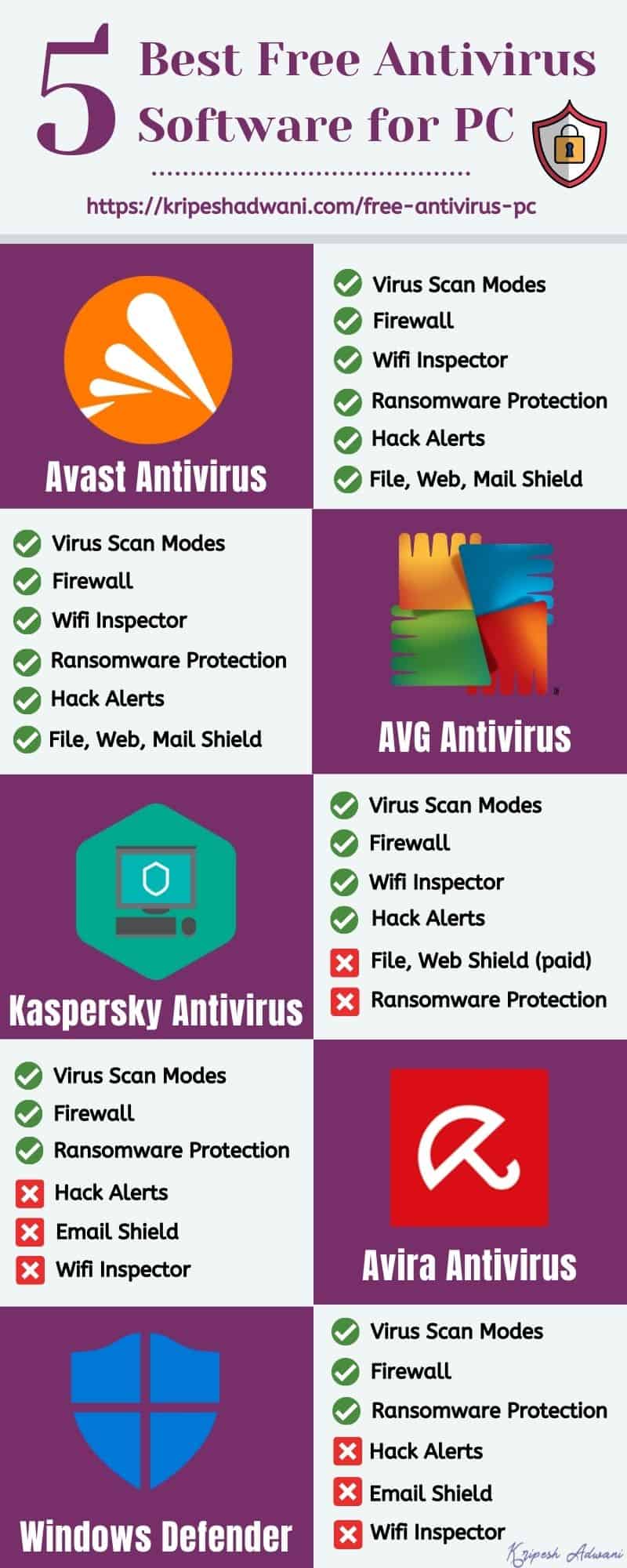
For users who prioritize ease of use and minimal system impact, or those who find comprehensive suites overwhelming, several excellent lightweight options exist. Avast One (which replaced the traditional Avast Free/Premium) offers a good balance of protection and features in a user-friendly interface. AVG AntiVirus Free (now part of Avast) also provides solid basic protection without significant performance overhead. For Windows users, Microsoft Defender has improved dramatically and offers competent baseline protection, often sufficient for those with very careful online habits and who combine it with good browsing practices. These options are often a good starting point, but may lack the advanced features found in full security suites.
Business-Focused Solutions
It’s important to note that home user antivirus solutions differ significantly from business-focused ones. Business solutions, like those from Sophos, CrowdStrike, or ESET, offer centralized management consoles, endpoint detection and response (EDR) capabilities, and advanced threat intelligence tailored to corporate environments. They focus on protecting multiple devices across an organization, often integrating with other IT security infrastructure. While the underlying detection technologies might be similar, the deployment, management, and scalability aspects are entirely different, making consumer products unsuitable for most organizational needs.
Making the Right Choice: Factors to Consider
Selecting the ideal virus protection software is a personal decision influenced by several factors unique to your digital life. There’s no single “best” solution for everyone, but by considering these points, you can narrow down the options.
Your Operating System (Windows, macOS, Android, iOS)
The primary operating system (OS) you use dictates your options. While Windows users have the widest array of choices, macOS security, though historically seen as less vulnerable, increasingly benefits from dedicated antivirus software. Mobile devices (Android and iOS) also require protection against specific mobile threats like malicious apps and phishing. Ensure the software you choose is compatible and optimized for all the platforms you intend to protect, especially if you opt for a multi-device license. Some suites offer cross-platform protection, simplifying management across your various devices.
Your Digital Habits and Risk Profile
Consider how you use the internet. Are you a casual browser who mostly checks email and social media? Or are you a power user who frequently downloads files, visits obscure websites, uses torrents, or engages in online banking and shopping regularly? Users with higher-risk digital habits (e.g., clicking on many links, downloading from unverified sources) will need more robust, comprehensive protection. If you handle sensitive personal or professional data, or if you have children who use the internet, features like identity theft protection and parental controls become more critical.
Budget and Subscription Models
Antivirus software typically operates on an annual subscription model. Prices can vary significantly based on the number of devices covered, the features included, and the length of the subscription. While free antivirus options exist, they often come with limitations in features, support, or may include advertising. Determine your budget and compare the value proposition of different paid suites. Look for introductory offers or multi-year discounts, but always prioritize robust security over the lowest price. Remember, the cost of an antivirus subscription is almost always less than the cost and hassle of dealing with a data breach or ransomware attack.
Independent Lab Test Results (e.g., AV-Test, AV-Comparatives)
To cut through marketing claims, always consult independent antivirus testing labs like AV-Test and AV-Comparatives. These organizations rigorously test antivirus products against real-world threats, evaluating their protection capabilities, performance impact, and usability. They provide objective, scientific data on how well each product performs. Look for software that consistently earns high scores across all categories, indicating a balanced and effective solution. Their reports are invaluable for making an evidence-based decision.
Customer Support and Reputation
Even the most intuitive software might require technical assistance occasionally. Look for providers that offer responsive and knowledgeable customer support through multiple channels (phone, email, live chat). Read user reviews to gauge the company’s reputation for reliability, customer service, and how it handles privacy concerns. A company with a long-standing positive reputation for both security and user privacy is generally a safer bet.
Best Practices for Staying Protected (Beyond Software)
While excellent antivirus software is crucial, it’s just one component of a holistic digital security strategy. No software can entirely protect you if you engage in risky behaviors.
Regular Software Updates
Keep your operating system, web browsers, and all installed applications updated. Software updates frequently include critical security patches that close vulnerabilities exploited by malware. Enable automatic updates whenever possible. This includes your antivirus software itself, which needs regular definition updates to recognize the latest threats.
Strong, Unique Passwords and Two-Factor Authentication
A strong password is a unique, long phrase combining uppercase and lowercase letters, numbers, and symbols. Never reuse passwords across different accounts. Use a reputable password manager to create and store these complex passwords securely. Wherever possible, enable two-factor authentication (2FA) for your online accounts. This adds an extra layer of security, requiring a second verification step (like a code from your phone) even if your password is compromised.
Cautious Browsing and Email Habits
Think before you click. Be suspicious of unsolicited emails, especially those asking for personal information or containing urgent demands. Hover over links to see their true destination before clicking. Avoid downloading files or clicking links from unknown sources. Be wary of pop-ups and unexpected warnings while browsing. When in doubt, err on the side of caution.
Data Backup Strategies
Even with the best protection, unforeseen events can happen. Regular backups of your important data are an essential safety net. Store backups in multiple locations, such as an external hard drive and a cloud service, ensuring at least one copy is offline to protect against ransomware that might encrypt connected drives. In the event of a system failure, malware infection, or accidental deletion, a recent backup can save you from significant data loss and stress.
In conclusion, choosing the “best” virus protection software requires a blend of understanding the current threat landscape, identifying essential features, and considering your individual needs and habits. By leveraging robust software alongside diligent personal practices, you can navigate the digital world with greater confidence and significantly reduce your risk of falling victim to cyber threats.
aViewFromTheCave is a participant in the Amazon Services LLC Associates Program, an affiliate advertising program designed to provide a means for sites to earn advertising fees by advertising and linking to Amazon.com. Amazon, the Amazon logo, AmazonSupply, and the AmazonSupply logo are trademarks of Amazon.com, Inc. or its affiliates. As an Amazon Associate we earn affiliate commissions from qualifying purchases.