
In the rapidly evolving landscape of software development, managing changes to source code is a fundamental requirement. Among the various tools designed to handle this complexity, Apache Subversion—commonly referred to as SVN—stands as one of the most enduring and reliable systems. Despite the rise of distributed version control systems like Git, Subversion remains a cornerstone in many enterprise environments, government projects, and legacy systems. This article explores the technical intricacies of Subversion software, its architectural philosophy, and its continued relevance in modern technology stacks.
Understanding the Fundamentals of Subversion (SVN)
Apache Subversion is a centralized version control system (CVCS) designed to track changes to files and directories over time. Originally created in 2000 by CollabNet, Inc., it was built to be a more robust and user-friendly successor to the Concurrent Versions System (CVS). Today, as an Apache Software Foundation project, it provides a stable platform for developers to collaborate, revert changes, and maintain a historical record of a project’s evolution.
How Centralized Version Control Works
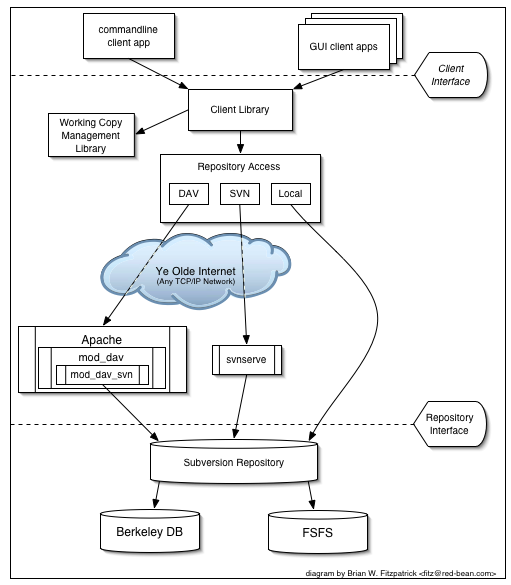
At the heart of Subversion is a centralized architecture. Unlike distributed systems where every contributor has a full copy of the project’s history, SVN relies on a single central server that houses the “master” repository. Developers “check out” a specific version of the code to their local machines—known as a working copy—make their changes, and then “commit” (or “check in”) those changes back to the central server. This model ensures a “single source of truth,” making it easier for administrators to manage permissions and audit trails.
The Core Components: Repository, Working Copy, and Revisions
To understand SVN, one must grasp three primary concepts:
- The Repository: This is the central database that stores the entire history of the project. It doesn’t just store the current files; it stores every version of every file that has ever been committed.
- The Working Copy: This is a private workspace on a developer’s local machine. It contains a specific snapshot of the project, allowing the developer to edit files without affecting the rest of the team until they are ready to share their work.
- Revisions: Every time a developer commits a set of changes, the repository creates a new “revision number.” These are sequential integers (e.g., Revision 1, Revision 2) that apply to the entire repository tree, rather than individual files. This global revision system simplifies the process of identifying the state of the project at any given point in time.
The “Copy-Modify-Merge” Model
Subversion primarily uses the “Copy-Modify-Merge” model of data sharing. In this workflow, multiple developers can edit the same file simultaneously in their respective working copies. When they commit their work, SVN attempts to automatically merge the changes. If two developers edit the same line of code, the system flags a “conflict,” requiring human intervention to resolve the discrepancy. This approach maximizes productivity by preventing developers from being blocked by others’ work.
Key Features and Technical Advantages of Subversion
Subversion was engineered to solve the limitations of earlier tools, and its feature set reflects a commitment to data integrity and administrative control. For many organizations, these features make SVN a superior choice for specific technical workflows.
Atomic Commits and Data Integrity
One of Subversion’s most significant contributions to version control is the concept of atomic commits. In older systems, if a network failure occurred during a commit, the repository could be left in a corrupted or “partially updated” state. SVN ensures that a commit is an “all-or-nothing” operation. Either the entire set of changes is successfully written to the repository, or the entire operation is rolled back. This guarantees that the repository remains in a consistent state, protecting the project from data corruption.
Efficient Handling of Binary Files and Large Repositories
While some version control systems struggle with large binary files (such as high-resolution textures in game development or large PDF documentation sets), Subversion handles them with relative ease. SVN uses a binary-differencing algorithm to store changes between versions, which saves significant disk space. Furthermore, because users only check out a single version of the code (the “head” or a specific branch) rather than the entire history of the project, SVN is often more performant for massive repositories that span decades of data.
Granular Access Control and Security
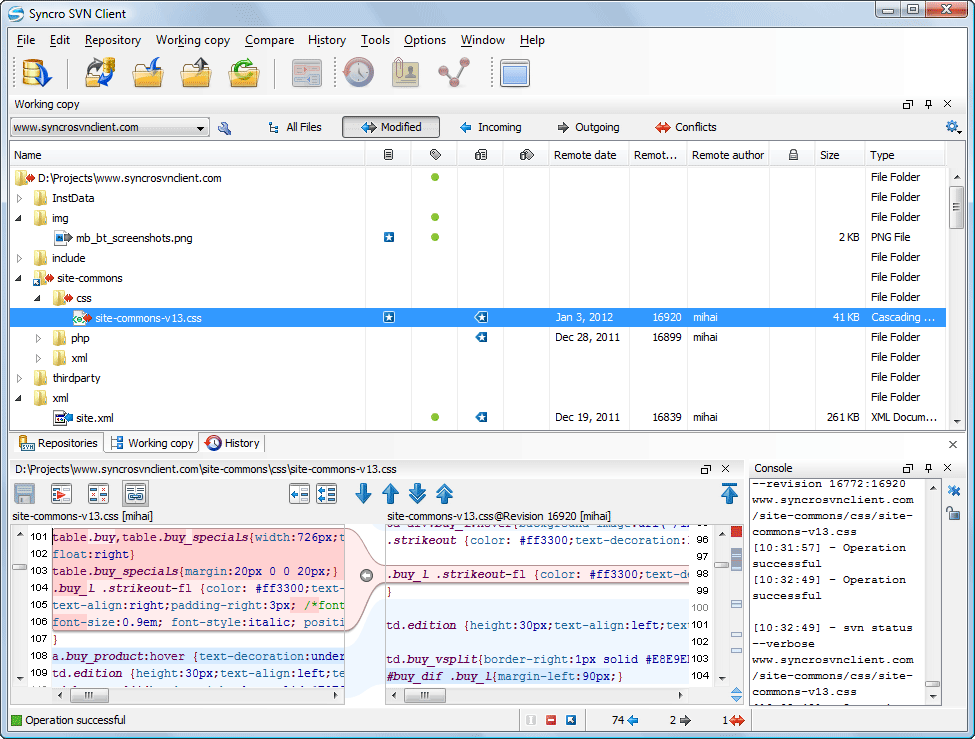
For enterprises with strict security requirements, SVN offers a level of granular control that is difficult to achieve in distributed systems. Administrators can set read/write permissions at the directory level or even the individual file level. This is particularly useful in large organizations where certain teams should only have access to specific modules of a project. Because all transactions go through the central server, auditing who changed what and when is straightforward, making SVN a favorite for industries requiring high levels of compliance and digital security.
Subversion vs. Git: Selecting the Right System
The debate between Subversion and Git is a staple of technical discussions. While Git has become the industry standard for open-source development, the choice between the two often depends on the specific needs of the development environment and the nature of the project.
Centralized vs. Distributed Architecture
The most fundamental difference lies in the architecture. Git is distributed, meaning every developer has a full backup of the repository. This allows for offline work and fast local operations. Subversion, being centralized, requires a connection to the server for most operations (like committing or viewing history). However, the centralized nature of SVN is often viewed as a benefit by corporate IT departments who want centralized backups and a clear hierarchy of authority over the codebase.
Learning Curve and Ease of Use
Git is known for its powerful but complex command-line interface, which can be daunting for beginners or non-technical stakeholders (like designers or project managers). Subversion’s conceptual model is generally considered more intuitive. The “checkout, edit, commit” workflow is linear and easy to visualize. For teams that include non-developers, or for projects where the overhead of learning a complex tool like Git is not justified, SVN provides a lower barrier to entry.
Branching and Merging Philosophies
In Git, branching is a lightweight, everyday occurrence. In Subversion, a branch is technically a directory copy within the repository. While SVN has improved its branching and merging capabilities significantly in version 1.5 and later, it is still generally perceived as more “heavyweight” than Git’s branching. Organizations that follow a stable, long-term release cycle often find SVN’s structured branching perfectly adequate, whereas rapid-iteration “Agile” teams might prefer Git’s flexibility.
Best Practices for Implementing SVN in Professional Workflows
To get the most out of Subversion, teams should follow established conventions that have been refined over decades of software engineering. Proper structure and discipline are key to maintaining a healthy repository.
Structuring Your Repository: Trunk, Branches, and Tags
A standard SVN repository follows a specific directory structure that helps maintain order:
- The Trunk: This is the main line of development where the most stable, current code resides.
- Branches: These are used for experimental features, bug fixes, or specific release versions. When a feature is complete, it is merged back into the trunk.
- Tags: These are “frozen” snapshots of the code at a specific point in time, usually used for releases (e.g., “Version 1.0”). Unlike branches, tags are meant to be read-only.
Commit Message Standards and Documentation
Since the repository serves as a historical record, the quality of commit messages is vital. A professional SVN workflow requires descriptive, concise messages that explain why a change was made, not just what was changed. This practice is essential for future debugging and for new team members who need to understand the project’s technical evolution.
Integrating SVN with Modern Tech Tooling
SVN is far from an isolated tool. It integrates seamlessly with various Continuous Integration and Continuous Deployment (CI/CD) pipelines. Tools like Jenkins, TeamCity, and Azure DevOps have robust support for SVN. Additionally, many Integrated Development Environments (IDEs) like IntelliJ IDEA, Eclipse, and Visual Studio offer built-in SVN clients, allowing developers to manage their version control without leaving their coding environment.
The Enduring Role of Subversion in the Modern Era
While the tech world often chases the newest trends, the longevity of Subversion software is a testament to its reliability and the specific problems it solves. It remains a powerful tool for projects where centralized control, granular security, and the efficient management of large binary assets are prioritized over distributed flexibility.
For a technology professional, understanding Subversion is more than just a history lesson; it is a practical skill. Whether you are maintaining a legacy system for a financial institution, managing massive assets for a game studio, or seeking a version control system with a straightforward mental model, SVN offers a battle-tested solution. By providing a stable “Single Source of Truth,” Subversion continues to facilitate global collaboration and safeguard the world’s digital infrastructure. In the diverse ecosystem of software development tools, Subversion holds its ground as a robust, secure, and highly capable version control system.
aViewFromTheCave is a participant in the Amazon Services LLC Associates Program, an affiliate advertising program designed to provide a means for sites to earn advertising fees by advertising and linking to Amazon.com. Amazon, the Amazon logo, AmazonSupply, and the AmazonSupply logo are trademarks of Amazon.com, Inc. or its affiliates. As an Amazon Associate we earn affiliate commissions from qualifying purchases.