
In the digital age, data is king. From tracking personal budgets to managing multi-million dollar businesses, spreadsheets have become an indispensable tool for organizing, analyzing, and visualizing information. At the heart of this powerful functionality lies the humble Excel file. But what exactly is an Excel file called, and why is it so ubiquitous? This article will delve into the nomenclature of Excel files, explore their fundamental purpose, and connect it to the broader themes of technology, brand, and money that drive our modern world.
The Anatomy of an Excel File: Beyond the Extension
When we talk about “what is an Excel file called,” we’re often referring to its file extension. The most common and widely recognized extension for Microsoft Excel files is .xlsx. This extension signifies a modern, XML-based file format that replaced the older binary format.

However, it’s important to understand that the term “Excel file” encompasses more than just the .xlsx extension. It refers to any file created or recognized by Microsoft Excel, a powerful spreadsheet program developed by Microsoft. Excel itself is a cornerstone of the Microsoft Office suite, a collection of productivity applications that have shaped how we work and interact with information for decades.
The .xlsx extension is a clear indicator to your operating system and to other software applications that the file contains data structured in a way that Excel can interpret. This structure typically includes:
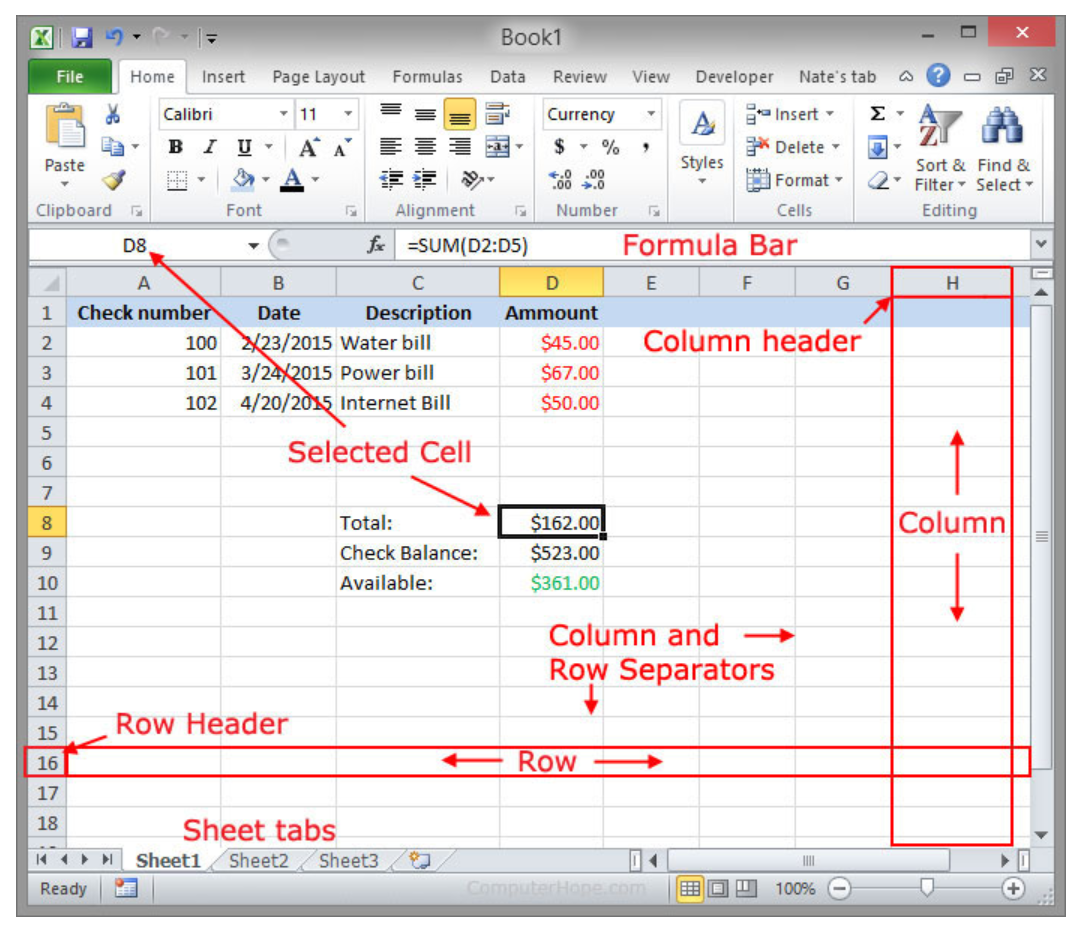
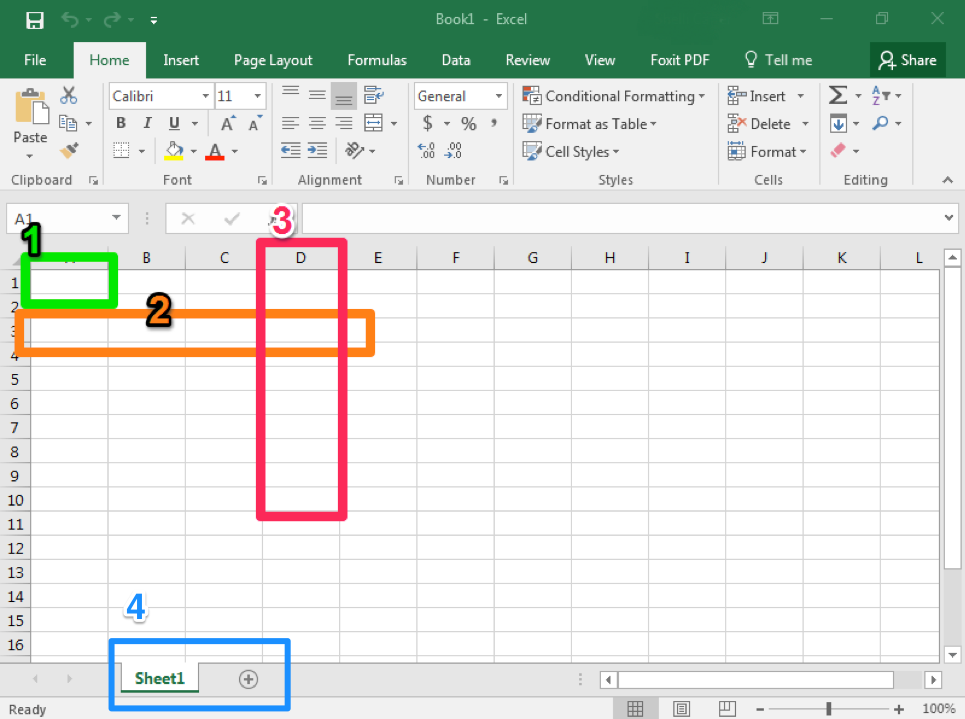
- Worksheets (or Sheets): These are the individual tabs within an Excel workbook. Each sheet can contain its own grid of rows and columns, allowing for the separation of different datasets or analyses.
- Cells: The intersection of a row and a column, where data is entered. Cells can contain text, numbers, dates, formulas, and more.
- Formulas and Functions: Excel’s true power lies in its ability to perform calculations. Formulas are user-defined expressions, while functions are pre-built formulas for common operations (e.g., SUM, AVERAGE, VLOOKUP).
- Formatting: This includes the visual presentation of data, such as fonts, colors, borders, and cell alignment, which are crucial for readability and analysis.
- Charts and Graphs: Excel allows users to visualize data through various chart types, making complex information easier to understand.
- Macros: These are small programs written in Visual Basic for Applications (VBA) that can automate repetitive tasks within Excel.
Different Flavors of Excel Files: A Brief History
While .xlsx is the current standard, you might encounter other Excel file extensions, particularly if you’re working with older versions of the software or specific types of functionality:
.xls: This is the older, binary file format used by Excel versions prior to Excel 2007. While still largely compatible,.xlsxoffers advantages in terms of file size, stability, and security..xlsm: This extension indicates an Excel Macro-Enabled Workbook. These files contain macros, and are used when automation is a key part of the spreadsheet’s functionality. Security settings in Excel often warn users when opening.xlsmfiles due to the potential for malicious code within macros..xlsb: This is a binary workbook format that can be significantly faster to open and save than.xlsxfiles, especially for very large spreadsheets. It’s less common for everyday use but can be beneficial for performance-intensive tasks..xltxand.xltm: These are Excel templates. They contain pre-defined formatting, formulas, and structures that can be used as a starting point for new workbooks..xltmfiles include macros.
Understanding these different extensions can be helpful when troubleshooting compatibility issues or when deciding on the best file format for specific needs.
The Ubiquitous Role of Excel Files in the Modern Tech Landscape
The question “what is an Excel file called” is not just about a file extension; it’s about recognizing a fundamental building block of modern technology and its impact across various domains. Excel files, in their various forms, are the silent workhorses behind countless technological applications and processes.
Technology Trends and Productivity
In the realm of Tech, Excel files are intrinsically linked to productivity. Microsoft Excel is a prime example of powerful software that enhances our ability to manage information efficiently. Whether it’s developers tracking bug reports, data scientists preparing datasets for AI Tools, or project managers outlining schedules, Excel provides a versatile platform.
Tutorials on everything from basic data entry to complex financial modeling often rely on the use of Excel files as the medium for instruction. The ability to manipulate and analyze data within a spreadsheet format is a fundamental digital skill. Furthermore, the growing integration of Excel with other technologies, such as cloud storage and business intelligence platforms, further cements its position. For instance, data exported from sophisticated Apps or extracted from sensor logs can often be conveniently stored and pre-processed in an Excel file before being fed into more advanced analytical systems.
Digital Security also plays a role. While Excel files themselves are not inherently insecure, the data they contain can be sensitive. Protecting Excel files through passwords, encryption, and proper access controls is a crucial aspect of digital security, especially when dealing with financial or proprietary information.
Brand Strategy and Data-Driven Marketing
The Brand aspect of the website highlights how data, often stored in Excel files, informs strategic decisions. In Brand Strategy, understanding customer demographics, sales figures, and marketing campaign performance is paramount. Excel files are frequently used to consolidate this data for analysis.
Marketing professionals rely heavily on spreadsheets to track campaign ROI, manage customer lists, and analyze website traffic. A well-organized Excel file can provide invaluable insights into what marketing efforts are resonating with the target audience. For example, a case study on a successful marketing campaign might detail the use of Excel to segment customer bases, track engagement metrics, and ultimately attribute sales to specific marketing channels.
Personal Branding can also be enhanced through the intelligent use of data. Individuals looking to advance their careers might use Excel to track their professional development, manage their network, or even analyze job market trends. The ability to present data clearly and concisely, often derived from an Excel file, can be a powerful differentiator.
Money Management and Financial Insights
The Money category is perhaps where the importance of Excel files is most directly felt. Personal Finance management is vastly simplified with the use of Excel. From creating detailed budgets and tracking expenses to planning for retirement, Excel provides the tools to gain control over one’s financial life.
Investing often involves complex calculations and the need to track stock prices, portfolio performance, and market trends. Excel spreadsheets are indispensable for investors to perform these analyses. Online Income and Side Hustles also benefit greatly from Excel’s organizational capabilities. Freelancers can track invoices, manage clients, and calculate their earnings, while individuals pursuing side projects can monitor their profitability and resource allocation.
In Business Finance, Excel is a ubiquitous tool for financial forecasting, budgeting, and reporting. Small businesses might use Excel to manage their day-to-day finances, while larger corporations use it for more complex financial modeling. The availability of numerous Financial Tools and templates, many of which are Excel-based or designed to integrate with Excel, further underscores its importance in the financial world.
Beyond the Extension: The Power of Structure and Analysis
The true essence of an “Excel file” lies not just in its .xlsx or other extensions, but in the structure it provides for organizing and analyzing data. This structure empowers individuals and businesses to:
Organize and Store Information Effectively
At its most basic level, an Excel file acts as a digital ledger. Rows and columns provide a logical framework for entering and storing various types of data, from simple lists of names and addresses to complex scientific measurements. This organization is crucial for making data accessible and manageable.
Analyze and Interpret Data
This is where Excel truly shines. The ability to apply formulas and functions allows users to perform calculations, identify trends, and extract meaningful insights from raw data. This is vital for informed decision-making across all aspects of life and business. Whether it’s calculating the profit margin on a new product or determining the average rainfall over a decade, Excel makes complex analysis accessible.
Visualize Information for Clarity
Data can often be overwhelming. Excel’s charting capabilities transform rows and columns of numbers into easily digestible visual representations like bar graphs, pie charts, and line graphs. This visual storytelling is essential for communicating complex information to a wider audience, whether it’s presenting sales figures to a board or illustrating personal spending habits to a financial advisor.
Automate Repetitive Tasks
As mentioned earlier, macros can automate mundane tasks, saving significant time and reducing the potential for human error. This is particularly valuable in business settings where repetitive data entry or reporting is common.
Conclusion: The Enduring Relevance of the Excel File
So, what is an Excel file called? At its most fundamental, it’s a file with an extension like .xlsx, .xls, .xlsm, or .xlsb, signifying data structured for Microsoft Excel. However, this simple answer belies its profound impact.
From the cutting edge of Tech and the strategic decisions in Brand management to the fundamental importance of Money management, Excel files are the unsung heroes of our data-driven world. They are more than just digital documents; they are powerful tools that enable organization, analysis, and informed decision-making. Understanding the nature and capabilities of Excel files is, therefore, an essential skill for anyone navigating the complexities of modern life and business. The ability to effectively create, manage, and interpret data within these versatile spreadsheets will continue to be a cornerstone of productivity and success across all domains.
aViewFromTheCave is a participant in the Amazon Services LLC Associates Program, an affiliate advertising program designed to provide a means for sites to earn advertising fees by advertising and linking to Amazon.com. Amazon, the Amazon logo, AmazonSupply, and the AmazonSupply logo are trademarks of Amazon.com, Inc. or its affiliates. As an Amazon Associate we earn affiliate commissions from qualifying purchases.