
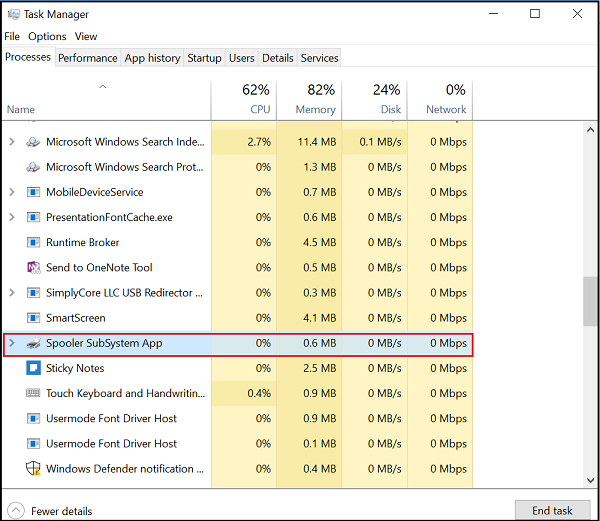
The term “spooler subsystem app” refers to a critical background process in modern operating systems designed to manage and sequence tasks for shared peripheral devices, most commonly printers. While the concept might sound obscure, its function is indispensable for smooth system operation, preventing resource contention and improving user experience. Essentially, a spooler acts as an intermediary, collecting data from various applications, queuing it, and then sending it to the target device in an orderly fashion, ensuring that multiple requests can be handled concurrently without creating bottlenecks or conflicts.
Demystifying the Spooler Subsystem
At its core, a spooler subsystem embodies a fundamental principle of computing: resource sharing and asynchronous processing. Without it, every application would have to wait for the device to become available, leading to significant delays and potential data corruption if multiple programs attempted to access the same resource simultaneously.
The Core Concept of Spooling
Spooling is an acronym for “Simultaneous Peripheral Operations Online.” This technique enables a computer to manage data input/output requests for peripheral devices that are much slower than the CPU and main memory. Instead of waiting for a slow device, the operating system “spools” (stores) the data in a temporary memory area (a buffer or queue) and processes it as the device becomes ready. For example, when you print a document, the spooler quickly accepts the print job from your application, stores it, and then allows your application to continue running without delay. The spooler then feeds the job to the printer at its own pace.
Historical Context and Evolution
The concept of spooling emerged in the mainframe era, primarily to maximize the utilization of expensive and slow peripherals like line printers and card readers. Early computers were highly I/O bound, meaning the CPU spent a disproportionate amount of time waiting for input or output operations to complete. Spooling provided a way to overlap computation with I/O, significantly improving system throughput. As personal computing evolved, the need for spoolers intensified with the proliferation of individual printers and network printing, making them an integral part of operating systems like Windows, macOS, and Linux. Modern spoolers have grown in sophistication, handling complex print formats, network protocols, and advanced job management features.
Key Components of a Spooler
A typical spooler subsystem comprises several key components working in concert:
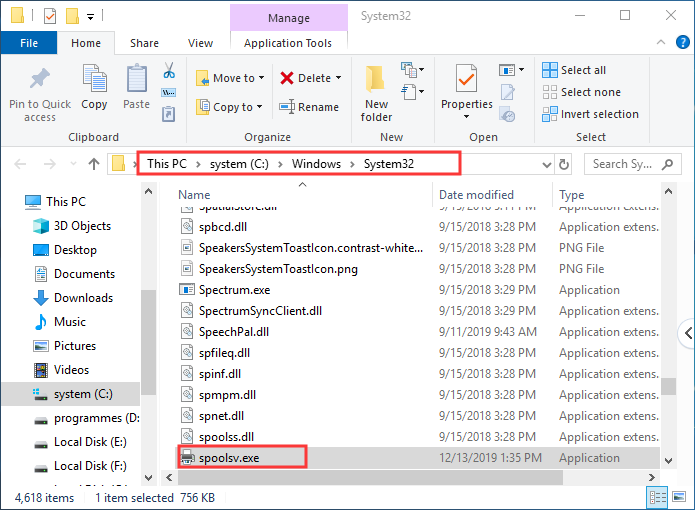
- Spooler Service/Daemon: This is the core executable process that runs in the background. It’s responsible for managing the entire spooling operation, including accepting print jobs, scheduling them, and communicating with printers.
- Print Processor: This component interprets the data received from the application and prepares it for the specific printer. It might involve converting the document into a printer-specific language (e.g., PostScript, PCL) or handling advanced features like color management.
- Print Driver: A software component specific to a particular printer model. The driver translates the generic print commands from the operating system into commands that the physical printer can understand and execute.
- Print Queue: A temporary storage area, usually on the hard disk, where print jobs are held in order until the printer is available. Each printer typically has its own queue.
- Port Monitor: This component handles the actual communication with the printer over a specific port (e.g., USB, Ethernet, Wi-Fi). It sends the data processed by the driver to the printer and monitors the printer’s status.
How the Print Spooler Works in Practice
Understanding the step-by-step process of a print spooler clarifies its critical role in the printing workflow.
User Command to Print
The process begins when a user initiates a print command from an application (e.g., Microsoft Word, Adobe Reader). Instead of sending the document directly to the printer, the application renders the document into an intermediate format (often a device-independent bitmap or a raw print stream) and passes this data, along with print settings, to the operating system’s spooler service.
Spooler’s Role in Job Management
Upon receiving the print job, the spooler service immediately takes over. It performs several crucial tasks:
- Job Creation: It creates a new print job entry in its internal queue. This entry includes metadata such as the originating application, user, document name, and selected printer.
- Job Spooling: The actual print data is then written to a temporary file on the hard drive. This is the “spooled” file. This process is very fast, allowing the user’s application to become responsive almost instantly.
- Job Prioritization: If multiple jobs are in the queue, the spooler manages their order based on submission time, user-defined priorities, or administrative overrides.
Communication with the Printer
Once a print job reaches the front of the queue and the target printer is available, the spooler activates the next phase.
- Driver Interaction: The spooler uses the installed print driver for that specific printer. The driver takes the spooled data and converts it into the proprietary language (e.g., PCL, PostScript, XPS) that the physical printer understands.
- Port Monitoring: The port monitor then takes this printer-specific data and transmits it to the printer via the designated connection (USB, network cable, wireless). It constantly checks the printer’s status, ensuring data is sent correctly and detecting errors like paper jams or out-of-ink conditions.
Handling Multiple Print Jobs
The true power of the spooler lies in its ability to manage multiple print jobs concurrently. If several users or applications send print requests simultaneously to the same printer, the spooler accepts all jobs, spools them, and then feeds them to the printer one by one. This prevents print jobs from colliding, ensures fair access to the printer, and maintains the integrity of each document. Users experience seamless printing, even if the printer is busy, as their applications are not held hostage waiting for the physical device.
Beyond Printing: Other Spooler Applications
While printing is the most common and widely recognized application of spooling, the underlying concept extends to other areas where asynchronous processing of tasks for shared resources is beneficial.
Fax Spooling
Similar to print spooling, fax spooling involves queuing outgoing fax transmissions. When a user sends a fax, the document is spooled to a temporary file, and the fax modem or server handles the actual transmission in the background. This allows the user to continue working without waiting for the slow, often time-consuming, faxing process to complete.
Batch Processing and Job Queues
In larger computing environments, especially in enterprise systems or high-performance computing, the concept of job queues (which are essentially a form of spooling) is crucial. Complex, resource-intensive tasks are submitted to a job scheduler, which queues them and executes them in batches, often during off-peak hours or when necessary resources become available. This ensures efficient utilization of computing power and equitable access to shared processing resources.
Network Spooling and Shared Resources
In networked environments, spooling becomes even more vital. A network print server acts as a centralized spooler, managing print queues for multiple printers accessible across the network. This allows many users to send print jobs to shared network printers, with the server handling the load balancing, job prioritization, and error reporting. This extends to other shared network resources where tasks need to be queued and processed sequentially, although printing remains the predominant use case for network spoolers.
Error Handling and Recovery
A robust spooler subsystem is also responsible for error handling. If a printer runs out of paper, experiences a jam, or goes offline, the spooler can detect these issues through its port monitor and driver. It then typically pauses the current print job, alerts the user or administrator, and attempts to resume printing once the issue is resolved. This prevents data loss and ensures that print jobs can eventually complete, even after temporary device failures.
Common Issues and Troubleshooting
Despite its robust design, the spooler subsystem can sometimes encounter issues, leading to printing problems. Understanding these common pitfalls is key to effective troubleshooting.
Printer Not Responding
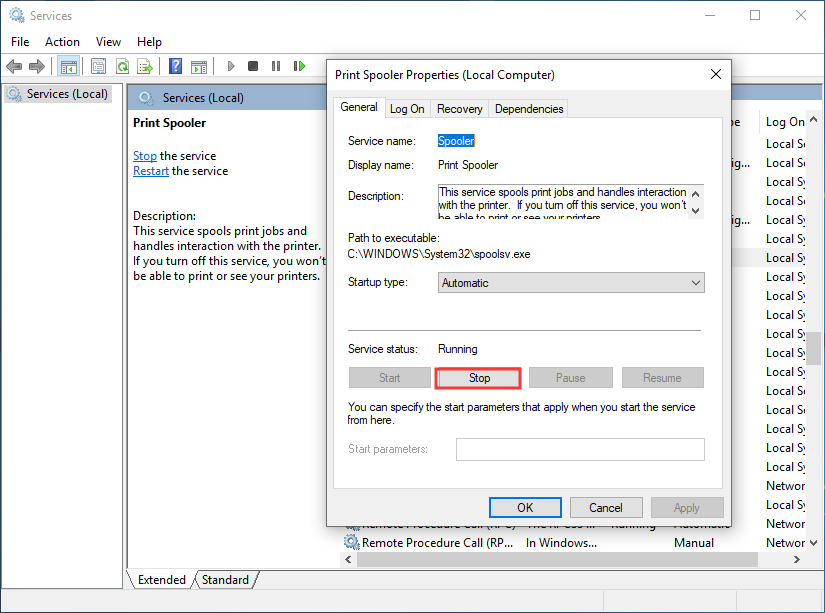
One of the most frequent problems is the printer refusing to print or appearing offline. This often relates to the spooler service getting stuck or corrupted. The initial troubleshooting step typically involves restarting the print spooler service. On Windows, this is done via the Services management console. A simple restart can clear a hung queue or reset a faulty connection.
Jobs Stuck in Queue
Print jobs frequently get “stuck” in the queue, preventing subsequent jobs from printing. This can be caused by a corrupted print job file, an unresponsive printer driver, or a communication error with the printer. To resolve this, users usually need to open the print queue, cancel all pending jobs, and then restart the spooler service. Clearing temporary print files from the spooler directory (e.g., C:WindowsSystem32spoolPRINTERS on Windows) can also help if the job files themselves are corrupt.
Spooler Service Crashes
In more severe cases, the entire print spooler service might crash repeatedly. This is often indicative of a corrupted or incompatible printer driver. Drivers are critical software components, and a poorly written or outdated driver can destabilize the spooler. Updating drivers to the latest version from the manufacturer’s website is a common fix. In some instances, malware or system file corruption can also lead to spooler instability.
Security Implications
The spooler subsystem, like any core operating system component, can be a target for security vulnerabilities. Historically, flaws in print spooler services have been exploited to gain elevated privileges or execute malicious code, such as the infamous PrintNightmare vulnerability. Therefore, keeping operating systems and printer drivers updated with the latest security patches is paramount. Network administrators also need to configure print servers securely, limiting access and regularly auditing permissions.
Best Practices for Spooler Management
To ensure optimal performance and stability of the spooler subsystem:
- Keep Drivers Updated: Regularly check for and install the latest printer drivers.
- Monitor Service Status: Periodically check the status of the print spooler service.
- Clear Queue Regularly: Encourage users to clear old or unnecessary print jobs.
- Secure Print Servers: Apply strong security policies and regular patching for networked print servers.
- Check Disk Space: Ensure sufficient free disk space on the drive where spool files are stored.
The Future of Spooling in a Cloud-Native World
As computing shifts towards cloud-based services and virtualized environments, the spooler subsystem continues to evolve, adapting to new architectures and demands.
Cloud Printing Solutions
Cloud printing services (like Google Cloud Print, before its deprecation, or universal print solutions from vendors like Microsoft) externalize the spooling process to the cloud. Instead of a local spooler, print jobs are sent to a cloud service, which then handles the queueing, processing, and secure transmission to registered printers, regardless of their location. This simplifies printer management for large organizations and enables printing from any device connected to the internet.
Virtualization and Containerization
In virtualized and containerized environments, the spooler often runs within virtual machines or containers, isolated from other services. This approach enhances stability and security, as a problem with one spooler instance doesn’t affect the entire host system. It also allows for dynamic scaling, where print services can be provisioned or de-provisioned as needed.
Enhanced Security Models
Future spooler subsystems will likely incorporate even more robust security features, leveraging zero-trust principles and advanced authentication mechanisms. With the increasing sophistication of cyber threats, securing every layer of the operating system, including peripheral management, remains a top priority. This will involve more stringent access controls, encrypted communication pathways for print data, and integration with advanced threat detection systems, ensuring that the spooler continues to be a reliable and secure component of our digital infrastructure.
aViewFromTheCave is a participant in the Amazon Services LLC Associates Program, an affiliate advertising program designed to provide a means for sites to earn advertising fees by advertising and linking to Amazon.com. Amazon, the Amazon logo, AmazonSupply, and the AmazonSupply logo are trademarks of Amazon.com, Inc. or its affiliates. As an Amazon Associate we earn affiliate commissions from qualifying purchases.