
In the vast landscape of software tools, few applications achieve the kind of ubiquitous presence and enduring loyalty that Notepad++ commands, particularly among developers, system administrators, and even advanced everyday users. At its core, Notepad++ is a free, open-source text and source code editor designed for Microsoft Windows. While its name might suggest a mere upgrade to the rudimentary Notepad utility built into Windows, Notepad++ is, in fact, a quantum leap forward, offering a rich suite of features that transform plain text editing into a highly efficient and productive experience.
Its primary purpose revolves around providing a more robust and intelligent environment for working with various programming languages, markup languages, and general text files. Notepad++ differentiates itself by integrating powerful functionalities like syntax highlighting, code folding, advanced search capabilities, and a plugin architecture, all while maintaining a lightweight footprint and exceptional speed. This article delves into the myriad uses of Notepad++, exploring why it has become an indispensable tool for millions worldwide and how it elevates the process of text manipulation and code development.
Beyond Basic Text Editing: The Core Purpose of Notepad++
At first glance, Notepad++ might appear as just another text editor. However, its true power lies in its specialized features that cater to the intricate demands of coding and advanced text processing, far surpassing the capabilities of standard text editors. It’s designed to be a bridge between simple notepad-style functionality and full-fledged Integrated Development Environments (IDEs), offering significant enhancements without the associated bloat or steep learning curve.
A Programmer’s Ally: Syntax Highlighting and Code Folding
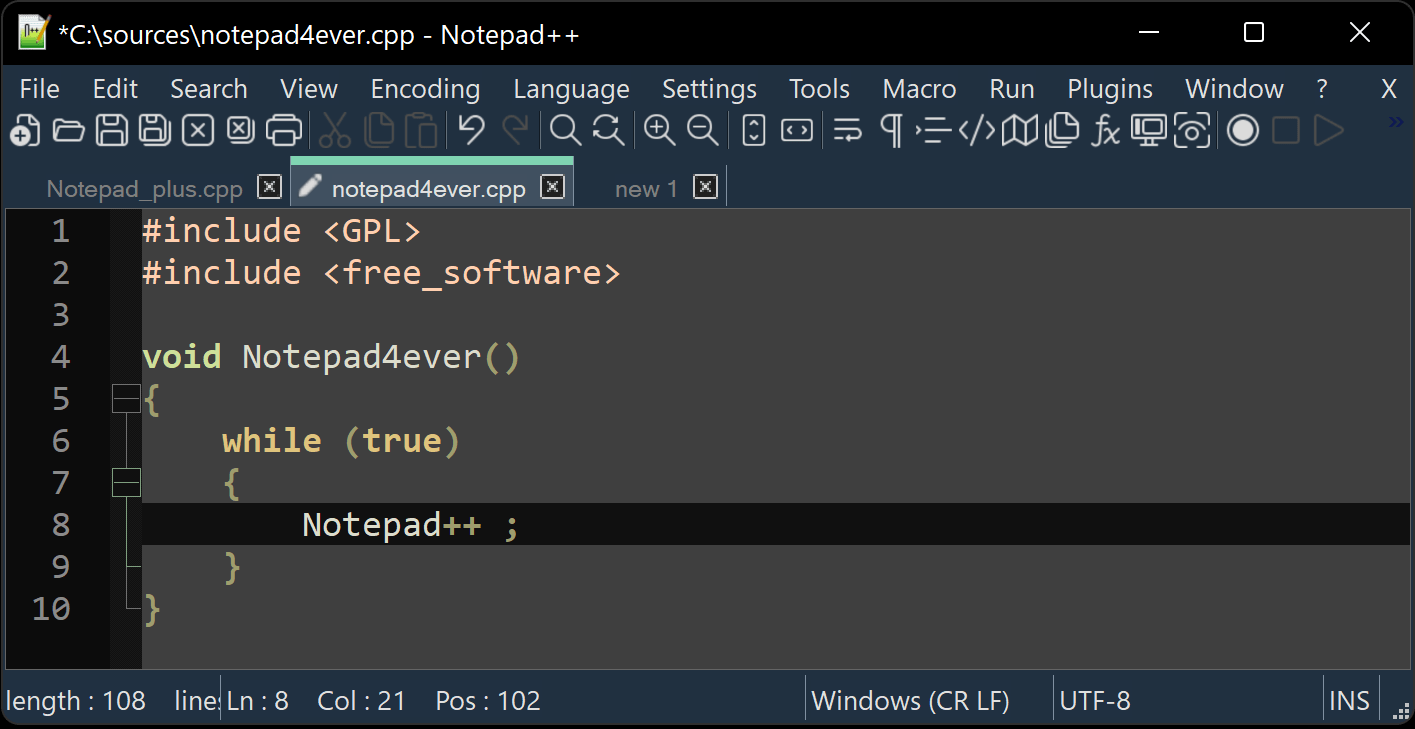
One of the most immediate and impactful features for anyone dealing with code is syntax highlighting. Notepad++ supports an astounding array of programming languages (over 80), including C++, Java, Python, HTML, CSS, JavaScript, PHP, XML, and many more. This feature automatically color-codes different elements of the code—keywords, variables, comments, strings, operators—making the code significantly more readable, easier to debug, and quicker to understand at a glance. Imagine trying to decipher a complex script in monochrome text; the difference is night and day.
Coupled with syntax highlighting is code folding (or collapsing). This allows users to hide or show blocks of code, such as functions, loops, or conditional statements, enabling a cleaner view of the overall structure, especially in large files. This structural overview is invaluable for navigation and focusing on specific sections of a project without being overwhelmed by the entire codebase. For developers, these two features alone are often enough to justify making Notepad++ their go-to text editor.
Plain Text Powerhouse: Handling Large Files and Diverse Encodings
Beyond programming, Notepad++ excels as a plain text editor for general purposes. Unlike many basic editors that struggle with very large text files, Notepad++ handles them with surprising grace and speed. This makes it an ideal tool for system administrators reviewing extensive log files, data analysts processing large datasets, or anyone needing to manipulate documents that would crash lesser applications.
Furthermore, its robust support for various character encodings (ASCII, UTF-8, UCS-2, etc.) ensures that text files from different sources and operating systems can be opened, edited, and saved correctly without corruption or display issues. This is a critical feature in a globalized digital environment where text often crosses linguistic and platform boundaries, making Notepad++ a reliable choice for maintaining data integrity.
Key Features That Elevate the Editing Experience
Notepad++ is packed with an array of features designed to boost productivity and streamline the text editing workflow. These functionalities collectively contribute to its reputation as a versatile and indispensable tool for a diverse user base.
Tabbed Document Interface and Multi-View
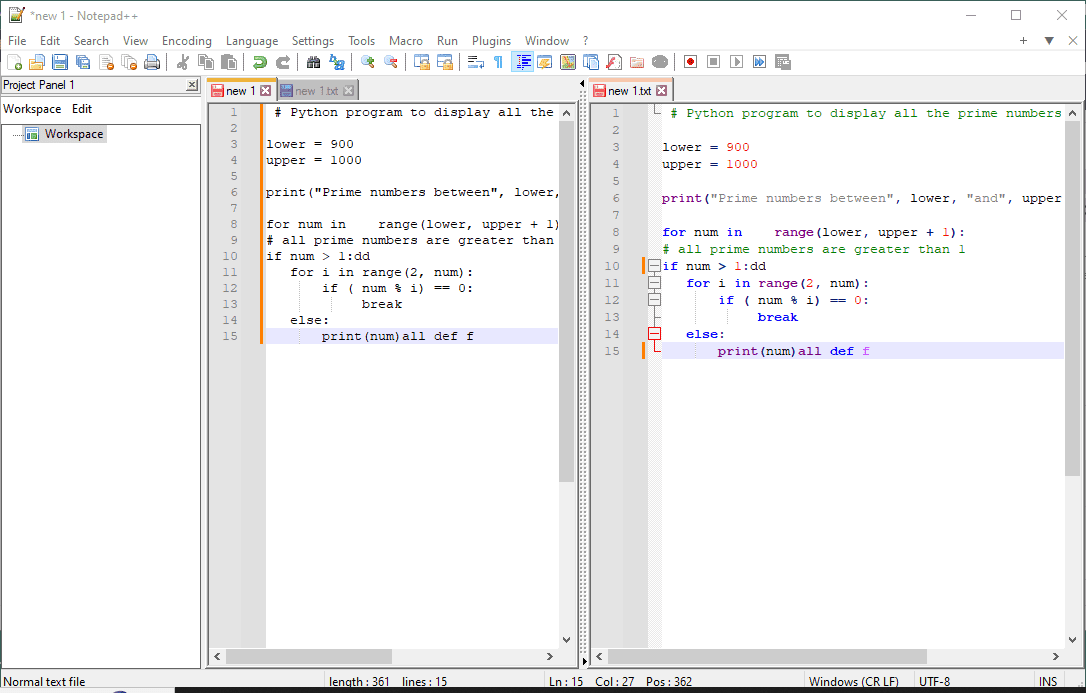
The tabbed document interface (TDI) is a fundamental convenience, allowing users to open and manage multiple files within a single window, much like tabs in a web browser. This eliminates the clutter of numerous open windows and simplifies switching between different documents. More impressively, Notepad++ offers a multi-view feature, enabling users to split the editor window into two (horizontally or vertically). This is exceptionally useful for comparing two files side-by-side, editing a header file while viewing its corresponding source file, or referring to documentation while coding. Changes in one view can often be mirrored in the other, enhancing synchronization and comparison tasks.
Powerful Search and Replace (Regex Capabilities)
One of Notepad++’s most potent features is its advanced Find and Replace functionality. Beyond simple text matching, it supports regular expressions (regex). Regular expressions are patterns used to match character combinations in strings. This capability transforms basic search-and-replace into a sophisticated text manipulation tool, allowing users to find and modify complex patterns, reformat data, or extract specific information from large bodies of text with precision and efficiency. For example, a user could use regex to find all email addresses in a document, reorder elements within a specific string format, or clean up inconsistent whitespace. This power is invaluable for data cleaning, refactoring code, or automating text transformations.
Auto-completion and Function List
For programmers, auto-completion is a significant time-saver. Notepad++ can provide suggestions for words as you type, drawing from the current file, other open files, or defined syntax dictionaries. This reduces typing errors and speeds up the coding process, especially for repetitive code elements or long variable names. Complementing this is the Function List, which scans the active document for functions, classes, or other defined structures and displays them in a navigable panel. This makes it incredibly easy to jump to specific parts of a large code file without endless scrolling.
Session Management and Data Recovery
Notepad++ offers intelligent session management. It remembers which files were open when the application was last closed, and by default, it reopens them automatically. This feature, combined with its robust data recovery mechanisms, ensures that work is rarely lost due to crashes or accidental closures. It automatically saves unsaved changes, providing peace of mind and reducing the frustration of losing progress—a common pitfall with less sophisticated editors.
Who Benefits Most from Notepad++? Common Use Cases
The versatility and robust feature set of Notepad++ make it an essential tool for a wide range of professionals and hobbyists alike. Its lightweight nature and powerful capabilities strike a perfect balance for many specific use cases.
Software Developers and Programmers
This is arguably the largest and most apparent user base. Developers leverage Notepad++ for writing, editing, and reviewing code in almost any language. Its syntax highlighting, code folding, auto-completion, and regex capabilities are daily necessities. While it doesn’t replace a full IDE for debugging or complex project management, it serves as an excellent companion for quick edits, script writing, configuration file management, and even prototyping before moving to a heavier environment.
Web Developers and Designers
HTML, CSS, JavaScript, and PHP are core languages for web development, and Notepad++ provides superb support for all of them. Web developers use it to craft front-end code, write server-side scripts, manipulate JSON data, and manage large numbers of interconnected files. The multi-view feature is particularly useful for pairing HTML with its corresponding CSS or JavaScript file, and FTP/SFTP plugins can facilitate direct editing of files on remote servers.
System Administrators and IT Professionals
System admins frequently deal with configuration files (e.g., Apache, Nginx, network device configs), log files (often massive), and scripting (PowerShell, Bash, Python). Notepad++’s ability to handle large files, its powerful search with regex, and syntax highlighting for various scripting languages make it invaluable for troubleshooting, automation script development, and maintaining system integrity. Its quick launch time and low resource usage are also major advantages when working on production servers or VMs.
Content Creators and Technical Writers
For those who write extensively for the web or create technical documentation, Notepad++ is excellent for preparing and editing plain text, Markdown, or HTML content. Its ability to strip formatting, perform advanced text transformations, and handle diverse encodings ensures clean and consistent output. The word count and character count features are also useful for meeting specific content requirements.
Everyday Users Seeking Enhanced Text Editing
Even for individuals who don’t write code, Notepad++ offers significant advantages over basic notepad. For example, students can use it for taking notes, removing unwanted formatting from copied text, or practicing with regex for data manipulation. Anyone who frequently deals with text files that require more than just basic typing will find Notepad++ to be a significant upgrade, providing a cleaner, more efficient, and feature-rich environment.
Extending Functionality: Plugins and Customization
One of Notepad++’s most compelling strengths is its extensibility through a robust plugin architecture. This allows users to tailor the editor to their specific needs, adding functionalities that aren’t available out-of-the-box.
Enhancing Productivity with Plugin Manager
The Plugin Manager is an integral part of Notepad++, simplifying the process of browsing, installing, updating, and removing plugins. The community-driven nature of Notepad++ means there’s a vast repository of plugins available, ranging from FTP/SFTP clients for direct server file editing, spell checkers, compare tools for diffing files, JSON viewers/formatters, to sophisticated linting tools for various languages. This rich ecosystem significantly extends Notepad++’s utility, transforming it from a mere text editor into a highly specialized workbench for countless tasks.
Tailoring the Environment: Themes, Styles, and Macros
Beyond plugins, Notepad++ offers extensive options for customization of its user interface and behavior. Users can choose from a variety of built-in themes and styles to alter the appearance of the editor, including syntax highlighting colors, fonts, and background. This allows for personalization to improve readability or simply match personal aesthetic preferences.
Furthermore, Notepad++ supports macros, which are recorded sequences of keystrokes and commands. Users can record a series of actions and then replay them with a single shortcut, automating repetitive tasks such. This feature is a powerful time-saver for anyone performing routine text manipulations.
Integrating with External Tools
While Notepad++ itself is not an IDE, it can effectively integrate with external tools. Users can configure custom run commands to compile code, execute scripts, or launch other applications directly from within Notepad++. This allows for a flexible workflow where Notepad++ handles the editing, and specialized tools handle compilation, version control, or deployment, creating a highly personalized and efficient development environment.
Notepad++ in the Modern Development Workflow
In an era dominated by feature-rich IDEs and specialized code editors, Notepad++ maintains its strong relevance, carving out a unique and indispensable niche within the modern development workflow.
Complementing IDEs and Specialized Editors
Notepad++ is rarely seen as a direct competitor to full-fledged IDEs like Visual Studio, IntelliJ IDEA, or Eclipse. Instead, it serves as an excellent complement. Developers often use it for quick edits on individual files, examining configuration files, reviewing log output, or drafting simple scripts when firing up a heavy IDE would be overkill. Its speed and light resource usage make it ideal for these “side tasks” that are ubiquitous in any development cycle. For those who primarily work in highly specialized environments, Notepad++ offers a general-purpose text editing escape.
Its Enduring Relevance in a Diverse Toolset
The digital landscape is characterized by a diversity of tools, and Notepad++’s strength lies in its ability to adapt and serve multiple roles. For many, it’s the default text editor for opening any unknown file type, for quickly comparing two pieces of text, or for performing a sophisticated find-and-replace operation across multiple files. Its enduring relevance stems from its perfect balance of simplicity for basic tasks and power for advanced ones, without demanding significant system resources or a steep learning curve.

The Open-Source Advantage and Community Support
Being an open-source project, Notepad++ benefits from a vibrant and active community. This community contributes to its development, creates plugins, and provides extensive support. This collaborative ecosystem ensures continuous improvement, quick bug fixes, and a steady stream of new features and functionalities, solidifying its position as a reliable and evolving tool that responds to user needs and industry trends. The transparency and flexibility of open-source development are key to its longevity and widespread adoption.
In conclusion, Notepad++ is far more than just an enhanced Notepad. It is a powerful, versatile, and highly customizable text and source code editor that serves as an essential tool for a broad spectrum of users, from professional developers and system administrators to technical writers and everyday users seeking advanced text manipulation capabilities. Its blend of speed, functionality, extensibility, and community support has cemented its place as an indispensable utility in the Windows ecosystem, proving that sometimes, the simplest tools, when meticulously crafted, can be the most powerful.
aViewFromTheCave is a participant in the Amazon Services LLC Associates Program, an affiliate advertising program designed to provide a means for sites to earn advertising fees by advertising and linking to Amazon.com. Amazon, the Amazon logo, AmazonSupply, and the AmazonSupply logo are trademarks of Amazon.com, Inc. or its affiliates. As an Amazon Associate we earn affiliate commissions from qualifying purchases.