
In the expansive world of sandbox gaming and procedural software design, few titles have influenced the industry as profoundly as Minecraft. Within this digital ecosystem, players encounter a variety of mechanics that dictate how the world evolves, decays, and reacts to non-player characters (NPCs) or “mobs.” One of the most significant, yet frequently misunderstood, technical configurations within this environment is known as “mob griefing.”
Primarily controlled through a specific boolean game rule, mob griefing determines whether the game’s AI-controlled entities have the authority to alter the physical architecture of the world. While the term “griefing” in a multiplayer context usually refers to a human player intentionally causing distress or destruction, “mob griefing” is a codified software behavior. Understanding this mechanic is essential for server administrators, technical players, and software enthusiasts who wish to master the balance between environmental realism and structural security.

Understanding the Concept: Defining Mob Griefing in Digital Environments
At its core, mob griefing is a game rule—a toggleable setting within the game’s engine—that dictates the interactive relationship between entities and blocks. In the default state of most survival environments, mob griefing is enabled. This means that certain NPCs are programmed with the ability to delete, move, or transform blocks within the world.
The Origin and Syntax of the Command
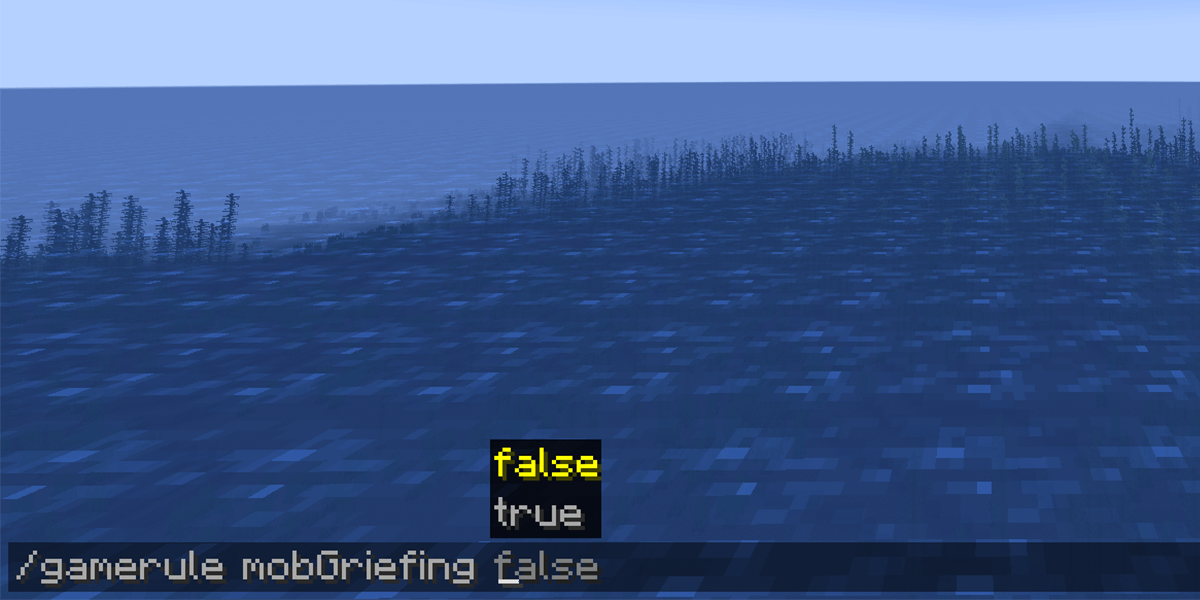
From a technical perspective, mob griefing is managed via the command console. The syntax used by administrators and players with elevated permissions is /gamerule doMobGriefing <true/false>. This command interacts directly with the world’s metadata.
When set to true, the software allows the AI to perform “destructive” or “transformative” tasks. When set to false, the AI’s ability to modify the block grid is revoked, though their ability to deal damage to players or other entities typically remains intact. This distinction is vital: mob griefing is an environmental interaction setting, not a combat setting.
The Binary Nature of the Rule
The challenge for many users lies in the “all or nothing” nature of the base software. In the vanilla version of the game engine, the mob griefing rule is a global toggle. It does not allow for a granular selection of which mobs can or cannot interact with the world. Turning it off stops a Creeper from blowing up a player’s house, but it also inadvertently disables several beneficial or neutral AI behaviors, creating a complex trade-off for those managing the technical aspects of their digital world.
The Technical Impact on World Simulation
To truly understand the weight of the doMobGriefing rule, one must examine the specific behaviors it governs. The game’s logic branches significantly depending on this setting, affecting everything from resource gathering to automated systems.
Destructive Interactions: Creepers and Ghasts
The most notorious examples of mob griefing involve explosive entities. The Creeper, a flagship entity of the game, is programmed to detonate when in proximity to a player. If mob griefing is enabled, the explosion calculates a blast radius and deletes blocks within that radius based on their blast resistance.
Similarly, the Ghast—a flying entity found in the “Nether” dimension—fires explosive projectiles. With mob griefing disabled, these explosions still occur and can damage the player, but the landscape remains untouched. For server administrators, disabling this is often a priority to prevent “terrain scarring,” where the natural landscape becomes riddled with craters over time, increasing the data overhead for the world file and degrading the aesthetic quality of the environment.
Constructive and Automated Interactions: Villagers and Sheep
Perhaps the most surprising aspect of mob griefing is its impact on “passive” or “utility” mobs. Villagers, the primary NPC inhabitants of the game’s towns, use griefing mechanics to interact with farmland. They are programmed to harvest mature crops and replant seeds.
Technically, the act of “breaking” a crop block and “placing” a seed block is categorized as mob griefing. If a player sets doMobGriefing to false, Villagers lose the ability to farm. This effectively breaks many automated food production systems and prevents Villager populations from breeding, as their breeding mechanic is often tied to the amount of food in their inventory. Likewise, Sheep “grief” the world by eating grass blocks to regrow their wool. Disabling the rule prevents the transformation of grass blocks into dirt blocks, which can halt automated wool harvesting machines.
Item Management: Endermen and Zombies
Other mobs interact with the world by picking up items or moving blocks. The Enderman has a specific AI routine that allows it to “steal” certain blocks (like dirt, sand, or flowers) and move them elsewhere. Over hundreds of hours, this can lead to noticeable changes in the geography.
Zombies, on the other hand, have a specific mechanic on higher difficulty settings where they can “break” wooden doors. This is a form of griefing that creates a security risk for NPC villages. Disabling the rule makes doors invulnerable to these entities, fundamentally changing the defensive strategy required by the player.
Strategic Server Management and Performance Optimization
For those running professional or community servers, the decision to enable or disable mob griefing is often a matter of performance and user experience (UX) design.
Controlling World Decay and Resource Scarcity
In a high-traffic multiplayer environment, the cumulative effect of mobs interacting with the world can be catastrophic. If fifty players are active, the number of Creeper explosions occurring globally can lead to a phenomenon known as “world rot,” where the initial spawn areas become uninhabitable and visually unappealing. By disabling mob griefing, administrators ensure that the structural integrity of player builds is maintained, which is crucial for retaining a user base that invests heavily in architectural projects.
Impact on Tick Speed and Server Latency
From a hardware perspective, every block update requires a calculation. When an explosion occurs, the server must calculate the blast rays, check the resistance of every block in the path, drop items for the destroyed blocks, and update the lighting engine for the newly created void. In a local single-player session, this is negligible. However, on a server with limited RAM or CPU overhead, multiple simultaneous griefing events can cause “TPS” (Ticks Per Second) drops, leading to lag and a poor user experience.
How to Configure Mob Griefing Settings
Configuring these settings requires access to the game’s backend or the in-game chat interface with administrative privileges. The process varies slightly depending on the version of the software being utilized.
Standard Java Edition Procedures
For users on the Java Edition (the primary platform for technical modding and large-scale servers), the process is straightforward. A player with “OP” (Operator) status simply types /gamerule doMobGriefing false into the console. This change is instantaneous and persistent, saving directly to the level.dat file of the world. No restart is required, making it a dynamic tool for managing live events.
Bedrock Edition and Education Edition Variations
In the Bedrock Edition—which spans consoles, mobile devices, and Windows 10—the setting is often found in the world configuration menu before the world is even loaded. While the command line still works, the GUI-based approach makes it more accessible to casual users. In Education Edition, this setting is frequently disabled by default to ensure that the “classroom” environment remains stable while students are working on specific assignments.
Using Plugins for Granular Control
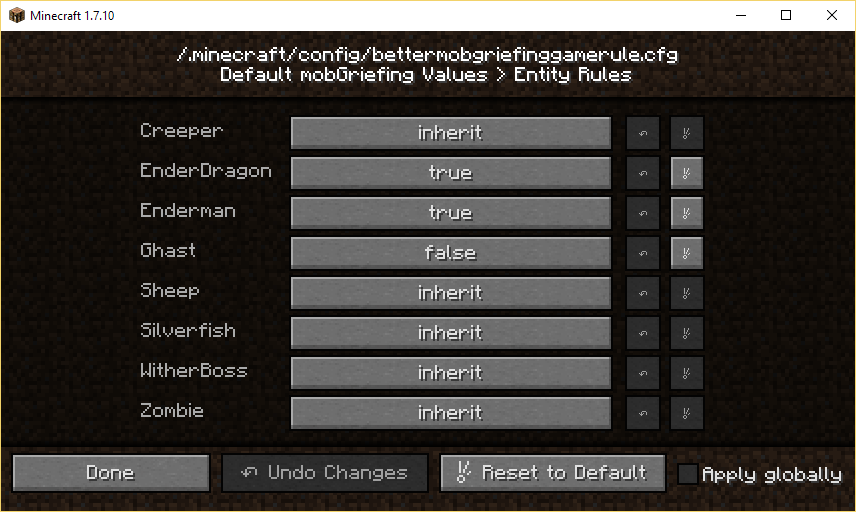
Because the vanilla doMobGriefing command is a “blunt instrument” (turning off both the “bad” Creeper explosions and the “good” Villager farming), the professional tech community has developed third-party solutions. Using server software like Spigot, Paper, or Fabric, administrators can install plugins that offer granular control. These tools allow a dev-op to:
- Disable Creeper damage to blocks.
- Allow Endermen to move blocks.
- Allow Villagers to continue farming.
- Prevent Ghast fireballs from destroying terrain while still allowing them to start fires.
This level of precision is the gold standard for modern server management, as it preserves the game’s “automation meta” while protecting the visual landscape.
The Evolving Meta of Environment Interaction in Sandbox Software
The concept of mob griefing represents a fascinating intersection of AI agency and player autonomy. In early software iterations, the world was static; the player was the only force of change. The introduction of mob griefing changed the genre by creating a “living world” that could push back against the player.
As AI tools and game engines become more sophisticated, the definition of mob griefing is likely to expand. We are seeing the rise of “dynamic environments” where NPCs don’t just destroy blocks, but could theoretically build or repair them. For now, the doMobGriefing toggle remains one of the most powerful tools in a developer’s or administrator’s arsenal for defining the “rules of engagement” within a digital space.
Whether you are a developer looking to understand entity-component systems or a server host trying to optimize performance, mastering the technical nuances of mob griefing is a vital step in managing modern interactive software. It is a reminder that in a world built of data and blocks, the power to change the environment is the ultimate variable.
aViewFromTheCave is a participant in the Amazon Services LLC Associates Program, an affiliate advertising program designed to provide a means for sites to earn advertising fees by advertising and linking to Amazon.com. Amazon, the Amazon logo, AmazonSupply, and the AmazonSupply logo are trademarks of Amazon.com, Inc. or its affiliates. As an Amazon Associate we earn affiliate commissions from qualifying purchases.