
In an increasingly digitized world, where Microsoft products form the backbone of countless personal and professional endeavors, the need for reliable technical support is paramount. From troubleshooting a stubborn Windows error to resolving an issue with an Office 365 subscription or seeking assistance with an Xbox console, users frequently find themselves searching for that elusive “Microsoft support number.” However, the quest for a single, universal number often leads to frustration, revealing a much more intricate and multi-layered support ecosystem than many anticipate.
This article delves into the realities of Microsoft’s customer assistance, moving beyond the simple search for a phone number to explore the comprehensive digital infrastructure designed to serve its vast global user base. We’ll uncover why a direct phone call isn’t always the first or most efficient solution and guide you through the official, secure channels to ensure you receive authentic, effective help for your technology challenges. Understanding this landscape is crucial not only for resolving immediate tech issues but also for safeguarding against the growing threat of support scams.
The Evolving Landscape of Microsoft Support
For many years, the phone call was the quintessential method for seeking technical assistance. You had a problem, you found a number, and you spoke to a representative. While this direct human interaction still holds value, the sheer scale of Microsoft’s user base and the complexity of its product portfolio have necessitated a significant evolution in its support strategy. The days of a single, readily available global support number for every issue are largely behind us, replaced by a more dynamic and often more efficient multi-channel approach.
Beyond a Single Number: A Multi-Channel Approach
Microsoft has strategically transitioned towards a diverse array of support options, aiming to empower users with self-help tools while still providing pathways to live assistance when necessary. This shift is not merely about cost-cutting; it’s about optimizing the support experience for different types of issues and user preferences. The primary goal is often to enable users to find solutions quickly and independently, reserving live agent interactions for more complex or account-specific problems.
Key components of this multi-channel strategy include:
- Extensive Knowledge Bases: Vast libraries of articles, FAQs, and troubleshooting guides covering virtually every Microsoft product.
- Community Forums: Platforms where users can connect with peers and Microsoft experts to share problems and solutions.
- Virtual Agents and Chatbots: AI-driven tools designed to understand user queries, provide instant answers, and guide users to relevant resources or the correct live support channel.
- Online Chat Support: Direct messaging with live agents for real-time assistance, often preferred for its convenience and the ability to share links or screenshots.
- Scheduled Callbacks: An option within some support flows to request a phone call from a Microsoft representative at a convenient time, reducing wait times.
- Product-Specific and Regional Phone Numbers: Direct lines are still available, but they are typically segmented by product (e.g., Windows, Office, Xbox, Surface) or geographic region, and often require navigating through online prompts first.
Why Direct Phone Support Can Be Elusive
The perceived “elusiveness” of a direct Microsoft support number stems from several practical and strategic considerations. Imagine the volume of calls if every single Microsoft user with a query, no matter how minor, immediately dialed a central number. The system would be perpetually overwhelmed, leading to unbearable wait times and a frustrating experience for everyone.
Therefore, Microsoft, like many major tech companies, priorit employs a triage system:
- Volume Management: Directing common issues to self-help resources significantly reduces the load on phone lines, allowing agents to focus on problems that genuinely require their expertise.
- Efficiency and Speed: Many simple queries can be resolved faster through a quick search, an FAQ, or an AI chatbot than by waiting on hold for a live agent.
- Cost-Effectiveness: Providing live phone support on a global scale is incredibly expensive. Digital channels offer a more scalable and cost-effective way to deliver assistance.
- Documentation and Data Collection: Digital interactions (chat, forms) often create an easily accessible record of the troubleshooting steps, which can be useful for both the user and the support team.
This strategic pivot is ultimately aimed at providing more efficient, scalable, and tailored support, even if it means altering the traditional expectation of immediately finding a universal phone number.
The Myth of a Universal “Microsoft Support Number”
One of the most important takeaways for any user seeking Microsoft assistance is to dispel the notion of a single, all-encompassing “Microsoft support number.” There isn’t one magical number that connects you to the right department for every conceivable issue, from a forgotten password on your Microsoft account to a critical system error on your server.
Instead, support is highly specialized. A number for Xbox technical issues will likely differ from one for Microsoft 365 business support, and both will vary regionally. This specialization ensures that when you do connect with a live agent, they are equipped with the knowledge and tools pertinent to your specific problem, rather than being a generalist who might need to transfer you multiple times. The search should therefore shift from “what is the Microsoft support number” to “what is the official support channel for my specific product and issue in my region.”
Locating Official Microsoft Support Channels
Navigating Microsoft’s vast support ecosystem can feel like a maze if you don’t know where to start. The key is always to begin with the official Microsoft website and follow their structured pathways. This approach not only leads to the most accurate information but also protects you from potentially malicious third-party scams.
Starting with the Microsoft Support Website
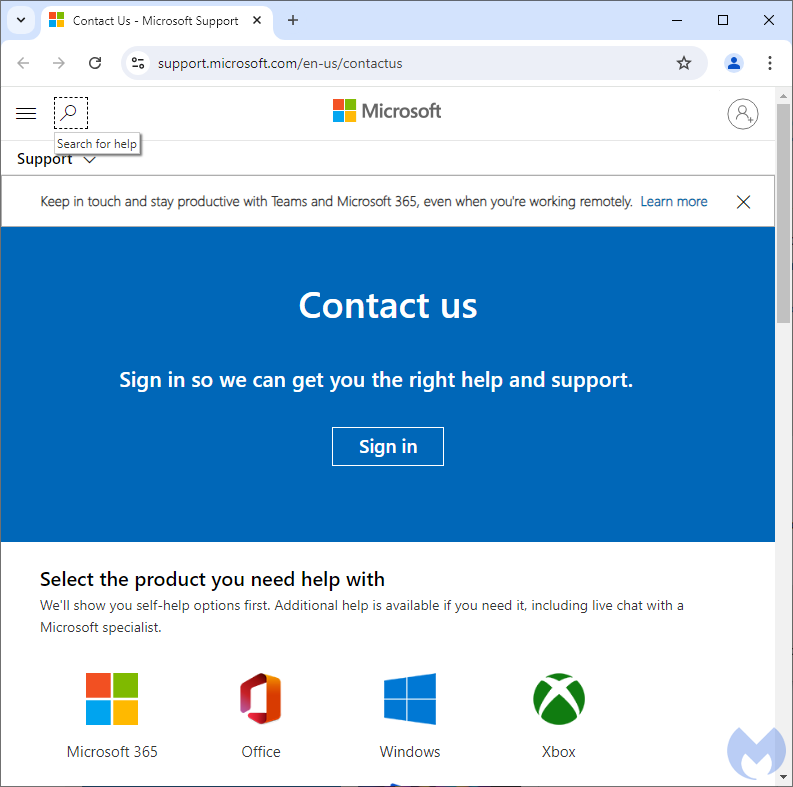
The absolute first and most critical step for any support query is to visit the official Microsoft Support website. This is the central hub for all assistance and is meticulously organized to guide you based on your product and issue.
- URL: Always ensure you are on a legitimate Microsoft domain (e.g.,
support.microsoft.com). - Product Categories: The site is typically segmented by major product lines: Windows, Office, Xbox, Surface, Microsoft 365, Azure, Dynamics 365, Developer Tools, and more. Selecting your product category is crucial.
- Search Functionality: Utilize the search bar. Entering keywords related to your problem (e.g., “Windows 11 update error,” “Office 365 installation issues,” “Xbox controller not connecting”) will often lead you directly to relevant troubleshooting articles or self-help tools.
- Guided Support: Many pages offer “guided help” or “virtual agent” prompts that walk you through a series of questions to narrow down your issue and provide tailored solutions or direct you to the appropriate live support.
For example, if you have a Windows issue, you’d navigate to the Windows support section. If it’s an Office 365 problem, you’d head to the Microsoft 365 support area. This segmentation ensures you’re interacting with the most relevant information and, eventually, the most knowledgeable support personnel.
Leveraging Online Chat and Virtual Agents
Once you’ve navigated to the relevant product support page, you’ll often encounter options for online chat or interaction with a virtual agent (chatbot). These tools are designed for immediate, often automated, assistance and are increasingly effective for a wide range of common issues.
- Virtual Agent: This is usually the first line of digital defense. The chatbot can interpret your queries, provide links to articles, and guide you through basic troubleshooting steps. For many users, this is enough to resolve their problem without needing human intervention.
- Live Chat Support: If the virtual agent can’t resolve your issue, or if you prefer human interaction, most product support paths will eventually offer an option to “Talk to an agent” or “Chat with a person.” This connects you with a live Microsoft support representative via text chat. It’s an excellent option for issues that require detailed explanations, sharing error messages, or when you need real-time, step-by-step guidance without the potential language barriers or audio issues of a phone call.
The benefit of chat support is its immediacy and the ability to multitask while waiting for responses, as well as having a written transcript of the interaction for future reference.
Community Forums and Knowledge Bases
Beyond direct support, Microsoft cultivates robust community forums and extensive knowledge bases, which are invaluable resources for problem-solving.
- Microsoft Community Forums: These official forums are bustling hubs where users can post questions, share experiences, and receive answers from other experienced users, MVPs (Most Valuable Professionals), and sometimes Microsoft employees. It’s particularly useful for niche problems, finding workarounds, or understanding common issues.
- Microsoft Learn (formerly TechNet/MSDN): For developers, IT professionals, and advanced users, Microsoft Learn offers in-depth documentation, tutorials, and technical articles. While not direct support, it’s an unparalleled resource for understanding Microsoft technologies at a deep level.
- Knowledge Base Articles (KBs): These are the backbone of self-help. When you search for an issue, you’ll often land on a KB article that outlines known problems, symptoms, and step-by-step solutions.

These resources empower users to become proactive problem-solvers, often resolving issues faster than waiting for direct support.
Direct Phone Numbers for Specific Products/Regions
While the emphasis is on digital channels, direct phone numbers for Microsoft support do exist. However, they are typically:
- Product-Specific: You’ll find different numbers for Xbox support, Microsoft 365 business support, Surface hardware support, etc.
- Region-Specific: Numbers are localized for different countries and languages. A number for the US might not work for the UK, and vice-versa.
- Often Accessed After Digital Triage: In many cases, you’ll only find the appropriate phone number after navigating through the Microsoft support website, using the virtual agent, or trying online chat. This ensures you’re routed to the correct department with minimal transfers.
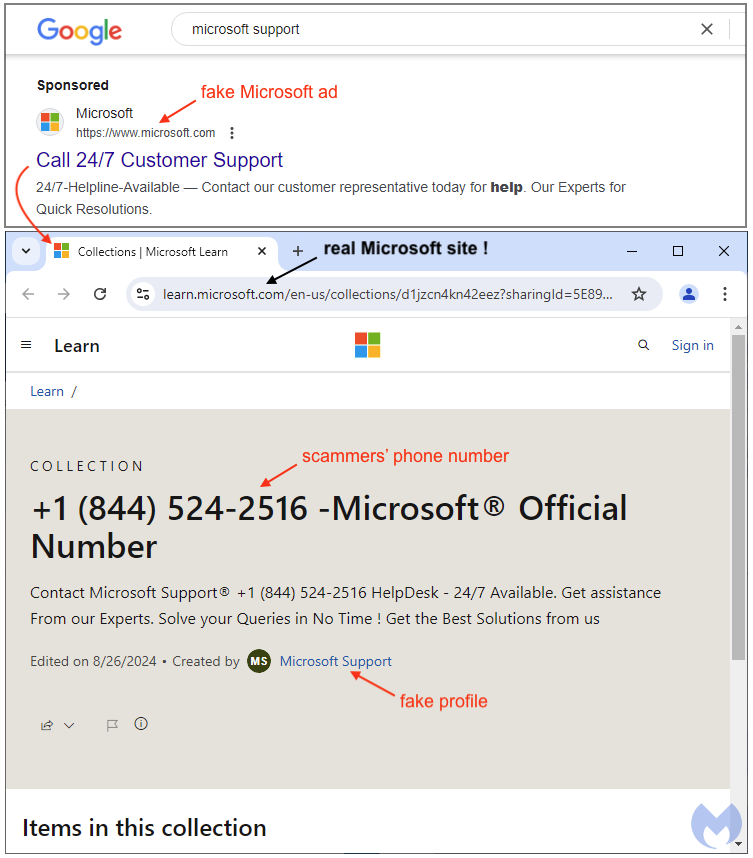
Important Note: Never rely on a phone number found through a generic web search, especially if it’s prominently displayed on an unofficial-looking website. Always cross-reference any number with the official Microsoft support portal to avoid tech support scams. Official numbers are usually found deep within the support site after you’ve identified your specific product and issue. For example, business users with Microsoft 365 subscriptions often have dedicated support numbers available within their admin portals.
Best Practices for Engaging with Microsoft Support
Once you’ve identified the appropriate channel and are ready to contact Microsoft support, a little preparation can significantly streamline the process and lead to a quicker resolution. Thinking ahead not only saves your time but also helps the support agent diagnose and address your issue more efficiently.
Preparing for Your Support Interaction
Before you initiate contact, gather as much relevant information as possible. This preparation is akin to a doctor’s pre-consultation notes – the more accurate details you provide, the better the diagnosis.
- Product and Version Information: Clearly identify the exact Microsoft product and its version (e.g., Windows 11 Home, Microsoft Office 365 Personal, Xbox Series X, Surface Pro 9). Include any build numbers if relevant (e.g., for Windows).
- Detailed Problem Description: Articulate the issue clearly and concisely. What exactly is happening? When did it start? Has anything changed recently (new software, updates, hardware)?
- Error Messages and Codes: If you’re receiving error messages, write them down verbatim, including any numerical error codes. Screenshots are incredibly helpful for chat support.
- Troubleshooting Steps Already Taken: List all the steps you’ve already tried to resolve the issue yourself. This prevents the agent from suggesting solutions you’ve already attempted and helps them move to more advanced diagnostics.
- Account Information: Have your Microsoft account details ready, especially if the issue pertains to subscriptions, billing, or account access. Never share your password unless you are absolutely certain you are on an official, secure Microsoft portal.
- Internet Connection Details: If the issue is internet-related, be prepared to discuss your internet service provider (ISP), router details, and connection type.
- Availability: If requesting a callback, be ready for the call at the scheduled time.
Escalation Paths and Advanced Assistance
Not all problems are solved on the first interaction. Sometimes, an issue requires specialized knowledge or a deeper dive into system diagnostics. Understanding the potential for escalation can manage your expectations.
- Tiered Support: Microsoft, like most tech companies, operates on a tiered support system. Initial contacts (Tier 1) handle common issues. If they can’t resolve it, the issue might be escalated to Tier 2 (more experienced technicians) or even Tier 3 (engineers or product specialists).
- Documentation and Case Numbers: Always note down any case numbers or reference IDs provided during your initial interaction. This is crucial for follow-ups and if your issue needs to be escalated, as it ensures continuity of service and prevents you from having to explain everything from scratch again.
- Remote Assistance: For complex software issues, Microsoft support agents might offer to connect to your computer remotely to diagnose and fix the problem directly. Ensure you are comfortable with this and understand the implications before granting access. Only allow remote access from official Microsoft support channels.
Security Considerations: Avoiding Scams
This is perhaps the most critical aspect of seeking technical support. The prevalence of “tech support scams” makes it imperative to exercise extreme caution when searching for and interacting with support personnel.
- Official Sources ONLY: Always initiate contact with Microsoft through their official website (
support.microsoft.com). Never call a number found in a pop-up warning, an unsolicited email, or a generic web search result unless you have verified it against the official Microsoft site. - Unsolicited Contact: Microsoft will never call you out of the blue to inform you of a problem with your computer or offer unsolicited support. If you receive such a call, it is a scam. Hang up immediately.
- Red Flags: Be suspicious of anyone who:
- Asks for remote access immediately without proper verification.
- Demands payment via gift cards, cryptocurrency, or wire transfers.
- Claims your computer is infected with “hundreds of viruses” and tries to scare you into buying unnecessary software or services.
- Asks for your password or other highly sensitive personal information unnecessarily.
- Insists you install “special software” outside of known, legitimate tools.
- Reporting Scams: If you encounter a tech support scam, report it to Microsoft (via
www.microsoft.com/reportascam) and your local authorities. This helps protect others.
Vigilance is your strongest defense against these malicious actors. Always assume the worst when an unsolicited offer of “support” arrives, and always verify the authenticity of any support channel you interact with.
Maximizing Your Microsoft Product Experience Through Effective Support
Effective support isn’t just about fixing problems; it’s about empowering users to get the most out of their technology. By understanding and utilizing Microsoft’s support ecosystem wisely, you can enhance your overall experience with their products and ensure smoother operations.
Proactive Problem Solving with Microsoft Resources
Beyond reactive troubleshooting, Microsoft’s support resources can be invaluable for proactive problem-solving and skill development. Regularly visiting the Microsoft Support website or exploring the Microsoft Learn platform can help you:
- Stay Informed: Keep up-to-date with new features, best practices, and security updates for your products.
- Learn New Skills: Tutorials and guides can help you master advanced functionalities of Office applications, understand Windows settings, or optimize your gaming experience on Xbox.
- Prevent Issues: By understanding common pitfalls and recommended configurations, you can avoid many problems before they even arise.
- Community Engagement: Participating in forums not only helps you get answers but also allows you to contribute your own knowledge, fostering a collaborative learning environment.
Treating Microsoft’s support channels as a continuous learning resource can transform your relationship with their technology from merely transactional to deeply empowering.
The Value of Microsoft Accounts and Subscriptions
Your Microsoft account and any associated subscriptions (like Microsoft 365, Xbox Game Pass, or Azure) play a crucial role in streamlining your support experience.
- Personalized Support: When you log into the Microsoft Support website with your account, the system can often tailor support options based on your registered products and subscription status. For instance, Microsoft 365 subscribers often have access to premium support features.
- Easier Verification: Having your account details readily available makes the verification process much quicker when interacting with live agents, confirming your identity and ownership of products or services.
- Subscription Benefits: Many paid subscriptions include enhanced support options, such as dedicated phone lines, faster response times, or specialized agents. Familiarize yourself with the support benefits included with your specific subscription.
- Centralized Management: Your Microsoft account acts as a central hub for managing devices, subscriptions, billing, and security settings, which are often pertinent to support inquiries.
Ensuring your Microsoft account information is up-to-date and secure is a foundational step for efficient support and overall digital hygiene.
Conclusion
The question “what is Microsoft support number?” is more complex than it appears, serving as a gateway to understanding the vast and evolving landscape of modern tech support. While direct phone lines still exist, they are increasingly integrated within a comprehensive digital ecosystem that prioritizes self-help, online chat, and community collaboration.
The key to successfully navigating Microsoft’s support channels lies in a strategic approach: always start with the official support.microsoft.com website, meticulously identify your product and issue, leverage the extensive self-help resources, and only then proceed to live chat or product-specific phone numbers as directed. Crucially, maintaining unwavering vigilance against tech support scams is paramount.
By embracing this multi-faceted approach, users can not only resolve their immediate technical challenges efficiently and securely but also empower themselves to proactively engage with Microsoft’s resources, ultimately enhancing their overall technology experience in a world increasingly dependent on reliable digital solutions.
aViewFromTheCave is a participant in the Amazon Services LLC Associates Program, an affiliate advertising program designed to provide a means for sites to earn advertising fees by advertising and linking to Amazon.com. Amazon, the Amazon logo, AmazonSupply, and the AmazonSupply logo are trademarks of Amazon.com, Inc. or its affiliates. As an Amazon Associate we earn affiliate commissions from qualifying purchases.