
In an increasingly digital world, the need for compact, reliable, and high-capacity data storage is paramount. From the earliest days of computing, engineers have strived to condense vast amounts of information into smaller and smaller packages. Among the most ubiquitous and enduring solutions to this challenge is the Micro SD card. A marvel of miniaturization, this tiny sliver of technology has become an indispensable component in countless devices, seamlessly expanding their capabilities and enabling users to carry their digital lives in their pockets. But beyond its familiar appearance, what exactly is a Micro SD card, and how does this unassuming piece of tech manage to store gigabytes, even terabytes, of data?
This article will delve into the technical intricacies of Micro SD cards, exploring their evolution, deciphering their often-confusing specifications, examining their diverse applications, and guiding you through the process of selecting and utilizing them effectively. We’ll uncover the engineering brilliance that allows such a small device to wield such significant data-handling power, firmly establishing its vital role in the modern technological landscape.
The Evolution and Anatomy of Tiny Storage
The journey to the Micro SD card began with a fundamental need for portable data. Understanding its origins and physical makeup is key to appreciating its current capabilities.
A Brief History: From SD to MicroSD
The Secure Digital (SD) card standard was first introduced in 1999 by SanDisk, Panasonic, and Toshiba, building upon the earlier MultiMediaCard (MMC) format. Designed to offer improved data transfer rates and security features, SD cards quickly became the standard for digital cameras and other portable electronics. However, as devices continued to shrink, a smaller form factor was needed.
This led to the introduction of the miniSD card in 2003, followed shortly by the even smaller microSD card in 2005. Initially known as TransFlash, SanDisk developed it specifically for mobile phones, which were becoming increasingly sophisticated and required expandable storage for photos, videos, and applications. The microSD card retained all the features of its larger siblings but in a dramatically reduced size, measuring just 15 mm × 11 mm × 1 mm – roughly the size of a fingernail. This miniaturization was a game-changer, allowing manufacturers to integrate expandable storage into incredibly compact devices without compromising on functionality.
Miniaturization Meets Mighty Capability: Physical Characteristics
The physical design of a Micro SD card is a testament to precision engineering. Despite its minuscule dimensions, it houses several critical components. At its core is a NAND flash memory chip, the non-volatile storage medium that retains data even without power. This chip is where all your photos, videos, and files are stored. Surrounding the flash chip is a controller chip, a tiny processor that manages data read/write operations, error correction, and wear leveling to maximize the card’s lifespan.
These components are encased in a durable plastic housing, designed to protect them from physical damage, static electricity, and often, environmental factors like water and extreme temperatures (though specific durability varies by manufacturer and model). The metallic contacts on one side of the card are crucial for communication with the host device, providing the electrical interface for power and data transfer. The ingenious design allows for incredible storage density, packing significant amounts of data into an almost imperceptible package.
How It Works: The Basics of Flash Memory
Unlike traditional hard drives that rely on spinning platters and read/write heads, Micro SD cards utilize flash memory, a type of EEPROM (Electrically Erasable Programmable Read-Only Memory). Flash memory stores data in blocks of memory cells, specifically using floating-gate transistors. These transistors can trap electrons, representing a binary “1” or “0” depending on the presence or absence of a charge.
When you write data to a Micro SD card, the controller chip directs the voltage to program these cells. Reading data involves detecting the charge level in each cell. The beauty of flash memory lies in its non-volatility; once data is written, it remains stored even when the device is powered off, unlike volatile RAM. This makes it ideal for permanent storage in portable devices. The controller also performs crucial tasks like wear leveling, distributing data writes evenly across all memory blocks to prevent premature failure of frequently used sectors, thus extending the card’s overall lifespan.
Decoding Micro SD Card Specifications: Speed, Capacity, and Classes
Choosing the right Micro SD card requires understanding its specifications, which can often seem like an alphabet soup of acronyms and numbers. These details directly impact a card’s performance and suitability for different tasks.
Understanding Capacity: GB, TB, and Future Possibilities
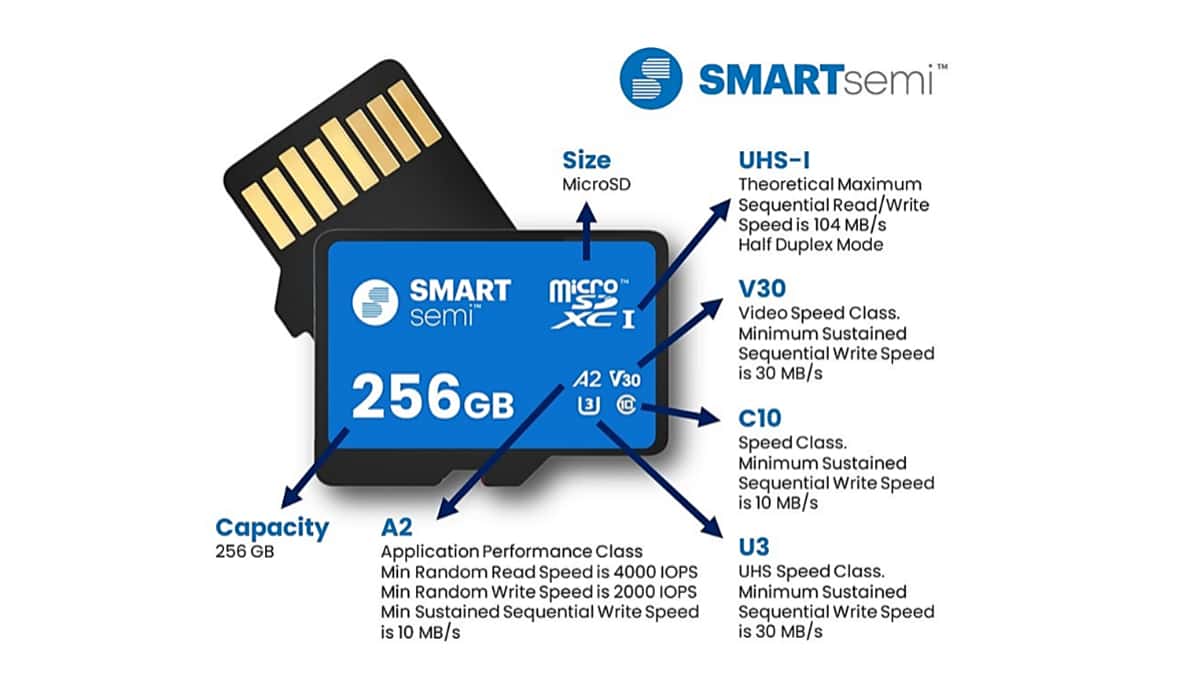
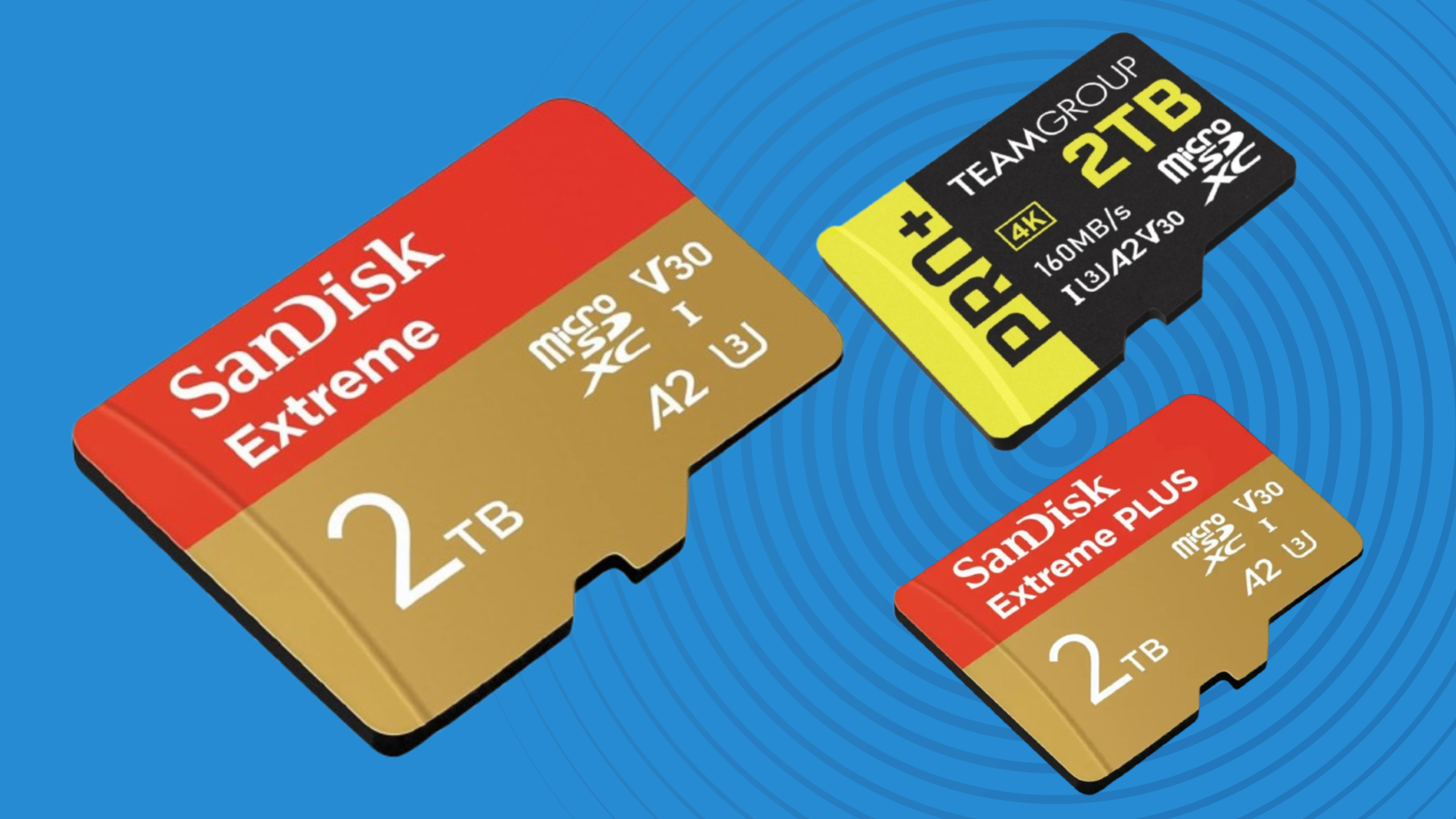
Capacity refers to the total amount of data a Micro SD card can store. It’s measured in gigabytes (GB) and, increasingly, terabytes (TB). Common capacities range from a few gigabytes (e.g., 8GB, 16GB) to hundreds of gigabytes (e.g., 128GB, 256GB, 512GB), and now even 1TB or 2TB cards are available. The growth in capacity is exponential, driven by advancements in NAND flash technology, particularly 3D NAND, which stacks memory cells vertically to achieve higher densities.
When selecting a card, always consider your current and future storage needs. High-resolution photos, 4K videos, extensive app libraries, and large game files consume space rapidly. While a smaller card might be cheaper, a larger capacity often offers better long-term value, especially if your device can support it.
Speed Classes Explained: From Class 2 to UHS-II/III and V-Class
Perhaps the most critical specification after capacity is speed, which dictates how quickly data can be written to and read from the card. Various speed classes have been introduced over time to address the growing demands of different applications.
-
Standard Speed Class (C): These are the oldest and slowest classes, denoted by a number inside a circle.
- Class 2 (C2): Minimum write speed of 2 MB/s
- Class 4 (C4): Minimum write speed of 4 MB/s
- Class 6 (C6): Minimum write speed of 6 MB/s
- Class 10 (C10): Minimum write speed of 10 MB/s
These are generally suitable for basic photography and standard definition video.
-
UHS Speed Class (U): Ultra High Speed (UHS) classes were introduced for devices requiring faster performance, such as Full HD and 4K video recording. These cards utilize a different bus interface than standard speed class cards.
- UHS Speed Class 1 (U1): Minimum write speed of 10 MB/s (often found on Class 10 cards)
- UHS Speed Class 3 (U3): Minimum write speed of 30 MB/s
UHS cards also come in different bus interfaces: UHS-I (up to 104 MB/s theoretical bus speed) and UHS-II/III (up to 312 MB/s or 624 MB/s theoretical bus speed, respectively, featuring an additional row of pins). For optimal performance with UHS-II/III cards, both the card and the host device must support the interface.
-
Video Speed Class (V): Designed specifically for high-resolution video recording, these classes guarantee minimum sequential write speeds necessary for smooth 4K, 8K, and 360-degree video capture without dropped frames.
- V6: Minimum write speed of 6 MB/s
- V10: Minimum write speed of 10 MB/s
- V30: Minimum write speed of 30 MB/s
- V60: Minimum write speed of 60 MB/s
- V90: Minimum write speed of 90 MB/s
Application Performance Class (A-Class): Optimizing for Apps
With smartphones increasingly relying on Micro SD cards to run applications, a new standard emerged: the Application Performance Class. This class addresses not just sequential read/write speeds, but also random read/write speeds, which are crucial for the rapid small file operations characteristic of app usage.
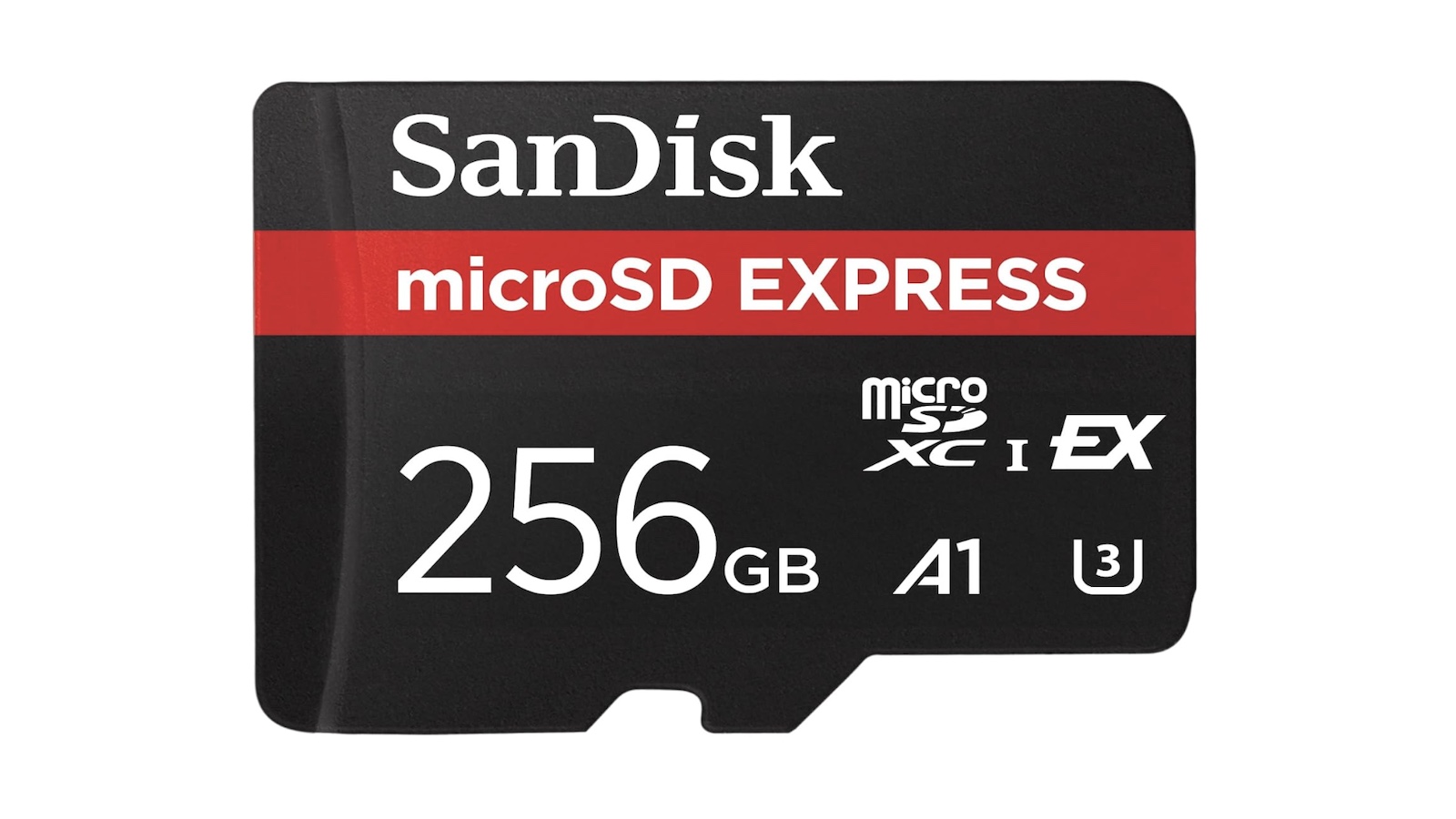
- A1: Minimum random read IOPS (Input/Output Operations Per Second) of 1500, minimum random write IOPS of 500, and minimum sustained sequential write speed of 10 MB/s.
- A2: Minimum random read IOPS of 4000, minimum random write IOPS of 2000, and minimum sustained sequential write speed of 10 MB/s.
A-class cards ensure a smoother experience when installing and running apps directly from the Micro SD card, reducing lag and improving responsiveness.
Form Factors and Compatibility: MicroSD vs. SD
While this article focuses on Micro SD cards, it’s important to understand their relationship with standard SD and miniSD cards. Micro SD cards are the smallest of the family. Most Micro SD cards come with an SD adapter, allowing them to be inserted into devices that only accept larger standard SD cards. This backward compatibility is incredibly convenient, making a single Micro SD card versatile across multiple device types. However, remember that using an adapter does not magically increase the speed of the card; its performance will still be governed by its own speed class and the host device’s capabilities.
Where Micro SD Cards Shine: Common Applications and Use Cases
The compact size and impressive capabilities of Micro SD cards have made them indispensable across a vast array of consumer electronics and specialized devices. Their versatility is a key reason for their enduring relevance.
Expanding Smartphone and Tablet Storage
Perhaps the most common use for Micro SD cards is augmenting the internal storage of smartphones and tablets. Many Android devices and some Windows tablets feature a Micro SD card slot, allowing users to significantly expand their capacity for photos, videos, music, and even applications. This is particularly valuable as file sizes continue to grow, and internal storage, while increasing, still often falls short for media-heavy users. A high-capacity, fast Micro SD card can transform a device with limited internal storage into a multimedia powerhouse.
Elevating Digital Cameras and Drones
For photographers and videographers, Micro SD cards (often used with an SD adapter in full-size camera slots) are the backbone of their workflow. High-resolution RAW photos and demanding 4K/8K video recording require not only vast storage but also incredibly fast write speeds to prevent buffering and ensure smooth capture. Drones, particularly those capable of capturing aerial footage in stunning resolutions, also rely on high-speed Micro SD cards to store their output. The Video Speed Classes (V30, V60, V90) are particularly relevant here.
Powering Portable Gaming Devices and Action Cams
Nintendo Switch users, for instance, heavily rely on Micro SD cards to expand their game library beyond the console’s internal storage. The ability to carry dozens of large game titles on a single card greatly enhances the portability and versatility of these devices. Similarly, action cameras like GoPros, designed for capturing extreme sports and adventure in high definition, demand robust and fast Micro SD cards to reliably record intense, high-bitrate video footage in challenging environments.
Enabling Single-Board Computers (SBCs) and IoT
Micro SD cards are the primary boot device and storage medium for popular single-board computers like the Raspberry Pi. They store the operating system, applications, and all user data for these miniature computers, which are widely used for hobbyist projects, home automation, and various Internet of Things (IoT) applications. Their small footprint and ease of replacement make them ideal for these embedded systems.
In-Car Dashcams and Surveillance Systems
Dashcams constantly record footage, overwriting older files as needed. This continuous write cycle demands a durable Micro SD card with high endurance. Specialized “high endurance” Micro SD cards are designed for this purpose, offering enhanced longevity under constant recording conditions. Similarly, network cameras and home surveillance systems often use Micro SD cards for localized video storage, providing a reliable and compact backup or primary recording solution.
Choosing the Right Micro SD Card: A Buyer’s Guide
With the plethora of options available, selecting the ideal Micro SD card can be daunting. A careful consideration of your specific needs and device compatibility is crucial.
Matching Card to Device Needs
The first step is to identify the host device and its requirements. Does your smartphone primarily need extra space for photos, or will you be running apps from it? Is your camera shooting 4K video at a high bitrate, or just casual snapshots?
- Smartphones/Tablets: Look for a good balance of capacity and A1/A2 speed class for optimal app performance.
- Digital Cameras/Drones: Prioritize U3 or V30/V60/V90 speed classes, especially for 4K/8K video.
- Gaming Consoles (e.g., Nintendo Switch): High capacity and U3 or A1/A2 speed for faster game loading.
- Dashcams/Surveillance: Invest in “high endurance” cards designed for continuous recording, often rated as Class 10 or U1/U3.
- Raspberry Pi/SBCs: A good quality Class 10 or U1 card is usually sufficient, with A1/A2 being beneficial for more intensive applications.
Always check your device’s manual for its maximum supported capacity and speed class. Inserting a 1TB card into a device that only supports up to 256GB, or a UHS-II card into a UHS-I slot, will not yield full performance benefits.
The Importance of Reputable Brands
The market is flooded with Micro SD cards, but quality and reliability can vary significantly. Sticking to reputable brands like SanDisk, Samsung, Kingston, PNY, Lexar, and Western Digital is highly recommended. These manufacturers invest heavily in R&D, use high-quality flash memory, and rigorously test their products. While they might be slightly more expensive, the peace of mind regarding data integrity and card longevity is well worth it. Counterfeit cards, which often claim high capacities or speeds but deliver neither, are a persistent problem, making brand trust essential.
Considering Durability and Reliability
Beyond speed and capacity, the physical resilience of a Micro SD card can be important, especially for devices used in harsh environments. Many reputable cards boast features like:
- Waterproof: Withstands immersion in water.
- Temperature Proof: Operates in extreme heat and cold.
- X-ray Proof: Immune to airport X-ray scanners.
- Magnet Proof: Resists magnetic fields.
- Shock Proof: Withstands drops and impacts.
While no card is indestructible, these features provide an added layer of protection for your valuable data, particularly relevant for action cameras, drones, or outdoor photography equipment.
Price vs. Performance: Finding the Sweet Spot
It’s tempting to opt for the cheapest card or the highest-spec card, but the optimal choice often lies in the middle. Overspending on an ultra-fast card for a device that can’t utilize its full speed is wasteful. Conversely, saving a few dollars on a slow, generic card can lead to frustrating performance issues or even data loss. Aim for the best card that meets your device’s maximum capabilities and your specific usage needs, from a trusted brand, at a competitive price.
Maximizing Your Micro SD Card’s Lifespan and Performance
Like any electronic storage medium, Micro SD cards benefit from proper handling and maintenance to ensure optimal performance and longevity.
Proper Insertion and Removal
Always insert the Micro SD card correctly, matching the orientation shown on your device. For removal, it’s crucial to “safely eject” or “unmount” the card from your device’s software interface before physically pulling it out. This ensures that all write operations are completed and prevents data corruption. Abruptly removing a card while it’s being written to can damage the file system or even the card itself.
Formatting and File Systems
When you first get a Micro SD card, or if you encounter issues, formatting it is often recommended. Formatting prepares the card for use with a specific file system.
- FAT32: Older, more widely compatible file system, but has a 4GB file size limit and 2TB partition size limit. Suitable for older devices or smaller cards.
- exFAT: Newer, designed for flash memory. Supports larger file sizes (over 4GB) and larger partition sizes, making it ideal for high-capacity cards and devices that handle large video files.
- NTFS: Primarily used by Windows, less common for Micro SD cards due to its overhead, but sometimes used in specific applications.
Most cameras and modern Android devices will format the card to exFAT by default, which is generally the best choice for cards 64GB and above.
Data Backup and Recovery Practices
Micro SD cards, despite their reliability, are not immune to failure. It’s paramount to regularly back up important data stored on your cards to another medium, such as a computer’s hard drive, an external SSD, or cloud storage. This protects against accidental deletion, card corruption, or physical damage. In case of data loss, specialized data recovery software can sometimes retrieve deleted or corrupted files, but success is not guaranteed, underscoring the importance of preventative backups.
Avoiding Counterfeit Cards
The market for counterfeit Micro SD cards is unfortunately robust. These cards typically feature fake branding, inflated capacity claims, and significantly lower performance than advertised. They can lead to data loss, frustratingly slow operation, and compatibility issues. To avoid them:
- Purchase from reputable retailers: Stick to authorized dealers, major electronics stores, or official brand stores online.
- Be wary of “too good to be true” deals: Extremely low prices for high-capacity, high-speed cards are a major red flag.
- Check the packaging: Authentic cards usually have high-quality printing, proper seals, and detailed information.
- Test the card: Use software like H2testw (for Windows) or F3 (for Mac/Linux) to verify the actual capacity and write speed of a new card.
Conclusion: The Enduring Role of Compact Storage
The Micro SD card, a diminutive powerhouse of data storage, has cemented its place as an indispensable component in our connected world. From its humble beginnings as a tiny accessory for mobile phones, it has evolved into a sophisticated piece of technology capable of handling the most demanding data storage and transfer tasks. Understanding its technical specifications, from capacity and speed classes to application performance, empowers users to make informed decisions that optimize their devices’ capabilities.
As technology continues to advance, so too will the Micro SD card, pushing boundaries in capacity, speed, and endurance. It’s a testament to continuous innovation, demonstrating that even the smallest components can play the biggest roles in shaping our digital experiences. The Micro SD card isn’t just a storage device; it’s a gateway to expanded possibilities, ensuring that our digital memories, creations, and information remain accessible, portable, and secure, no matter where our technological journey takes us.
aViewFromTheCave is a participant in the Amazon Services LLC Associates Program, an affiliate advertising program designed to provide a means for sites to earn advertising fees by advertising and linking to Amazon.com. Amazon, the Amazon logo, AmazonSupply, and the AmazonSupply logo are trademarks of Amazon.com, Inc. or its affiliates. As an Amazon Associate we earn affiliate commissions from qualifying purchases.