
In our hyper-connected era, we often take for granted the invisible threads that allow our devices to talk to one another. Whether you are printing a document from your laptop, streaming a high-definition movie from a media server to your smart TV, or collaborating on a shared drive in a corporate office, you are utilizing a Local Area Network (LAN). But what exactly is a “local area” in the context of technology, and why does it remain the foundational pillar of our digital infrastructure?
A Local Area Network is a collection of devices connected together in one physical location, such as a home, office, or building. While the internet connects the entire globe, a LAN focuses on the “local,” providing high-speed, secure, and reliable communication between a specific group of users and devices. As technology evolves—with the rise of the Internet of Things (IoT), remote work, and edge computing—the definition and capability of the local area network are expanding, making it more critical than ever to understand its inner workings.

1. Defining the Core Characteristics of a LAN
At its simplest, a LAN is defined by its scale and its ownership. Unlike the Wide Area Networks (WANs) that span cities or continents, a LAN is typically confined to a small geographic area. This proximity allows for technologies that offer much higher data transfer speeds than those available over long distances.
The Technical Boundaries of the “Local Area”
The “local” in Local Area Network typically refers to a single room, a house, or an office suite. In some cases, a LAN can span a group of buildings, such as a university campus, although these are sometimes categorized as Campus Area Networks (CANs). The defining technical trait is that the network hardware—the cables, routers, and switches—is usually owned and managed by the person or organization using the network, rather than a telecommunications provider.
How LANs Differ from WANs and MANs
To understand a LAN, it is helpful to contrast it with its larger cousins. A Metropolitan Area Network (MAN) connects users across a city, while a Wide Area Network (WAN), like the internet, connects different LANs across vast distances. The primary differences lie in speed and latency. Because LANs cover short distances, they experience very low latency (delay) and can achieve staggering speeds, currently ranging from 1 Gbps to 100 Gbps in professional environments, far exceeding the typical upload speeds provided by external internet service providers.
Private vs. Public Access
Another hallmark of a LAN is its private nature. While the internet is a public highway, a LAN is a private driveway. It allows an organization to keep sensitive data within its own walls. Devices on a LAN can communicate with each other without ever sending data out to the public internet, providing a layer of inherent security and speed that public networks cannot match.
2. The Architecture and Hardware of Local Networks
Building a functional local area network requires a combination of physical hardware and sophisticated software protocols. The architecture of a LAN determines how efficiently data moves and how easily the network can be scaled as more devices are added.
Wired vs. Wireless: Ethernet and Wi-Fi
The most recognizable components of a LAN are the connections themselves.
- Ethernet (Wired): For decades, the RJ45 Ethernet cable has been the gold standard for LANs. Wired connections are preferred for their stability and speed. In high-stakes environments like data centers or gaming setups, Ethernet is essential because it is less susceptible to interference than wireless signals.
- Wi-Fi (Wireless LAN or WLAN): Most modern LANs are actually “hybrid,” using Wi-Fi to provide mobility. A WLAN uses radio waves to connect devices like smartphones and laptops to the network. With the advent of Wi-Fi 6 and Wi-Fi 7, wireless speeds are beginning to rival traditional wired connections, though they still face challenges with signal degradation through walls and floors.
Essential Components: Routers, Switches, and Hubs
The “brain” of the LAN is the hardware that directs traffic.
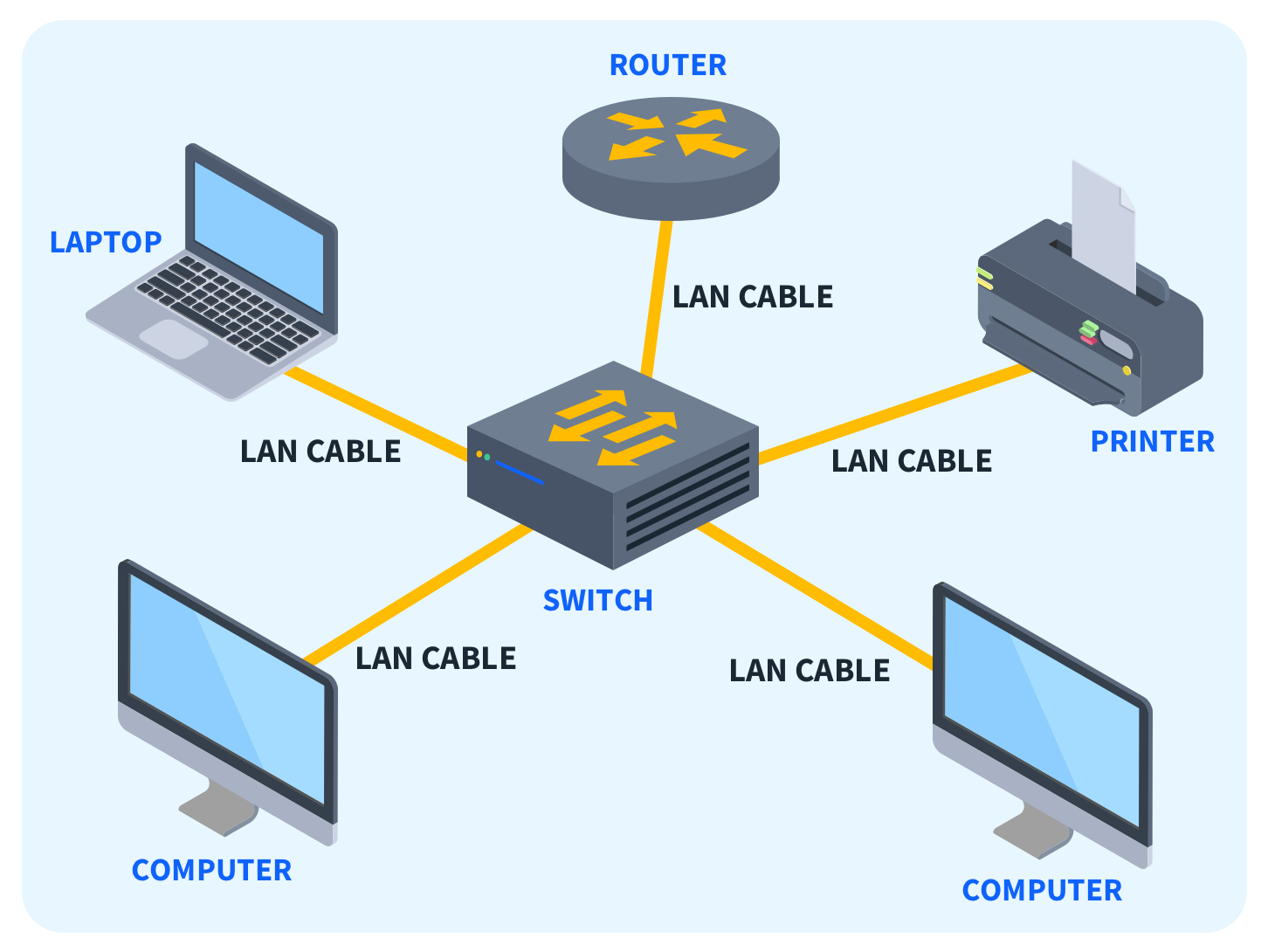
- Routers: The router acts as the gateway between the LAN and the internet. It assigns local IP addresses to every device, ensuring that a request for a website from one laptop doesn’t accidentally end up on another person’s tablet.
- Switches: While a router connects the network to the outside world, a switch connects devices within the network. A switch is “smart”—it learns which device is connected to which port and sends data only to the intended recipient, maximizing efficiency.
- Access Points: In larger local areas, a single router isn’t enough to provide wireless coverage. Access points are installed to extend the Wi-Fi signal, allowing users to roam through a building without losing their local connection.

Network Topologies: Star, Ring, and Bus
The “topology” of a LAN refers to how the devices are logically laid out. The most common modern topology is the Star Topology, where every device is connected to a central hub or switch. This is popular because if one cable breaks, only that specific device loses connection, while the rest of the network stays online. Older systems used Bus Topologies (all devices on one cable) or Ring Topologies, but these are largely obsolete due to their vulnerability—if the main cable failed, the entire network went down.
3. The Importance of LAN in Modern Business and Homes
The “local area” is no longer just about connecting a PC to a printer. It has become the central nervous system for modern living and corporate operations.
Data Sharing and Resource Management
The primary reason LANs were invented was to share expensive resources. In the 1980s, this meant sharing a single laser printer among ten computers. Today, it means sharing massive amounts of data via Network Attached Storage (NAS). In a business environment, a LAN allows employees to access centralized databases, run internal applications, and use Voice over IP (VoIP) phone systems. Because these services are hosted locally, they are lightning-fast and remain functional even if the external internet goes out.
Security and Privacy in a Local Environment
Security is perhaps the greatest advantage of a well-configured LAN. By using a LAN, an organization can create a “perimeter.” Within this perimeter, administrators can implement firewalls, set up Virtual Local Area Networks (VLANs) to segment sensitive departments (like HR or Finance) from the rest of the office, and monitor traffic for anomalies. This “air-gapped” potential—where a LAN is completely disconnected from the public internet—is used by high-security facilities to ensure that digital assets are physically impossible to hack from the outside.
The Role of LAN in Edge Computing and IoT
As we move toward the era of the Internet of Things (IoT), the LAN is becoming more crowded. Smart lights, thermostats, security cameras, and industrial sensors all live on the LAN. This has given rise to “Edge Computing,” where data is processed locally on the LAN rather than being sent to a distant cloud server. By processing data in the “local area,” latency is virtually eliminated, which is crucial for real-time applications like autonomous warehouse robots or smart medical devices.
4. Future Trends in Local Networking
The concept of the “local area” is undergoing a radical transformation as software begins to play a larger role than hardware.
The Integration of 5G and LAN
There is a growing trend toward “Private 5G” networks. In large industrial local areas—like a shipping port or a massive manufacturing plant—traditional Wi-Fi often struggles with range and interference. Companies are now beginning to deploy their own private 5G networks, which function as a high-performance LAN but use cellular technology. This provides the security of a private network with the mobility and range of a mobile carrier.
Software-Defined Networking (SDN) in Local Spaces
Traditionally, managing a LAN required physical access to hardware. With Software-Defined Networking (SDN), administrators can manage the entire local network through a single software interface. This allows for “dynamic segmenting,” where the network can automatically reconfigure itself to prioritize certain types of traffic, such as a high-priority video conference, or to isolate a device that appears to be infected with malware.
Enhanced Cybersecurity with Zero Trust Architecture
The old philosophy of LAN security was “trust but verify”—once a device was inside the local network, it was trusted. However, modern tech trends are moving toward Zero Trust Architecture. In a Zero Trust LAN, no device is trusted by default, even if it is physically plugged into the wall. Every connection request must be authenticated and encrypted. This shift is essential in an era where employees bring their own devices (BYOD) into the local area, potentially introducing threats to the internal network.
Conclusion
Understanding “what is local area” is fundamental to navigating the modern technological landscape. While we often focus on the global reach of the internet, it is the Local Area Network that provides the speed, security, and connectivity required for our daily tasks. From the Ethernet cables hidden in office walls to the sophisticated Wi-Fi protocols in our pockets, the LAN is the unsung hero of the digital age. As we look toward a future of AI-driven automation and the expansion of the IoT, the local network will only become more intelligent, more secure, and more integrated into every aspect of our lives. By mastering the local area, we build the foundation for a truly connected world.
aViewFromTheCave is a participant in the Amazon Services LLC Associates Program, an affiliate advertising program designed to provide a means for sites to earn advertising fees by advertising and linking to Amazon.com. Amazon, the Amazon logo, AmazonSupply, and the AmazonSupply logo are trademarks of Amazon.com, Inc. or its affiliates. As an Amazon Associate we earn affiliate commissions from qualifying purchases.