
In the vast landscape of modern computing, few components hold as much significance as the central processing unit, or CPU. Often referred to as the “brain” of a computer, the CPU is responsible for executing instructions, performing calculations, and managing the flow of data that underpins every digital task. At the forefront of this critical technology for decades has been Intel, and their most ubiquitous and recognizable product line for mainstream computing is the Intel Core series.
More than just a brand name, Intel Core represents a continuously evolving family of microprocessors designed to power everything from entry-level laptops and everyday desktop PCs to high-performance gaming rigs and professional workstations. Understanding what Intel Core is, how it functions, and the nuances between its various iterations is crucial for anyone looking to make informed decisions about their computing hardware, whether they are a casual user, a dedicated gamer, a content creator, or a tech enthusiast. This article will delve deep into the essence of Intel Core, demystifying its architecture, decoding its naming conventions, and exploring its impact on our digital lives.
The Core of Computing: Understanding Intel Core Processors
At its heart, an Intel Core processor is a complex integrated circuit containing billions of transistors, designed to perform computations at incredibly high speeds. Since its inception, the Intel Core brand has been synonymous with innovation, driving the evolution from single-core processors to today’s sophisticated multi-core designs capable of handling a multitude of tasks simultaneously.
A Legacy of Innovation and Evolution
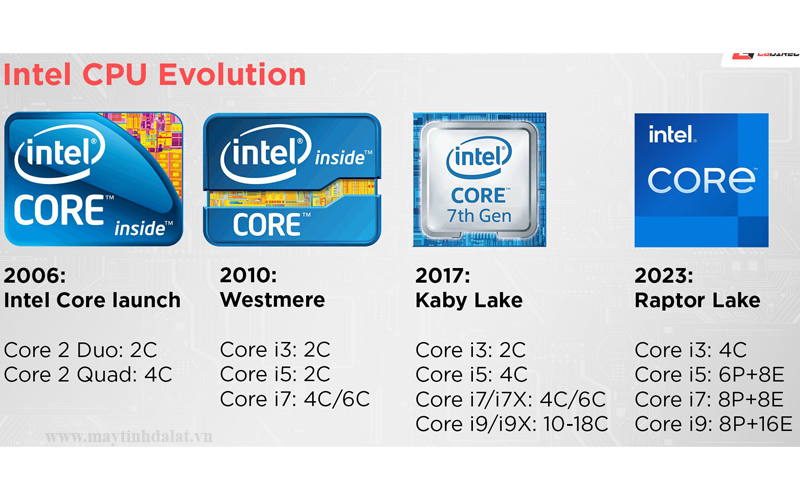
The journey of Intel Core began in 2006, replacing the older Pentium and Celeron lines as Intel’s flagship mainstream offering. Early Core processors like the Core Duo and Core 2 Duo marked a significant shift towards multi-core architectures, allowing computers to process more information concurrently and improving overall responsiveness. This foundational move set the stage for continuous innovation, with Intel regularly releasing new generations of Core processors, each bringing advancements in performance, power efficiency, and integrated features.
Over nearly two decades, Intel has refined its manufacturing processes, shrunk transistor sizes, and introduced increasingly complex microarchitectures. This relentless pursuit of improvement has led to processors that are not only faster but also more efficient, generating less heat and consuming less power, which is critical for mobile devices and sustainable computing. Each new generation of Intel Core processors builds upon the last, incorporating lessons learned and pushing the boundaries of what’s possible within a compact silicon chip.
Key Architectural Elements
To truly grasp what an Intel Core processor does, it’s essential to understand its fundamental architectural components:
- Cores & Threads: This is perhaps the most significant differentiator. A “core” is essentially an independent processing unit within the CPU. Early CPUs had a single core; modern Intel Core processors feature multiple cores (e.g., 2, 4, 6, 8, 10, 12, 14, 16, 24, or even more). Each core can handle a different task or part of a larger task.
- Hyper-Threading (HT): Intel’s proprietary technology that allows each physical core to act as two “logical” threads. This tricks the operating system into seeing more cores than are physically present, enabling more efficient utilization of the core’s resources and improving performance in multi-threaded applications. So, an 8-core processor with Hyper-Threading can handle 16 threads simultaneously.
- Clock Speed (GHz): Measured in Gigahertz (GHz), clock speed indicates how many instruction cycles a core can execute per second. A 3.0 GHz processor can perform 3 billion cycles per second. Higher clock speeds generally mean faster performance for single-threaded tasks, though overall performance is a complex interplay of many factors.
- Turbo Boost: Intel’s dynamic frequency scaling technology that automatically increases the clock speed of specific cores when workloads demand it, as long as thermal and power limits allow. This provides a temporary performance boost for demanding applications.
- Cache Memory (L1, L2, L3): A small, extremely fast memory built directly into the CPU. It stores frequently accessed data and instructions, reducing the time the CPU spends waiting for information from slower main system RAM (Random Access Memory).
- L1 Cache: Smallest and fastest, dedicated to individual cores.
- L2 Cache: Larger than L1, shared by a pair of cores or sometimes individual cores.
- L3 Cache (Shared Cache): Largest and slowest of the caches, shared by all cores on the processor, acting as a buffer to main memory.
- Integrated Graphics (Intel Iris Xe, UHD Graphics): Most Intel Core processors include an Integrated Graphics Processing Unit (iGPU) right on the same chip. This allows the computer to display visuals without needing a separate, dedicated graphics card, which is common in laptops and many desktop systems. Intel’s latest integrated graphics solutions, like Iris Xe, offer surprisingly capable performance for everyday tasks, media consumption, and even light gaming.
- Manufacturing Process (nanometers): Refers to the size of the transistors on the chip. A smaller nanometer (nm) process (e.g., 10nm, 7nm, or Intel’s “Intel 7,” “Intel 4,” “Intel 3” nomenclature) typically allows for more transistors in a smaller area, leading to greater performance, higher efficiency, and lower power consumption.
- TDP (Thermal Design Power): A metric indicating the maximum amount of heat generated by the CPU that the cooling system is designed to dissipate under typical workloads. Higher TDP often means higher performance potential but also requires more robust cooling solutions.
Decoding the Intel Core Naming Convention
Navigating the vast array of Intel Core processors can be daunting without understanding their naming scheme. Intel employs a systematic nomenclature that, once deciphered, provides crucial insights into a processor’s performance tier, generation, and specific features.
The i-Series Lineup: i3, i5, i7, i9, and Beyond
The most prominent part of the Intel Core name is the “i” followed by a number:
- Intel Core i3: Represents the entry-level segment. i3 processors are designed for basic computing tasks like web browsing, email, word processing, and light multimedia consumption. They typically feature fewer cores and threads, making them cost-effective for everyday use where high performance isn’t a primary concern.
- Intel Core i5: The mainstream workhorse. i5 processors offer a significant step up in performance from i3s, providing an excellent balance of price and power for general productivity, moderate gaming, and more demanding multi-tasking. They often feature more cores and higher clock speeds, sometimes with Hyper-Threading.
- Intel Core i7: Geared towards high-performance users. i7 processors are ideal for advanced gaming, content creation (video editing, graphic design), engineering applications, and users who demand smooth performance across multiple intensive tasks. They feature more cores/threads, larger cache sizes, and higher clock speeds than i5s.
- Intel Core i9: The enthusiast and professional powerhouse. i9 processors are at the top of the consumer lineup, offering the highest core/thread counts, largest cache, and fastest clock speeds. They are designed for extreme gaming, professional 3D rendering, complex data analysis, and other highly demanding workloads where maximum performance is paramount.
- Intel Core Ultra (Newer Addition): Introduced with the Meteor Lake architecture, Core Ultra represents a new premium tier, emphasizing AI capabilities (via an integrated NPU – Neural Processing Unit), advanced integrated graphics, and optimized power efficiency through a chiplet design. This series is positioned above the traditional Core i-series for high-end laptops and potentially desktops, signifying a shift in Intel’s branding to highlight specific capabilities beyond just raw CPU power.
Generation Numbers: The Pace of Progress
Following the “i” series designation, a series of digits indicates the processor’s generation. For example, an Intel Core i7-14700K belongs to the 14th generation, while an i5-12400 belongs to the 12th generation.
Newer generations generally bring:
- Improved Performance: Often due to microarchitectural enhancements, higher clock speeds, and more efficient core designs.
- Better Power Efficiency: Crucial for laptops, allowing for longer battery life and cooler operation.
- Newer Features: Support for faster RAM (e.g., DDR5), newer connectivity standards (e.g., PCIe 5.0, Thunderbolt), and enhanced integrated graphics.
- Security Enhancements: Continuous improvements in hardware-level security features.
Always prioritize the latest available generation for a given budget, as the generational leaps can offer significant improvements in user experience.
Suffix Letters: Unlocking Specific Features
The letters at the end of the processor model number provide crucial information about its specific characteristics:
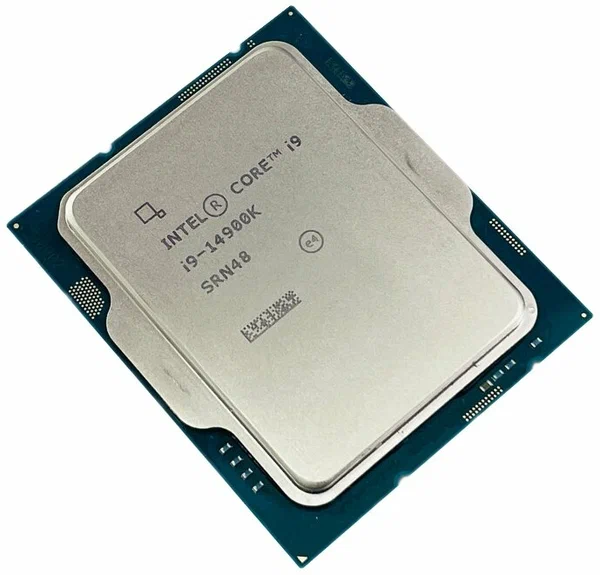
- K (Unlocked): Indicates an “unlocked” processor, meaning its clock multiplier can be adjusted by the user for overclocking. This allows enthusiasts to push the processor beyond its factory-set speeds for additional performance, provided they have adequate cooling.
- F (No Integrated Graphics): Signifies that the processor lacks integrated graphics. Systems using these CPUs require a separate, dedicated graphics card. These are often chosen by gamers or professionals who always use a discrete GPU and want to save a bit of cost.
- KF (Unlocked, No Integrated Graphics): A combination of the K and F suffixes.
- U (Ultra-Low Power): Commonly found in thin and light laptops, these processors prioritize power efficiency and extended battery life over raw performance.
- H (High Performance Mobile): Designed for performance-oriented laptops, offering more cores and higher clock speeds than U-series processors for gaming and demanding mobile workstations.
- P (Performance Mobile): A newer suffix indicating a processor with higher base power and performance than U-series, but still optimized for laptops.
- T (Power Optimized Lifestyle): Energy-efficient desktop processors optimized for low power consumption and cooler operation, often used in small form factor PCs.
- G (Integrated Graphics with Discrete GPU): Less common now, but historically indicated a processor with enhanced integrated graphics, sometimes even bundled with a low-power discrete GPU on the same package (e.g., Kaby Lake G series).
- S (Special Edition): Rare, indicating a limited edition or slightly tweaked version.
Understanding these suffixes allows users to select a processor that perfectly matches their specific needs and system type.
Performance & Application: Matching Intel Core to Your Needs
The choice of an Intel Core processor significantly impacts a computer’s overall performance and suitability for various tasks. Matching the right Core series to your primary usage ensures optimal performance without overspending.
Entry-Level Computing (Intel Core i3)
- Best for: Everyday tasks like web browsing, email, word processing, spreadsheets, video streaming, and light social media use.
- Typical Users: Students, home users, budget-conscious consumers, small business basic workstations.
- Experience: Smooth and responsive for single or a few simultaneous light applications. May struggle with very intensive multi-tasking or demanding software.
Mainstream & Gaming (Intel Core i5)
- Best for: General productivity, more demanding multi-tasking, mainstream gaming (especially when paired with a dedicated GPU), photo editing, and casual content creation.
- Typical Users: Mainstream gamers, general office workers, power users who juggle multiple applications.
- Experience: Excellent balance of performance and value. Handles most modern games at respectable frame rates and smoothly runs productivity suites.
High-Performance & Professional (Intel Core i7)
- Best for: Advanced gaming, video editing (up to 4K), graphic design, CAD, music production, software development, and demanding multi-threaded applications.
- Typical Users: Enthusiast gamers, content creators, engineers, programmers.
- Experience: Significantly faster for intensive workloads, capable of rendering large files more quickly and maintaining high frame rates in demanding games.
Enthusiast & Workstation (Intel Core i9 & Core Ultra)
- Best for: Professional content creation (8K video editing, 3D rendering, animation), scientific simulations, large-scale data analysis, extreme multi-tasking, and ultimate gaming performance.
- Typical Users: Professional studios, researchers, competitive esports players, tech enthusiasts demanding the absolute best.
- Experience: Uncompromising performance, allowing for the fastest possible completion of the most resource-intensive tasks, with unparalleled smoothness and responsiveness. The Core Ultra series further enhances this with dedicated AI acceleration and advanced integrated graphics.
Factors Influencing Real-World Performance
It’s crucial to remember that a processor is just one component. Real-world performance is also heavily influenced by:
- RAM (Random Access Memory): Sufficient and fast RAM is essential for multi-tasking and running demanding applications.
- SSD (Solid State Drive): An SSD dramatically improves boot times, application loading, and overall system responsiveness compared to traditional hard drives.
- GPU (Graphics Processing Unit): For gaming, video editing, and 3D rendering, a powerful dedicated graphics card often has a more significant impact than the CPU.
- Cooling System: An inadequate cooling system can cause the CPU to “throttle” (reduce clock speed) to prevent overheating, limiting performance.
- Software Optimization: The efficiency with which software utilizes multiple cores and threads also plays a crucial role.
The Future of Intel Core and Processor Technology
The landscape of computing is ever-changing, and Intel Core processors continue to evolve to meet new demands and leverage emerging technologies. The focus is increasingly shifting beyond raw clock speed to more holistic performance, efficiency, and specialized capabilities.
Heterogeneous Architecture (P-cores/E-cores)
A significant architectural shift, starting with Intel’s 12th generation “Alder Lake” processors, is the adoption of a hybrid or “heterogeneous” core design. This involves two types of cores on a single chip:
- Performance-cores (P-cores): Designed for raw speed and single-threaded performance, handling demanding tasks.
- Efficient-cores (E-cores): Optimized for multi-threaded efficiency and handling background tasks with lower power consumption.
Intel’s Thread Director technology works with the operating system to intelligently assign tasks to the most appropriate cores, maximizing both performance and efficiency. This design is crucial for balancing the needs of intensive applications with the desire for longer battery life and cooler operation, particularly in mobile devices.
Advancements in Manufacturing and Design
Intel is continuously pushing the boundaries of semiconductor manufacturing. Moving to smaller process nodes (e.g., Intel 4, Intel 3) allows for more transistors in a smaller space, leading to improved performance, lower power consumption, and increased transistor density. Furthermore, Intel is embracing advanced packaging technologies and chiplet designs, where different components of the CPU (like CPU cores, integrated graphics, and I/O controllers) are manufactured separately and then integrated onto a single package. This modular approach offers greater flexibility, improves manufacturing yields, and allows for the integration of diverse functionalities more effectively.
AI Integration and Specialized Cores
The rise of Artificial Intelligence (AI) is having a profound impact on processor design. Newer Intel Core processors, particularly the Core Ultra series, integrate dedicated Neural Processing Units (NPUs). These specialized AI accelerators are designed to efficiently handle AI and machine learning workloads, offloading them from the CPU and GPU. This can enhance features like background blur in video calls, AI-powered image editing, real-time language translation, and other AI-driven applications, often with greater power efficiency than traditional CPU/GPU computation. This trend signifies a move towards more intelligent processors that can adapt and optimize for the software demands of the future.
Power Efficiency and Sustainability
As technology advances, so does the awareness of its environmental impact. Future Intel Core developments will continue to prioritize power efficiency. Beyond improving battery life in laptops, this also contributes to lower energy consumption for desktop PCs and data centers, reducing operational costs and carbon footprints. Innovations in core design, manufacturing processes, and power management techniques are all geared towards achieving higher performance per watt, making computing more sustainable.
Conclusion
The Intel Core series stands as a testament to continuous innovation in the world of microprocessors. From its humble beginnings as a multi-core pioneer to its current sophisticated architectures featuring heterogeneous cores and dedicated AI accelerators, Intel Core has consistently been at the heart of personal computing. Understanding the nuances of its i-series tiers, generational advancements, and suffix designations empowers users to make informed decisions, ensuring their chosen hardware is perfectly aligned with their specific needs and aspirations.
As we look to the future, Intel Core processors are poised to further integrate AI capabilities, refine efficiency, and push the boundaries of performance, continuing to shape how we interact with technology and driving the digital experiences of tomorrow. Whether you’re a casual browser or a professional powerhouse, an Intel Core processor is likely the silent, yet incredibly powerful, engine driving your digital world.
aViewFromTheCave is a participant in the Amazon Services LLC Associates Program, an affiliate advertising program designed to provide a means for sites to earn advertising fees by advertising and linking to Amazon.com. Amazon, the Amazon logo, AmazonSupply, and the AmazonSupply logo are trademarks of Amazon.com, Inc. or its affiliates. As an Amazon Associate we earn affiliate commissions from qualifying purchases.