
In today’s rapidly evolving technological landscape, data is king. From the apps on your phone to the complex algorithms powering artificial intelligence, virtually everything relies on the ability to store, manage, and retrieve vast amounts of information. This is where Structured Query Language, or SQL, emerges as a fundamental cornerstone of the tech world. But what exactly is SQL, and why is it so pervasive across domains like technology, branding, and even personal finance? This article will delve into the core of SQL, exploring its purpose, its essential components, and its undeniable significance in unlocking the power of data.

SQL is not a programming language in the traditional sense, like Python or Java, which are used to build applications from the ground up. Instead, SQL is a domain-specific language designed exclusively for managing and manipulating data held within relational database management systems (RDBMS). Think of it as the universal translator for databases, allowing users to communicate their data needs and instructions with precision and efficiency. Its declarative nature means you tell the database what you want, and the database figures out how to get it. This distinction is crucial to understanding its power and its place in the tech ecosystem.
The Pillars of SQL: Understanding the Core Commands
At its heart, SQL is built upon a set of foundational commands, often categorized into different groups based on their function. Understanding these categories is key to grasping what SQL can do.
Data Definition Language (DDL): Shaping Your Database Structure
Before you can store any data, you need a place to put it, and a structure to organize it. This is the realm of Data Definition Language (DDL). DDL commands are used to define, modify, and delete database objects. Imagine building a house – DDL is like laying the foundation, erecting the walls, and designing the rooms.
-
CREATE: This command is used to create new database objects. The most common objects you’ll create are tables. A table is essentially a spreadsheet-like structure that holds your data in rows and columns. When creating a table, you define its name and the names and data types of each column. For instance, you might create a
Customerstable with columns likeCustomerID(an integer),FirstName(text),LastName(text), andEmail(text). You can also specify constraints likePRIMARY KEY(a unique identifier for each row) andNOT NULL(ensuring a column always has a value). You can also useCREATEto define other database objects likeVIEWS(virtual tables based on queries) andINDEXES(to speed up data retrieval). -
ALTER: As your data needs evolve, you’ll often need to modify existing database structures. The
ALTERcommand allows you to do just that. You can add new columns to an existing table, remove columns, or change the data type of a column. For example, if you decide to start collecting customer phone numbers, you would useALTER TABLE Customers ADD COLUMN PhoneNumber VARCHAR(20);. -
DROP: When a database object is no longer needed, you can remove it using the
DROPcommand. This is a permanent action, so it’s important to be cautious. You can drop tables, views, indexes, and even entire databases.DROP TABLE Customers;would permanently delete theCustomerstable and all its data.
Data Manipulation Language (DML): Populating and Managing Your Information
Once your database structure is in place, you need to fill it with data and manage it. This is where Data Manipulation Language (DML) comes into play. DML commands allow you to insert, update, and delete records within your tables. Think of this as furnishing your house and managing its contents.
-
INSERT: This command is used to add new rows of data into a table. You specify the table you want to insert into and provide the values for each column. For example:
INSERT INTO Customers (CustomerID, FirstName, LastName, Email) VALUES (1, 'Alice', 'Smith', 'alice.smith@example.com');. -
UPDATE: When information changes, you need to modify existing records. The
UPDATEcommand allows you to change the values in one or more columns for specific rows. It’s crucial to use aWHEREclause withUPDATEto ensure you only modify the intended records. Without aWHEREclause, you’d update all rows in the table! For instance:UPDATE Customers SET Email = 'alice.s@newdomain.com' WHERE CustomerID = 1;. -
DELETE: This command is used to remove rows from a table. Similar to
UPDATE, theWHEREclause is essential for targeted deletion.DELETE FROM Customers WHERE CustomerID = 1;would remove the record for Alice.
Data Query Language (DQL): Extracting Insights from Your Data
The most frequently used aspect of SQL for many users is Data Query Language (DQL). This is where you retrieve the information you need from your database. DQL allows you to ask specific questions of your data and get precise answers. This is akin to finding specific items within your house or getting a summary of what you own.
- SELECT: The
SELECTcommand is the workhorse of DQL. It’s used to retrieve data from one or more tables. You specify which columns you want to see, from which table(s), and you can add conditions to filter the results.
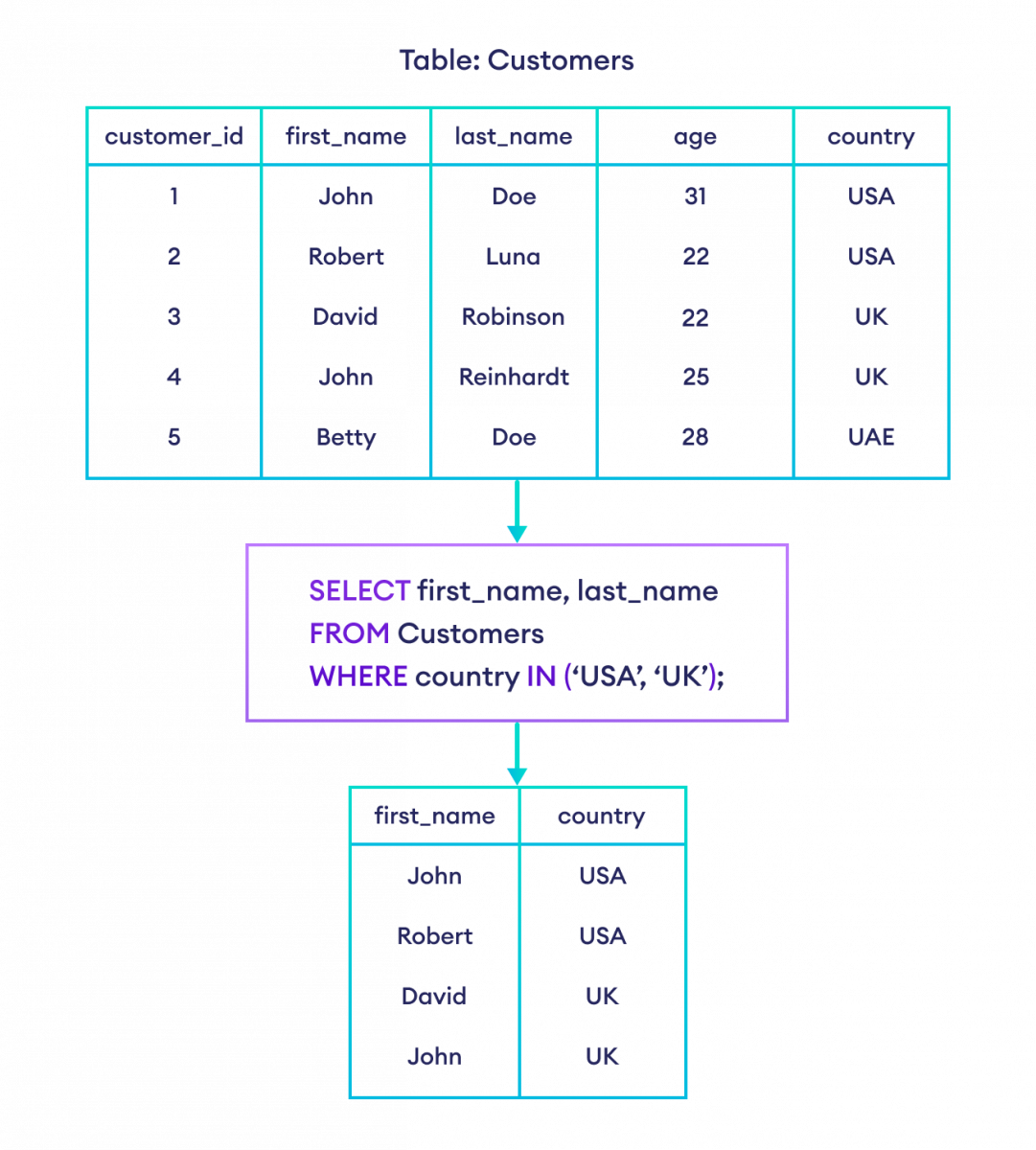
*   **Basic SELECT:** `SELECT FirstName, LastName FROM Customers;` would return the first and last names of all customers.
*   **Filtering with WHERE:** `SELECT * FROM Customers WHERE LastName = 'Smith';` would return all columns for customers whose last name is 'Smith'. The asterisk `*` is a wildcard meaning "all columns".
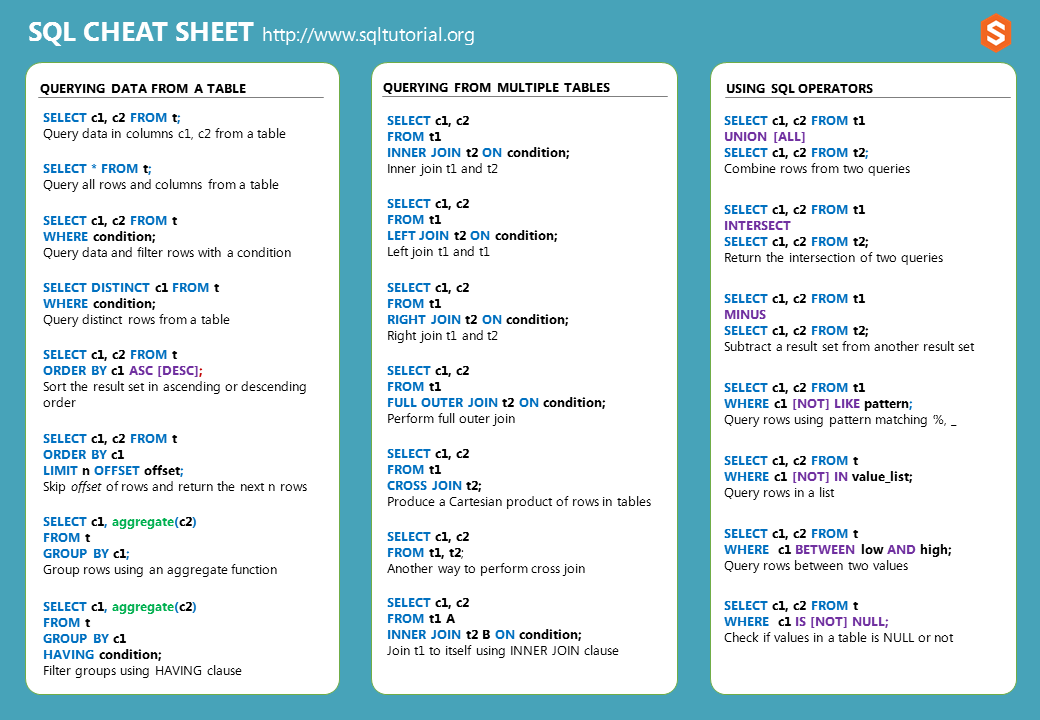
*   **Sorting with ORDER BY:** `SELECT FirstName, LastName FROM Customers ORDER BY LastName ASC;` would retrieve first and last names, sorted alphabetically by last name. `ASC` means ascending, `DESC` means descending.
*   **Joining Tables:** Often, data is spread across multiple related tables. The `JOIN` clause allows you to combine rows from two or more tables based on a related column. For example, if you have an `Orders` table linked to the `Customers` table by `CustomerID`, you could retrieve customer names and their order details.
Data Control Language (DCL) and Transaction Control Language (TCL): Ensuring Security and Integrity
While DDL, DML, and DQL are the most visible aspects of SQL for day-to-day data management, DCL and TCL are vital for maintaining security and ensuring data consistency, especially in larger, multi-user environments.
-
DCL (Data Control Language): Commands like
GRANTandREVOKEare used to manage user permissions.GRANTallows you to give users specific privileges (e.g., the ability to select data, insert data, or even administer the database), whileREVOKEtakes those permissions away. This is crucial for digital security and controlling who can access and modify sensitive information. -
TCL (Transaction Control Language): Commands like
COMMIT,ROLLBACK, andSAVEPOINTmanage transactions. A transaction is a sequence of SQL operations treated as a single unit of work.COMMITmakes all changes within a transaction permanent, whileROLLBACKundoes them. This ensures data integrity, preventing partial updates that could corrupt your database.
SQL Across the Tech, Brand, and Money Spheres
The power and versatility of SQL extend far beyond just IT departments. Its ability to efficiently manage and extract insights from data makes it invaluable across diverse fields.
SQL in the Tech Domain: The Backbone of Modern Applications
In the Tech world, SQL is indispensable. Every application that stores user information, product catalogs, transaction histories, or sensor data relies on a database, and SQL is the language to interact with it.
- Software Development: Developers use SQL to build databases for web applications, mobile apps, and desktop software. They define table structures, write queries to retrieve user profiles, process orders, and manage content.
- AI and Machine Learning: While AI models are trained on data, SQL is often used to prepare and curate that data. Data scientists use SQL to extract relevant datasets, clean them, and transform them into formats suitable for machine learning algorithms. Understanding SQL is a prerequisite for many data science roles.
- Data Analytics and Business Intelligence: SQL is the primary tool for data analysts and business intelligence professionals. They use it to query data warehouses, generate reports, identify trends, and provide actionable insights to businesses. From understanding customer behavior to tracking sales performance, SQL is at the forefront.
- Digital Security: Securely storing and accessing data is paramount. SQL plays a role in managing access controls (through DCL), auditing data changes, and ensuring the integrity of sensitive information.
SQL in the Brand Domain: Understanding Your Audience
While not as direct as in tech, SQL’s influence on Brand strategy is significant by enabling data-driven decision-making.
- Marketing and Customer Relationship Management (CRM): Marketing teams use SQL to segment customer databases based on demographics, purchase history, and engagement. This allows for highly targeted marketing campaigns, personalized recommendations, and a better understanding of customer journeys. CRM systems, which are database-driven, heavily rely on SQL for their operations.
- Market Research and Case Studies: Analyzing survey data, social media engagement, and sales figures – all stored in databases – often involves SQL queries to extract meaningful patterns and inform brand messaging and product development. Case studies often present data derived from these analyses.
- Reputation Management: Tracking brand mentions, customer feedback, and sentiment analysis often involves querying large datasets. SQL can help identify common themes in feedback and monitor shifts in public perception.
SQL in the Money Domain: Financial Management and Growth
For those focused on Money, whether personal or corporate, SQL provides the tools for robust financial management and informed investment decisions.
- Personal Finance Management: While many personal finance apps abstract away the database layer, they are built upon it. For individuals who manage their finances using spreadsheets or custom tracking systems, SQL can be used to organize and analyze spending habits, track investments, and forecast budgets.
- Online Income and Side Hustles: Entrepreneurs and freelancers often track their income, expenses, and client information in databases. SQL allows them to analyze profitability, identify top-performing services or products, and manage invoices efficiently.
- Business Finance: From small businesses to large corporations, financial data is critical. SQL is used to manage accounting systems, process payroll, track inventory, generate financial statements, and conduct financial forecasting. Understanding your company’s financial health often starts with querying your financial databases.
- Investing: Financial institutions use sophisticated databases to store stock prices, trading volumes, and economic indicators. Traders and analysts leverage SQL to extract historical data for backtesting trading strategies, identifying market trends, and making informed investment decisions.
The Future of SQL: Evolution and Integration
SQL has been around for decades, yet it remains remarkably relevant. Its enduring success lies in its robust design and its ability to adapt. While NoSQL databases have emerged to handle specific types of data (like unstructured text or graph data), relational databases and SQL continue to be the dominant force for structured data.
The evolution of SQL continues with new standards and extensions, and its integration with modern data processing frameworks is seamless. Tools and platforms that utilize AI and machine learning often provide SQL interfaces for data access, further cementing its position. Learning SQL is not just about mastering a language; it’s about gaining a fundamental skill that unlocks the potential of data across a vast spectrum of industries and personal pursuits. Whether you’re building the next groundbreaking app, crafting a compelling brand narrative, or striving for financial freedom, understanding “what is in SQL” is your key to navigating the data-rich world we inhabit.
aViewFromTheCave is a participant in the Amazon Services LLC Associates Program, an affiliate advertising program designed to provide a means for sites to earn advertising fees by advertising and linking to Amazon.com. Amazon, the Amazon logo, AmazonSupply, and the AmazonSupply logo are trademarks of Amazon.com, Inc. or its affiliates. As an Amazon Associate we earn affiliate commissions from qualifying purchases.