
When you press the power button on a computer running a Linux distribution, a complex symphony of hardware checks and software handshakes begins. For most users, this process is invisible until the login screen appears. However, there is a critical intermediary operating behind the scenes that bridges the gap between the computer’s hardware and the Linux kernel. This intermediary is the Grand Unified Bootloader, commonly known as GRUB.
In the technical ecosystem of Linux, GRUB is more than just a menu; it is a sophisticated piece of software responsible for loading and managing the boot process. Understanding GRUB is essential for anyone looking to master Linux administration, troubleshoot boot failures, or manage multiple operating systems on a single machine.
1. The Fundamentals of the Grand Unified Bootloader (GRUB)
At its core, GRUB is a “bootloader”—the first software program that runs when a computer starts. Its primary responsibility is to load the operating system’s kernel into the system’s memory (RAM) and then hand over execution to that kernel. Without a bootloader, the hardware would have no instructions on how to locate or initiate the operating system stored on the hard drive.
The Evolution from GRUB Legacy to GRUB 2
The original version of GRUB, now referred to as “GRUB Legacy,” was developed in the late 1990s. While revolutionary at the time, it had limitations regarding modern hardware and complex partition schemes. Around 2002, work began on GRUB 2, a complete rewrite designed to be more modular, portable, and powerful.
Today, when people refer to “GRUB Linux,” they are almost exclusively talking about GRUB 2. It supports modern firmware like UEFI (Unified Extensible Firmware Interface), recognizes advanced partition tables like GPT (GUID Partition Table), and can even boot operating systems from compressed filesystems or network locations.
How GRUB Fits into the Linux Boot Process
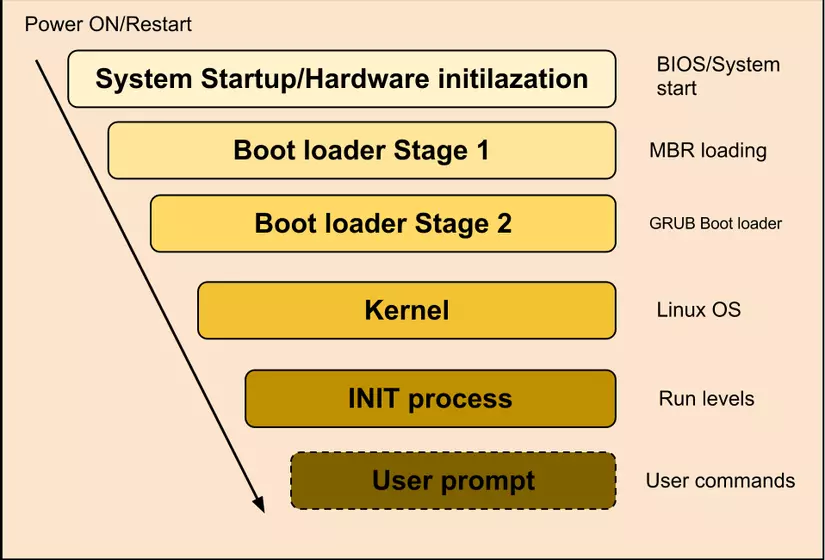
To understand GRUB’s importance, one must look at the sequence of events during a system startup:
- POST (Power-On Self-Test): The hardware checks itself for functionality.
- Firmware (BIOS/UEFI): The system firmware looks for a bootable device.
- GRUB Execution: The firmware hands control to GRUB.
- Kernel Loading: GRUB locates the Linux kernel on the disk, loads it into memory, and provides it with necessary parameters.
- Init Process: The kernel takes over and starts the system’s “init” process (usually
systemd), which brings up the user interface.
2. Core Architecture and Functionality
GRUB is often described as a “miniature operating system.” It has its own shell, its own file system drivers, and its own configuration language. This complexity is what makes it so versatile compared to simpler bootloaders like LILO (LInux LOader).
Modular Scripting and Flexibility
Unlike its predecessors, GRUB 2 is highly modular. It loads only the necessary modules required to access the hardware. For example, if your Linux partition is formatted with the Btrfs or XFS filesystem, GRUB loads a specific module to read that filesystem. This modularity ensures that the core bootloader remains small while retaining the ability to support almost any storage configuration.
Multi-Boot Environments
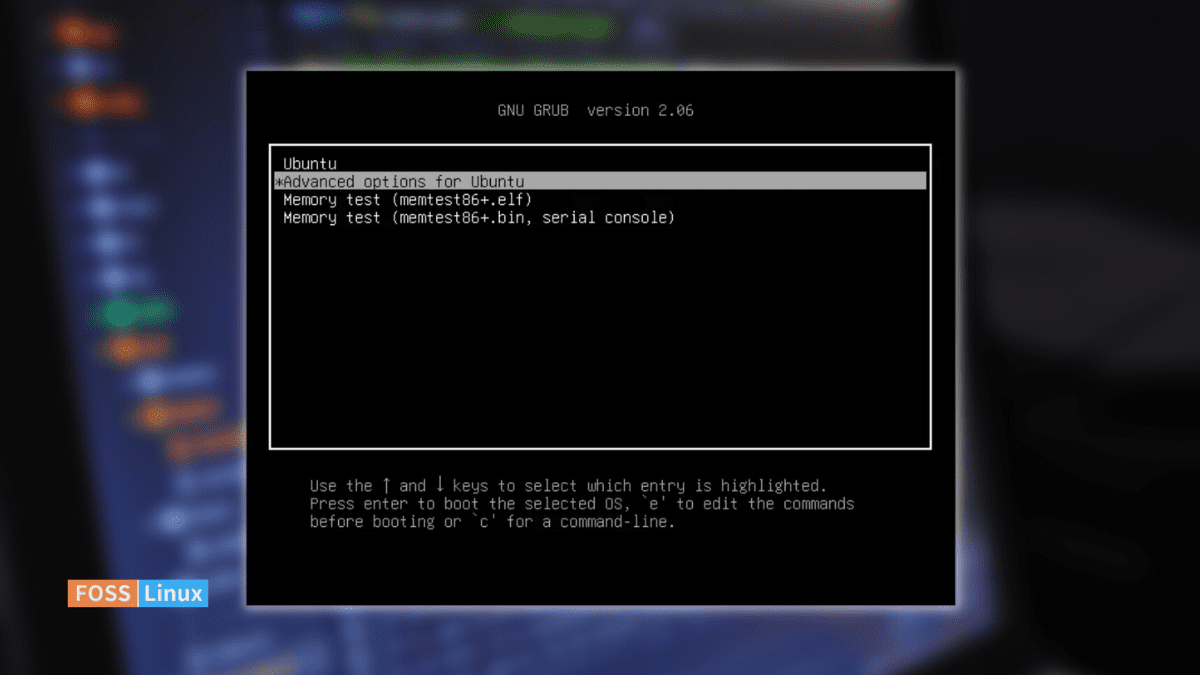
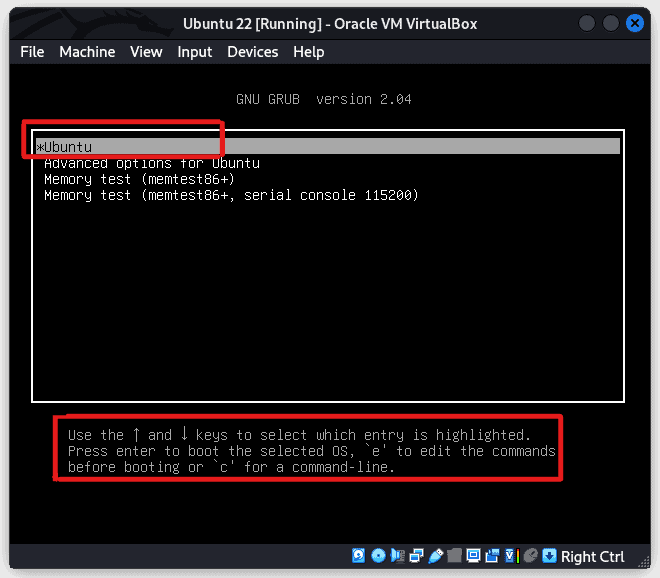
One of GRUB’s most popular features is its ability to manage “multi-boot” setups. If a user has both Windows and a Linux distribution like Ubuntu or Fedora installed, GRUB acts as the traffic controller. It presents a menu at startup, allowing the user to choose which environment to enter. Through a utility called os-prober, GRUB can automatically detect other installed operating systems and add them to its boot menu.
Support for Modern Hardware: BIOS vs. UEFI
The transition from traditional BIOS to modern UEFI firmware changed how computers boot. GRUB adapted by supporting both. On older BIOS systems, GRUB resides in the Master Boot Record (MBR). On modern UEFI systems, GRUB is stored as an .efi application within a dedicated EFI System Partition (ESP). This adaptability ensures that Linux remains compatible with everything from decade-old laptops to the latest high-end workstations.
3. Configuring and Managing GRUB
For many Linux users, GRUB is a “set it and forget it” component. However, power users often need to modify its behavior—whether to change the default OS, adjust the countdown timer, or add specific kernel parameters for hardware compatibility.
The Importance of /etc/default/grub
In GRUB 2, users do not typically edit the main configuration file (/boot/grub/grub.cfg) directly, as it is automatically generated and complex. Instead, customizations are made in a simpler file located at /etc/default/grub.
Key variables found here include:
- GRUB_DEFAULT: Sets which menu entry is selected by default.
- GRUB_TIMEOUT: Determines how many seconds the menu stays on screen before auto-booting.
- GRUBCMDLINELINUX_DEFAULT: Allows users to pass “flags” to the kernel, such as
quiet splashto hide technical text during boot, ornomodesetto troubleshoot graphics drivers.
Generating the Configuration File
After making changes to the default settings, the user must “bake” those changes into the actual bootloader. This is done using the grub-mkconfig command (or update-grub on Debian-based systems). This command scans the hard drive for kernels and other operating systems, applies the user’s settings, and writes a fresh grub.cfg file.
Adding Aesthetic Flair
While GRUB is functional, it doesn’t have to be boring. GRUB supports high-resolution themes, background images (splash screens), and custom fonts. Professional workstations often use branded GRUB themes to provide a seamless visual experience from the moment the screen turns on.
4. Maintenance, Security, and Troubleshooting
Because GRUB is the gateway to the system, it is also a primary point of failure and a potential security risk. Knowing how to manage these aspects is a hallmark of technical proficiency in the Linux world.
Navigating the GRUB Rescue Prompt
Nothing strikes fear into a Linux novice like the sight of the grub rescue> prompt. This occurs when GRUB can find its initial files but cannot locate its configuration or modules—often due to a deleted partition or a moved hard drive.
In this mode, GRUB provides a limited command-line interface. A skilled technician can use commands like ls to view partitions, set to define the root directory, and insmod to load the necessary modules to manually boot the system and repair the installation.
Bootloader Security
From a digital security perspective, GRUB is a potential vulnerability. An attacker with physical access to a machine could use GRUB’s “edit” mode (usually accessed by pressing ‘e’ at the menu) to bypass the root password by adding init=/bin/bash to the kernel parameters.
To prevent this, GRUB allows for password protection. Administrators can configure GRUB to require a username and password before allowing anyone to edit boot entries or even boot specific operating systems. This is a standard practice in secure corporate and server environments.
Modern Alternatives and the Future of GRUB
While GRUB remains the industry standard, the Linux ecosystem is always evolving. Newer alternatives like systemd-boot have gained popularity for their simplicity and speed, particularly on UEFI-only systems. Unlike GRUB, systemd-boot does not attempt to support every filesystem or legacy BIOS, resulting in a much smaller code footprint.
However, GRUB’s sheer versatility and its ability to handle complex configurations (like RAID or encrypted /boot partitions) mean it is unlikely to be replaced as the default bootloader for major distributions like RHEL, SUSE, or Ubuntu anytime soon.
Conclusion: The Unsung Hero of the Linux Stack
The Grand Unified Bootloader is the unsung hero of the Linux operating system. It sits at the delicate intersection of hardware and software, performing the essential task of bringing the kernel to life. Whether it is managing a dual-boot setup between Linux and Windows, providing a recovery environment during a system crash, or securing the boot process against unauthorized access, GRUB remains a cornerstone of modern computing.
For the tech enthusiast, understanding GRUB is more than a lesson in “how to boot a computer”; it is an insight into how modern operating systems interact with hardware. As we move further into an era of complex virtual machines and diverse hardware architectures, the flexibility and robustness of GRUB ensure that Linux remains accessible, customizable, and resilient.
aViewFromTheCave is a participant in the Amazon Services LLC Associates Program, an affiliate advertising program designed to provide a means for sites to earn advertising fees by advertising and linking to Amazon.com. Amazon, the Amazon logo, AmazonSupply, and the AmazonSupply logo are trademarks of Amazon.com, Inc. or its affiliates. As an Amazon Associate we earn affiliate commissions from qualifying purchases.