
In the vast landscape of modern communication platforms, Discord has carved out a unique position that transcends the typical boundaries of instant messaging and social media. Originally launched in 2015 as a niche tool for gamers to coordinate strategies, the platform has evolved into a multifaceted digital ecosystem. Today, it serves as a central hub for communities of all shapes and sizes, professional teams, educational groups, and hobbyists. Understanding what Discord is used for requires looking beyond its gaming roots and examining the architecture that makes it a powerhouse for real-time collaboration.
The Architecture of Community: Servers and Channels
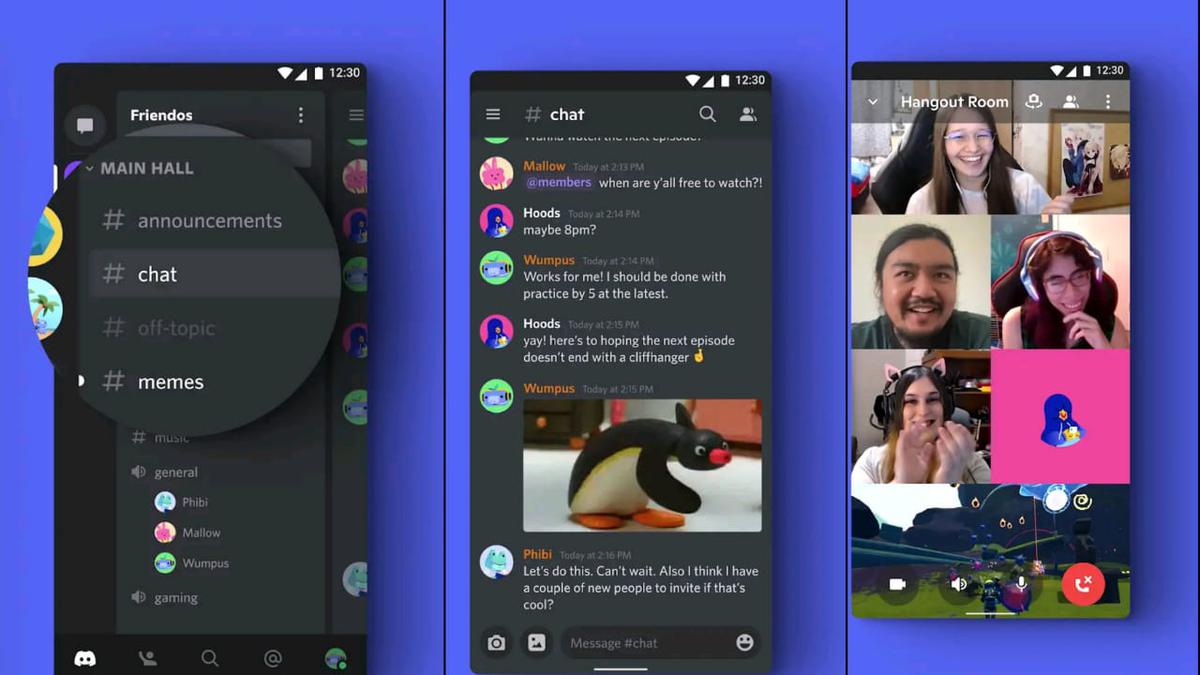
At the heart of Discord’s functionality are “Servers.” A server acts as a digital space or private club where specific groups of people can congregate. Unlike traditional social media platforms that rely on algorithms to feed content to users, Discord is intentionally designed to be an opt-in, curated experience.
Understanding Servers
A server is a self-contained environment that can be invite-only for small groups of friends or open to thousands of members as a public community. Because each server has its own member list, moderation rules, and administrative hierarchy, it provides a sense of privacy and exclusivity that is often missing from more public platforms like X (formerly Twitter) or Facebook.
The Role of Channels
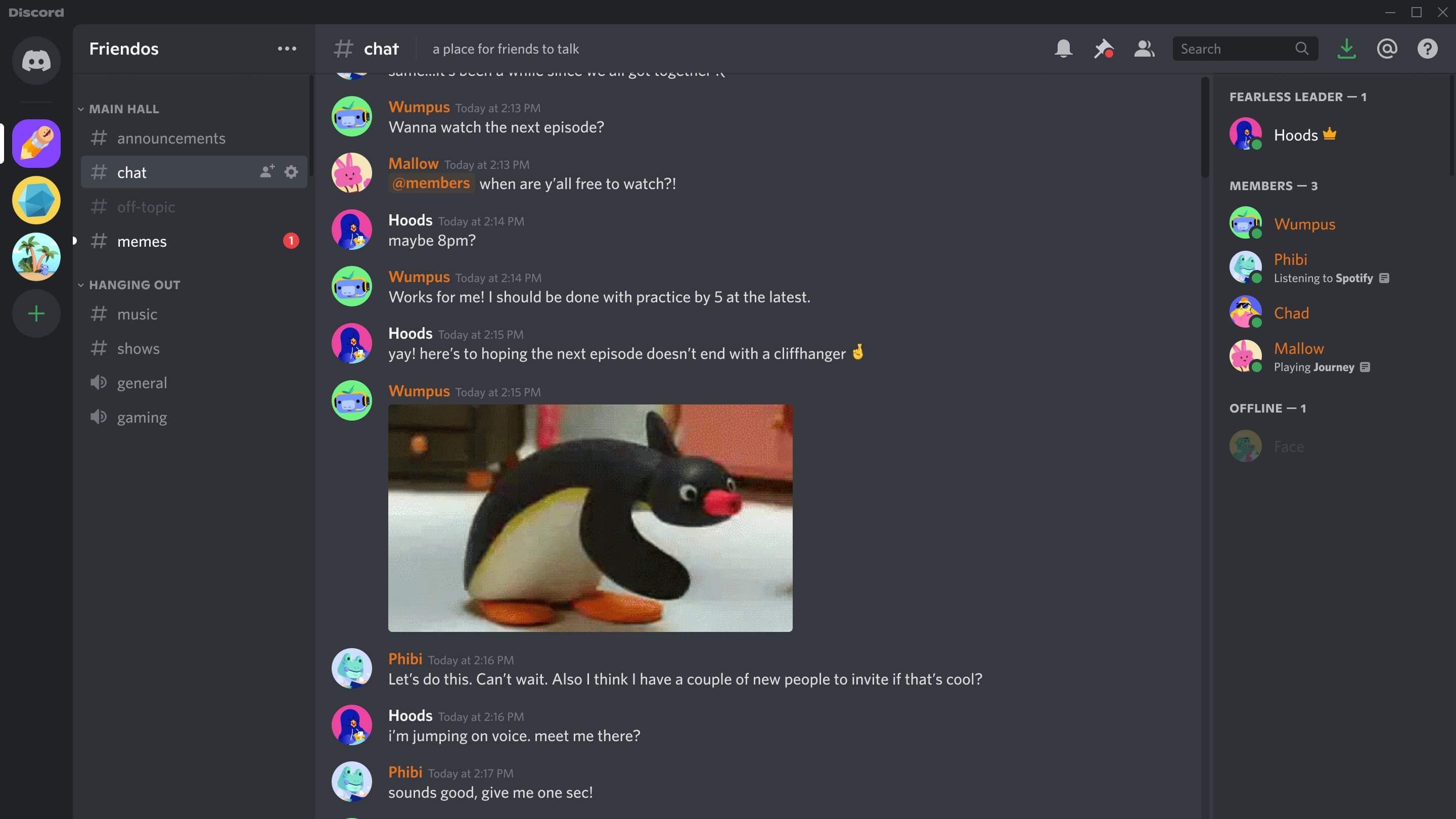
Within each server, the environment is further segmented into “channels.” This is where the platform’s organizational prowess shines. Channels are typically divided into two types:
- Text Channels: These function like traditional chat rooms, allowing users to post messages, share files, and link images in an organized, asynchronous format. Because the history of the conversation is archived, new members can catch up on discussions, and information can be searched or pinned for future reference.
- Voice and Video Channels: These are perhaps Discord’s most distinct feature. Unlike a standard phone call or video conference, voice channels are “always-on” spaces. A user simply clicks to enter the channel, and they are immediately connected with whoever else is inside. This creates a low-friction environment for spontaneous collaboration, akin to walking into a shared physical workspace.
Discord as a Professional and Collaborative Tool
While its reputation is deeply tied to gaming, the business world has increasingly adopted Discord as an efficient alternative to traditional project management tools and communication software like Slack or Microsoft Teams. Its ability to host large volumes of files, screen share with high fidelity, and manage roles makes it an ideal environment for remote-first teams and creative agencies.
Role-Based Access Control
One of the primary reasons Discord is favored for professional use is its granular permission system. Server owners can assign specific “Roles” to members, such as “Administrator,” “Manager,” “Editor,” or “Freelancer.” These roles can be configured to dictate who can view specific channels, who can moderate messages, and who can invite new members. This hierarchical structure ensures that sensitive project discussions remain contained while maintaining transparency for the broader team.
Live Collaboration and Screen Sharing
The platform’s high-quality screen sharing and audio capabilities allow for seamless remote collaboration. Teams use these features for live “co-working” sessions, where members stay connected in a voice channel while working on independent tasks, providing a digital sense of presence that mitigates the isolation often felt by remote workers. When a problem arises, a team member can simply broadcast their screen to the channel, and colleagues can provide immediate feedback or troubleshooting, significantly reducing the lag time inherent in email or ticket-based systems.
Educational and Hobbyist Communities
Beyond professional applications, Discord has revolutionized the way niche interest groups gather. By removing the barriers of geographic distance, the platform allows for deep-dive discussions on highly specific topics that might not find a sustainable home on more broad-reaching social networks.
Peer-to-Peer Learning Environments
Education-focused servers are common, ranging from language learning groups to coding bootcamps. In these spaces, experts and students interact in real-time. A coding student can drop a snippet of problematic code into a text channel, and a mentor can reply with a corrected version or a link to documentation. The ability to search through previous messages means that common questions are often already answered, fostering a library of institutional knowledge that grows organically as the community matures.
Hobbyist and Enthusiast Hubs
From mechanical keyboard collectors to bird watchers and digital artists, Discord provides a home for the “hyper-niche.” Because servers are categorized by interest rather than by the identity of the individual posting, users can focus on the content. This leads to higher-quality discourse and a reduction in the “performative” nature of social media, where the focus is often on personal branding rather than topic-based knowledge exchange.
The Technological Infrastructure Behind the Experience
The success of Discord as a multifaceted tool lies in its technical versatility. It is not merely a chat application; it is a platform that integrates with the broader web through a robust API (Application Programming Interface).
Bot Integration and Automation
One of the most powerful features of Discord is the integration of “Bots.” These are automated software programs that can perform a vast array of tasks within a server. They can handle moderation by automatically filtering spam or prohibited content, welcome new members with customized messages, play music, or integrate with external tools like Trello, GitHub, or Google Calendar. For businesses and large communities, these bots are essential for automating mundane administrative tasks, allowing the human moderators to focus on community management and discourse.
Cross-Platform Reliability
Discord’s architecture is designed for cross-platform synchronization. Whether accessed via the desktop application, a web browser, or the mobile app, the state of the server remains identical. This consistency is crucial for professional teams and active hobbyists who need to stay connected while on the move. The push-notification system is highly customizable, allowing users to mute specific channels or servers so they are only alerted to messages that are directly relevant to them, a feature that helps prevent “notification fatigue.”

Future-Proofing Communication
The question of “what is Discord used for” has evolved significantly since 2015. It has transformed from a niche chat tool for gaming into a flexible, scalable, and highly customizable communication infrastructure. Its utility lies in its modularity—the ability to be as simple as a three-person chat room or as complex as a global community of thousands, managed by sophisticated bots and detailed permission settings.
As organizations and individuals continue to seek alternatives to the intrusive algorithms and public-facing nature of traditional social media, Discord’s model of private, purpose-built digital spaces is likely to grow in influence. It offers a solution to the “noise” of the internet by allowing users to curate their digital intake and interact in spaces governed by community-led rules. Whether for business collaboration, educational exchange, or community building, Discord stands as a critical tool in the modern technological stack, bridging the gap between passive consumption and active, real-time community engagement. By focusing on the fundamentals of conversation and shared spaces, Discord provides a unique blend of intimacy and scale that is essential for the future of digital interaction.
aViewFromTheCave is a participant in the Amazon Services LLC Associates Program, an affiliate advertising program designed to provide a means for sites to earn advertising fees by advertising and linking to Amazon.com. Amazon, the Amazon logo, AmazonSupply, and the AmazonSupply logo are trademarks of Amazon.com, Inc. or its affiliates. As an Amazon Associate we earn affiliate commissions from qualifying purchases.