
In the contemporary digital landscape, wireless connectivity is the invisible tether that binds our ecosystem of devices. From the smartphone in your pocket to the smart thermostat on your wall, the transition from wired to wireless has been one of the most significant technological shifts of the 21st century. However, despite their ubiquity, a common confusion persists among users regarding the two primary pillars of wireless communication: Bluetooth and Wi-Fi.
While both technologies utilize radio frequency (RF) signals to transmit data through the air, they were designed with fundamentally different objectives, architectures, and use cases. Understanding the nuances between them is not merely an academic exercise; it is essential for optimizing device performance, ensuring digital security, and making informed hardware purchasing decisions. This article explores the technical foundations, performance metrics, and strategic applications of Bluetooth and Wi-Fi in the modern tech era.
1. Fundamental Architectural Differences: LAN vs. PAN
At their core, Bluetooth and Wi-Fi operate on different networking philosophies. The primary distinction lies in the “topology” or the way devices interact with one another and the broader internet.
How Wi-Fi Functions: The Local Area Network (LAN)
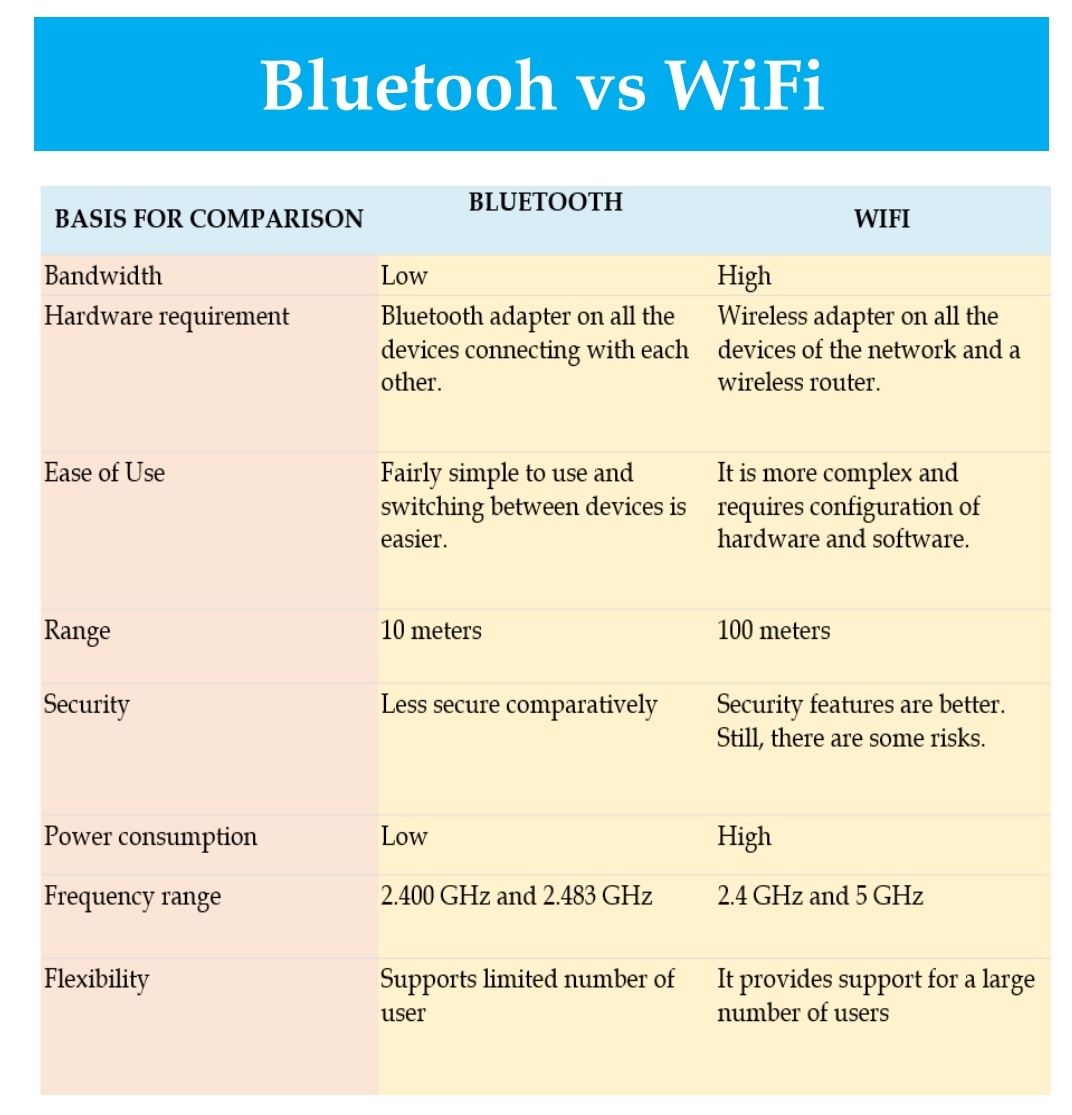
Wi-Fi, based on the IEEE 802.11 family of standards, is designed to provide high-speed internet access and connect multiple devices within a localized area, such as a home, office, or coffee shop. It typically operates through a central “hub”—the wireless router or access point. In a Wi-Fi configuration, the router acts as the gateway, managing data traffic between the local devices and the global internet. This architecture allows for a “Star” topology, where every device communicates directly with the router to gain access to shared resources or the web.
How Bluetooth Functions: The Personal Area Network (PAN)
Bluetooth, governed by the IEEE 802.15.1 standard, was conceptualized as a cable replacement technology. Its goal is to create a Personal Area Network (PAN), where devices connect directly to one another over short distances without the need for a central router. This is often referred to as “ad-hoc” connectivity or point-to-point communication. When you pair your wireless headphones to your smartphone, you are creating a tiny, two-node network that exists only for that specific interaction.
Spectrum and Frequency Management
Both technologies primarily utilize the 2.4 GHz ISM (Industrial, Scientific, and Medical) radio band, which is unlicensed and globally available. However, they manage this crowded space differently. Wi-Fi uses a “fixed” channel approach (though modern routers can switch channels to avoid interference), whereas Bluetooth employs Frequency Hopping Spread Spectrum (FHSS). Bluetooth “hops” between 79 different frequencies 1,600 times per second, which helps it avoid interference from other devices operating in the same 2.4 GHz range—a critical feature for maintaining a stable connection in dense environments.
2. Speed, Bandwidth, and Range: A Comparative Analysis
When evaluating wireless technology, the three most critical metrics are how much data it can carry (bandwidth), how fast it can move it (speed), and how far the signal can travel (range).
Throughput Capabilities: Why Wi-Fi Wins for Streaming
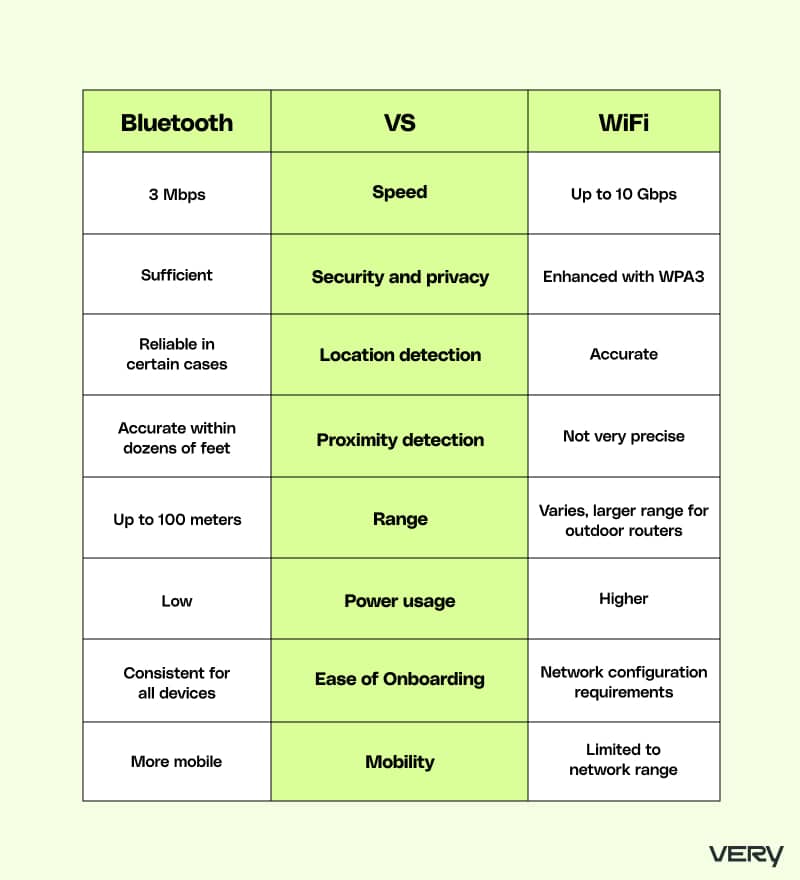
Wi-Fi is the clear winner when it comes to raw data throughput. Modern standards like Wi-Fi 6 (802.11ax) and the emerging Wi-Fi 7 can reach theoretical speeds of 9.6 Gbps and beyond 40 Gbps, respectively. This high bandwidth is necessary for data-intensive tasks such as 4K video streaming, high-definition video conferencing, and large file transfers.
In contrast, Bluetooth is designed for low-bandwidth applications. Even the latest Bluetooth 5.4 standard tops out at around 2 Mbps. While this is more than sufficient for high-quality audio streaming or transmitting heart rate data from a smartwatch, it is woefully inadequate for downloading a movie or running a professional cloud-based workstation.
Proximity Limits: The Short-Range Nature of Bluetooth
Range is another area of significant divergence. Wi-Fi is built for coverage. A standard home router can typically cover an entire house or a small office, with a range extending up to 100 meters (300 feet) indoors, depending on obstacles and frequency (5 GHz has a shorter range but higher speed than 2.4 GHz).
Bluetooth is inherently short-range. Most consumer Bluetooth devices are “Class 2,” meaning they have a functional range of about 10 meters (33 feet). While “Class 1” Bluetooth devices can technically reach up to 100 meters, they consume significantly more power, defeating one of the primary advantages of the technology. For most users, Bluetooth is a “room-scale” technology, whereas Wi-Fi is a “building-scale” technology.
Interference and Signal Stability
Because Wi-Fi covers more ground and carries more data, it is more susceptible to physical interference from walls, furniture, and other electronics. This is why many high-performance tech setups utilize Wi-Fi extenders or Mesh systems. Bluetooth, thanks to its frequency-hopping nature and short-range focus, is generally more resilient against interference in small spaces, though its signal is easily blocked by the human body or dense metallic objects.
3. Power Efficiency and Energy Management
In the age of mobile tech and the Internet of Things (IoT), battery life is a premium commodity. The way Bluetooth and Wi-Fi consume energy is one of the most important factors for hardware designers.
Bluetooth Low Energy (BLE) and the IoT Revolution
The introduction of Bluetooth Low Energy (BLE) was a turning point for the technology. BLE allows devices to remain connected or “discoverable” while consuming a fraction of the power required by traditional Bluetooth or Wi-Fi. This is why your fitness tracker can last for weeks on a single charge, or why “AirTags” and other tracking tiles can run for a year on a tiny coin-cell battery. BLE is designed to stay in a “sleep” mode, waking up only for milliseconds to transmit small bursts of data.
The High Power Demands of Wi-Fi Connectivity
Wi-Fi is notoriously power-hungry. Maintaining a constant connection to a router and processing high volumes of data requires significant energy. This is why smartphones generally see faster battery drain when the Wi-Fi radio is working hard (such as during a long download) compared to when it is merely connected to a pair of Bluetooth earbuds. While newer standards like Wi-Fi 6 have introduced “Target Wake Time” (TWT) to help IoT devices save energy, Wi-Fi remains unsuited for ultra-low-power, long-term battery operation.
4. Security Protocols and Data Privacy
As our lives become increasingly digital, the security of our wireless transmissions is paramount. Both technologies have evolved to counter sophisticated cyber threats.
Wi-Fi Security: WPA3 and Network Encryption
Because Wi-Fi provides access to a full network and the internet, it is a high-value target for hackers. Security protocols have evolved from the easily cracked WEP to WPA, WPA2, and the current gold standard, WPA3. WPA3 uses 128-bit or 192-bit encryption and features “Simultaneous Authentication of Equals” (SAE), which makes it much harder for attackers to guess passwords via brute-force attacks. When using Wi-Fi, the security of the entire network often rests on the configuration of the router.
Bluetooth Security: Pairing Mechanisms and Vulnerabilities
Bluetooth security focuses on the “pairing” process. When two devices connect, they exchange encryption keys to ensure that the data sent between them cannot be intercepted by a third party. However, Bluetooth has historically been susceptible to attacks like “Bluejacking” (sending unsolicited messages) or “Bluesnarfing” (unauthorized data access). Modern Bluetooth versions have mitigated many of these risks by requiring “Just Works” numeric comparisons or passkeys during the pairing process to verify the identity of the devices.
5. Choosing the Right Protocol for Your Tech Stack
Understanding the difference between Bluetooth and Wi-Fi allows tech-savvy users and developers to deploy the right tool for the job.
When to Prioritize Wi-Fi
- Internet Access: If you need to connect to the web, Wi-Fi is the standard.
- High-Definition Media: For streaming Netflix, YouTube, or gaming, the bandwidth of Wi-Fi is non-negotiable.
- Multi-Device Synchronization: If you are setting up a smart home ecosystem (like smart lights, cameras, and speakers) that needs to be controlled from anywhere in the world, Wi-Fi (often combined with cloud services) is the backbone.
- File Sharing: For moving large gigabytes of data between computers.

When Bluetooth is the Superior Choice
- Peripheral Connectivity: Keyboards, mice, and headphones should almost always use Bluetooth to avoid clutter and save power.
- Direct Device-to-Device Links: Transferring a single contact card or photo between two phones (such as via AirDrop, which uses a combination of both, but initiates with Bluetooth).
- Wearables: Smartwatches, heart rate monitors, and glucose trackers rely on the low energy consumption of BLE.
- Proximity-Based Triggers: Digital keys for cars or smart locks that unlock as you approach use Bluetooth to sense your immediate presence.
In conclusion, Bluetooth and Wi-Fi are not competitors; they are complementary technologies. Wi-Fi is the high-speed highway that connects us to the digital world, while Bluetooth is the versatile, energy-efficient tool that connects our personal devices to us. By recognizing their distinct strengths—the range and speed of Wi-Fi versus the efficiency and simplicity of Bluetooth—we can better navigate the complex, wireless world of modern technology.
aViewFromTheCave is a participant in the Amazon Services LLC Associates Program, an affiliate advertising program designed to provide a means for sites to earn advertising fees by advertising and linking to Amazon.com. Amazon, the Amazon logo, AmazonSupply, and the AmazonSupply logo are trademarks of Amazon.com, Inc. or its affiliates. As an Amazon Associate we earn affiliate commissions from qualifying purchases.