
In the modern digital landscape, where high-speed internet is as fundamental as electricity, the efficiency of our wireless networks has become a primary concern for tech enthusiasts and professionals alike. As the 2.4GHz band became overcrowded with everything from microwave ovens to Bluetooth devices, the industry shifted toward the 5GHz spectrum to provide faster speeds and more bandwidth. However, even the 5GHz band is not an infinite resource. This is where DFS, or Dynamic Frequency Selection, comes into play.
DFS channels represent a specialized segment of the 5GHz wireless spectrum that was originally reserved for radar systems. By understanding and utilizing these channels, users can often find a “hidden” lane of connectivity that is significantly less congested than standard Wi-Fi channels. This article explores the technical intricacies of DFS, its benefits, the inherent challenges, and how to effectively implement it within your networking environment.
What is DFS? Demystifying Dynamic Frequency Selection
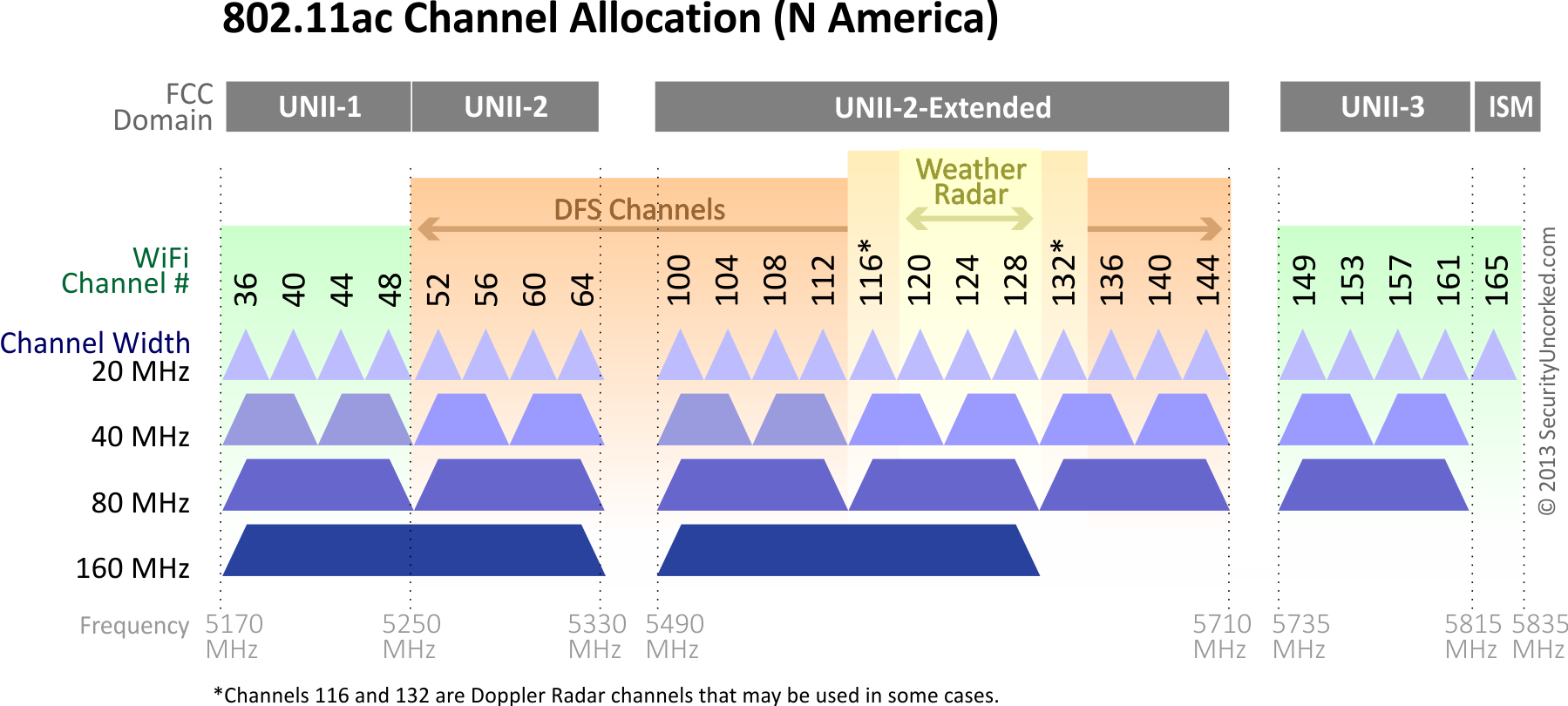
Dynamic Frequency Selection (DFS) is a mechanism that allows unlicensed wireless devices—specifically Wi-Fi routers and access points—to operate in the 5GHz frequency bands that are already allocated to primary users, such as weather radar, military installations, and satellite communications. Without DFS, large portions of the 5GHz spectrum would be strictly off-limits to consumer hardware to prevent interference with critical infrastructure.
The Intersection of Wi-Fi and Radar
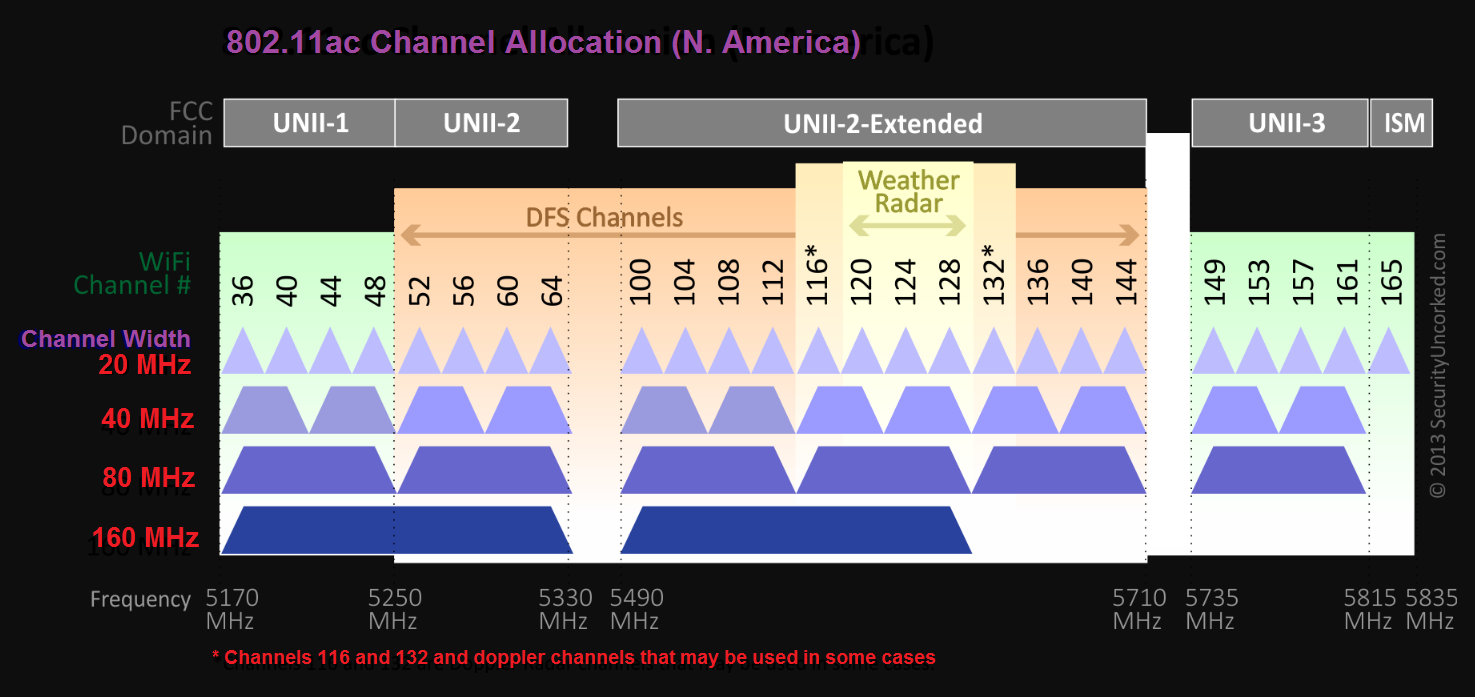
The 5GHz spectrum is divided into several sub-bands. The U-NII-1 (lower) and U-NII-3 (upper) bands are the “standard” channels most routers use. However, the U-NII-2 and U-NII-2 Extended bands sit in the middle and are shared with Terminal Doppler Weather Radar (TDWR) and military radar systems. Because these radar systems are vital for aviation safety and national security, international regulatory bodies (like the FCC in the United States and ETSI in Europe) mandate that Wi-Fi devices must “listen” for radar pulses. If a radar signal is detected, the Wi-Fi device must vacate that frequency immediately.
How DFS Functions in Modern Routers
When a router is set to a DFS channel, it doesn’t start broadcasting immediately. It enters a state known as a Channel Availability Check (CAC). During this period, which typically lasts 60 seconds (or up to 10 minutes in some specialized regions), the router stays silent and listens for any sign of radar activity. If the coast is clear, it begins transmitting. Once active, the router continues to monitor the channel in the background. This “In-Service Monitoring” ensures that if a radar system starts up later, the router can detect it and trigger a move to a different channel within milliseconds to avoid interference.
The Benefits of Using DFS Channels for High-Density Networking
For the average user in a detached suburban home, standard channels might suffice. However, for those living in dense urban environments or managing enterprise-level networks, DFS channels offer a competitive edge in maintaining signal integrity and speed.
Avoiding Congestion in Urban Environments
The primary advantage of DFS is the dramatic reduction in co-channel interference. In high-density apartment complexes or office buildings, dozens of routers are often fighting for the same few non-DFS channels (such as 36, 40, 44, 48 or 149, 153, 157, 161). This results in “traffic jams” where devices must wait for their turn to speak, leading to latency and dropped packets. Because DFS channels require specialized hardware certification and have stricter operational rules, they are far less populated. Switching to a DFS channel is akin to moving from a gridlocked city street to a wide-open private highway.
Achieving Higher Throughput and Lower Latency
To achieve the gigabit speeds promised by Wi-Fi 6 (802.11ax) and Wi-Fi 7, routers often need to use wider channel widths, such as 80MHz or 160MHz. In the standard 5GHz spectrum, there simply isn’t enough contiguous space to host multiple 160MHz channels without overlapping. DFS opens up a massive block of additional spectrum, making it possible to deploy ultra-wide channels that are essential for 4K/8K streaming, high-fidelity VR gaming, and large-scale data transfers. By utilizing DFS, you effectively double or triple the available “lanes” for your data, ensuring that your high-performance gadgets aren’t throttled by spectral limitations.
The Trade-offs: Why DFS Isn’t Always the Perfect Solution
While DFS offers significant performance potential, it is not a “set it and forget it” solution for everyone. There are technical hurdles and operational behaviors that can occasionally frustrate users who aren’t prepared for them.
The Channel Availability Check (CAC) and Connection Delays
The most immediate drawback of DFS is the startup delay. When you reboot your router or change its settings to a DFS channel, your 5GHz Wi-Fi will appear to be “broken” for at least a minute. During this time, the router is performing its mandatory CAC to ensure no radar is present. For users accustomed to near-instant connectivity, this can be mistaken for a hardware failure. Furthermore, if your router supports “Zero-Wait DFS,” it requires additional radio hardware to scan in the background, which often drives up the cost of the device.
Radar Interference and Automatic Channel Switching
The “Dynamic” in DFS is its most important—and sometimes most annoying—feature. If your router is operating on a DFS channel and detects a radar pulse, it is legally required to stop transmitting on that channel immediately. Most routers will then automatically jump to a standard, non-DFS channel. For the user, this manifests as a sudden, brief disconnection of all Wi-Fi devices. If you live near an airport or a naval base, these “DFS events” might happen frequently, making the connection feel unstable. In such cases, the benefits of the extra bandwidth are outweighed by the lack of reliability.
Implementing DFS in Your Home or Enterprise Network
If you’ve determined that your environment is relatively free of radar interference, implementing DFS can revolutionize your network performance. However, successful deployment requires a methodical approach.
Compatibility Check: Do Your Devices Support DFS?
Before forcing your router into a DFS channel, it is crucial to verify that your client devices (smartphones, laptops, smart TVs) can actually see those channels. While most modern high-end gadgets are DFS-compatible, some older or budget-oriented devices are hardcoded to only look for standard channels. For instance, some older streaming sticks or low-cost IoT devices might simply fail to find your Wi-Fi network if it is sitting on Channel 52 or 100. Always perform a site survey with a tool like “Wi-Fi Analyzer” to see which channels your various devices can detect.
Configuration Best Practices for Stability
To get the most out of DFS without the headaches, follow these technical best practices:
- Identify Radar Proximity: Use online databases to see if you live within a few miles of a TDWR station (often located near major airports). If you do, avoid the specific channels those stations use (usually channels 120-128).
- Use 80MHz Instead of 160MHz: While 160MHz is faster, it spans more DFS territory, increasing the statistical likelihood of hitting a radar signal. An 80MHz channel is often the “sweet spot” for stability and speed.
- Prioritize Ethernet for Critical Tasks: Since DFS can cause occasional channel hops, ensure that stationary devices that require 100% uptime (like a desktop PC or a server) are connected via Ethernet, leaving the DFS-boosted Wi-Fi for mobile devices.
The Future of Wireless Spectrum: Beyond DFS to 6GHz (Wi-Fi 6E/7)
The lessons learned from DFS are currently shaping the future of wireless technology. As we move into the era of Wi-Fi 6E and Wi-Fi 7, the industry is looking at the 6GHz band to solve the congestion issues that DFS originally addressed.
How DFS Paved the Way for Wider Bands
The implementation of DFS taught engineers how to share spectrum intelligently. This experience was vital when regulators opened up the 6GHz band for Wi-Fi 6E. In the 6GHz band, a similar concept called AFC (Automated Frequency Control) is being used. Unlike DFS, which “listens” for radar, AFC uses a centralized database to tell the router which frequencies are safe to use based on its geographic location.

The Longevity of DFS in the 5GHz Band
Even with the arrival of 6GHz, the 5GHz band—and its DFS channels—will remain relevant for years to come. 6GHz signals have a shorter range and struggle to penetrate walls compared to 5GHz. Consequently, DFS will continue to be a vital tool for technical users who need to maximize the potential of their existing hardware. As long as we share the airwaves with radar and satellites, the “dynamic” dance of DFS will be a cornerstone of high-performance wireless networking.
By mastering the use of DFS channels, you transition from being a passive consumer of technology to an active architect of your digital environment. Whether you are seeking the lowest possible ping for competitive gaming or a clear channel for a high-stakes video conference, DFS provides the extra room needed to excel in an increasingly crowded wireless world.
aViewFromTheCave is a participant in the Amazon Services LLC Associates Program, an affiliate advertising program designed to provide a means for sites to earn advertising fees by advertising and linking to Amazon.com. Amazon, the Amazon logo, AmazonSupply, and the AmazonSupply logo are trademarks of Amazon.com, Inc. or its affiliates. As an Amazon Associate we earn affiliate commissions from qualifying purchases.