
Cross-browser scripting (XBS), often a source of both frustration and innovation for web developers, refers to the practice and challenge of ensuring that a website or web application functions identically and optimally across a variety of web browsers and their respective versions. In an ecosystem teeming with different rendering engines, JavaScript interpreters, and API implementations, XBS is a fundamental aspect of building robust and accessible web experiences. It’s not just about making a site “work” but ensuring a consistent, high-quality user experience regardless of the browser choice.
Understanding Cross-Browser Scripting (XBS)
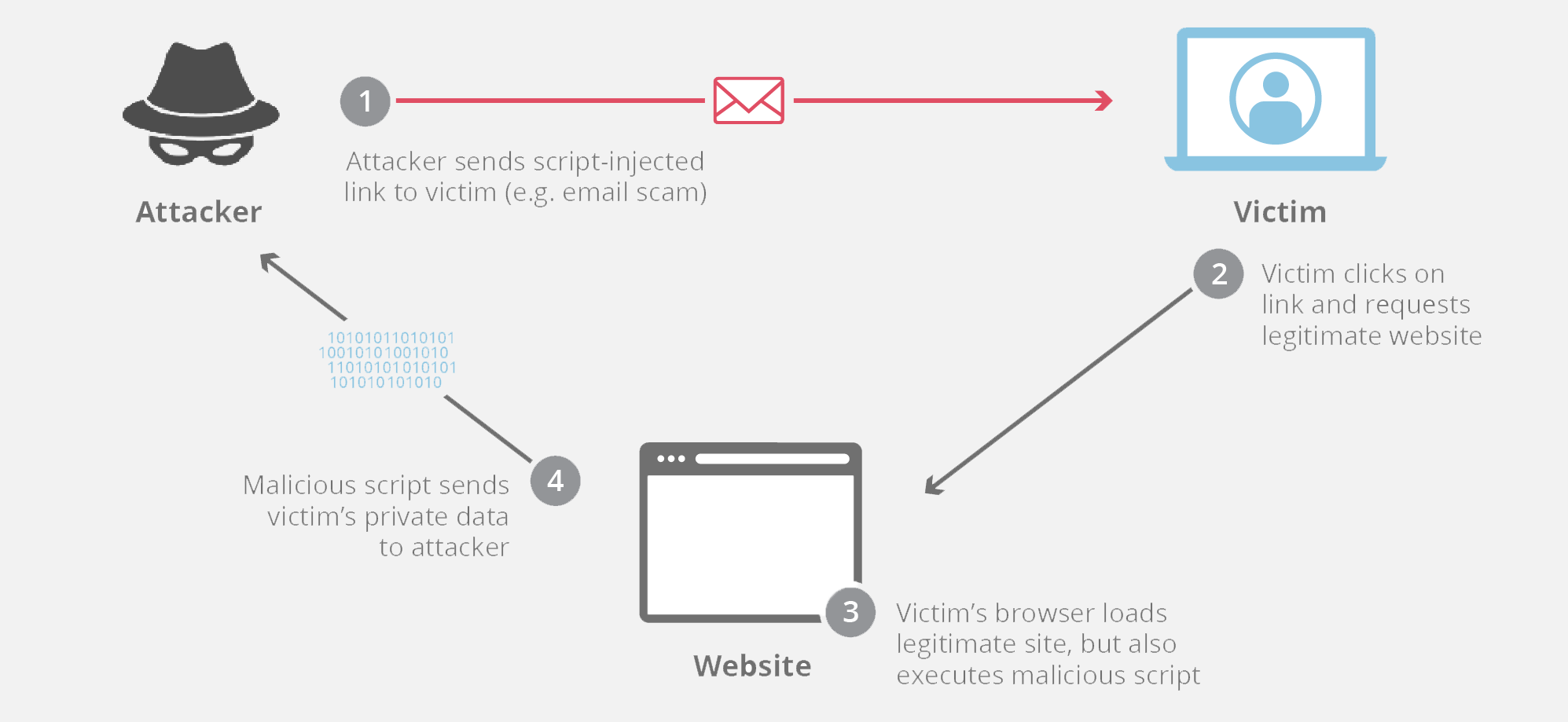
At its core, cross-browser scripting is the art and science of writing code that behaves predictably across disparate browser environments. This critical discipline emerged from the early days of the web when browser wars led to a fragmented landscape of proprietary features and inconsistent implementations of web standards.
The Core Concept: Ensuring Universal Functionality
The primary goal of XBS is to achieve functional and visual parity. This means that a button clicked in Chrome should trigger the same action and produce the same visual feedback as when clicked in Firefox, Safari, Edge, or even less common browsers. Scripting, in this context, refers to JavaScript and other client-side technologies that power interactive elements, dynamic content loading, animations, and complex application logic. Without careful cross-browser consideration, a feature that works perfectly in one browser might be broken, visually distorted, or completely non-functional in another. It’s about building a web that is truly universal and inclusive.
Historical Context and Evolution
The necessity for cross-browser scripting became glaringly apparent during the late 1990s and early 2000s. Netscape Navigator and Internet Explorer, then dominant, often implemented DHTML (Dynamic HTML) features and JavaScript APIs in incompatible ways. Developers found themselves writing separate code paths, often called “browser sniffing,” to detect the user’s browser and serve browser-specific code. This era was characterized by proprietary extensions and a lack of unified standards, creating a highly challenging environment for web development.
Over time, the web community, led by organizations like the W3C (World Wide Web Consortium), pushed for greater standardization. While modern browsers have significantly improved their adherence to open web standards (HTML5, CSS3, ECMAScript), subtle differences in implementation, rendering engines (e.g., Blink for Chrome/Edge, Gecko for Firefox, WebKit for Safari), and API support continue to necessitate a diligent approach to XBS.
Why it Matters for Developers and Users
For developers, ignoring XBS can lead to significant rework, increased debugging time, and a fragmented user base. A feature that isn’t cross-browser compatible can alienate users who prefer specific browsers, leading to poor reviews, lost engagement, and a damaged brand reputation. From a user’s perspective, inconsistent experiences erode trust and can make a website feel unprofessional or broken. A site that looks great and functions flawlessly on one device but breaks on another provides a frustrating and often alienating experience. It directly impacts accessibility and ensures that the web remains a level playing field for everyone, regardless of their technology choices.
Common Challenges in Cross-Browser Scripting
Despite significant advancements in web standards and browser development, numerous challenges persist in achieving perfect cross-browser compatibility. These often stem from the inherent complexities of different rendering engines and their interpretations of specifications.
DOM Manipulation Differences
The Document Object Model (DOM) is a programming interface for web documents. It represents the page structure as a tree of objects, allowing JavaScript to interact with HTML and CSS. However, subtle differences in how browsers implement the DOM can lead to issues. For instance, event handling models can vary, with older browsers using attachEvent while modern ones use addEventListener. Even newer DOM APIs might have minor discrepancies in how they return collections of elements or handle node insertion/removal. Developers must be aware of these nuances to ensure their scripts correctly manipulate elements, styles, and events across all target browsers.
CSS and JavaScript Interpretation Variations
Different browser engines parse and execute CSS and JavaScript in distinct ways. For CSS, this often manifests in rendering differences, such as how box models are calculated, how fonts are rendered, or how Flexbox and Grid layouts behave under specific edge cases. Vendor prefixes (e.g., -webkit-, -moz-, -ms-) were once a common way to use experimental CSS features but still crop up for some newer properties. For JavaScript, variations can occur in how strict engines are with certain syntaxes, how they handle asynchronous operations, or their specific JIT (Just-In-Time) compilation optimizations. While ECMAScript standards have greatly unified core JavaScript, fringe behaviors and performance characteristics can still differ.
API Inconsistencies and Feature Support
The web platform is constantly evolving, with new APIs being introduced regularly (e.g., Web Workers, Service Workers, WebSockets, Geolocation API, WebGL, Fetch API). Browsers roll out support for these APIs at different rates, and sometimes their implementations might have slight variations or bugs. Older browsers, in particular, may lack support for modern APIs entirely, leading to broken functionality if a website relies heavily on them without providing fallbacks. Managing these inconsistencies requires careful feature detection and often involves polyfills – pieces of code that provide modern API functionality to older browsers that don’t natively support it.
Performance and Rendering Engine Peculiarities
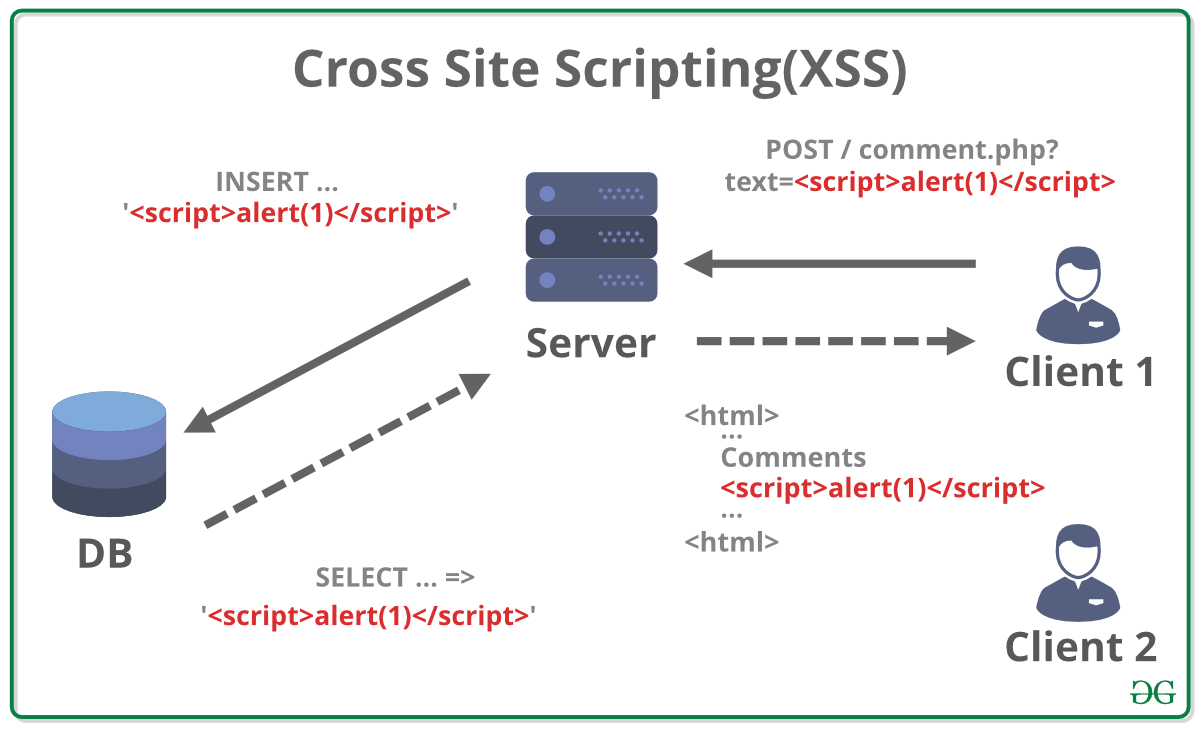
Beyond functional and visual compatibility, performance can also vary significantly across browsers. Different rendering engines have unique ways of optimizing layout, painting pixels, and executing JavaScript. A complex animation or a heavily script-driven section of a website might run smoothly on a high-performance browser but cause noticeable lag or jankiness on another, especially on less powerful devices. Understanding these performance peculiarities and optimizing code for the lowest common denominator, while progressively enhancing for more capable browsers, is crucial for a consistent user experience.
Strategies and Tools for Effective Cross-Browser Scripting
Addressing cross-browser challenges effectively requires a multi-faceted approach, combining adherence to standards, smart development patterns, and robust testing methodologies.
Adhering to Web Standards
The most fundamental strategy for cross-browser compatibility is to write code that strictly adheres to established web standards from the W3C (HTML5, CSS3, ECMAScript). Browsers are continuously striving to comply with these standards, meaning that code written according to these specifications has the highest chance of working consistently across different environments. Developers should validate their HTML and CSS and use modern JavaScript features while being mindful of their target browser support.
Progressive Enhancement and Graceful Degradation
These two complementary philosophies are cornerstones of resilient web development.
- Progressive Enhancement advocates for starting with a solid, accessible, and functional baseline experience using standard HTML and CSS. Then, incrementally add richer JavaScript-driven features and visual enhancements for more capable browsers. This ensures that even in the absence of JavaScript or advanced browser features, the core content and functionality remain available.
- Graceful Degradation involves building a feature-rich experience for modern browsers and then providing sensible fallbacks or simpler alternatives for older or less capable browsers. For example, a video player might default to an HTML5 video tag but offer a Flash-based player (though rarely used now) or a direct download link for browsers that don’t support the modern video tag. The key is that the user still gets a usable, albeit less feature-rich, experience.
Modern Frameworks and Libraries
Contemporary JavaScript frameworks like React, Angular, and Vue.js, along with utility libraries such as jQuery (though less prominent for DOM manipulation in modern development), significantly abstract away many cross-browser inconsistencies. These tools often handle DOM manipulation, event binding, and AJAX requests in a way that is normalized across various browsers. They often include their own compatibility layers or leverage tools like Babel, a JavaScript compiler that transpiles modern ECMAScript code into backward-compatible versions, ensuring functionality even in older environments. Using these established tools can save developers countless hours otherwise spent on manual compatibility fixes.
Browser Compatibility Tools and Testing
Rigorous testing is non-negotiable for cross-browser compatibility.
- Automated Testing Tools: Tools like Selenium, Cypress, Playwright, and Puppeteer allow developers to write scripts that automate interactions with a web page across multiple browsers. This enables efficient regression testing and ensures that changes don’t inadvertently break functionality in specific environments.
- Manual Testing: While automation is powerful, manual testing remains crucial. Services like BrowserStack and Sauce Labs provide access to a vast array of real browsers and devices, allowing developers to manually test and inspect their sites on various platforms, operating systems, and browser versions. Local testing across different installed browsers is also a fundamental step.
- Linting and Static Analysis: Tools like ESLint and Stylelint can catch potential syntax errors or non-standard practices in JavaScript and CSS that might lead to cross-browser issues, providing feedback even before the code is executed in a browser.
Feature Detection vs. Browser Sniffing
A critical best practice is to employ feature detection rather than browser sniffing.
- Feature detection involves checking whether a specific browser supports a particular feature or API before attempting to use it. For example, instead of checking
if (navigator.userAgent.indexOf("MSIE") > -1), a developer would checkif (typeof window.localStorage !== 'undefined')to see if local storage is available. This approach is more robust because it focuses on capabilities rather than making assumptions based on the browser’s identity, which can be spoofed or change. - Browser sniffing, on the other hand, involves identifying the user’s browser (e.g., using
navigator.userAgent) and then executing browser-specific code. This method is brittle and prone to breakage as user agents can change, and different versions of the same browser might have varying feature sets.
The Future of Cross-Browser Scripting
The landscape of cross-browser compatibility is constantly evolving, driven by ongoing efforts towards standardization and the increasing ubiquity of “evergreen” browsers.
Standardization and Evergreen Browsers
One of the most significant positive shifts in recent years has been the increased alignment of major browser vendors (Google, Mozilla, Apple, Microsoft) with web standards. The “browser wars” of old have largely been replaced by a collaborative push towards a more unified web platform. Furthermore, the prevalence of “evergreen” browsers—browsers that automatically update to the latest version in the background—has dramatically reduced the problem of supporting ancient, non-standard-compliant browser versions. This means developers can increasingly rely on modern web features without extensive polyfills or browser-specific hacks.
Web Components and PWA Adoption
Technologies like Web Components offer a promising future for cross-browser development. They allow developers to create custom, reusable HTML elements with encapsulated styling and behavior, which are designed to work consistently across all modern browsers. Progressive Web Apps (PWAs) also contribute to a more uniform experience by offering app-like functionality (offline support, push notifications) that leverages standard web technologies, aiming for a consistent user experience regardless of the underlying browser or device.
The Enduring Need for Vigilance
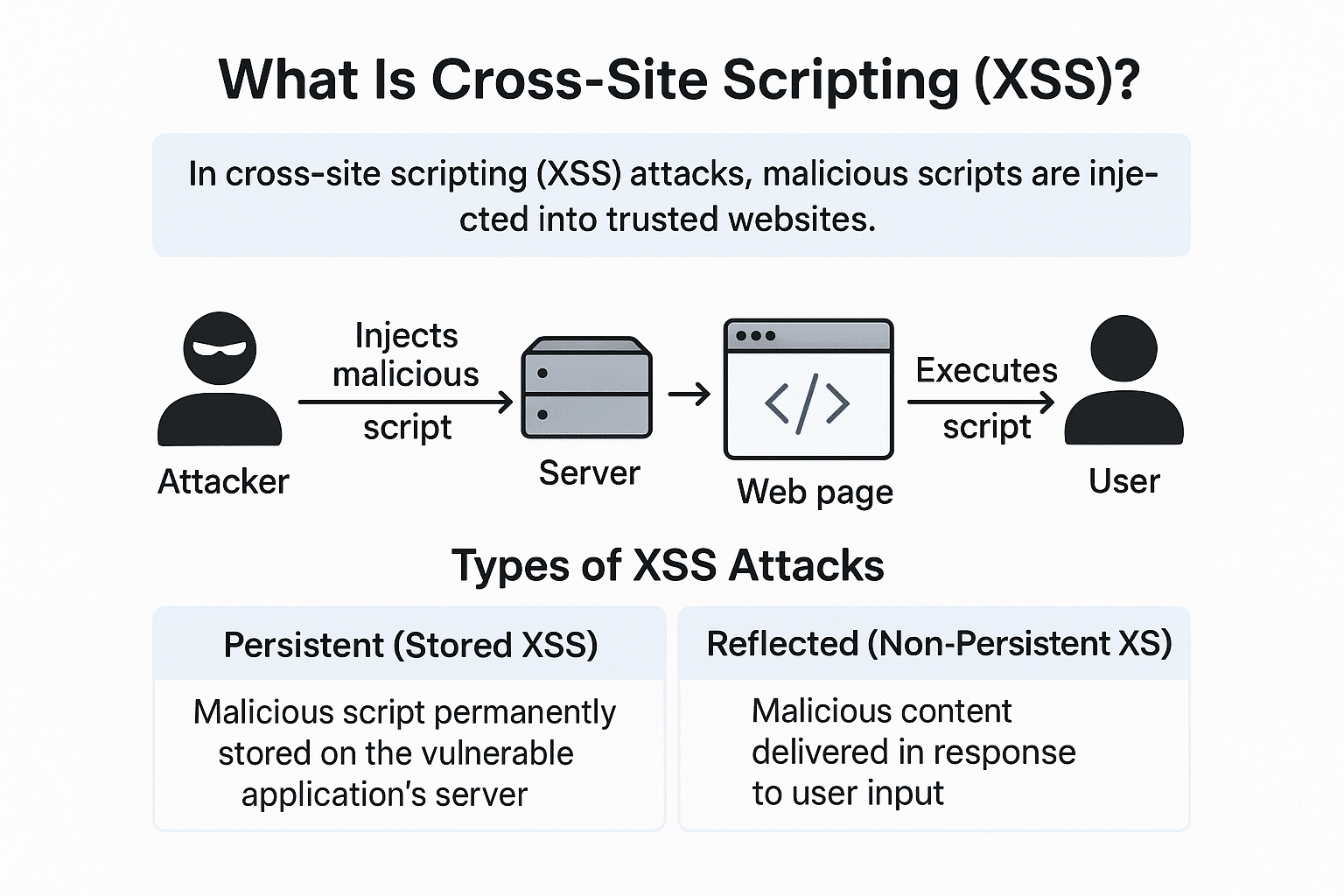
Despite these advancements, the need for vigilance in cross-browser scripting will never fully disappear. The web is a dynamic environment; new devices, form factors (foldables, mixed reality headsets), and input methods continuously emerge. While core standards are stabilizing, new experimental APIs and features will always introduce minor discrepancies or require careful implementation. Therefore, continuous testing, staying updated with browser release cycles, and adopting best practices like progressive enhancement will remain crucial for ensuring that web applications deliver a high-quality, inclusive experience for all users. The focus shifts from fixing pervasive incompatibilities to handling subtle edge cases and embracing new capabilities responsibly.
aViewFromTheCave is a participant in the Amazon Services LLC Associates Program, an affiliate advertising program designed to provide a means for sites to earn advertising fees by advertising and linking to Amazon.com. Amazon, the Amazon logo, AmazonSupply, and the AmazonSupply logo are trademarks of Amazon.com, Inc. or its affiliates. As an Amazon Associate we earn affiliate commissions from qualifying purchases.