
In the world of software engineering, the transition from writing source code to executing a functional application is rarely a direct path. For developers working with compiled languages like C, C++, and Fortran, this transition involves a complex orchestration of compilers, linkers, and dependency managers. At the heart of this orchestration in modern development environments lies a humble yet incredibly powerful file: CMakeLists.txt.
While many developers encounter this file when cloning a repository from GitHub or starting a new project in an Integrated Development Environment (IDE), its internal logic and strategic importance are often misunderstood. A CMakeLists.txt file is essentially the “instruction manual” for CMake, a cross-platform build system generator. To understand what a CMakeLists.txt file is, one must first understand the problem it solves and how it transforms the way we build software.
What is a CMakeLists.txt File?
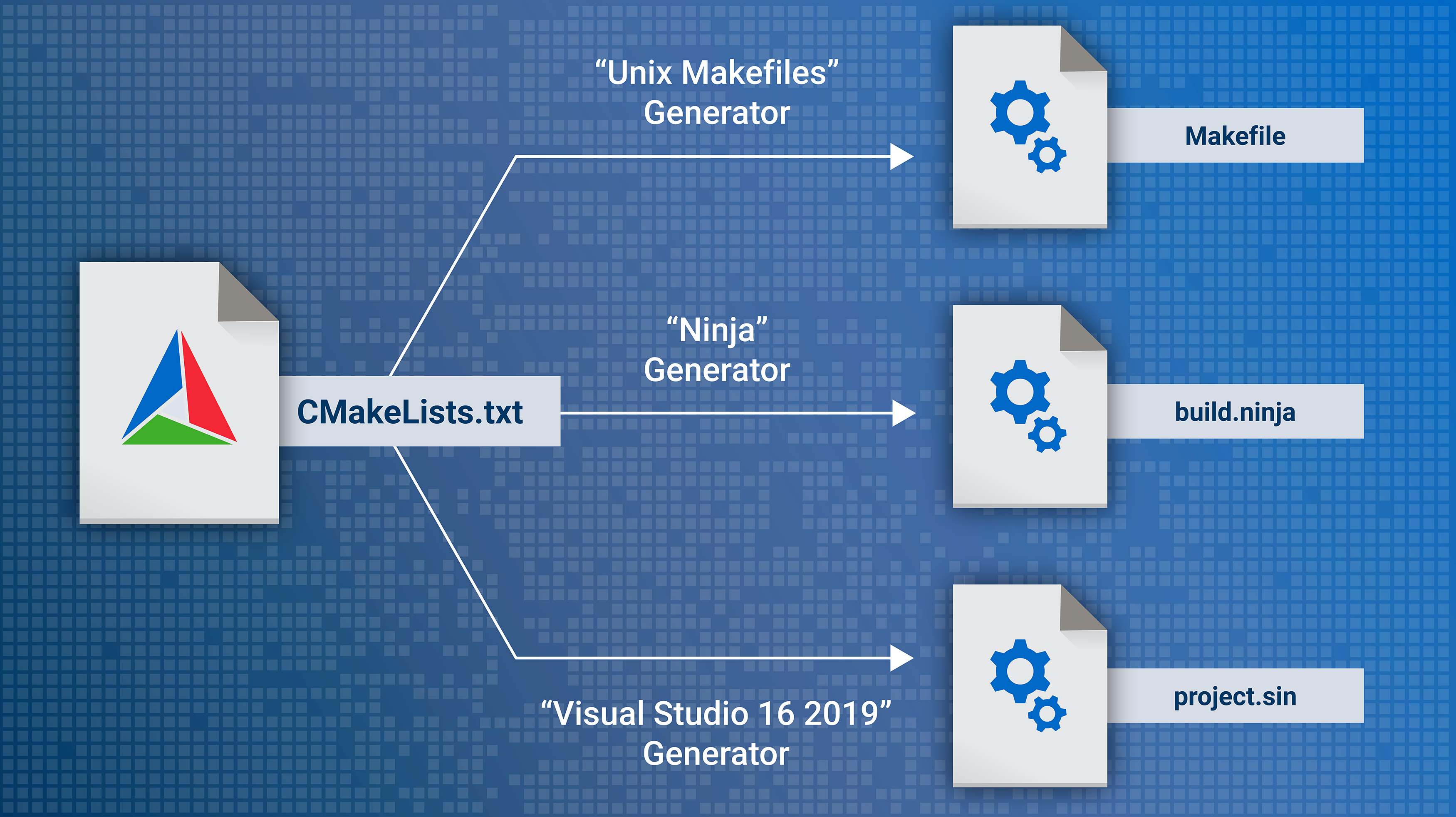
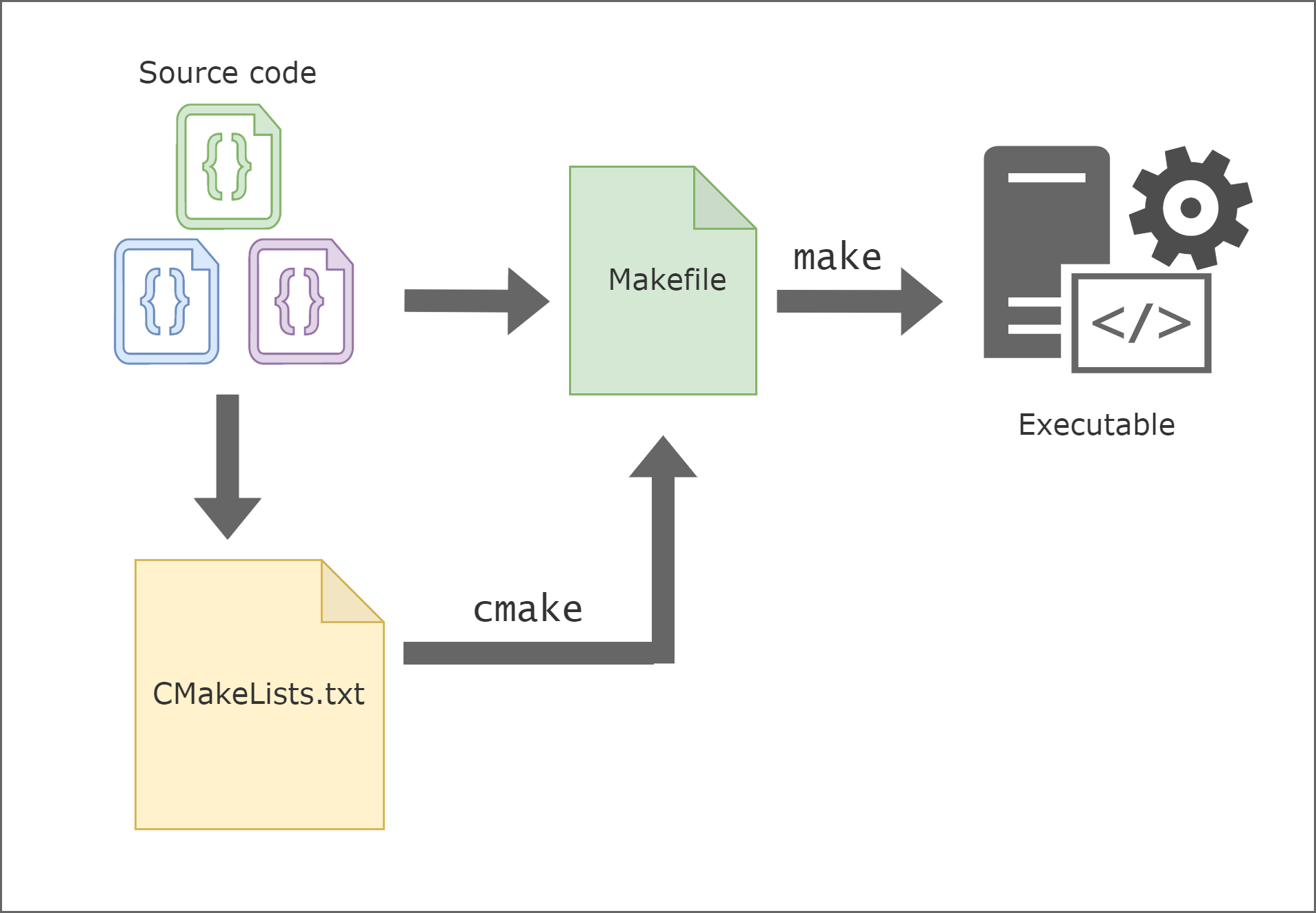
At its simplest, CMakeLists.txt is a plain-text configuration file that contains a series of commands describing how a software project should be built. It serves as the primary input for CMake (Cross-Platform Make). Unlike a Makefile, which tells the computer exactly how to compile specific files for a specific operating system, a CMakeLists.txt file provides a higher-level abstraction.
The Role of CMake in the Build Process
To appreciate CMakeLists.txt, we must distinguish between a build system and a build generator. A build system—such as Make, Ninja, or MSBuild—executes the actual compilation and linking of code. However, these systems are often platform-specific. A Makefile that works on Linux will not work for a Visual Studio project on Windows.
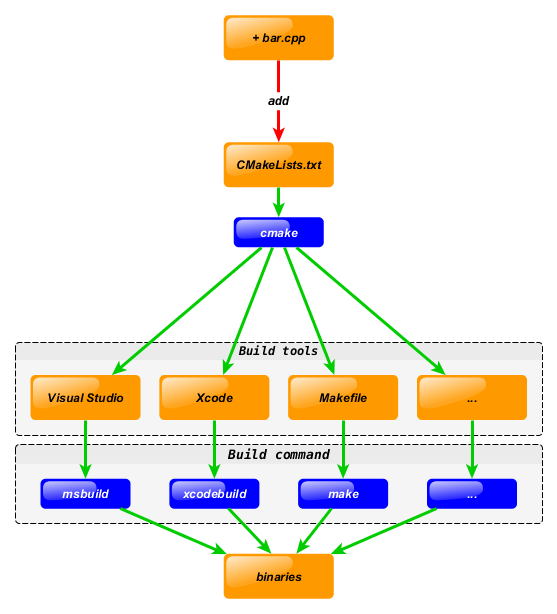
CMake acts as the intermediary. When you run CMake, it reads the CMakeLists.txt file and generates the appropriate build files for your specific environment. On Windows, it might generate a .sln file for Visual Studio; on Linux, it produces a Makefile; and on macOS, it can generate an Xcode project. This abstraction allows developers to define their build logic once and deploy it across any operating system.
Why We Use CMakeLists Instead of Traditional Makefiles
The shift toward CMake and its configuration files was driven by the increasing complexity of modern software. In the early days of computing, managing a handful of source files was manageable with a manual Makefile. Today, projects often involve hundreds of libraries, thousands of source files, and dependencies that span multiple different environments.
Traditional Makefiles are notoriously difficult to maintain and are highly sensitive to the environment in which they are created. CMakeLists.txt solves this by being “platform-agnostic.” It doesn’t care about the specific paths of your compiler or the nuances of your shell environment. Instead, it uses a scripting language to find what it needs, ensuring that “if it builds on my machine, it will build on yours.”
Anatomy of a CMakeLists.txt File: Core Commands and Syntax
A well-structured CMakeLists.txt file follows a logical progression. It starts with global settings, moves to target definitions, and concludes with dependency management. Understanding the basic syntax is essential for any developer looking to master the tech stack of systems programming.
Setting the Foundation: cmakeminimumrequired and project
The first few lines of any CMakeLists.txt file establish the environment. The cmake_minimum_required(VERSION X.X) command is a safeguard. Since CMake is constantly evolving, newer commands might not be available in older versions. By specifying a version, you ensure that the build process doesn’t fail due to syntax incompatibilities.
Following the version requirement is the project() command. This does more than just name the project; it initializes the internal variables that CMake uses to track the language (usually CXX for C++ or C), the version of the software, and the project’s metadata. This metadata is often used later to generate installers or documentation.
Managing Targets: addexecutable and addlibrary
The core of any build script is defining what you actually want to create. In CMake terminology, these are called “targets.”
- add_executable: This command takes a name and a list of source files (e.g.,
main.cpp). It tells the system that these files should be compiled and linked together to create an executable program. - add_library: Modern software is rarely a single monolithic block. Instead, it is broken down into reusable components called libraries. This command allows developers to compile code into static or shared libraries that can be used by the main executable or shared with other projects.
By separating code into various targets, CMakeLists.txt allows for incremental builds. If you change one file in a library, CMake is smart enough to recompile only that library, significantly speeding up the development cycle.
Dependency Management: targetlinklibraries and find_package
One of the most complex tasks in software development is managing external dependencies. If your program uses a graphics library like OpenGL or a networking library like Boost, you need to tell the compiler where those libraries are and how to link them.
In the past, this meant hardcoding file paths into your build script—a practice that led to “brittle” builds. CMake introduces find_package(), which automatically searches the system for the required libraries. Once found, target_link_libraries() is used to associate those dependencies with a specific target. This command handles the “heavy lifting” of including the correct header files and linking the binary files, ensuring the software has everything it needs to run.
The Strategic Advantages of Using CMake in Software Development
In the tech industry, efficiency and scalability are the primary metrics of success. The use of CMakeLists.txt offers several strategic advantages that make it the industry standard for C and C++ development.
Cross-Platform Compatibility and Portability
The most significant advantage of CMake is its portability. In a diverse tech landscape, software must often run on a variety of hardware, from ARM-based mobile devices to x86-64 servers. By using a CMakeLists.txt file, a developer can define the build logic in a way that is independent of the underlying hardware or operating system.
This portability extends to the development tools themselves. Developers on a single team might prefer different IDEs—one might use VS Code, another CLion, and another Vim. Because CMake is supported by almost every major C++ IDE, the CMakeLists.txt file acts as a universal project format, allowing everyone to work in their preferred environment without duplicating build logic.
Integration with Modern IDEs and CI/CD Pipelines
In the modern DevOps era, Continuous Integration and Continuous Deployment (CI/CD) are vital. Automated servers like Jenkins, GitHub Actions, or GitLab CI need a way to build code without human intervention.
CMakeLists.txt is perfectly suited for this. Because it is a command-line-driven tool, it is easily integrated into automated scripts. A CI/CD pipeline can trigger a CMake build with a single command, run automated tests using CTest (a component of the CMake ecosystem), and package the software for distribution. This automation reduces human error and ensures that the software is always in a “buildable” state.
Best Practices for Writing Scalable CMakeLists
As projects grow from small scripts to massive enterprise applications, the CMakeLists.txt file can become complex. Following best practices is essential to keep the build system maintainable and efficient.
Modern CMake vs. Legacy CMake
Experienced developers often distinguish between “Legacy” and “Modern” CMake. Legacy CMake relied heavily on global variables, which could lead to conflicts in large projects. Modern CMake (versions 3.0 and later) emphasizes a “target-based” approach.
In Modern CMake, you attach properties (like include directories and compiler flags) directly to a target rather than setting them globally. This creates a much cleaner architecture where targets “know” what they need to build themselves. This encapsulation makes it easier to move libraries between projects and prevents “pollution” of the build environment.
Organizing Large Projects with Subdirectories
For large-scale applications, having a single, massive CMakeLists.txt file is a recipe for disaster. The best practice is to use a hierarchical structure. By using the add_subdirectory() command, a master CMakeLists.txt at the root of the project can call smaller, more focused CMakeLists.txt files located within individual module folders.
This modularity allows teams to work on different parts of the project simultaneously without interfering with each other’s build configurations. It also makes the project easier to navigate for new developers, as the build logic for a specific component is located right next to its source code.
Conclusion: Embracing Build Automation for Better Software
The CMakeLists.txt file is far more than just a list of source files; it is a sophisticated script that manages the lifecycle of a software project. By abstracting the complexities of different compilers and operating systems, it empowers developers to focus on what truly matters: writing high-quality code.
In an era where software is increasingly interconnected and cross-platform compatibility is a requirement rather than a luxury, understanding and mastering CMake is a fundamental skill for any software professional. From the initial project() declaration to the final target_link_libraries(), every line in a CMakeLists.txt file serves to ensure that the bridge between source code and functional software is stable, efficient, and reproducible. As you continue to explore the tech landscape, let your CMakeLists.txt be the reliable blueprint that brings your digital innovations to life.