
In the dynamic landscape of modern IT infrastructure, the demand for always-on availability, robust performance, and seamless scalability is paramount. Single servers, no matter how powerful, inherently represent a single point of failure and have finite capacity. This fundamental limitation gave rise to the concept of server clustering – a sophisticated architectural approach that transforms a collection of independent machines into a unified, resilient, and high-performing system.
At its core, a cluster server is a group of networked computers, often referred to as nodes, that work together as a single, cohesive unit to achieve shared goals. These goals typically revolve around enhancing the reliability, availability, performance, and scalability of applications and services beyond what a single server could provide. Rather than individual machines operating in isolation, a cluster enables them to pool their resources, share workloads, and provide redundancy, ensuring continuous operation even in the face of individual component failures. This concept is distinct from virtualization, where multiple virtual machines run on a single physical host, as clustering aggregates the power and resilience of multiple physical or virtual hosts themselves.
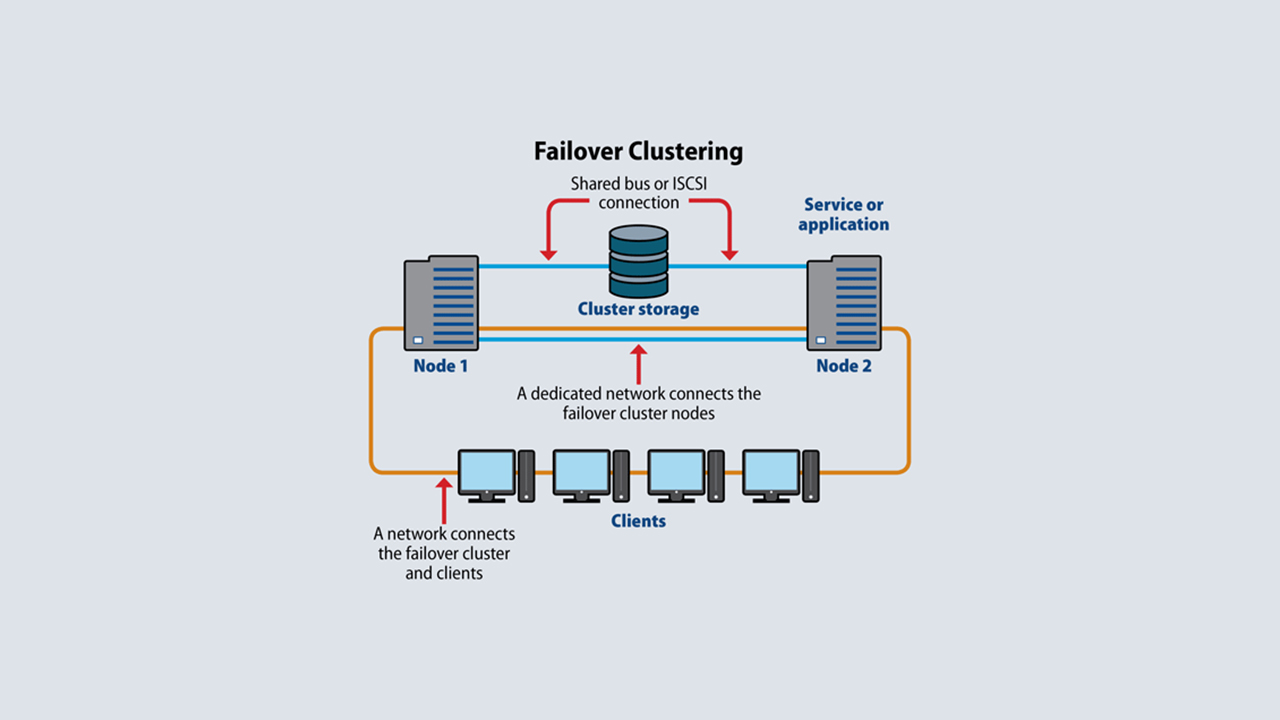
The Core Concept of Server Clustering
The primary motivation behind server clustering is to overcome the inherent vulnerabilities and limitations of standalone servers. Imagine a critical business application, such as an e-commerce platform or a core banking system. If that application runs on a single server and that server experiences a hardware failure, power outage, or software crash, the application becomes unavailable, leading to lost revenue, damaged reputation, and significant operational disruption. Clustering directly addresses this by building redundancy and distribution into the very fabric of the infrastructure.
Why Server Clustering Matters: Key Benefits
Implementing a server cluster delivers several compelling advantages that are crucial for contemporary enterprise IT environments:
High Availability (HA)
High availability is arguably the most critical benefit of server clustering. It ensures that services and applications remain operational and accessible even if one or more components of the cluster fail. This is achieved through:
- Redundancy: Multiple nodes exist within the cluster, meaning that if one node experiences an issue, others are available to take over its workload.
- Failover: This is the automatic process by which a failing node’s workload and resources (like IP addresses, disk access, and running applications) are transferred to a healthy node in the cluster. This failover is designed to be as seamless and transparent as possible, often occurring without any noticeable interruption to end-users or client applications.
- Reduced Downtime: By eliminating single points of failure and automating recovery processes, HA clusters significantly minimize unplanned downtime, which is vital for business continuity and revenue generation. Examples include critical database servers, enterprise resource planning (ERP) systems, and crucial web applications where every minute of downtime can have substantial financial and reputational costs.
Scalability
As organizations grow and their data processing or user traffic demands increase, their IT infrastructure must be able to adapt. Server clustering offers robust mechanisms for scalability:
- Horizontal Scaling: Rather than upgrading a single server to a more powerful (and expensive) machine (vertical scaling), clustering allows for horizontal scaling by simply adding more nodes to the existing cluster. This is often a more cost-effective and flexible way to expand capacity.
- Distributed Workload: A cluster can intelligently distribute incoming requests and processing tasks across its multiple nodes. This ensures that no single server becomes a bottleneck and that performance remains consistent even under peak loads. This is particularly beneficial for applications with variable demand, such as e-commerce platforms during holiday sales or social media platforms experiencing viral traffic spikes.
Improved Performance
Beyond just handling more users, clustering can also enhance the raw processing speed and responsiveness of applications:
- Load Balancing: A key feature in many cluster types is the ability to distribute network traffic or computational tasks evenly among the active nodes. This prevents any single server from becoming overloaded, leading to faster response times and improved user experience.
- Parallel Processing: For computationally intensive tasks, certain types of clusters (especially High Performance Computing clusters) can break down a single large problem into smaller sub-problems, with each node processing a part simultaneously. This dramatically accelerates the completion of complex calculations, simulations, or data analyses.
Cost-Efficiency (in Specific Contexts)
While initial setup costs for clustering can be higher due to specialized hardware and software, it can offer long-term cost benefits:
- Optimal Resource Utilization: By distributing workloads and dynamically reallocating resources, clusters can make more efficient use of hardware than multiple siloed, underutilized servers.
- “Pay-as-you-Grow” Model: Horizontal scaling allows organizations to invest in additional capacity only as their needs dictate, rather than over-provisioning expensive, monolithic servers that may sit idle for long periods.
Types of Server Clusters
The term “cluster server” is broad, encompassing several distinct architectures designed to meet specific operational requirements. Understanding these different types is crucial for selecting the right solution for a particular application or workload.
High Availability (HA) Clusters
As discussed, HA clusters prioritize continuous operation and minimize downtime. They are characterized by:
- Active-Passive Configuration: One node (the active node) handles the workload, while another (the passive node) stands by, ready to take over immediately if the active node fails. This configuration is simpler to manage but doesn’t utilize the passive node’s resources for active processing.
- Active-Active Configuration: All nodes in the cluster are actively processing workloads simultaneously. If one node fails, its workload is redistributed among the remaining active nodes. This configuration offers better resource utilization and higher performance under heavy loads but is more complex to set up and manage.
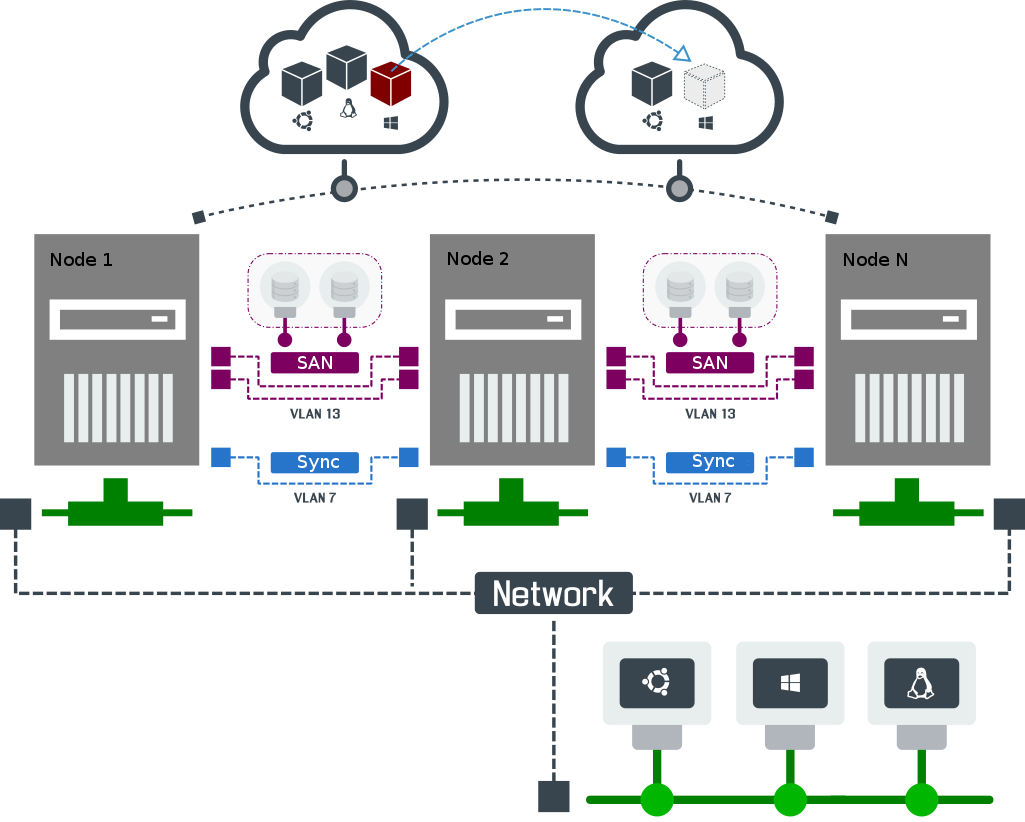
- Shared Storage: Essential for HA clusters, ensuring that all nodes have access to the same data. In a failover scenario, the new active node can immediately access the application’s data without interruption.
- Heartbeat Mechanisms: Nodes constantly monitor each other’s health through private network connections (heartbeats) to detect failures rapidly.
- Use Cases: Database servers (e.g., SQL Server Failover Cluster Instances, Oracle RAC), critical business applications, file servers, virtual machine hosts (e.g., VMware vSphere HA, Microsoft Hyper-V Failover Clustering).
Load Balancing Clusters
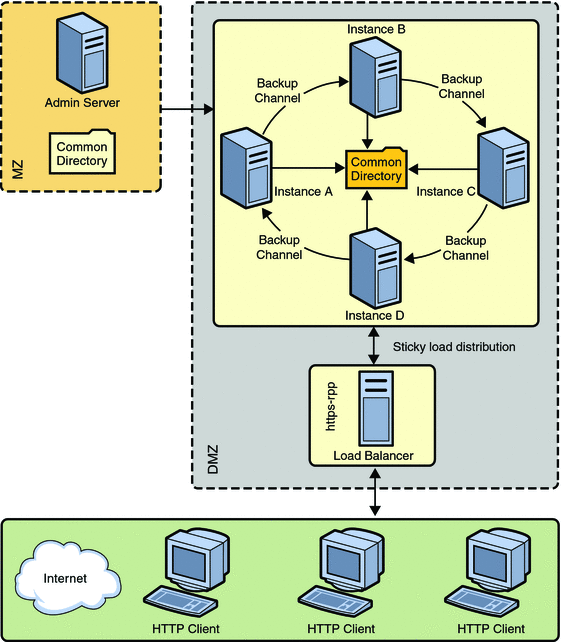
Load balancing clusters are designed primarily to distribute incoming network traffic or application requests across multiple servers. Their main goals are to optimize resource utilization, maximize throughput, and reduce response times, while also providing a degree of fault tolerance.
- Mechanism: A specialized device or software (the load balancer) sits in front of the server pool. It receives all incoming client requests and intelligently directs them to one of the healthy backend servers based on a chosen algorithm.
- Algorithms: Common load balancing algorithms include round-robin (distributing requests sequentially), least connections (sending requests to the server with the fewest active connections), IP hash (directing requests from the same IP address to the same server), and weighted algorithms (favoring more powerful servers).
- Use Cases: High-traffic web servers, application servers, API gateways, streaming media services.
High Performance Computing (HPC) Clusters
HPC clusters are engineered for intense computational tasks that require massive processing power, often involving parallel processing of large datasets or complex simulations.
- Focus: Solving a single, extremely large computational problem by dividing it into smaller parts that are processed concurrently by many nodes.
- Interconnects: HPC clusters often rely on extremely high-speed, low-latency network interconnects (like InfiniBand or specialized Ethernet networks) to enable rapid communication and data exchange between nodes.
- Use Cases: Scientific research, weather forecasting, financial modeling, molecular dynamics, artificial intelligence (AI) and machine learning (ML) training, oil and gas exploration.
Storage Clusters
Storage clusters provide highly available, scalable, and resilient storage solutions.
- Shared Storage Pool: Multiple storage nodes work together to present a unified pool of storage to client servers or applications.
- Data Replication: Data is often replicated across multiple nodes or storage devices within the cluster to ensure availability even if a storage component fails.
- Use Cases: Network Attached Storage (NAS) clusters, Storage Area Networks (SANs), distributed file systems (e.g., GlusterFS, Ceph), object storage systems.
Key Components and How They Interoperate
A functional server cluster relies on the seamless interaction of several critical components:
- Nodes (Servers): These are the individual physical or virtual machines that make up the cluster. Each node runs its own operating system and applications.
- Interconnects: High-speed network connections that link the nodes together. Often, multiple redundant networks are used to prevent a single network failure from isolating nodes. A dedicated private network for internal cluster communication (heartbeats, management data) is common.
- Shared Storage: For many types of clusters, especially HA and storage clusters, a mechanism for shared storage is crucial. This allows all nodes to access the same set of data disks, ensuring data consistency and enabling failover. Common shared storage solutions include Storage Area Networks (SANs) using Fibre Channel or iSCSI, Network Attached Storage (NAS), or direct-attached storage replicated across nodes.
- Cluster Management Software: This is the brain of the cluster. It’s a specialized software suite that monitors the health of all nodes and resources, detects failures, orchestrates failover processes, manages resource allocation, and provides a unified interface for administering the cluster.
- Examples: Microsoft Failover Cluster Manager, Red Hat Pacemaker/Corosync (for Linux), VMware vCenter Server (for virtual machine clusters), Kubernetes (for container orchestration, which inherently forms a cluster of nodes).
- Quorum: A critical concept to prevent a “split-brain” scenario. Split-brain occurs when nodes lose communication with each other and each believes it is the sole active node, potentially leading to data corruption as both attempt to write to shared storage. Quorum is a mechanism (often involving a witness disk or a specific number of nodes) that dictates which part of a partitioned cluster can remain operational, ensuring that only one set of nodes has write access to shared resources at any given time.
The Failover Process in HA Clusters
When a failure occurs in an HA cluster, the cluster management software initiates a carefully orchestrated failover process:
- Monitoring: All nodes continuously monitor each other’s health, often through private “heartbeat” network connections and by checking the status of shared resources.
- Failure Detection: If a node stops responding or its health checks fail, the cluster management software detects the failure within a predefined timeout period.
- Resource Migration: The cluster software identifies the resources (e.g., application services, IP addresses, shared disk volumes) that were active on the failed node. It then reallocates these resources to a healthy, designated standby node.
- Service Restart: Applications and services that were running on the failed node are started on the new active node.
- Client Redirection: Clients that were connected to the failed node are transparently redirected to the new active node, often without manual intervention, ensuring minimal disruption to their operations.
Implementing and Managing Server Clusters
While offering significant benefits, implementing and managing server clusters requires careful planning, technical expertise, and ongoing attention.
Design Considerations
- Workload Analysis: A thorough understanding of the applications and services that will run on the cluster is paramount. What are their specific requirements for availability, performance, and data integrity?
- Redundancy at All Levels: Beyond just redundant servers, consider redundancy for network paths, power supplies, storage controllers, and even physical locations (for disaster recovery).
- Shared Storage Strategy: The choice between SAN, NAS, or distributed storage systems will depend on performance needs, budget, and existing infrastructure.
- Network Topology: Design a robust, high-speed, and redundant network infrastructure, often with dedicated private networks for cluster communication.
- Quorum Configuration: Properly configure the quorum mechanism to prevent split-brain scenarios and ensure cluster stability.
- Budget vs. Requirements: Balance the desired levels of resilience and performance with the available budget for hardware, software, and skilled personnel.
Common Challenges
- Complexity: Designing, deploying, and managing a robust cluster can be significantly more complex than managing individual servers. It requires specialized knowledge and experience.
- Maintenance: Patching, software upgrades, and configuration changes within a cluster environment require careful planning and execution to avoid accidental downtime or service interruption.
- Troubleshooting: Diagnosing issues in a distributed system with multiple interconnected components can be challenging and time-consuming.
- Cost: The initial investment in redundant hardware, specialized software, and the need for highly skilled administrators can be substantial.
- Split-Brain Syndrome: If not properly configured, especially quorum settings, a cluster can enter a split-brain state, leading to data corruption and significant downtime.
Modern Trends and Future of Clustering
The principles of clustering are more relevant than ever in the evolving tech landscape:
- Cloud-Native Architectures: Technologies like microservices, containers (Docker), and container orchestration platforms (Kubernetes) inherently leverage clustering concepts. Kubernetes, for instance, manages a cluster of nodes to run and scale containerized applications with built-in resilience and load balancing.
- Distributed Databases: Many modern NoSQL databases (e.g., MongoDB, Cassandra, Apache Kafka) are designed from the ground up to be distributed and clustered, offering massive scalability and high availability.
- Software-Defined Infrastructure: The trend towards software-defined networking, storage, and data centers simplifies the deployment and management of clustered environments through automation and abstraction.
- Edge Computing Clusters: As data generation moves closer to the source (e.g., IoT devices, remote offices), smaller, resilient clusters are being deployed at the “edge” to process data locally, reducing latency and bandwidth requirements.
In conclusion, server clustering is not merely an optional add-on but a foundational strategy for building resilient, scalable, and high-performing IT infrastructure. By understanding its various forms, core components, and operational nuances, organizations can harness the power of distributed computing to ensure business continuity and meet the ever-growing demands of the digital age.
aViewFromTheCave is a participant in the Amazon Services LLC Associates Program, an affiliate advertising program designed to provide a means for sites to earn advertising fees by advertising and linking to Amazon.com. Amazon, the Amazon logo, AmazonSupply, and the AmazonSupply logo are trademarks of Amazon.com, Inc. or its affiliates. As an Amazon Associate we earn affiliate commissions from qualifying purchases.