
In an increasingly digital world, the convenience and security of mobile payments have become indispensable. Among the frontrunners in this evolution is Google Pay, a robust platform designed to simplify how we manage money, make purchases, and interact with various services. Far more than just a payment app, Google Pay — now often integrated and evolving within the broader Google Wallet experience — represents a sophisticated technological solution that streamlines everything from in-store taps to online checkouts and peer-to-peer transfers. This guide will walk you through the intricacies of setting up, using, and optimizing Google Pay, ensuring you can harness its full potential for a smoother, more secure digital life. We’ll delve into the mechanics, security protocols, and integration points that make Google Pay a cornerstone of modern digital commerce, firmly anchoring our discussion in the realm of technology, apps, and digital security.
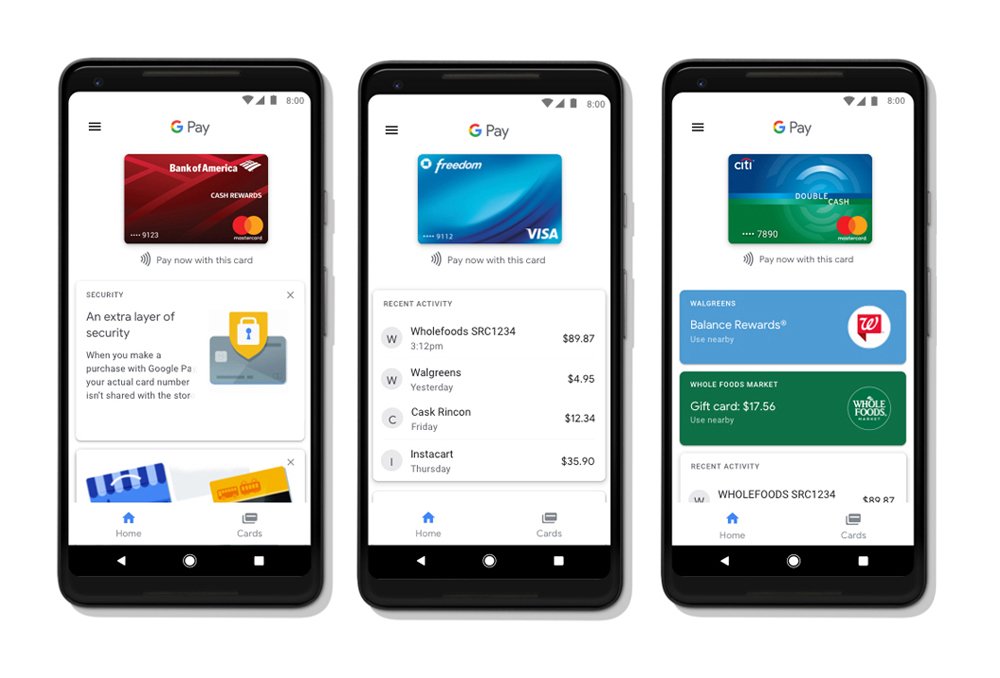
Getting Started with Google Pay: Setup and Configuration
The journey into effortless digital payments begins with the correct setup of Google Pay on your device. This foundational stage is critical for ensuring smooth, secure transactions moving forward.
Downloading and Initializing the App
The first step is to acquire the Google Pay app (or access Google Wallet, which has largely absorbed Google Pay’s core functionalities for payment and passes). For Android users, this typically involves finding “Google Wallet” or “Google Pay” on the Google Play Store. iOS users can download “Google Wallet” from the Apple App Store. Once downloaded, opening the app will prompt you to link it to your existing Google account. If you don’t have one, the app will guide you through creating a new account, which is a straightforward process requiring basic personal information. This Google account acts as the central hub for your payment methods, loyalty cards, and transaction history, ensuring a unified experience across Google services.
Adding Payment Methods
With the app initialized, the next crucial step is to add your preferred payment methods. Google Pay supports a wide array of options, including credit cards, debit cards, and in some regions, direct bank account linking. To add a card, you’ll typically select the “Add a card” option. You can then either use your device’s camera to scan the card details automatically – a convenient feature that minimizes manual entry errors – or manually input the card number, expiry date, and CVV. For debit cards and certain bank accounts, a verification step is often required, which might involve a small temporary charge, a code sent via SMS to your registered phone number, or a quick call to your bank. This verification process is a vital security measure, confirming that you are the legitimate owner of the card or account. It’s advisable to add multiple payment methods, offering flexibility and a fallback option should one card encounter an issue.
Setting Up Security Features
Digital security is paramount for any payment platform, and Google Pay integrates several robust features. During setup, you’ll be prompted to enable screen lock security if you haven’t already. This is non-negotiable for using Google Pay, as it ensures that only you can authorize transactions. Options typically include a PIN, pattern, fingerprint (for devices with biometric scanners), or facial recognition (for compatible devices). For added security, some transactions, especially larger ones or those conducted on unfamiliar terminals, may require you to unlock your phone using your chosen screen lock method. This multi-layered approach safeguards your financial information and prevents unauthorized access, even if your phone falls into the wrong hands. Understanding and enabling these security measures is key to a worry-free digital payment experience.
Mastering Google Pay: Everyday Transactions and Features
Once Google Pay is set up, its true power lies in its versatility across various transaction types, making daily payments effortless and secure.
In-Store Purchases with NFC
The most iconic use of Google Pay is its tap-to-pay functionality in physical stores. This relies on Near Field Communication (NFC) technology, which allows two devices (your phone and the payment terminal) to communicate wirelessly over a short distance. To make an in-store payment, simply ensure your phone’s NFC is enabled (usually found in your device settings). When at a compatible payment terminal, unlock your phone (or just wake it for smaller transactions in some regions) and hold the back of your device near the terminal’s contactless symbol. You’ll typically see a confirmation on your phone screen and hear a beep from the terminal once the transaction is complete. The system automatically uses your default payment card, but you can easily switch to another card within the app before tapping. This method replaces the need for physical cards, offering speed and enhanced security as your actual card number is never transmitted to the merchant.
Online and In-App Payments
Beyond physical stores, Google Pay shines as a seamless checkout option for online shopping and in-app purchases. When you encounter the “Pay with Google Pay” button on a website or within an app, selecting it allows you to complete your purchase using the payment methods already stored in your Google account. This eliminates the tedious process of repeatedly entering card numbers, expiry dates, and billing addresses for every transaction. The system securely pulls the necessary information, often requiring only a quick confirmation from you. This integration vastly improves the user experience, reduces cart abandonment, and enhances security by minimizing the exposure of your raw card details to multiple vendors. Many e-commerce platforms and digital services now prominently feature Google Pay, making it a ubiquitous and convenient choice.
Peer-to-Peer (P2P) Payments
In certain regions and within specific iterations of Google Pay (or Google Wallet), the platform facilitates peer-to-peer money transfers, allowing you to send and receive money from friends and family with ease. This feature typically involves linking a bank account directly to Google Pay, enabling instant or near-instant transfers without incurring transaction fees. To send money, you simply select a contact from your phone, enter the amount, and choose the bank account or card you wish to pay from. Receiving money usually involves a notification and the option to transfer the funds to your linked bank account. This P2P functionality transforms Google Pay into a versatile financial tool, capable of splitting bills, sending gifts, or settling debts efficiently, all while leveraging Google’s secure infrastructure.
Managing Loyalty Cards and Tickets
Google Pay extends its utility beyond just payments by serving as a digital wallet for various passes. You can add loyalty cards from your favorite stores, gift cards, boarding passes, event tickets, and even public transport passes. This feature helps declutter your physical wallet and ensures you never miss out on rewards or struggle to find your ticket at the crucial moment. To add a pass, you usually select “Add to Wallet” or “Add a pass” within the app and then either scan a barcode, input details manually, or import from an email or another app. When checking out or boarding, simply open the Google Pay app, select the relevant pass, and present its barcode or QR code to the scanner. This integration consolidates your digital life, making essential cards and tickets readily accessible on your smartphone.
Advanced Features and Ecosystem Integration
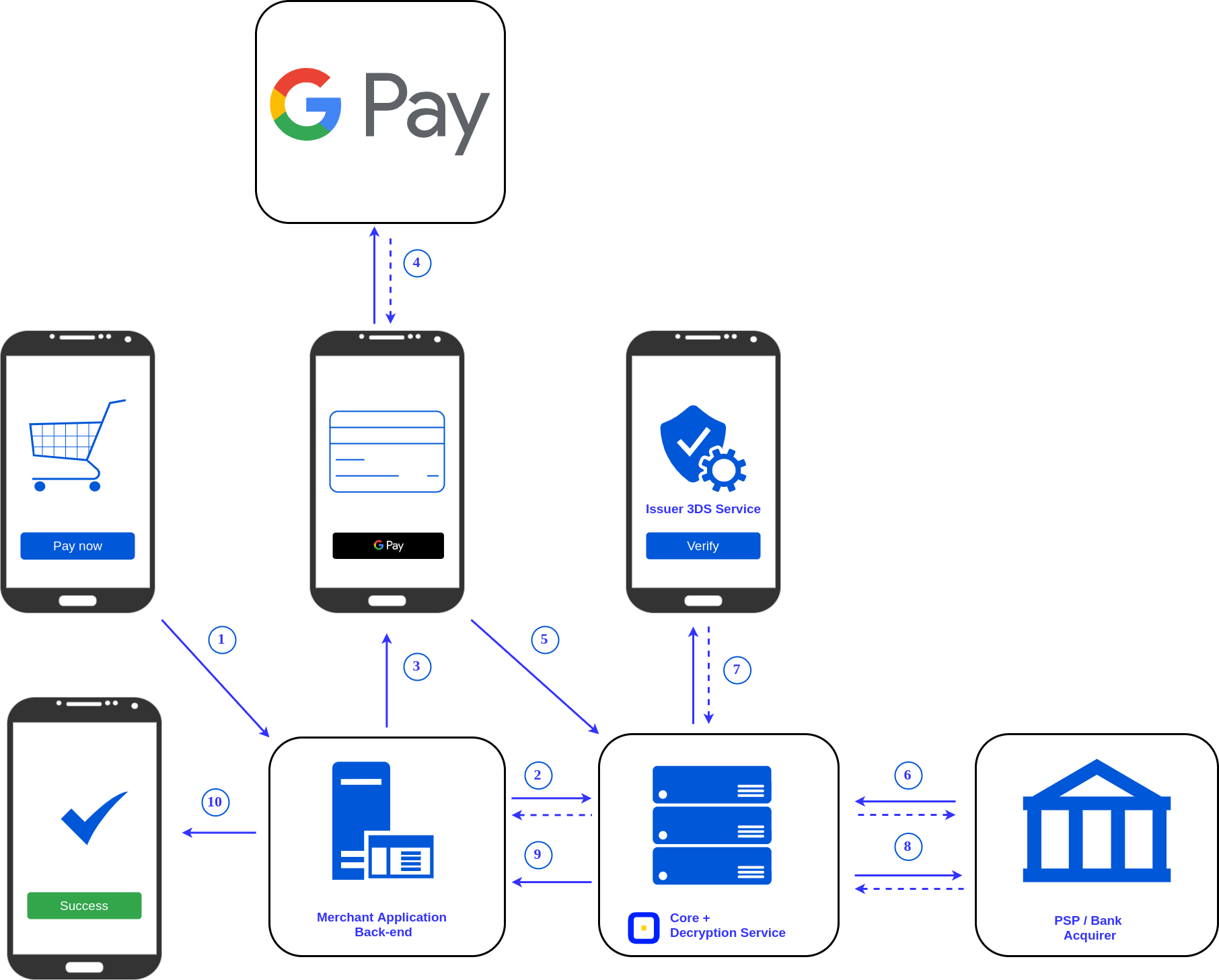
Google Pay is designed to be deeply integrated into the broader Google ecosystem and extend its capabilities beyond basic transactions, offering enhanced convenience and smart functionality.
Google Pay on Wear OS and Other Devices
The reach of Google Pay isn’t limited to smartphones. It extends seamlessly to smartwatches running Wear OS by Google, enabling you to make contactless payments directly from your wrist. Setting up Google Pay on your smartwatch involves opening the Google Wallet app on your watch, adding a payment method (which often syncs from your phone), and setting up a screen lock for security. Once configured, you can tap your watch to a compatible payment terminal just as you would with your phone. This feature is particularly convenient for moments when carrying your phone isn’t practical, such as during a run or when you simply prefer a lighter carry. Furthermore, Google Pay can be integrated into other devices and platforms, such as Chrome for autofilling payment details, demonstrating its pervasive utility across the Google hardware and software landscape.
Exploring Google Pay Offers and Rewards
Google Pay often includes a dedicated section for offers, rewards, and cashback programs, turning your payments into opportunities for savings. These promotions can range from cashback on specific purchases, discounts at participating retailers, or bonus points on loyalty programs. The app typically personalizes these offers based on your transaction history and location, ensuring relevance. Users can browse available offers, activate them, and sometimes earn rewards automatically when making qualifying purchases with Google Pay. This feature adds significant value, making Google Pay not just a payment tool but also a smart shopping assistant that helps you save money and maximize benefits from your spending. It leverages Google’s analytical capabilities to deliver timely and appealing incentives.
Transit and Parking Payments
In an increasing number of cities worldwide, Google Pay is revolutionizing urban mobility by integrating with public transport systems and parking services. Users in supported areas can add transit cards or tickets directly to their Google Pay wallet, allowing them to tap their phone or smartwatch at turnstiles and bus readers to pay for fares. This eliminates the need for physical tickets or fumbling for change, significantly speeding up commutes. Similarly, many smart parking meters and apps now accept Google Pay, simplifying the payment process for parking. This integration highlights Google Pay’s ambition to become an all-encompassing digital wallet, tackling everyday inconveniences with elegant technological solutions and enhancing the user’s interaction with urban infrastructure.
Security and Privacy in Google Pay
Understanding the robust security and privacy measures employed by Google Pay is crucial for users, reinforcing trust and ensuring peace of mind with every transaction.
Tokenization and Encryption
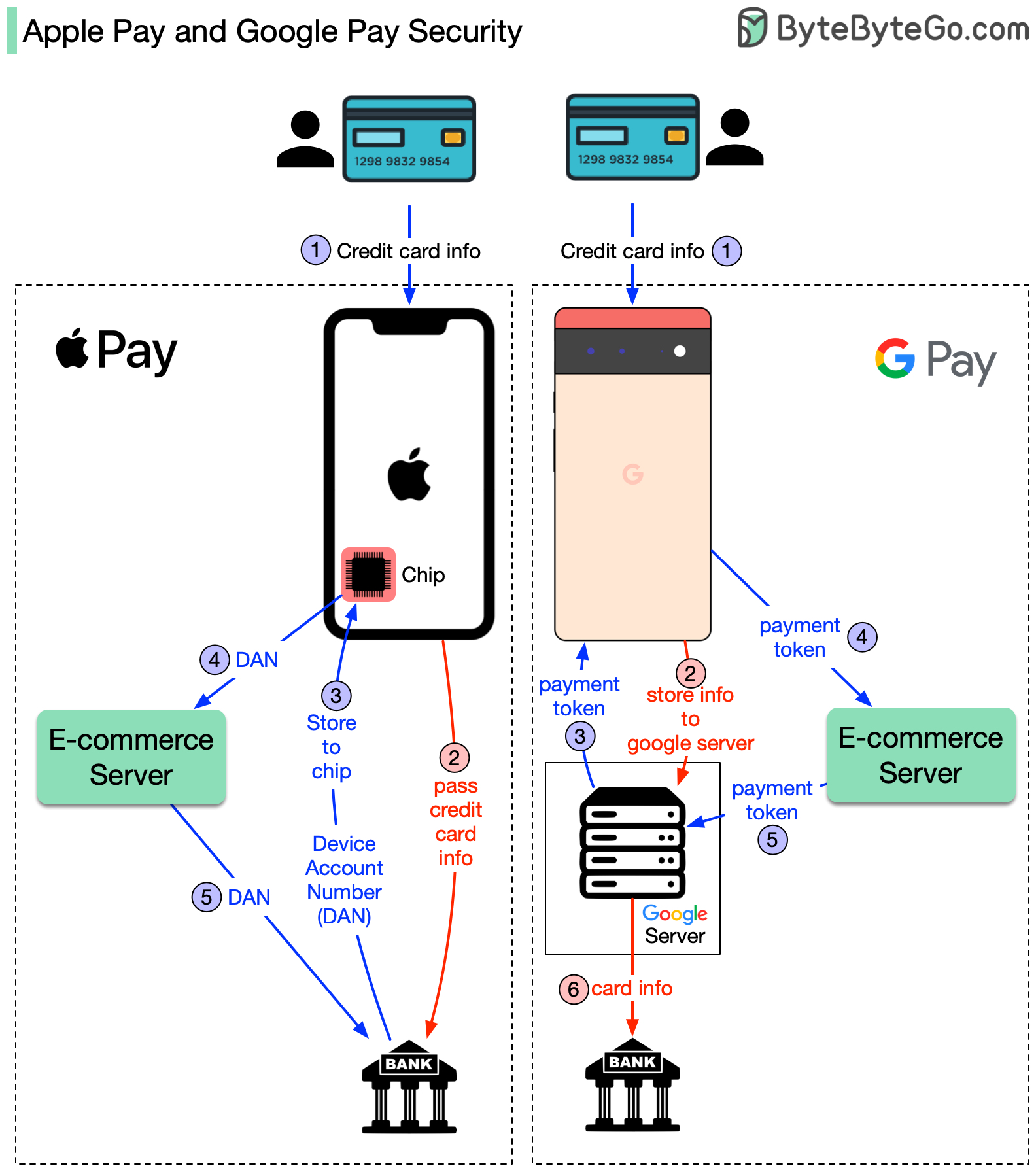
At the core of Google Pay’s security architecture is an advanced technology called tokenization. When you add a credit or debit card to Google Pay, your actual card number is not stored on your device or shared with merchants during a transaction. Instead, it is replaced with a unique, encrypted digital account number (a “token”). This token is specific to your device and wallet. When you make a purchase, this token, along with a cryptogram that changes with each transaction, is transmitted to the merchant. Even if intercepted, this token is useless to fraudsters because it cannot be reverse-engineered to reveal your actual card details and is typically valid only for that specific transaction. All communications between your device, Google’s servers, and the payment networks are also heavily encrypted, providing multiple layers of protection against data breaches and unauthorized access.
Fraud Protection and Account Monitoring
Google implements sophisticated fraud detection systems that continuously monitor transactions for suspicious activity. These algorithms leverage machine learning to identify unusual spending patterns or potential compromises. If a suspicious transaction is flagged, Google’s systems can automatically decline it or prompt for additional verification, such as a biometric scan or PIN. Furthermore, users have tools within the Google Pay app to review their transaction history, report unauthorized transactions, and remotely lock or wipe their payment data from a lost or stolen device. Banks and card issuers also extend their existing fraud protection policies to Google Pay transactions, offering an extra layer of financial security and recourse in case of fraudulent activity. This collaborative approach between Google and financial institutions creates a comprehensive shield against digital theft.
Data Privacy and Control
Google is transparent about its data privacy practices, offering users significant control over their information. While Google Pay processes transactional data, it does so primarily to facilitate payments, provide personalized offers, and enhance security. Your payment activity helps Google understand your preferences to offer more relevant services, but this data is generally used in an aggregated and anonymized fashion for broader analysis, not to sell your individual transaction history to third parties. Within the Google Account settings, users can review and manage their privacy settings, including controlling activity data, personalization options, and ad settings. Google is committed to complying with global data protection regulations, ensuring that user data is handled responsibly and with respect for privacy, allowing individuals to maintain oversight of their digital footprint while enjoying the benefits of Google Pay.
Troubleshooting and Best Practices
Even with the most advanced technology, occasional hitches can occur. Knowing how to troubleshoot common issues and adopting best practices can significantly enhance your Google Pay experience.
Common Issues and Solutions
One frequent issue with in-store payments is a “Payment not completed” or “Try again” message. This can often be resolved by ensuring your phone’s NFC is turned on, holding your phone closer to the terminal, or trying a slightly different angle. Make sure your phone is unlocked (or screen awake for smaller transactions) before tapping. If a specific card isn’t working, check if it’s expired or if there are any network issues with your bank. Sometimes, simply restarting the app or your phone can clear minor glitches. For online or in-app payments, ensure your internet connection is stable. If you’re experiencing persistent problems, verifying that your app is updated to the latest version and checking Google Pay’s support pages for known outages or device-specific compatibility issues can provide solutions.
Optimizing Your Google Pay Experience
To get the most out of Google Pay, several best practices can be adopted. Firstly, always keep the app updated. Updates often include security enhancements, bug fixes, and new features that improve performance and reliability. Regularly review your linked payment methods, removing any expired cards or ones you no longer use to maintain a clean and secure digital wallet. Familiarize yourself with the various app settings, especially those related to notifications and privacy, to tailor the experience to your preferences. For frequent users, setting Google Pay as your default payment method in relevant apps and online stores can save valuable time. Lastly, always be mindful of your device’s battery life, as a dead phone means no Google Pay access. Keeping your device charged ensures seamless payment capabilities when you need them most.
Conclusion
Google Pay stands as a powerful testament to the advancements in digital payment technology, transforming how we interact with money in an increasingly connected world. From simplifying in-store taps and streamlining online checkouts to consolidating loyalty cards and integrating with public transport, it offers a multifaceted solution that prioritizes convenience, speed, and above all, robust security. By understanding its setup, leveraging its diverse features, appreciating its advanced security protocols like tokenization, and adopting sound troubleshooting practices, users can unlock a truly seamless and worry-free digital payment experience. Google Pay is more than just an app; it’s an intelligent financial tool that empowers individuals to navigate the modern economy with greater efficiency and confidence, solidifying its role as an essential component of our digital lives within the ever-evolving tech landscape. Embracing Google Pay means embracing the future of secure, effortless transactions.
aViewFromTheCave is a participant in the Amazon Services LLC Associates Program, an affiliate advertising program designed to provide a means for sites to earn advertising fees by advertising and linking to Amazon.com. Amazon, the Amazon logo, AmazonSupply, and the AmazonSupply logo are trademarks of Amazon.com, Inc. or its affiliates. As an Amazon Associate we earn affiliate commissions from qualifying purchases.