
In the fast-paced world of web development and quality assurance, automation is the cornerstone of efficiency. As web applications grow in complexity, the ability to test these platforms across different browsers is no longer a luxury—it is a requirement. Central to this automated ecosystem is a component often referenced by developers but frequently misunderstood by those outside the immediate engineering circle: the Chrome Driver.
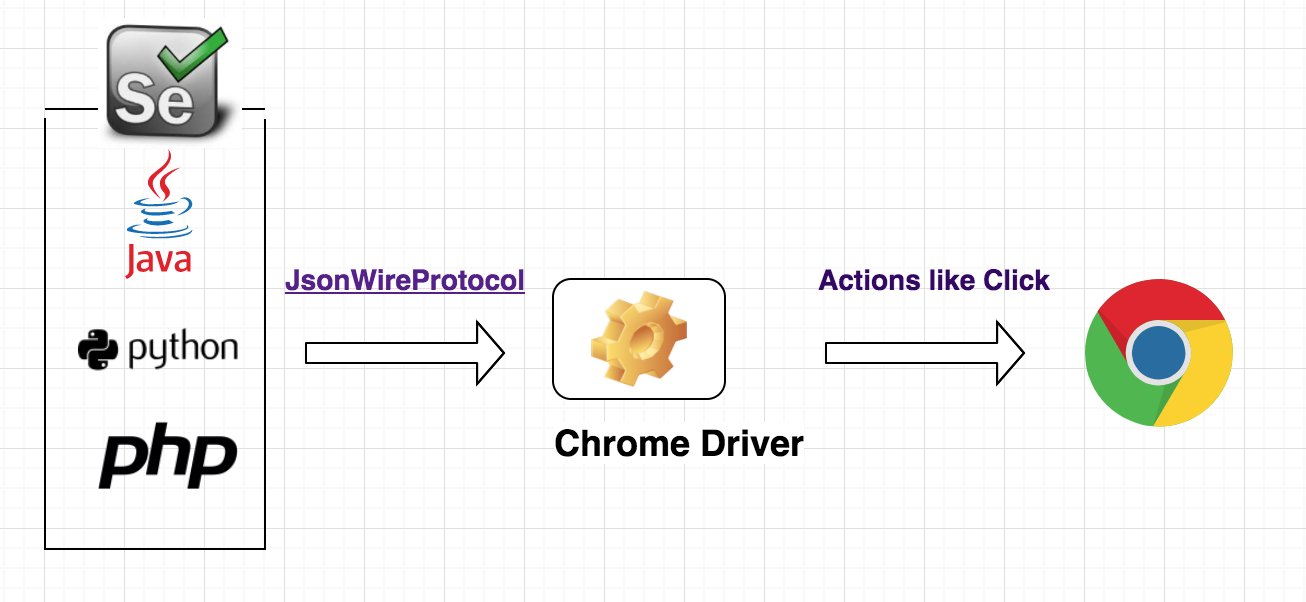
To understand Chrome Driver, one must first look at the bridge between human intent and machine execution. At its core, Chrome Driver is a standalone executable that allows the Selenium WebDriver to interact with the Google Chrome browser. It serves as the vital link—a translator, if you will—that interprets commands sent from a testing script and translates them into actions that the Chrome browser can execute, such as clicking buttons, navigating to URLs, or extracting data from a web page.
The Architecture of Browser Automation
The relationship between your test code, the driver, and the browser is a classic client-server model. When you write an automated script, you are operating as the client. The browser, however, does not speak your programming language natively. This is where the WebDriver protocol enters the conversation.
The Role of the WebDriver Protocol
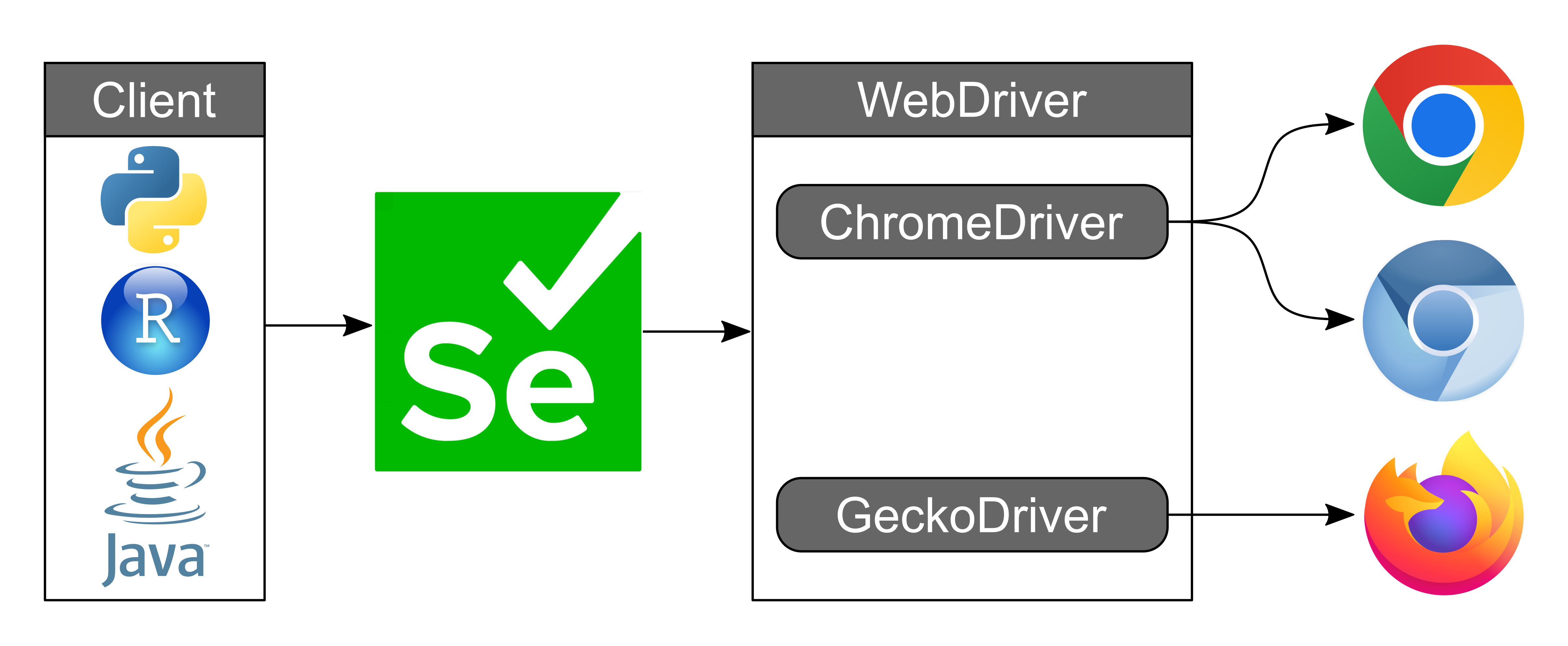
The WebDriver protocol is a W3C-standardized interface that allows programs to control the behavior of web browsers remotely. It provides a common language that ensures your automation scripts remain consistent, regardless of whether you are testing on Chrome, Firefox, or Edge. Chrome Driver is the specific implementation of this protocol tailored exclusively for the Chromium engine.
How Communication Flows
When you initiate a test, your script sends HTTP requests to the Chrome Driver. These requests might look like “find the element with ID ‘login-button'” or “type ‘username’ into this field.” Chrome Driver receives these commands, processes them, and communicates directly with the Chrome browser via the Chrome DevTools Protocol (CDP). Once the browser executes the action, the result is sent back through the driver to your script, confirming success or reporting a failure.
Why Chrome Driver Is Essential for Modern QA
The landscape of software development has shifted toward Agile and DevOps methodologies, where “Continuous Integration” and “Continuous Deployment” (CI/CD) are standard. In these environments, code is updated and deployed multiple times a day. Manual testing cannot keep pace with this velocity; it is inherently prone to human error and scaling limitations.
Eliminating Manual Repetition
Consider a standard e-commerce platform. A developer needs to ensure that the checkout process works flawlessly every time a minor CSS tweak or backend database change is implemented. Manually clicking through the cart, entering dummy credit card information, and verifying the order confirmation page twenty times a day is unsustainable. Chrome Driver allows QA engineers to script this workflow, enabling the machine to perform these repetitive tasks in seconds, 24 hours a day.
Cross-Browser Compatibility and Scalability
While Chrome Driver is specific to Chrome, its existence allows developers to build scalable testing suites. By utilizing Selenium or other automation frameworks like Playwright or Cypress (which utilize similar driver concepts), teams can run their test suites across a grid of browsers simultaneously. This ensures that a web application provides a consistent user experience, whether the customer is on Chrome, Edge, or a headless version of Chrome running on a remote cloud server.
Installation, Configuration, and Version Management
Implementing Chrome Driver is generally a straightforward process, but it requires careful attention to version synchronization. This is the most common pitfall for those new to automated testing.
The Version Matching Requirement
Chrome Driver must be compatible with the specific version of the Chrome browser installed on the host machine. If you update your Chrome browser to version 124, you must ensure that your Chrome Driver executable is also version 124. Using a mismatched driver often results in “SessionNotCreated” errors or general communication failures.
To mitigate this, modern automation frameworks have adopted “driver management” libraries—such as webdriver-manager for Python or bonigarcia/webdrivermanager for Java. These tools automatically check the version of the browser installed on your machine, download the corresponding Chrome Driver, and configure the path for you, removing the headache of manual maintenance.
Headless Execution
One of the most powerful features Chrome Driver offers is the ability to run in “headless” mode. In this configuration, Chrome runs without a visible graphical user interface (GUI). Because the browser doesn’t have to render images, CSS styles, or complex animations, the test suite executes significantly faster and consumes fewer system resources. This is the gold standard for CI/CD pipelines, where the primary goal is to verify functionality behind the scenes rather than observe the visual transition of pages.
Beyond Basic Testing: Use Cases for Chrome Driver
While QA automation is the primary use case for Chrome Driver, its capabilities extend into other critical areas of technology, particularly in data scraping and performance monitoring.
Web Scraping and Data Extraction
In the age of big data, extracting information from dynamic websites—pages that load content via JavaScript after the initial HTML has been delivered—is a common task. Traditional HTTP libraries often struggle with modern web apps because they cannot execute JavaScript. Chrome Driver, by controlling a real instance of the browser, can render the page in its entirety. This allows data engineers to scrape complex websites, harvest information, and feed it into analytical databases for market research or competitive intelligence.
Performance Monitoring and Synthetic Testing
Chrome Driver is also instrumental in synthetic monitoring. By scripting specific user journeys—such as a user landing on a homepage, searching for a product, and adding it to their cart—teams can measure the performance of their site under controlled conditions. This helps in identifying bottlenecks, such as slow API responses or render-blocking scripts, before they impact real users. By running these scripts at regular intervals, companies can receive alerts the moment a critical user flow experiences latency or failure.
Best Practices for Stable Automation
As with any technical tool, the efficacy of Chrome Driver is heavily dependent on how the scripts are written. Brittle tests—tests that break whenever a minor change is made to the page layout—are the bane of any engineering team.
Strategic Element Selection
Avoid using fragile locators like absolute XPaths, which break the moment an element is moved slightly within the DOM. Instead, prioritize stable locators such as unique IDs, data-test attributes, or specific CSS classes that are less likely to change during front-end refactoring.
Implementing Explicit Waits
One of the most frequent sources of “flaky tests” is the race condition, where the test script tries to interact with an element before the browser has finished rendering it. Rather than using fixed “sleep” timers (which slow down the test suite), use explicit waits. These commands instruct the driver to wait until a specific condition is met—such as an element becoming clickable or a text field becoming visible—before proceeding. This creates a resilient test environment that reacts dynamically to the speed of the browser and the network.
Security Considerations
When using Chrome Driver for automated tasks, always be mindful of security. Never hard-code credentials (usernames and passwords) into your automation scripts. Use environment variables or secure vault services to inject sensitive data into your test runs. Furthermore, ensure that the environments where your automation runs are isolated and restricted, preventing potential security risks associated with browser-based automation tools interacting with production databases.
Chrome Driver remains an indispensable utility in the modern developer’s toolkit. By acting as the interface between code and browser, it enables the automation of the web, allowing teams to deliver software with confidence, gather data with precision, and monitor the health of their digital products with ease. As browsers continue to evolve, the tools that manage them will only become more sophisticated, further cementing the role of Chrome Driver in the future of web technology.
aViewFromTheCave is a participant in the Amazon Services LLC Associates Program, an affiliate advertising program designed to provide a means for sites to earn advertising fees by advertising and linking to Amazon.com. Amazon, the Amazon logo, AmazonSupply, and the AmazonSupply logo are trademarks of Amazon.com, Inc. or its affiliates. As an Amazon Associate we earn affiliate commissions from qualifying purchases.