
In the evolving landscape of web browsing, users are constantly seeking ways to streamline their workflows, enhance their privacy, and interact with web content more efficiently. While browser extensions are the most common solution for adding functionality to a web browser, there is a lighter, more agile, and often overlooked alternative: the bookmarklet. Despite being a technology that dates back to the early days of the internet, bookmarklets remain a powerful tool for power users, developers, and digital minimalists alike.
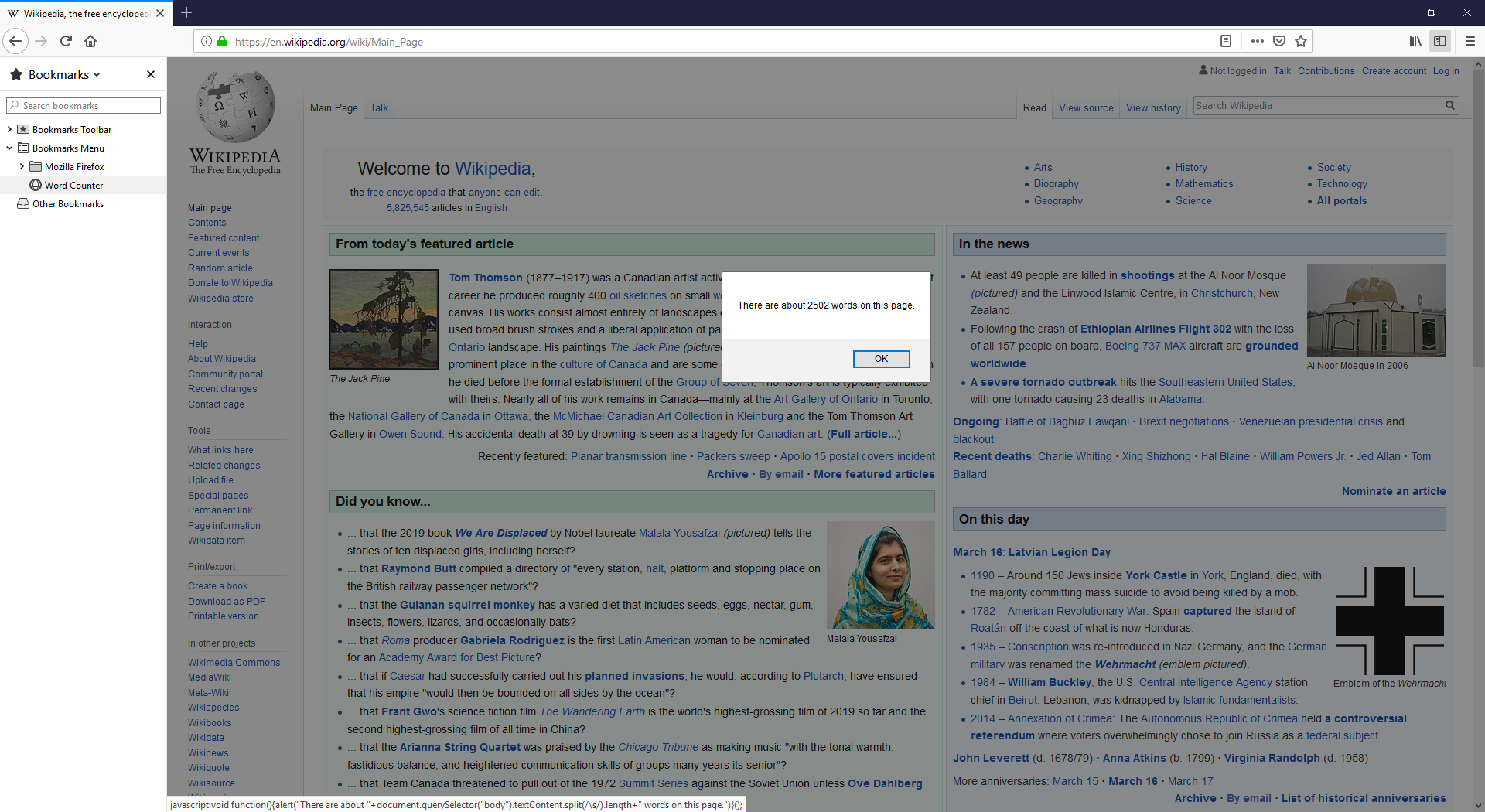
A bookmarklet is essentially a small snippet of JavaScript code stored as a URL within a browser bookmark. When clicked, instead of navigating to a new webpage, the bookmarklet executes its code on the current page. This allows for instantaneous transformations, data extraction, or integration with other web services without the heavy resource overhead associated with traditional browser extensions.
Understanding the Mechanics of Bookmarklets
To appreciate the utility of a bookmarklet, one must first understand how it differs from a standard URL and how it interacts with the Document Object Model (DOM) of a website.
The JavaScript Core: How They Work
Standard bookmarks function by using the http:// or https:// protocols to direct the browser to a specific server. Bookmarklets, however, utilize the javascript: pseudo-protocol. When a browser encounters a URL starting with javascript:, it treats the succeeding text as executable code rather than a web address.
When you click a bookmarklet, the browser executes the script within the context of the page you are currently viewing. This gives the script the ability to “see” what you see—it can read the text on the page, identify images, modify CSS styles, or even send specific data from that page to another application. Because these scripts are usually “minified” (compressed into a single line of text), they look like a jumble of characters to the untrained eye, but to the browser, they are a precise set of instructions.
Bookmarklets vs. Browser Extensions: Key Differences
While both serve to extend browser functionality, their architectures are fundamentally different. Browser extensions are essentially mini-applications that require installation, permission management, and constant background resources. They have access to deep browser APIs and can run continuously.
In contrast, bookmarklets are “on-demand” tools. They consume zero memory or CPU cycles until the moment you click them. Once the task is finished or the page is refreshed, the bookmarklet ceases to run. This makes them significantly more private and secure for certain tasks, as they do not have the “always-on” tracking capabilities that some malicious or poorly coded extensions might possess. Furthermore, bookmarklets are platform-agnostic; a single bookmarklet can often work across Chrome, Firefox, Safari, and Edge without any modification.
How to Install and Use Bookmarklets Safely
The simplicity of bookmarklets is one of their greatest strengths, but it also necessitates a basic understanding of browser security. Because bookmarklets execute code, it is vital to source them from trusted developers.
The Drag-and-Drop Method
The most common way to install a bookmarklet is via the “drag-and-drop” method. Most developers who provide bookmarklets will present them as a link on a webpage. To install it, you simply ensure your “Bookmarks Bar” (or “Favorites Bar”) is visible, then click and hold the link and drag it directly onto the bar.
Once placed, you can right-click the bookmark to rename it. The installation is instantaneous—no restarts or permission pop-ups required. This ease of installation makes them ideal for temporary tools that you might only need for a specific project.
Manual Creation via the Bookmark Manager
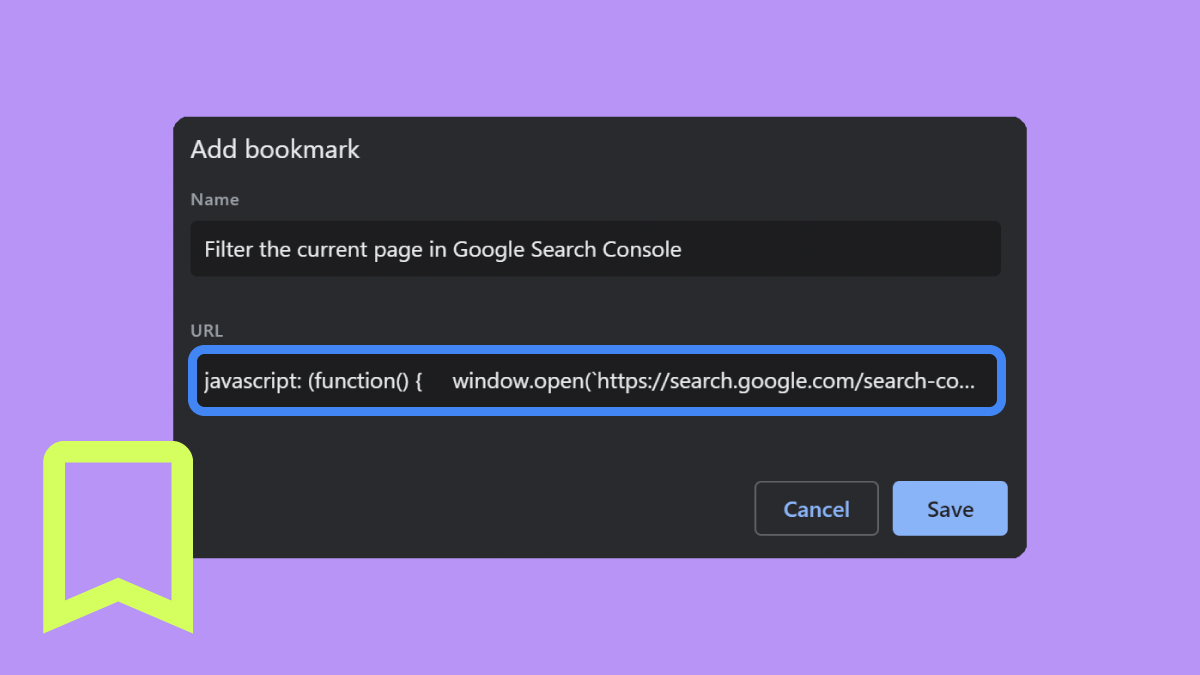
In some cases, you might find a snippet of code on a technical forum or a developer’s blog that you want to turn into a tool. This requires manual creation:
- Copy the JavaScript code (it usually starts with
javascript:(function(){...})()). - Create a new bookmark in your browser for any random page.
- Edit the properties of that bookmark.
- Replace the URL field with the copied JavaScript code.
- Save and rename the bookmark to something descriptive, like “Summarize Page” or “Dark Mode Toggle.”
Best Practices for Digital Security
Since bookmarklets run in the context of the current page, they have access to the information on that page, including sensitive data like session cookies or personal details if you are logged into a site. This creates a potential vector for Cross-Site Scripting (XSS) attacks if you use a bookmarklet from an untrustworthy source.
To maintain digital security, never install a bookmarklet that you cannot verify. If the code is obfuscated (meaning it is intentionally made unreadable), treat it with suspicion. A reputable bookmarklet should have a clear purpose, and for those with basic coding knowledge, the logic should be transparent upon inspection of the URL field.
Practical Use Cases for Modern Web Browsing
Bookmarklets excel at performing singular, repetitive tasks that don’t justify the “weight” of a full extension. From content consumption to technical auditing, their applications are vast.
Content Extraction and Research Tools
For researchers and students, bookmarklets can transform the way information is gathered. There are bookmarklets designed to:
- Generate Citations: Instantly create a bibtex or APA citation for the current page.
- Remove Paywalls/Distractions: Some bookmarklets strip away clutter, advertisements, and “sticky” headers to create a clean reading environment, similar to “Reader Mode” but often more customizable.
- Wayback Machine Lookup: With one click, you can check if a 404-error page or a recently changed article has an archived version on the Internet Archive.
- Translation: Highlight a block of text and click a Google Translate bookmarklet to see a translation in a pop-up window without leaving the page.
Web Development and Design Audits
Developers often use bookmarklets as “lightweight” dev tools. Instead of digging through the Inspect Element console, a bookmarklet can provide immediate visual feedback.
- Grid Overlays: Designers use them to overlay a CSS grid or rule on a live site to check alignment.
- Responsive Testing: Some bookmarklets can instantly resize the browser window to standard mobile or tablet dimensions.
- Accessibility Checks: Tools like the “Axe” or “WAVE” bookmarklets can highlight accessibility errors (like low color contrast or missing alt text) directly on the UI, making it easier to spot-check pages during development.
Privacy and UI Customization
Sometimes, a website’s user interface is simply uncooperative. Bookmarklets allow the user to “take back” the browser. For example, a “Zap” bookmarklet allows you to click on any element on a page (like an annoying pop-up that blocked your view) and delete it from the DOM instantly. Others can force-enable right-clicking on sites that try to disable it, or toggle “Dark Mode” on websites that do not natively support it by inverting specific CSS properties.
The Future of Bookmarklets in the Age of AI and Modern Browsers
As the web becomes more complex, one might assume that the humble bookmarklet is headed toward obsolescence. However, the rise of Artificial Intelligence and the push for browser privacy are actually creating a “renaissance” for these scripts.
Cross-Browser Compatibility and Portability
One of the biggest headaches for software developers is maintaining extensions across different “stores” (Chrome Web Store, Firefox Add-ons, etc.). Bookmarklets bypass this entirely. As long as a browser supports JavaScript in the address bar, the tool works. This portability is especially useful for users who switch between work and personal computers or use different browsers for different tasks. It ensures that their most vital “micro-tools” are always just a sync away via their browser account.

Integrating AI APIs into Bookmarklets
The most exciting frontier for bookmarklets is the integration of AI. With the advent of powerful LLM (Large Language Model) APIs, developers are creating bookmarklets that act as “AI sidekicks.”
Imagine clicking a bookmarklet that sends the text of a long article to an API and returns a three-bullet-point summary in a browser alert. Or a bookmarklet that takes the current page’s URL and generates a set of study flashcards automatically. Because bookmarklets are so easy to write, they are often the first place new AI integrations appear. They serve as a bridge between the static web and the generative capabilities of modern AI, providing a “shortcut” to intelligence without the need for a complex software suite.
In conclusion, while they may seem like a relic of a simpler internet, bookmarklets are a masterclass in functional efficiency. They represent the “Unix philosophy” of the web: do one thing, and do it well. Whether you are looking to boost your productivity, audit a website’s code, or simply remove the clutter from your digital life, the bookmarklet remains an essential, lightweight tool in the modern technologist’s arsenal.
aViewFromTheCave is a participant in the Amazon Services LLC Associates Program, an affiliate advertising program designed to provide a means for sites to earn advertising fees by advertising and linking to Amazon.com. Amazon, the Amazon logo, AmazonSupply, and the AmazonSupply logo are trademarks of Amazon.com, Inc. or its affiliates. As an Amazon Associate we earn affiliate commissions from qualifying purchases.