
In the intricate landscape of modern computer networking, efficiency and power conservation are paramount. As devices become more interconnected and constantly rely on network access, optimizing fundamental communication protocols becomes critical. One such optimization, often overlooked yet playing a significant role in system performance and power management, is ARP Offload. To fully grasp its importance, it’s essential to first understand the foundational protocol it seeks to enhance: the Address Resolution Protocol (ARP).
Understanding ARP: The Foundation
The internet protocol suite, often referred to as TCP/IP, relies on a layered approach to communication. At one layer, devices use IP addresses (e.g., 192.168.1.100) to identify each other globally or within a network. However, at a lower, physical layer (the data link layer), devices need a different kind of address for direct communication within a local network segment: the Media Access Control (MAC) address (e.g., 00:1A:C2:7B:00:4C). MAC addresses are hardware-specific and globally unique identifiers assigned to network interfaces.
The Role of IP and MAC Addresses
When a device on a local network wants to send data to another device on the same local network, it knows the destination’s IP address. But for the data to actually travel across the physical medium (Ethernet cable, Wi-Fi), it needs the destination’s MAC address. This is where ARP comes into play. ARP acts as a crucial translator, mapping logical IP addresses to physical MAC addresses.
How ARP Works: A Step-by-Step Process
The ARP process is straightforward and happens constantly in the background:
- ARP Request: When Device A (with IP 192.168.1.10 and MAC A) wants to send data to Device B (with IP 192.168.1.20) but doesn’t know Device B’s MAC address, Device A broadcasts an ARP request packet to all devices on the local network segment. This request essentially asks: “Who has IP address 192.168.1.20? Tell 192.168.1.10 (MAC A).”
- ARP Reply: Every device on the network receives the broadcast. Device B recognizes its own IP address in the request. It then sends an ARP reply packet directly back to Device A, stating: “I am 192.168.1.20, and my MAC address is MAC B.”
- Data Transmission: Once Device A receives the ARP reply, it now knows Device B’s MAC address and can encapsulate the data packet with the correct destination MAC address for direct communication.
The ARP Cache
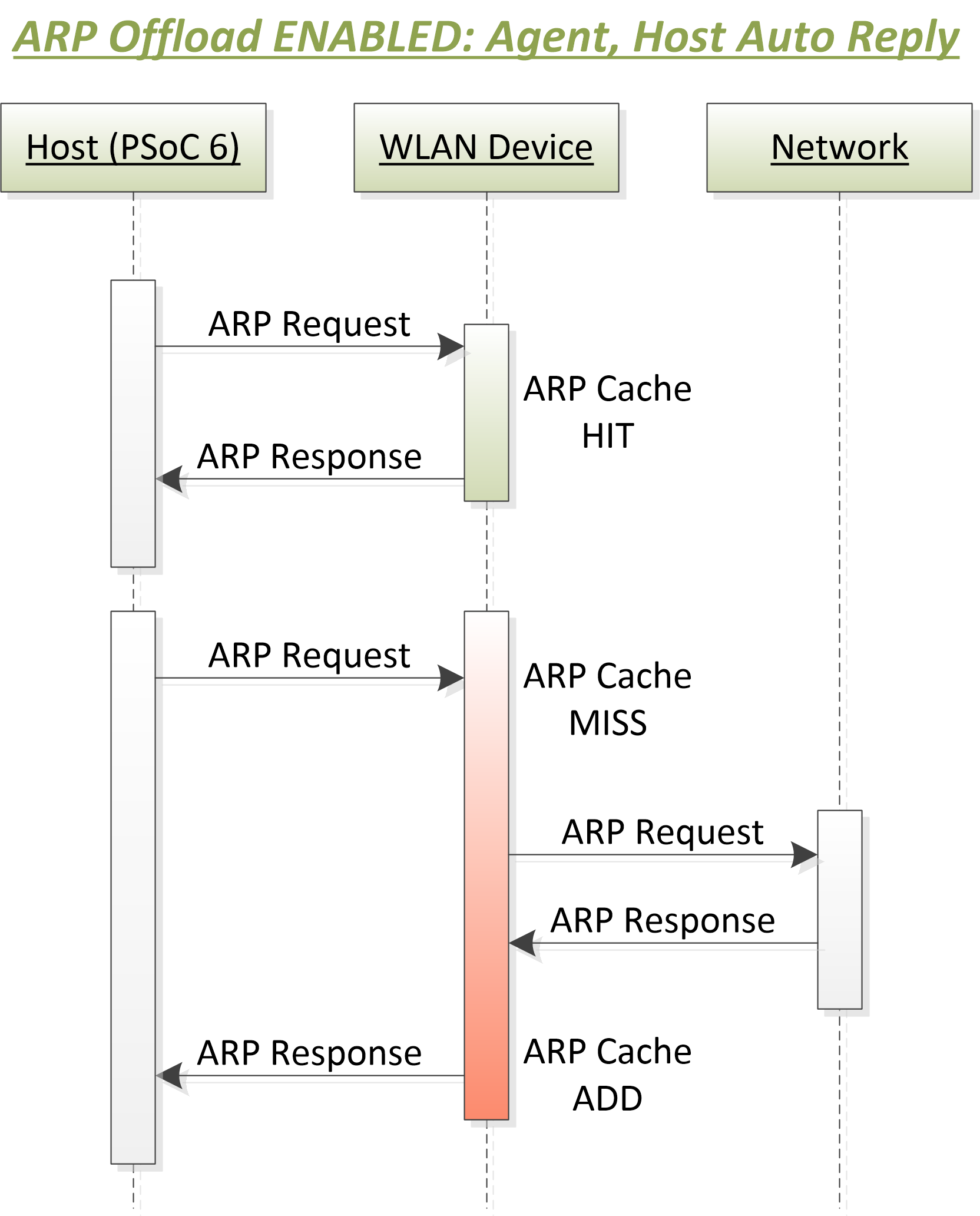
To avoid broadcasting an ARP request every single time it needs to communicate with a known device, each device maintains an ARP cache. This is a temporary table that stores recent IP-to-MAC address mappings. Before sending an ARP request, a device first checks its ARP cache. If the mapping is found, it uses the cached information, significantly speeding up communication and reducing network traffic. Entries in the ARP cache typically have a timeout period and are refreshed or removed if not used for a certain duration.
The Challenge of ARP Resolution
While ARP is fundamental and efficient, the sheer volume of ARP requests in a busy network environment, coupled with the need for devices to conserve power, presents several challenges that ARP offload aims to address.
CPU Overhead and Power Consumption
Every time a device receives an ARP request, its main CPU must process that request. Even if the device is not the target of the request, it still receives and processes the broadcast packet, comparing the target IP with its own. If it is the target, the CPU must then construct and send an ARP reply. In scenarios with many devices, frequent network scans, or rapidly changing network topologies, this can lead to:
- Increased CPU Utilization: The main processor spends cycles on network protocol housekeeping rather than application-level tasks.
- Higher Power Consumption: Even in idle states, constant ARP activity prevents the main CPU from entering deeper sleep modes, consuming more power, which is particularly critical for battery-powered devices like laptops, tablets, and IoT sensors.
Wake-on-LAN (WoL) and Network Idleness
For devices that support Wake-on-LAN (WoL), the ability to power them on remotely via a “magic packet,” ARP activity can be a double-edged sword. While the network interface card (NIC) itself needs to remain active in a low-power state to detect the magic packet, constant ARP requests targeting a sleeping device can prevent the rest of the system from truly powering down. The NIC might pass up requests to a lightly sleeping CPU, or if the NIC itself isn’t smart enough, the main CPU might be woken up unnecessarily to respond to standard ARP requests, defeating power-saving efforts.
Security Implications of Standard ARP
While not directly a security feature, the broadcast nature of ARP can be exploited in attacks like ARP spoofing or cache poisoning. When a device’s main CPU is always actively responding, it might be more susceptible to rapid-fire queries that could potentially destabilize its network stack or contribute to an attacker gaining information about active IPs on the network.
Introducing ARP Offload: A Hardware Solution
ARP Offload is a feature primarily found in network interface cards (NICs) that delegates the responsibility of responding to ARP requests from the main CPU to the NIC’s own dedicated hardware. This simple yet effective optimization allows the main system to remain in a low-power state (sleep, hibernation, or even fully off, provided power is supplied to the NIC) while still appearing active and responsive on the network.
Mechanism of Offloading
When ARP Offload is enabled, the NIC is programmed with the device’s IP address and its own MAC address. Instead of forwarding every incoming ARP request to the main CPU, the NIC’s dedicated circuitry intelligently monitors incoming network traffic. If an ARP request packet arrives specifically asking for the device’s IP address, the NIC itself generates and sends an ARP reply packet, using the stored IP-to-MAC mapping, without involving or waking up the main CPU.
This capability is particularly powerful when the main system is in a low-power state (e.g., ACPI S3 sleep state, where RAM is powered but the CPU is mostly off). The NIC maintains a minimal power state, constantly listening for these specific packets and responding autonomously.
Common Implementations

ARP Offload is a standard feature in most modern Ethernet and Wi-Fi adapters. It’s often bundled with other low-power network features, such as Wake-on-LAN (WoL) and Network Low Power Idle (N_LPI) or Power Management (PM) features. Operating systems like Windows, Linux, and macOS leverage these hardware capabilities to improve system standby times and overall energy efficiency.
How Offload Improves Efficiency
By offloading the ARP response function, the NIC performs a task that would otherwise require the main CPU to wake up, process the request, and then potentially go back to sleep. This reduces the number of “wake-ups” experienced by the CPU, leading to:
- Deeper Sleep States: The main system can enter and remain in deeper, more power-efficient sleep states for longer durations.
- Faster Transitions: The time taken for the main system to return to a fully operational state is minimized, as it hasn’t been disturbed by trivial network traffic.
- Reduced Overall Power Consumption: Directly contributes to extended battery life for mobile devices and lower energy bills for stationary ones.
Benefits and Implications of ARP Offload
The adoption of ARP Offload brings a host of advantages that impact both performance and energy efficiency across various device types.
Reduced CPU Utilization
For devices that are constantly connected, such as servers, workstations, or network appliances, ARP Offload subtly reduces the background load on the CPU. While a single ARP request is trivial, the cumulative effect in a busy network can add up. By handling these requests at the hardware level, the CPU is freed to dedicate its cycles to core applications and tasks, potentially improving overall system responsiveness.
Enhanced Power Efficiency for Devices
This is arguably the most significant benefit. For mobile devices, laptops, tablets, and IoT devices, battery life is a primary concern. ARP Offload allows these devices to remain connected and discoverable on the network, even when their main processing units are in a very low-power state. This means:
- Longer Battery Life: The device consumes less power during idle or standby periods.
- Reliable Wake-on-LAN (WoL): WoL functionality is more robust. When the main system is in a low-power state, the NIC can still respond to ARP requests, keeping the device “known” on the network. When a magic packet arrives, the NIC can then reliably trigger the main system to wake up, as it was never truly “disconnected” from the ARP perspective. Without ARP offload, devices might drop out of ARP tables on other network devices, making it harder for WoL to function correctly if other network devices assume it’s offline.
Improved Network Responsiveness
By allowing the NIC to respond instantly to ARP requests, devices appear more responsive on the network. This can contribute to slightly faster connection establishment times for other devices trying to communicate with it, as they don’t have to wait for the main CPU to wake up and process the request.
Security Advantages and Caveats
While ARP Offload is not a direct security feature designed to prevent ARP spoofing, it does offer indirect security benefits. By having the NIC handle routine ARP responses, the main system’s network stack is less exposed to constant ARP traffic during low-power states. This can subtly make certain network reconnaissance techniques that rely on device responsiveness less effective against a sleeping machine. However, it’s crucial to remember that ARP offload does not protect against sophisticated ARP-based attacks, which still require other layers of network security (e.g., dynamic ARP inspection on switches).
Deployment and Considerations
Implementing and understanding ARP Offload requires a basic awareness of operating system and hardware capabilities, as well as potential network implications.
Operating System and Hardware Support
ARP Offload is a widely supported feature. Most modern network adapters (Ethernet and Wi-Fi) from manufacturers like Intel, Realtek, Broadcom, and Killer Network have this capability. Operating systems such as:
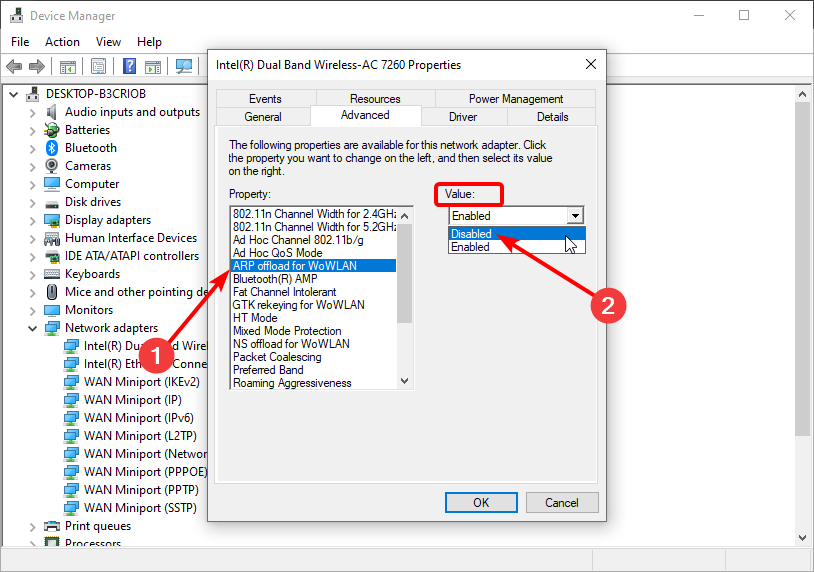
- Windows: Often has ARP Offload enabled by default for power management settings on network adapters. It can usually be configured through the device manager under the network adapter’s power management or advanced settings.
- Linux: Support is typically provided by network drivers, and configuration might involve
ethtoolor specific kernel module parameters. - macOS: Manages power and network features automatically, generally leveraging ARP Offload for optimal battery performance.
Verification of its status usually involves checking network adapter properties in the OS.
Configuration and Troubleshooting
For most users, ARP Offload works seamlessly in the background and requires no manual configuration. It’s often enabled by default as part of power-saving features. However, in specific scenarios, especially in enterprise environments, virtualized setups, or when troubleshooting unusual network behavior, an administrator might need to:
- Disable/Enable: Temporarily disable ARP Offload to diagnose network issues or test specific power consumption patterns. This is usually done via the network adapter’s advanced driver settings in the OS.
- Check Driver Versions: Ensure that the latest network adapter drivers are installed, as these often include bug fixes and performance improvements related to power management features like ARP Offload.
- Interaction with Virtualization: In virtual machine environments, the hypervisor and virtual NICs need to properly support these offload features to pass the benefits to the guest OS. Misconfigurations can sometimes lead to connectivity issues or unexpected power behavior for VMs.
Impact on Network Monitoring
Network administrators performing deep packet inspection or monitoring ARP tables might observe that a device with ARP Offload enabled appears responsive even when its main CPU is in a low-power state. This is an expected behavior and a sign that the offload is working correctly. However, it means that the responsiveness of a device to ARP requests does not necessarily indicate the activity level of its main CPU. Monitoring tools need to account for this hardware-level response.
In conclusion, ARP Offload is a crucial, often invisible, technology that underpins the efficiency and power management of modern networked devices. By intelligently delegating the mundane task of ARP resolution to dedicated hardware, it allows systems to remain connected and responsive while significantly extending battery life and reducing overall energy consumption. Understanding this mechanism is key to appreciating the subtle innovations that keep our digital world running smoothly and efficiently.
aViewFromTheCave is a participant in the Amazon Services LLC Associates Program, an affiliate advertising program designed to provide a means for sites to earn advertising fees by advertising and linking to Amazon.com. Amazon, the Amazon logo, AmazonSupply, and the AmazonSupply logo are trademarks of Amazon.com, Inc. or its affiliates. As an Amazon Associate we earn affiliate commissions from qualifying purchases.