
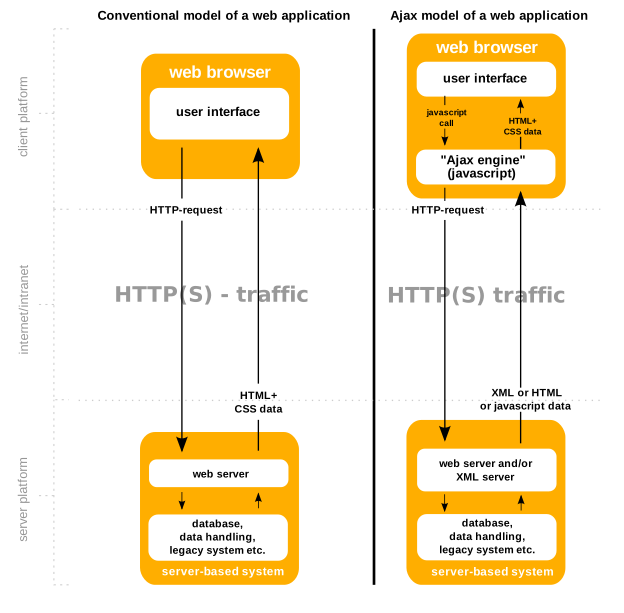
In the early days of the internet, every interaction with a website required a full page reload. If you wanted to check your inbox, you clicked a button, the screen went white, and the entire page re-downloaded from the server. This “stop-and-go” experience was the standard until the arrival of a revolutionary technology: the XMLHttpRequest (XHR) request.
Today, XHR is the silent engine behind the seamless, “app-like” experiences we take for granted. Whether you are scrolling through a live Twitter feed, receiving real-time stock updates, or seeing a “username taken” warning while typing in a registration form, you are witnessing XHR in action. This article explores the technical foundations of XHR, its role in modern software development, and how it paved the way for the contemporary web.

Understanding the Fundamentals: What is an XMLHttpRequest?
At its core, an XMLHttpRequest (XHR) is a JavaScript object used to retrieve data from a URL without having to do a full page refresh. Despite its name, XHR can be used to retrieve any type of data, not just XML. It supports JSON, HTML, and even plain text, making it a versatile tool for developers.
The Shift to Asynchronous Communication
The “A” in AJAX (Asynchronous JavaScript and XML)—the development methodology that popularized XHR—is the most critical component. In a synchronous world, a program must wait for one task to finish before moving to the next. If a server takes three seconds to respond, the entire browser remains frozen.
XHR introduced asynchronous communication. This allows the browser to send a request to a server in the background. While the server processes the request, the user can continue to interact with the page—scrolling, clicking, or typing. Once the data arrives, the browser triggers a “callback” function to update only the specific part of the page that needs the new information.
The Historical Significance of XHR
XHR was originally designed by Microsoft for Outlook Web Access in the late 1990s. It was later adopted by Mozilla, Safari, and Opera, eventually becoming a W3C standard. It was the catalyst for “Web 2.0,” moving the web away from static documents toward interactive applications. Without the foundation laid by XHR, modern frameworks like React, Angular, and Vue would likely look very different today.
The Anatomy of an XHR Request: How It Works Under the Hood
To understand why XHR is so powerful, one must look at how it manages the lifecycle of a data exchange. A typical XHR request follows a specific sequence of states and utilizes various HTTP methods to interact with a server.
The Lifecycle: Ready States
Every XHR object maintains a readyState property that tracks the status of the request. Understanding these states is crucial for debugging and optimizing web performance:
- 0 (UNSENT): The client has been created, but the
open()method hasn’t been called. - 1 (OPENED): The
open()method has been called. Here, the developer specifies the HTTP method (GET, POST, etc.) and the target URL. - 2 (HEADERS_RECEIVED): The request has been sent, and the server has returned the HTTP headers.
- 3 (LOADING): The response body is being downloaded. For large datasets, this state allows developers to track progress.
- 4 (DONE): The operation is complete. The data is fully downloaded, and the developer can now manipulate it via JavaScript.
Request Methods and Headers
XHR allows developers to specify the type of interaction they want with the server. A GET request is used to retrieve data, while a POST request is used to send data (like a form submission) to the server. Developers can also set custom HTTP headers. This is vital for security and data integrity, allowing the inclusion of authentication tokens or specifying the “Content-Type” (such as application/json) so the server knows exactly how to parse the incoming information.
Handling the Response
Once the request reaches the “DONE” state, the developer must check the HTTP status code. A 200 OK means everything went well, while codes like 404 (Not Found) or 500 (Internal Server Error) require error-handling logic. This granular control is what allows developers to build robust applications that provide feedback to users when things go wrong, rather than simply crashing or displaying a blank screen.
XHR vs. the Fetch API: A Modern Comparison
For nearly two decades, XHR was the only game in town for background data fetching. However, the introduction of the Fetch API in modern browsers has changed the landscape. While they both achieve similar goals, their underlying philosophies differ significantly.
Why Fetch is Gaining Ground
The Fetch API is designed to be more powerful and flexible than XHR. It uses Promises, which makes the code much cleaner and easier to read. While XHR relies on complex event listeners and nested callbacks (often leading to “callback hell”), Fetch allows for a more linear, readable flow using .then() or the modern async/await syntax.

Furthermore, Fetch provides a more unified way to handle global browser concepts like CORS (Cross-Origin Resource Sharing) and HTTP headers. It treats requests and responses as first-class objects, making it easier to clone them or manipulate them in Service Workers for offline capabilities.
Where XHR Still Excels
Despite the rise of Fetch, XHR has not been deprecated and remains useful in specific technical scenarios. The most notable advantage of XHR is its built-in support for progress events. If you are building an application that allows users to upload large files (like a video editing suite or a cloud storage service), XHR provides a native way to track exactly how many bytes have been uploaded. Fetch does not currently provide an easy, native way to monitor upload progress, often making XHR the preferred choice for heavy-duty file management tools.
Additionally, XHR has a long-standing history of browser compatibility. While Fetch is supported in all modern browsers, legacy enterprise systems still running older versions of Internet Explorer (though rare) require XHR or polyfills to function.
Security, Performance, and Best Practices
In the realm of digital security and software architecture, XHR requests must be handled with care. Because they allow a browser to communicate with a server programmatically, they are potential vectors for attacks if not managed correctly.
Navigating CORS and the Same-Origin Policy
By default, web browsers enforce the Same-Origin Policy, which prevents a script on one website from making an XHR request to a different domain. This is a critical security feature that prevents malicious sites from stealing sensitive data from your bank account if you happen to have it open in another tab.
To allow legitimate cross-site requests (for example, a frontend app on myapp.com calling an API on api.myapp.com), developers use CORS (Cross-Origin Resource Sharing). This involves the server sending specific headers that tell the browser, “I trust this origin, and it is allowed to access my data.”
Performance Optimization: Minimizing Latency
Every XHR request carries overhead. To maintain a high-performance application, developers must be strategic.
- Batching: Instead of sending ten separate XHR requests for ten pieces of data, it is often more efficient to batch them into a single request.
- Caching: Browsers can cache XHR responses. By setting appropriate “Cache-Control” headers, developers can ensure that the browser doesn’t waste bandwidth re-downloading data that hasn’t changed.
- Data Minimization: Developers should ensure that the server only sends the data the client actually needs. Moving from XML to JSON was a major step in this direction, as JSON is much more lightweight and faster for JavaScript to parse.
Authentication and Tokens
When making XHR requests to secure APIs, developers typically include a Bearer Token or a JWT (JSON Web Token) in the request header. It is a best practice to ensure these requests are always made over HTTPS to prevent “man-in-the-middle” attacks where a hacker could intercept the request and steal the credentials.
The Future of Data Fetching in Web Development
As we look toward the future of technology, the role of the XHR request is evolving from a daily tool to a fundamental building block. While high-level libraries like Axios or the native Fetch API are now the primary choices for new projects, they are essentially abstractions or evolutions of the concepts introduced by XHR.
The rise of GraphQL has further refined how we use these requests. Instead of making multiple XHR requests to different “endpoints” to get different pieces of data, GraphQL allows developers to make a single request that describes exactly what data they need, further reducing the payload size and improving mobile performance.
Furthermore, the advent of WebSockets and Server-Sent Events (SSE) has introduced true “push” capabilities, where the server can send data to the client without the client even asking. However, for the majority of standard CRUD (Create, Read, Update, Delete) operations, the request-response model pioneered by XHR remains the most efficient and reliable method.
Conclusion
The XMLHttpRequest request is one of the most significant innovations in the history of software development. It transformed the web from a collection of static documents into a vibrant ecosystem of interactive applications. By enabling asynchronous communication, it broke the “refresh cycle” and allowed developers to build the responsive, fluid experiences that define the digital age.
While newer technologies like the Fetch API offer a more modern syntax, the principles of XHR—managing state, handling HTTP methods, and navigating security protocols—remain essential knowledge for any developer. Understanding XHR is not just about learning an old way of doing things; it is about understanding the very plumbing of the modern internet. As we continue to push the boundaries of what is possible in a browser, XHR stands as the foundation upon which the future of the web was built.
aViewFromTheCave is a participant in the Amazon Services LLC Associates Program, an affiliate advertising program designed to provide a means for sites to earn advertising fees by advertising and linking to Amazon.com. Amazon, the Amazon logo, AmazonSupply, and the AmazonSupply logo are trademarks of Amazon.com, Inc. or its affiliates. As an Amazon Associate we earn affiliate commissions from qualifying purchases.