
In the complex tapestry of modern IT infrastructure, the acronym “OU” frequently emerges, particularly when discussing network management, security, and administrative delegation. Far from being a mere abbreviation, an Organizational Unit (OU) represents a fundamental building block within directory services, primarily Microsoft Active Directory, that underpins the robust, scalable, and secure operation of countless enterprises worldwide. Understanding what an OU is, its purpose, and its strategic implementation is critical for any IT professional aiming to design, manage, or troubleshoot a sophisticated network environment.
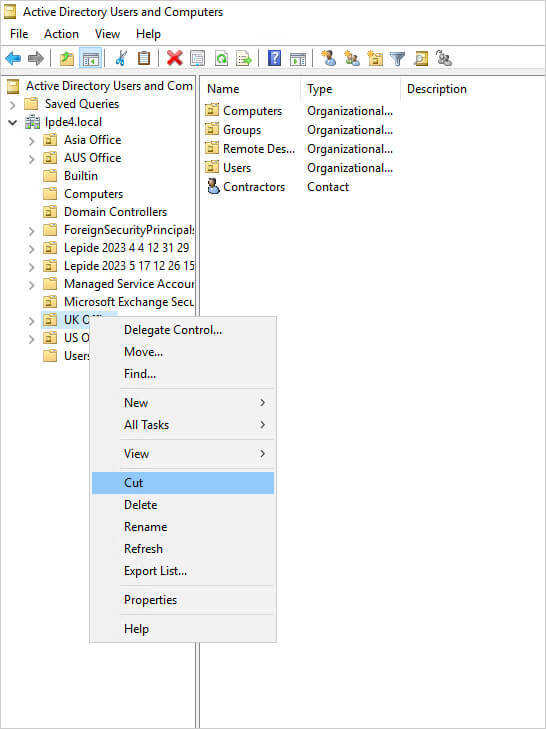
At its core, an OU is a container object within a directory service domain. It acts as a logical grouping mechanism for various network resources such as user accounts, computer accounts, groups, shared folders, and even other OUs. Imagine an organization chart; an OU is like a specific department, team, or branch office within that chart, but in a digital, administrative context. Its primary purpose revolves around two pivotal functions: facilitating the granular delegation of administrative control and enabling the targeted application of Group Policy Objects (GPOs). Without OUs, managing large, distributed networks would quickly descend into chaos, compromising both security and efficiency.
The Core Concept: Organizational Units in Directory Services
To truly grasp the significance of an OU, it’s essential to understand its definition, its role in a broader IT context, and how it differentiates from other related directory service components. An OU isn’t just a folder; it’s a powerful tool with specific implications for security, management, and policy enforcement.
Defining an OU
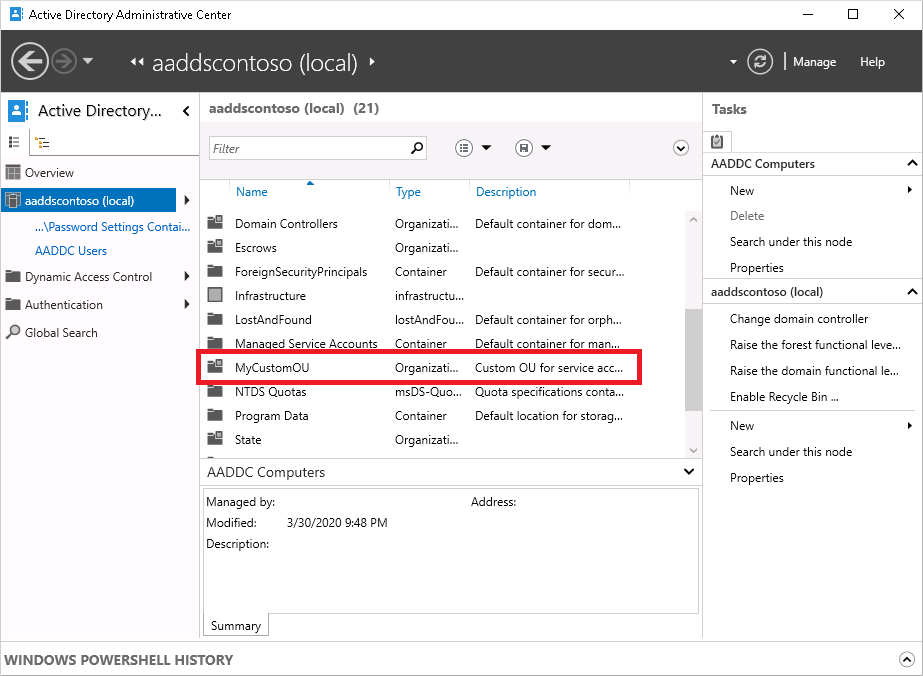
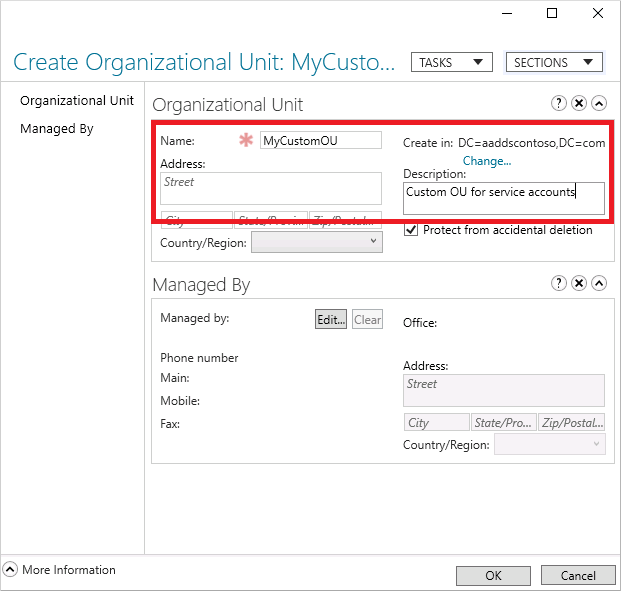
An Organizational Unit (OU) is a special type of container object within a domain in directory services like Active Directory. Unlike domains, which are security boundaries and represent a distinct administrative and replication partition, OUs exist within a domain. They allow administrators to create a hierarchical, logical structure that mirrors the organization’s administrative or functional model. For instance, an organization might have OUs for “Sales,” “Marketing,” “HR,” “IT,” “Servers,” “Workstations,” or even by geographical location like “New York Office” and “London Office.”
The objects that can reside within an OU include:
-
User Accounts: Individual employee accounts.
-
Computer Accounts: Workstations, laptops, and servers.
-
Groups: Security groups and distribution groups.
-
Shared Folders: Network shares.
-
Printers: Network-attached printers.
-
Other OUs: Allowing for a nested hierarchy.
This ability to group related objects logically is the first step towards streamlined management and policy application, setting the stage for more complex administrative strategies.
Why OUs are Essential for IT Infrastructure
The necessity of OUs stems from the inherent complexities of managing large-scale IT environments. Without them, administrators would face significant challenges in:
-
Logical Structuring: OUs provide a clear, intuitive way to organize tens, hundreds, or even thousands of network objects. This logical organization makes it easier to locate resources, understand the network layout, and maintain a consistent management approach.
-
Delegation of Administrative Control: This is perhaps the most compelling reason for OUs. They enable administrators to delegate specific management tasks to designated users or groups for a subset of the organization’s resources without granting them excessive permissions over the entire domain. For example, the HR department’s manager might be empowered to reset passwords only for users within the “HR Users” OU.
-
Application of Group Policy Objects (GPOs): OUs are the most granular level at which GPOs can be applied. GPOs are powerful tools for enforcing security settings, deploying software, configuring desktop environments, and managing many other aspects of the user and computer experience. By linking a GPO to a specific OU, policies can be targeted precisely to only the objects within that OU, allowing for differentiated configurations across the organization.
These three pillars — structuring, delegation, and policy application — make OUs indispensable for maintaining order, security, and efficiency in enterprise-level IT environments.
OU vs. Domain vs. Group: Clarifying the Distinctions
A common point of confusion for those new to directory services is differentiating between domains, OUs, and groups. While all three are fundamental components, they serve distinct purposes:
-
Domain: The domain is the primary administrative and security boundary in Active Directory. It represents a logical grouping of network objects that share a common database, security policies, and trust relationships. All users, computers, and OUs belong to a domain. A domain defines the scope of authentication and resource access within its boundaries. For example,
contoso.comwould be a domain. -
Organizational Unit (OU): As discussed, an OU is a container within a domain. It’s not a security boundary itself, but rather an administrative boundary for delegation and GPO application. Objects within an OU still belong to the overarching domain and adhere to its fundamental security principles, but the OU allows for further refinement of those principles.
-
Group: A group is a collection of user accounts, computer accounts, or other groups that can be assigned permissions to access resources. Groups are security principals; they are the entities to which permissions are directly assigned (e.g., “Sales_Group” has read access to the “Sales Shared Drive”). While OUs contain objects, including groups, they are not security principals themselves. You cannot grant permissions directly to an OU in the same way you would to a group. Instead, you delegate control over an OU, or apply GPOs to an OU, which then affects the objects within it.
Understanding these distinctions is crucial for designing a coherent and secure Active Directory infrastructure.
The Power of Delegation: Streamlining Administration
One of the most significant advantages of using Organizational Units lies in their ability to facilitate granular administrative delegation. In any large organization, it’s impractical and highly risky to have only a handful of domain administrators with full control over the entire network. OUs provide the mechanism to distribute administrative responsibilities safely and efficiently.
Granular Administrative Control
OUs empower central IT teams to delegate specific administrative tasks to individuals or groups who might not be full-fledged IT administrators. This means a department head, a branch office manager, or even a specialized help desk team can be granted permissions to manage only the resources relevant to their area of responsibility, without exposing critical domain-wide configurations.
Examples of delegated tasks include:
-
Resetting passwords for users within a specific department’s OU.
-
Managing (creating, modifying, deleting) user accounts in a particular OU.
-
Adding computers to a specific OU or joining them to the domain.
-
Managing shared resources (like printers or folders) within an OU.
This granular control dramatically reduces the workload on central IT and accelerates routine administrative processes, as requests can be handled by local or specialized teams rather than bottlenecking at a small group of highly privileged administrators.
Enhancing Security Posture
Delegation through OUs is a cornerstone of a strong security posture, primarily by adhering to the principle of least privilege. This principle dictates that users and processes should only have the minimum necessary permissions to perform their job functions.
By delegating administrative tasks via OUs, organizations can:
-
Reduce the “Blast Radius”: If an account with delegated privileges is compromised, the damage is confined only to the scope of that OU, rather than potentially impacting the entire domain.
-
Minimize the Number of Highly Privileged Accounts: Fewer accounts with domain admin rights mean fewer targets for attackers and a reduced risk of accidental misconfigurations or malicious activity at the highest level.
-
Improve Accountability: By clearly defining who has administrative control over which OUs, it becomes easier to track changes and hold individuals accountable for their actions.
This targeted approach to permissions management ensures that necessary administrative functions can be performed without unnecessarily elevating risk across the entire network.
Examples of Delegation Scenarios
Consider a large company with multiple departments and branch offices:
-
Help Desk: A dedicated “Help Desk” security group can be granted permission to reset passwords and unlock user accounts within the “Users” OU, or more specifically, within sub-OUs like “Sales Users” and “Marketing Users.” They wouldn’t have permission to modify server configurations or create new domain administrators.
-
Branch Office IT Staff: For a remote branch office, local IT personnel can be delegated administrative rights over the “BranchOfficeLocation” OU. This allows them to manage local computers, users, and printers without needing central IT intervention for routine tasks, and without granting them control over the entire corporate network.
-
Departmental Managers: An HR manager might be given the ability to view user properties (e.g., phone numbers, job titles) for users in the “HR Users” OU, enabling them to keep their departmental directory information up-to-date.
These scenarios highlight how OUs provide the flexibility to distribute administrative duties logically and securely, aligning IT management with the organizational structure.
Group Policy Management: The Foundation of Configuration
Beyond delegation, the other primary and equally critical function of Organizational Units is their role in applying Group Policy Objects (GPOs). GPOs are the backbone of configuration management in Active Directory environments, dictating everything from desktop backgrounds and network drive mappings to complex security settings and software deployments.
Applying Group Policies to OUs
Group Policy Objects are sets of configurations that can be linked to Active Directory containers: sites, domains, and OUs. OUs offer the most granular level of GPO application, allowing administrators to target policies precisely to specific sets of users or computers.
For example:
-
A “Sales Workstations” OU can have a GPO linked to it that enforces specific security settings, installs sales-related software, and maps a network drive to the sales share.
-
A “Server Management” OU, containing only server accounts, might have a GPO that restricts RDP access, configures server firewall rules, and enforces specific logging policies.
-
An “Executive Users” OU could have a GPO that configures a custom desktop wallpaper and specific Outlook settings.
By linking GPOs to OUs, administrators can ensure that users and computers receive the correct configurations based on their role, department, or location, without affecting other parts of the organization.
Inheritance and Enforcement
GPO application follows a specific order: Local, Site, Domain, and then Organizational Unit (LSDOU). Policies applied at a higher level (like the domain) are inherited by OUs and the objects within them. However, GPOs linked to OUs can override or supplement policies inherited from parent domains or sites.
-
Inheritance: By default, settings from parent OUs (and the domain) are inherited by child OUs.
-
Blocking Inheritance: Administrators can choose to block inheritance at an OU level, preventing GPOs from higher levels from applying. However, this should be used cautiously as it can lead to inconsistent configurations.
-
Enforcement: A GPO can be set to “enforced,” which prevents child OUs from blocking its inheritance. This is useful for critical security policies that must apply universally.
Understanding this inheritance model is vital for predicting how policies will apply and for troubleshooting GPO-related issues. Strategic placement of OUs and GPOs is key to a well-managed environment.
Strategic OU Design for GPOs
Effective GPO management heavily relies on a well-thought-out OU structure. A poor OU design can lead to overly complex GPOs, unintended policy applications, or a need for numerous exceptions, making administration cumbersome and error-prone.
Best practices for OU design concerning GPOs include:
-
Separate Users and Computers: It’s often beneficial to have separate OUs for user accounts and computer accounts, even within the same department (e.g., “Sales Users” and “Sales Workstations”). This allows for applying user-specific GPOs to user OUs and computer-specific GPOs to computer OUs.
-
Departmental/Role-Based OUs: Structuring OUs by department or user role (e.g., “Developers,” “Executives”) enables the application of tailored software deployments, security settings, or application configurations relevant to that specific group.
-
Geographical OUs: For organizations with multiple physical locations, OUs based on geography can be useful for applying location-specific policies, such as printer mappings or network settings relevant to a particular branch office.
-
Minimizing Depth: While OUs can be nested, excessively deep OU structures can make GPO management and troubleshooting more complex. Aim for a balance that provides necessary granularity without becoming unwieldy.
A strategic OU design acts as a blueprint, ensuring that Group Policy can be applied efficiently, securely, and with minimal overlap or conflict.
Best Practices for OU Design and Implementation
Implementing an effective OU structure is not a trivial task; it requires careful planning, adherence to best practices, and ongoing maintenance. A well-designed OU structure significantly contributes to the overall stability, security, and manageability of an Active Directory environment.
Planning Your OU Structure
The most critical step in OU implementation is the initial planning phase. This should involve key stakeholders from IT, security, and potentially departmental heads. Consider the following:
-
Organizational Chart: Does your current organizational chart lend itself to a clear OU structure (e.g., by department, division, or location)?
-
Administrative Model: Who needs to manage what? Which teams or individuals require delegated control over specific resources?
-
Group Policy Requirements: What are your organization’s security policies, software deployment strategies, and desktop configuration needs? How can OUs facilitate the targeted application of these policies?
-
Future Growth: Anticipate how the organization might grow or change in the future and design an OU structure that can adapt without major overhauls.
-
Simplicity vs. Granularity: Strive for a balance. Too few OUs can make delegation and GPO application difficult, while too many or an overly deep hierarchy can lead to complexity and administrative overhead.
Functional vs. Geographical vs. Hybrid Models
There are several common approaches to designing an OU structure:
-
Functional Model: OUs are created based on business functions or departments (e.g., “Sales,” “HR,” “Engineering,” “Finance”). This is often ideal when administrative tasks and GPOs largely align with departmental responsibilities.
-
Geographical Model: OUs are organized by physical locations (e.g., “New York,” “London,” “Tokyo”). This is suitable for organizations with distributed offices where local IT teams manage resources specific to their site or where location-specific GPOs are prevalent.
-
Hybrid Model: A combination of functional and geographical structures. For instance, a top-level OU might be geographical (e.g., “Europe”), with child OUs representing departments within that region (e.g., “Europe/Sales,” “Europe/HR”). This is often the most practical approach for large, multi-national organizations.
The choice of model depends heavily on the organization’s unique structure, administrative needs, and compliance requirements.
Naming Conventions and Documentation
Consistency and clarity are paramount in OU management:
-
Consistent Naming Conventions: Establish clear and consistent naming conventions for your OUs from the outset (e.g., “OUSales,” “UsersHR,” “Computers_Servers”). This makes the structure intuitive and easy to navigate for all administrators.
-
Thorough Documentation: Document your OU structure, detailing the purpose of each OU, the delegated permissions, and the GPOs linked to them. This documentation is invaluable for onboarding new IT staff, troubleshooting, and ensuring long-term manageability.
Regular Review and Refinement
An OU structure is not a static entity. As organizations evolve, so too should their directory service infrastructure:
-
Periodic Review: Regularly review your OU structure to ensure it still aligns with the organization’s current needs, administrative model, and security policies.
-
Adaptation: Be prepared to refine or reorganize OUs as departments merge, new offices open, or new technologies are introduced. Proactive adaptation prevents the structure from becoming outdated and inefficient.
-
Auditing: Periodically audit delegated permissions and GPO links to ensure they are still appropriate and haven’t inadvertently introduced security vulnerabilities or policy conflicts.
Beyond Active Directory: OUs in a Broader Context
While Microsoft Active Directory is the most common context for discussing Organizational Units, the underlying concept is not exclusive to it. The idea of logically grouping resources for administrative and policy purposes is a fundamental principle in various directory services and modern cloud environments.
Cloud-based Identity Management
Cloud platforms have adopted similar concepts to manage resources and identities at scale:
-
AWS Organizational Units: Amazon Web Services (AWS) utilizes “Organizations” to consolidate multiple AWS accounts into a single structure. Within an AWS Organization, you can create Organizational Units (OUs) to group accounts. This allows for centralized management of policies (Service Control Policies or SCPs) across accounts, similar to how GPOs are applied to OUs in Active Directory.
-
Azure AD Administrative Units: In Azure Active Directory, Administrative Units (AUs) serve a similar purpose, enabling the delegation of administrative control over a specific subset of users and groups. For example, a global administrator can create an AU for “Marketing Department Users” and delegate management responsibilities for only those users to a specific help desk team.
These cloud-native equivalents demonstrate the enduring value of the OU concept for managing distributed resources and permissions in a hierarchical manner.
LDAP and X.500 Directories
The concept of Organizational Units predates Active Directory itself. It is rooted in the X.500 directory services standard and its lighter-weight descendant, the Lightweight Directory Access Protocol (LDAP). In these directories, an “ou” attribute (organizationalUnitName) is a standard component of a distinguished name (DN), signifying a level in the directory tree below the organization (o) and above individual entries. The principles of grouping and hierarchy for easier management and policy application were already inherent in these foundational directory technologies.
Conclusion
The Organizational Unit (OU) is far more than a simple folder in a directory; it is a strategic administrative construct that lies at the heart of efficient, secure, and scalable IT infrastructure. By providing a logical framework for grouping users, computers, and other resources, OUs enable crucial functions like the granular delegation of administrative control and the precise application of Group Policy Objects.
From minimizing security risks through least privilege principles to streamlining daily IT operations and ensuring consistent configurations across diverse organizational segments, OUs are indispensable. Their foundational role in Active Directory, alongside their conceptual analogues in modern cloud identity management platforms, underscores their enduring relevance. A well-planned, clearly documented, and regularly reviewed OU structure is a hallmark of a mature and robust IT environment, empowering organizations to manage their digital assets effectively and securely in an ever-evolving technological landscape.
aViewFromTheCave is a participant in the Amazon Services LLC Associates Program, an affiliate advertising program designed to provide a means for sites to earn advertising fees by advertising and linking to Amazon.com. Amazon, the Amazon logo, AmazonSupply, and the AmazonSupply logo are trademarks of Amazon.com, Inc. or its affiliates. As an Amazon Associate we earn affiliate commissions from qualifying purchases.