
In the vast and often complex world of software, the act of installing an application might seem like a simple click-and-wait process for the end-user. However, beneath that user-friendly surface lies a sophisticated orchestration of files, configurations, and system changes, particularly within the Windows ecosystem. At the heart of this process for countless applications is the MSI installer. An MSI installer, fundamentally, is a database package used by the Microsoft Windows Installer service to install, maintain, and remove software on Windows operating systems. Far more than just an executable file, it represents a structured, transactional approach to software deployment, offering a blend of reliability, control, and management capabilities that have made it an indispensable tool for both individual users and large enterprises for decades. Understanding what an MSI installer is, how it functions, and its advantages and limitations is crucial for anyone navigating the intricate landscape of Windows software, from casual users to IT professionals seeking to streamline their tech environments and bolster digital security.
Understanding the Core of MSI: The Microsoft Windows Installer Technology
The concept of an MSI installer is inextricably linked to the Microsoft Windows Installer service, a core component of the Windows operating system. This powerful framework dictates how applications are installed, managed, and uninstalled, striving for consistency and system stability. It’s not just a file format; it’s an entire architecture designed to provide a robust and predictable environment for software deployment.
What Exactly is an MSI File?
An MSI file, which stands for “Microsoft Software Installer,” is not merely a program that runs to install other programs. Instead, it is a relational database package, structured using an OLE compound file format. This package contains comprehensive instructions and data about the software it’s designed to install. Think of it as a detailed blueprint and an accompanying toolkit, all bundled into one self-contained unit.
Within an MSI file, you’ll find a wealth of information systematically organized into various tables. These tables define crucial aspects of the installation process, including:
- Files: A list of all files to be installed, their source locations within the package, and their target destinations on the user’s system.
- Registry Keys: Details on registry entries that need to be created, modified, or deleted during installation. These are vital for applications to store configuration settings, licensing information, and system integrations.
- Shortcuts: Instructions for creating shortcuts on the desktop, in the Start Menu, or elsewhere, making the installed application easily accessible to the user.
- Components: Logical groupings of files, registry keys, and other resources that the installer treats as a single unit. This allows for modular installation and uninstallation.
- Features: User-selectable parts of the application. For instance, a word processor might offer “Basic Features,” “Spell Checker,” and “Templates” as distinct features, allowing users to choose what they want to install.
- Custom Actions: Specific commands or scripts that need to be executed at various points during the installation, such as checking for prerequisites, modifying configuration files, or integrating with other software.
- User Interface (UI) Sequences: Definitions for the dialog boxes, prompts, and progress bars that users see during interactive installations.
The database structure of an MSI file is key to its power. By having all this information meticulously cataloged, the Windows Installer service can perform intelligent operations, ensuring that installations are consistent, modifiable, and, if necessary, reversible. This structured approach significantly contributes to digital security and system integrity by standardizing how applications interact with the operating system.
The Role of the Windows Installer Service
While the MSI file provides the instructions, it’s the Microsoft Windows Installer service (often abbreviated as “Msiexec.exe”) that acts as the executor. This service is an integral part of Windows and runs with elevated privileges, allowing it to make necessary system-wide changes securely. It’s responsible for interpreting the MSI database and carrying out the installation, modification, repair, or uninstallation of software.
The Windows Installer service brings several critical capabilities to the table:
- Transactionality: This is perhaps one of its most significant features. Installations are treated as transactions. If any part of the installation fails or is interrupted (e.g., power outage, user cancellation), the Windows Installer can roll back all changes, restoring the system to its pre-installation state. This “all or nothing” approach prevents partial, corrupted installations that can destabilize a system, which is paramount for productivity and system reliability.
- Self-Healing: If an application installed with an MSI installer detects that crucial files are missing or corrupted (perhaps due to accidental deletion or system errors), the Windows Installer service can automatically repair the application. This is often triggered when a user attempts to launch the application or access a specific feature, significantly reducing support calls and enhancing user experience.
- Component Management: The service tracks which components are installed, by which applications, and where. This intelligent management helps prevent “DLL Hell” scenarios, where multiple applications install conflicting versions of shared libraries, leading to instability.
- User and System Context: Windows Installer can perform installations in either a per-user context (only available to the installing user) or a per-machine context (available to all users on the system). This flexibility is critical for both individual users and IT departments managing shared workstations, impacting everything from security protocols to software licensing.
By leveraging the Windows Installer service, MSI packages offer a level of control, reliability, and consistency that traditional .exe installers often struggle to match. This makes them a preferred choice for enterprise deployment and critical applications where system stability and managed rollouts are paramount.
Key Features and Advantages of MSI Installers
The sophisticated architecture of MSI installers, backed by the Windows Installer service, provides a host of features and advantages that contribute significantly to system stability, efficient IT management, and overall digital security. These benefits make MSI a powerful tool for deploying and managing software, especially in professional and enterprise environments.
Robustness and Reliability
The design philosophy behind MSI prioritizes the integrity and stability of the operating system. This focus translates into several key features that enhance the robustness and reliability of software installations.
- Transaction-based Installations: As previously mentioned, installations are atomic operations. This means that if an installation process encounters an error or is interrupted, the Windows Installer service will revert all changes made to the system, leaving it in its original state. This transactional rollback capability is a cornerstone of system stability, preventing fragmented or corrupted installations that could otherwise render an application unusable or even destabilize the entire operating system. For businesses, this translates directly to reduced downtime and fewer technical support issues, impacting productivity and ultimately, the bottom line.
- Self-Healing Applications: One of the most user-friendly and powerful features of MSI is its ability to self-heal. If an installed application’s critical files, registry entries, or shortcuts become missing or corrupted – whether accidentally deleted by a user or damaged by other software – the Windows Installer can detect this inconsistency. Upon the next attempt to launch the application or access a specific feature, the installer automatically repairs the damaged components, restoring the application to its intended state without requiring a full reinstallation. This proactive maintenance significantly enhances user experience and minimizes the need for manual intervention or IT support, contributing to greater productivity.
- Standardized Installation Logic: MSI enforces a standardized way of installing software. This consistency means that different applications, despite being from various vendors, adhere to a predictable installation lifecycle. This standardization simplifies troubleshooting, ensures adherence to best practices for system modifications, and helps maintain a cleaner, more organized operating environment, which is a subtle but significant aspect of digital security by reducing vectors for unintended system changes.
Streamlined Deployment and Management
For IT professionals and businesses, the management capabilities of MSI installers are arguably their most compelling advantage. They provide tools for efficient and scalable software deployment, saving considerable time and resources.
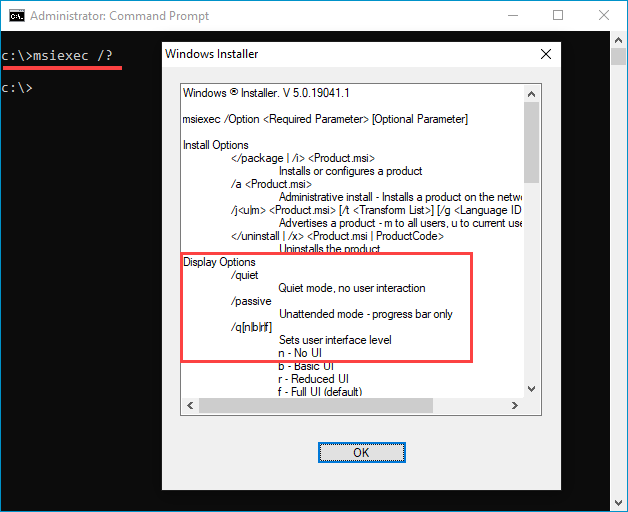
- Silent Installation and Uninstallation: MSI packages can be executed with command-line parameters that allow for fully automated, “silent” installations or uninstallations, meaning no user interaction is required. This feature is invaluable for large-scale deployments across numerous machines, as it enables IT administrators to script and automate software rollouts, updates, and removals without physically visiting each workstation. This capability dramatically boosts IT productivity and facilitates rapid response to software vulnerabilities or updates.
- Group Policy Integration: MSI installers integrate seamlessly with Microsoft Group Policy Objects (GPOs) in Active Directory environments. This allows administrators to centrally assign or publish software to users or computers within a network. Applications can be automatically installed upon user login or machine startup, ensuring that all employees have access to the necessary tools with minimal administrative overhead. This centralized control is a critical aspect of efficient IT management and maintaining a secure, standardized software environment across an organization.
- Patching and Upgrades (MSP Files): MSI technology supports incremental updates through Microsoft Patch (MSP) files. Instead of requiring a full reinstallation for every minor update or security patch, MSP files contain only the changes needed to update an existing MSI-installed application. This makes updates faster, reduces network bandwidth consumption, and minimizes disruption to users, further enhancing productivity and maintaining digital security by ensuring timely application of patches.
- Customization (Transforms – MST Files): A powerful feature for corporate environments is the ability to create “Transforms” (MST files). An MST file is a separate database that applies modifications to an original MSI package without altering the core installer. This allows administrators to customize an installation (e.g., pre-configure settings, disable certain features, specify license keys, or deploy specific configurations) for their organization’s needs without repackaging the entire application. This flexibility provides immense value for brand consistency and ensuring that software aligns with corporate policies and standards, while also improving installation efficiency.
Enhanced Security and System Integrity
Beyond efficiency, MSI installers contribute significantly to the security and integrity of the Windows operating system.
- Standardized Procedures Reduce Risks: The predictable nature of MSI installations means fewer surprises and less potential for unapproved or malicious changes to the system. By enforcing a consistent methodology for system modifications, MSI helps IT teams maintain tighter control over the software landscape, which is a fundamental aspect of digital security.
- Privilege Elevation Handled by Windows Installer: To install software that makes system-wide changes, administrator privileges are often required. The Windows Installer service handles this elevation securely, ensuring that only necessary changes are made with appropriate permissions, reducing the attack surface that less controlled installers might present.
- Digital Signing of MSI Packages: MSI packages can be digitally signed, allowing users and systems to verify the authenticity and integrity of the installer. A valid digital signature confirms that the package originated from a trusted publisher and has not been tampered with since it was signed. This is a crucial layer of digital security, helping to prevent the installation of malicious or compromised software and protecting systems from unauthorized modifications.
These combined advantages solidify the MSI installer’s position as a robust, reliable, and highly manageable solution for software deployment, particularly benefiting enterprise environments where consistency, control, and security are paramount.
Navigating the Challenges and Considerations with MSI
While MSI installers offer a wealth of advantages, they are not without their complexities and limitations. Understanding these challenges is essential for developers creating MSI packages and IT professionals deploying them, ensuring that the benefits are maximized while potential pitfalls are mitigated.
Complexity for Developers
For software developers, creating an MSI package can be a significantly more involved process than simply bundling an executable file. The structured, database-driven nature of MSI, while powerful, introduces a steep learning curve.
- Steep Learning Curve for Authoring Tools: Developers typically don’t create MSI files manually. Instead, they use specialized authoring tools such as WiX Toolset (Windows Installer XML), InstallShield, Advanced Installer, or Visual Studio Installer Projects. While these tools simplify the process, mastering them requires a deep understanding of the Windows Installer schema and its underlying concepts. WiX, for instance, requires developers to define the installation logic and components using XML, which can be verbose and intricate. This complexity can extend development cycles and require specialized expertise, potentially impacting project budgets and timelines (relating to business finance for development costs).
- XML-based Schema Can Be Intricate: The core of an MSI package, particularly when authored with tools like WiX, is defined through XML. This XML describes every file, registry entry, shortcut, component, and feature. Debugging issues within this intricate XML structure can be time-consuming and challenging, requiring meticulous attention to detail and a thorough grasp of the various tables and their interrelationships within the MSI database. Misconfigurations can lead to unpredictable installation behavior, requiring significant troubleshooting efforts.
- Custom Actions and Scripting: While custom actions provide immense flexibility, they also introduce complexity. Developers must ensure that any scripts or executables run as custom actions are robust, handle various system states, and execute securely. Poorly written custom actions can undermine the transactional integrity of MSI, leading to partial installations or even system instability, which can become a significant digital security concern if not properly vetted.
Specificity to Windows
One of the most apparent limitations of MSI installers is their platform specificity.
- Not Cross-Platform: MSI is a technology developed and maintained by Microsoft, exclusively designed for the Windows operating system. It relies heavily on core Windows components, such as the Windows Installer service and the Windows Registry. This means that an MSI package cannot be used to install software on macOS, Linux, or other operating systems. For developers aiming to distribute their software across multiple platforms, MSI is only one piece of a larger puzzle, often requiring separate installation solutions for each non-Windows platform. This can add to development overhead and resource allocation, an important consideration for businesses planning multi-platform product launches.
Potential for “Installer Hell” (Component and Version Conflicts)
While MSI was explicitly designed to mitigate issues like “DLL Hell” (where conflicting versions of shared libraries cause applications to fail), complex scenarios can still arise, leading to what some refer to as “Installer Hell.”
- Mismatched Components and Shared DLLs: Despite its robust component management, if multiple MSI packages are not authored carefully, especially regarding shared components or DLLs, conflicts can still emerge. For instance, if two applications install different versions of a shared library under the same component ID, an uninstall of one application might inadvertently remove a critical file needed by the other. While the Windows Installer tries to prevent this through reference counting, improper component design can lead to unintended consequences, destabilizing other applications.
- Version Conflicts: Similarly, complex dependencies and versioning issues can still crop up. If an application relies on a specific version of a runtime library or framework, and another application installs an incompatible version, it can lead to instability for one or both applications. Managing these dependencies across multiple installed software packages requires careful planning and adherence to best practices, especially in environments where many applications coexist. While MSI provides the tools to manage these issues, it still requires diligent development and testing to prevent them.
Understanding these challenges allows developers and IT professionals to approach MSI authoring and deployment with realistic expectations, implementing strategies to mitigate potential problems and leverage the technology’s strengths effectively.
MSI in the Modern Tech Landscape and Beyond
Despite its origins dating back to the late 1990s, the MSI installer remains a foundational technology in the Windows ecosystem, particularly in enterprise environments. However, the tech landscape is continuously evolving, with newer installation technologies emerging. Understanding MSI’s current relevance, its place alongside alternatives, and best practices for its use is crucial for navigating modern software deployment.
MSI in Enterprise and IT Administration
For large organizations, MSI is far from obsolete. It continues to be a cornerstone for reliable and scalable software deployment.
- Still a Cornerstone for Corporate Software Deployment: The robust features of MSI, such as silent installation, self-healing, transactional rollbacks, and especially customization via Transforms (MST files), make it indispensable for corporate IT departments. These capabilities allow administrators to standardize software configurations across thousands of machines, ensuring consistency, compliance, and controlled access. This level of control is vital for maintaining network integrity and managing a complex brand identity that relies on uniform software environments.
- Integration with SCCM, Intune, GPO: MSI’s deep integration with Microsoft’s management tools like System Center Configuration Manager (SCCM), Microsoft Intune, and Group Policy Objects (GPO) in Active Directory is a primary reason for its continued dominance in enterprise IT. These tools leverage MSI packages to automate software assignment, publishing, and patching on a grand scale, dramatically enhancing IT productivity. Centralized deployment capabilities ensure that critical security updates and new software are rolled out efficiently, contributing directly to an organization’s digital security posture and mitigating risks associated with outdated or unpatched applications. From a business finance perspective, this automation significantly reduces the operational costs associated with manual software management.
- Impact on IT Productivity and Digital Security: The ability to push software updates, security patches, and new applications silently and en masse, coupled with the self-healing properties of MSI, frees up IT staff from repetitive manual tasks. This increased productivity allows them to focus on more strategic initiatives. Furthermore, by ensuring that all software is consistently installed, configured, and updated, MSI plays a critical role in maintaining a strong digital security perimeter, reducing vulnerabilities that could arise from inconsistent installations or neglected patches.
MSI vs. Newer Installation Technologies
While MSI is robust, Microsoft and the broader industry have introduced newer installation technologies designed to address some of MSI’s complexities and adapt to modern application deployment paradigms.
- Comparison with ClickOnce, APPX, MSIX, Standalone EXEs:
- ClickOnce: Primarily for simple, web-deployed .NET applications, offering easy updates but limited system integration and often requires user interaction.
- APPX (and later MSIX): A packaging format for Universal Windows Platform (UWP) apps, focusing on containerization, clean installs/uninstalls, and efficient updates.
- MSIX: The successor to APPX and a potential future for traditional desktop app packaging. MSIX aims to combine the best features of MSI, APPX, and ClickOnce, offering reliable installation, updates, and uninstallation, containerization for system cleanliness, and improved network efficiency. It provides a more modern, secure, and performant app package format.
- Standalone EXEs: Simple, custom executable installers. They offer maximum flexibility but often lack the transactional integrity, rollback capabilities, and robust management features of MSI, making them less suitable for complex or enterprise-wide deployments.
- MSIX as the Future, but MSI Still Widely Used: Microsoft is actively promoting MSIX as the future of Windows application packaging, emphasizing its benefits in terms of reliability, security, and deployment efficiency for modern apps. However, the transition is gradual. There are countless legacy applications that still rely on MSI, and many enterprise tools and workflows are deeply integrated with MSI technology. For the foreseeable future, MSI will continue to be a prevalent and essential packaging format, especially for traditional desktop applications and in environments heavily reliant on Group Policy or SCCM. Businesses and developers need to consider the trade-offs between adopting cutting-edge technologies and maintaining compatibility with existing infrastructure.

Best Practices for Users and Businesses
Whether you’re an individual user or managing software across an enterprise, adhering to best practices can maximize the benefits and mitigate the risks associated with MSI installers.
- Verify Sources (Digital Security): Always download MSI packages from trusted, official sources. Verify digital signatures when available. This simple step is a critical component of digital security, protecting your systems from malicious software masquerading as legitimate installers.
- Understand Installation Options: When performing interactive installations, pay attention to custom installation options. Many MSI packages offer choices for features to install, installation locations, and even user-specific settings. Understanding these options allows you to tailor the software to your needs and avoid installing unnecessary components, which can impact productivity and system resources.
- For Businesses: Planning Deployments, Testing, Using Transforms: For IT administrators, thorough planning and testing are paramount. Before large-scale rollouts, test MSI packages and any associated MST transforms in a controlled environment to ensure they behave as expected and don’t introduce conflicts or vulnerabilities. Strategic use of MST files allows for highly customized, yet standardized, deployments that align with corporate policies, enhance brand consistency, and optimize resource allocation. Investing in careful planning upfront can significantly reduce future support costs and improve overall system reliability, directly benefiting the organization’s business finance.
- Regular Updates and Patch Management: Implement a robust patch management strategy. Regularly applying updates and security patches released by software vendors, often delivered via MSP files, is crucial for maintaining digital security and ensuring applications remain stable and functional. Automation through tools like SCCM or Intune is highly recommended for enterprises.
In conclusion, the MSI installer, powered by the Microsoft Windows Installer service, remains a cornerstone of software deployment on Windows. Its robust features for transactional installations, self-healing, and powerful management capabilities make it an invaluable tool for ensuring system stability, enhancing IT productivity, and maintaining strong digital security, particularly within enterprise environments. While newer technologies like MSIX point to the future, the enduring presence and utility of MSI underscore its continued relevance in the dynamic world of technology.
aViewFromTheCave is a participant in the Amazon Services LLC Associates Program, an affiliate advertising program designed to provide a means for sites to earn advertising fees by advertising and linking to Amazon.com. Amazon, the Amazon logo, AmazonSupply, and the AmazonSupply logo are trademarks of Amazon.com, Inc. or its affiliates. As an Amazon Associate we earn affiliate commissions from qualifying purchases.