
The simple question, “what is an iPhone charger called?”, often leads to a surprisingly nuanced discussion in the world of personal technology. It’s not just a single item, but rather a system of interconnected components, each with its own technical designation and role in powering your beloved Apple device. Far from being a mere accessory, the evolution of iPhone charging reflects significant advancements in power delivery, safety, and universal compatibility. Understanding these components is key not only to answering the titular question but also to optimizing your charging experience, ensuring device longevity, and making informed purchasing decisions in an increasingly complex tech landscape.
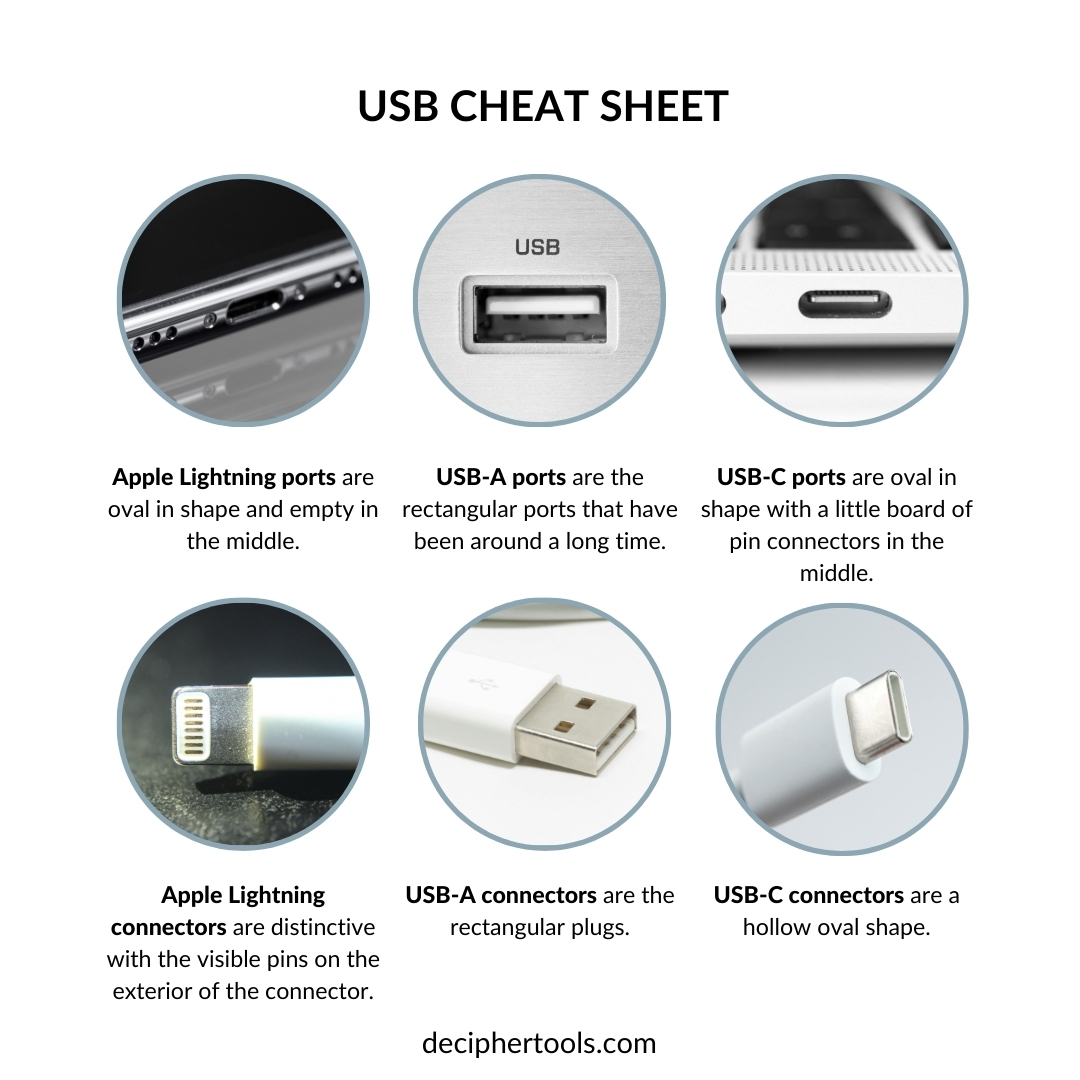
This article will demystify the “iPhone charger,” breaking down its constituent parts, exploring the technological journey it has undertaken, and providing essential insights into how these critical accessories function and integrate with the broader tech ecosystem.
Deconstructing the “iPhone Charger”: More Than Just a Name
When someone asks for an “iPhone charger,” they are typically referring to two distinct, yet complementary, components that work in tandem to deliver power from an electrical outlet to the iPhone’s battery. These are the power adapter (often called the wall plug or charging brick) and the charging cable. Each component plays a crucial role and has evolved significantly over the years.
The Power Adapter (Wall Plug or Charging Brick)
This is the part that plugs directly into a wall socket. Its primary function is to convert the alternating current (AC) electricity from your home’s power grid into direct current (DC) electricity at a voltage and amperage suitable for your iPhone. Early iPhone adapters were typically 5W (5 volts at 1 amp), small and square. As iPhones became more powerful and demand for faster charging grew, so too did the power output of these adapters.
Modern Apple and third-party adapters often support higher wattages (e.g., 18W, 20W, 30W, 60W, 96W, or even higher for MacBooks), enabling fast charging for compatible iPhone models. These adapters usually feature a USB-A port or, increasingly, a USB-C port, dictating the type of cable required to connect to the phone. The official term often used by Apple for this component is a “USB Power Adapter” or “USB-C Power Adapter.”
The Charging Cable (USB to Lightning/USB-C)
The second indispensable part is the cable that connects the power adapter to the iPhone itself. This cable serves as the conduit for the converted DC power. Over its history, the iPhone has utilized different proprietary and industry-standard connectors:
- 30-pin Dock Connector (discontinued): Used in early iPhone models up to the iPhone 4S. This was a wide, proprietary connector.
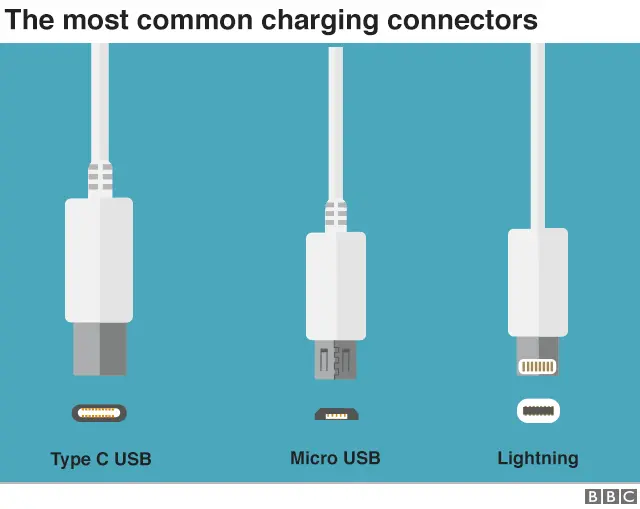
- Lightning Connector: Introduced with the iPhone 5 in 2012, this is a much smaller, reversible 8-pin connector. It has been a staple for iPhones for over a decade, offering data transfer alongside power delivery. Cables featuring this connector are typically called “USB-A to Lightning cables” or “USB-C to Lightning cables,” depending on the port on the power adapter.
- USB-C Connector: With the iPhone 15 series (late 2023), Apple transitioned from Lightning to USB-C. This is an industry-standard, reversible connector that supports higher power delivery and faster data transfer speeds. Cables for these models are referred to as “USB-C to USB-C cables.”
Therefore, when one asks what an iPhone charger is called, the most accurate answer is that it’s a combination of a USB Power Adapter and a Charging Cable (either Lightning or USB-C, depending on the iPhone model).
The Evolution of iPhone Charging Standards
The journey of iPhone charging technology is a microcosm of broader trends in personal electronics: the pursuit of faster charging, greater efficiency, and eventually, broader interoperability. This evolution has significantly impacted user experience and device capabilities.
From 30-pin to Lightning: Apple’s Proprietary Connectors
For its initial generations, the iPhone, much like its iPod predecessors, relied on Apple’s proprietary 30-pin Dock Connector. This large, somewhat cumbersome connector was versatile for its time, handling both charging and data synchronization. However, as devices grew thinner and component miniaturization became paramount, Apple sought a more compact solution.
In 2012, with the introduction of the iPhone 5, Apple unveiled the Lightning Connector. This radical shift brought several key advantages: it was significantly smaller, making sleeker device designs possible; it was reversible, eliminating the frustration of incorrect insertion; and it was designed to be more durable. The Lightning connector became a hallmark of Apple’s mobile ecosystem for over a decade, representing Apple’s commitment to its own integrated hardware and software environment.
The USB-C Era: Universal Compatibility and Power Delivery (PD)
While Lightning served Apple well, the broader tech industry was moving towards a more universal standard: USB-C. This connector, also reversible and compact, offered superior capabilities in terms of power delivery (supporting higher wattages and fast charging protocols like USB Power Delivery – USB PD) and data transfer speeds. As regulatory pressures mounted, particularly in the EU advocating for a common charging standard to reduce e-waste and consumer inconvenience, Apple eventually embraced USB-C.
The iPhone 15 series marked a pivotal moment, with all models adopting USB-C. This move not only aligns iPhones with a vast ecosystem of laptops, tablets, and other accessories that already use USB-C but also opens the door to potentially faster charging (with the right adapter and cable) and enhanced data transfer capabilities on Pro models. The advent of USB-C also emphasizes the USB Power Delivery (USB PD) standard, which intelligently negotiates power levels between the charger and the device for optimal and safe charging.
Wireless Charging: Qi Standard and MagSafe
Beyond wired connections, iPhone charging has also embraced the convenience of wireless charging. Starting with the iPhone 8 in 2017, iPhones gained support for the Qi wireless charging standard. Qi (pronounced “chee”) is an open interface standard developed by the Wireless Power Consortium for inductive power transfer over distances of up to 4 cm (1.6 inches). This meant iPhones could be charged by simply placing them on any compatible Qi charging pad, regardless of the manufacturer.
In 2020, with the iPhone 12 series, Apple introduced MagSafe for iPhone. Building on the Qi standard, MagSafe incorporated a magnetic array around the wireless charging coil. This innovation ensures perfect alignment between the iPhone and MagSafe accessories, maximizing charging efficiency (up to 15W, compared to 7.5W for standard Qi), enabling secure attachment of accessories like wallets, and paving the way for a new ecosystem of magnetic add-ons. MagSafe is, therefore, a specialized, enhanced form of Qi wireless charging tailored for the iPhone.
Understanding Power Ratings and Charging Speed
The speed at which your iPhone charges is not arbitrary; it’s a direct result of the power adapter’s output capabilities, the cable’s specifications, and the iPhone’s internal charging circuitry. Understanding the metrics involved is crucial for harnessing fast charging and ensuring optimal performance.
Watts, Amps, and Volts: The Language of Power
To grasp charging speed, it’s essential to understand the basic electrical units:
- Volts (V): Represents electrical potential difference. Think of it as the “pressure” that pushes electricity. iPhones typically charge at around 5V, but fast charging protocols like USB PD can deliver higher voltages (e.g., 9V or 15V) to the adapter, which is then regulated down for the phone.
- Amps (A): Represents electrical current, or the flow rate of electricity. Higher amperage means more current flowing.
- Watts (W): Represents electrical power, which is the product of Volts and Amps (W = V x A). This is the most common metric used to describe a charger’s output capacity and, consequently, its charging speed. A 5W charger delivers 5V at 1A, while a 20W charger might deliver 9V at approximately 2.22A.
A higher wattage generally translates to faster charging, provided the iPhone and cable are capable of accepting and delivering that higher power.
Fast Charging: What You Need to Know
Apple introduced fast charging capabilities with the iPhone 8 and X models. This allows compatible iPhones to charge up to 50% in about 30 minutes, significantly reducing downtime. To achieve fast charging, three conditions must be met:
- Compatible iPhone: iPhone 8 models and later (including iPhone SE 2nd generation and newer, and all iPhone 15 models).
- USB-C Power Adapter: A power adapter with at least 20W output (for most models; some Pro models benefit from even higher wattages like 30W). Apple’s official 20W USB-C Power Adapter is a common choice.
- USB-C to Lightning Cable or USB-C to USB-C Cable: Depending on your iPhone model, you need the correct cable that supports USB Power Delivery. Standard USB-A to Lightning cables typically do not support fast charging.
It’s important to note that fast charging typically delivers high power during the initial stages when the battery is low. As the battery approaches 80%, the charging speed intelligently slows down to preserve battery health and prevent overheating.
Impact of Cable Quality on Charging Performance
The charging cable is not just a wire; it’s an engineered component that significantly impacts charging speed and safety.
- Gauge of Wires: Thicker internal wires (lower gauge numbers) can carry more current with less resistance, leading to faster charging, especially for higher wattage chargers.
- Shielding and Insulation: Good quality cables have proper shielding to prevent electromagnetic interference and robust insulation for durability and safety.
- Chipset (for Lightning cables): Apple’s Lightning cables contain authentication chips. Non-MFi (Made For iPhone) certified cables may be rejected by the iPhone or provide suboptimal charging. USB-C cables, particularly those supporting higher power delivery, also contain E-Marker chips to communicate their capabilities to the connected devices.
- Length: While convenient, excessively long cables (e.g., over 2 meters for high-speed charging) can experience a slight voltage drop, potentially affecting charging speed if not properly engineered.
Investing in high-quality, certified cables is crucial for reliable, fast, and safe charging.
Navigating Compatibility and Authenticity
The market for iPhone chargers is flooded with options, from official Apple products to countless third-party alternatives. Making the right choice requires understanding compatibility, recognizing authenticity, and prioritizing safety.
MFi Certification: Why It Matters
For Lightning accessories, MFi (Made For iPhone/iPad/iPod) certification is Apple’s licensing program for third-party manufacturers. Products that carry the “MFi Certified” badge have undergone rigorous testing by Apple to ensure they meet Apple’s performance and safety standards.
- Reliability: MFi-certified cables and accessories are guaranteed to work seamlessly with your iPhone, preventing “This accessory may not be supported” messages.
- Safety: MFi products adhere to safety regulations, reducing the risk of overheating, short circuits, or damage to your device.
- Durability: They are typically built to higher quality standards, offering better longevity.
While the iPhone 15 series now uses USB-C, the principle of certified accessories remains important, although the specific “MFi” branding might evolve or be less critical for standard USB-C functionality, given USB-C’s open nature. However, for specialized features or higher power delivery, reputable brands and adherence to USB-IF (USB Implementers Forum) standards are key.
Choosing the Right Charger for Your iPhone Model
The “best” charger isn’t a one-size-fits-all solution. Your iPhone model dictates the ideal charging accessories:
- Older iPhones (pre-iPhone 8): A standard 5W or 10W USB-A power adapter with a USB-A to Lightning cable is sufficient. Fast charging is not supported.
- iPhone 8 through iPhone 14 Series: These models support fast charging. You’ll need a USB-C Power Adapter (20W or higher) and a USB-C to Lightning cable. They also support Qi wireless charging (up to 7.5W for standard Qi, 15W with MagSafe for iPhone 12 and newer).
- iPhone 15 Series and Newer: These models feature USB-C. You’ll need a USB-C Power Adapter (20W or higher for fast charging) and a USB-C to USB-C cable. They also support Qi and MagSafe wireless charging.
Always check the specifications of both your iPhone and the charger/cable to ensure compatibility and leverage fast charging capabilities where applicable.
Dangers of Counterfeit Chargers
The prevalence of counterfeit chargers and cables is a significant concern. These cheap imitations often lack proper internal components, shielding, and safety mechanisms.
- Safety Risks: Counterfeit chargers pose a serious risk of electric shock, fire, and overheating, which can damage the iPhone, surrounding property, or even cause personal injury.
- Device Damage: They can deliver inconsistent power, damage the iPhone’s charging port or battery, and shorten its lifespan.
- Poor Performance: Counterfeits often charge slowly, intermittently, or not at all.
Always purchase chargers and cables from reputable retailers and look for official Apple branding or MFi certification for Lightning accessories. If a deal seems too good to be true, it probably is.
Best Practices for Charger Longevity and Safety
Proper care and usage of your iPhone charger components not only extend their lifespan but also ensure the safety of your device and yourself. These accessories, while robust, are not indestructible.
Proper Storage and Handling
- Avoid Extreme Temperatures: Do not expose chargers or cables to excessive heat or cold, which can degrade materials and electronic components.
- Gentle Disconnection: Always pull by the plug or connector head, not by the cable itself, when disconnecting from the iPhone or power adapter. Yanking the cable can fray internal wires.
- Coil Neatly: When storing, coil cables loosely. Avoid tightly wrapping them around chargers or bending them at sharp angles, especially near the connector points, as this can stress the internal wiring and outer sheath.
- Keep Dry: Moisture is an enemy of electronics. Keep your chargers and cables dry to prevent corrosion and short circuits.
Recognizing Wear and Tear
Regularly inspect your cables and adapters for signs of damage:
- Fraying/Exposed Wires: The most common sign of a failing cable. Exposed wires are a serious electrical hazard.
- Kinks and Bends: Severe kinks or bends in the cable, especially near the connectors, indicate internal damage.
- Discoloration or Melting: Any signs of scorching, melting, or unusual discoloration on the adapter or cable are indicators of overheating and immediate discontinuation of use is necessary.
- Loose Connections: If the cable wiggles excessively in the port or adapter, it might be worn out.
If you notice any significant damage, it’s safer to replace the component to prevent potential harm to your iPhone or yourself.

Environmental Considerations and E-Waste
As technology users, we have a responsibility to consider the environmental impact of our gadgets and accessories. Discarded chargers and cables contribute to electronic waste (e-waste), which contains harmful substances if not properly disposed of.
- Recycle: Many electronic retailers and local recycling centers offer programs for e-waste. Do not simply throw old or broken chargers and cables in the regular trash.
- Longevity: By taking good care of your chargers and opting for quality, durable products, you reduce the frequency of replacements, thus lessening your environmental footprint.
- Universal Standards: The shift to USB-C, particularly if it truly becomes a universal standard, has the potential to significantly reduce e-waste by allowing a single charger and cable to power a wider array of devices, reducing the need for device-specific accessories.
In conclusion, “what is an iPhone charger called?” is a question that opens the door to a deeper understanding of mobile technology. From the distinct roles of the power adapter and cable to the groundbreaking shifts from Lightning to USB-C and the convenience of wireless charging, the evolution of these essential accessories underscores a relentless pursuit of efficiency, safety, and user experience. By understanding these nuances, users can make informed choices, extend the life of their devices, and contribute to a safer, more sustainable tech future.
aViewFromTheCave is a participant in the Amazon Services LLC Associates Program, an affiliate advertising program designed to provide a means for sites to earn advertising fees by advertising and linking to Amazon.com. Amazon, the Amazon logo, AmazonSupply, and the AmazonSupply logo are trademarks of Amazon.com, Inc. or its affiliates. As an Amazon Associate we earn affiliate commissions from qualifying purchases.