
In the landscape of consumer electronics, few devices have managed to blend utility, aesthetics, and simplicity as effectively as the Apple AirPort Time Capsule. Released during an era when home networking was notoriously complex and data loss was a common grievance for computer users, the Time Capsule represented Apple’s ambitious attempt to solve two problems at once: high-speed wireless connectivity and automated data backup. Although Apple officially discontinued the product line in 2018, the device remains a significant milestone in the history of home technology and continues to serve a dedicated user base today.

At its core, the AirPort Time Capsule is a hybrid device that combines a full-featured Wi-Fi base station with a “server-grade” internal hard drive. It was designed specifically to work in tandem with “Time Machine,” the backup software built into macOS. By integrating these two functions, Apple created a “set it and forget it” solution that allowed Mac users to back up every file on their computers wirelessly and automatically, ensuring that a hardware failure or accidental deletion would not result in the permanent loss of precious data.
The Convergence of Storage and Connectivity
The brilliance of the AirPort Time Capsule lay in its dual identity. Before its arrival, consumers typically had to purchase a separate router and an external hard drive, the latter of which usually required a physical USB or FireWire connection to the computer. This tethered nature meant that laptop users—a rapidly growing segment of the market—often neglected their backups because it was inconvenient to plug in a drive every day.
The Architecture of a Hybrid Device
Under the hood, the Time Capsule was more than just a standard router. Depending on the generation, it housed a 3.5-inch hard drive with capacities ranging from 500GB in the early models to 3TB in the final versions. The internal hardware was optimized for constant operation. Unlike standard external drives designed for occasional use, the Time Capsule utilized drives that were rated for the high-duty cycles of a network-attached storage (NAS) environment.
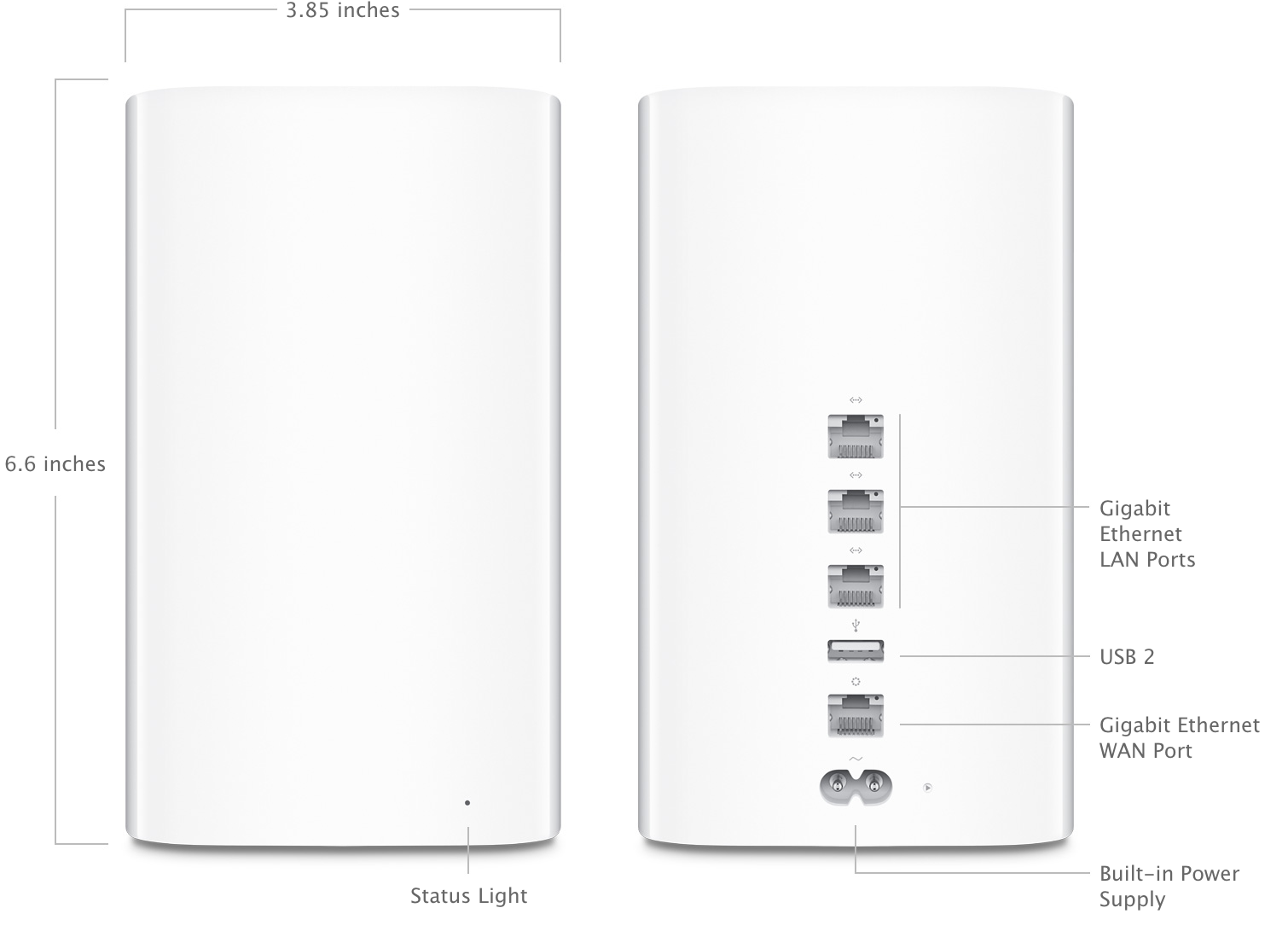
The networking component was equally robust. The final iteration, the fifth-generation model (A1470), featured a vertical “tower” design that was not merely an aesthetic choice but a functional one. This height allowed the six antennas—three for the 2.4GHz band and three for the 5GHz band—to be positioned at the top of the device, maximizing the spread of the signal and reducing interference from the internal components and the hard drive itself.
A Brief History of Iterations
The product line evolved significantly over its decade-long lifespan. The first generation, introduced at Macworld Expo in 2008, utilized the 802.11n Wi-Fi standard. It was a flat, square device that resembled the Mac Mini or the original Apple TV. As the years progressed, Apple updated the internals to support simultaneous dual-band Wi-Fi, allowing older devices and newer, faster devices to operate on different frequencies without slowing each other down.
The most radical change came in 2013 with the fifth generation. Apple shifted to the 802.11ac standard, which offered significantly higher speeds and better range. This was also when the device adopted the taller form factor, which improved thermal management—a critical factor for a device that contained both a heat-generating processor and a spinning platter hard drive.
The Seamless Synergy with macOS and Time Machine
The primary selling point of the AirPort Time Capsule was its deep integration with the Apple ecosystem. For users of macOS, the setup process was remarkably simple compared to the convoluted web interfaces of contemporary third-party routers. Through the AirPort Utility app, users could configure their entire network and backup schedule in a matter of minutes.
The Mechanics of Incremental Backups
When a Mac is first connected to a Time Capsule, it performs an initial “full” backup, which involves copying every file on the system to the internal drive. After this initial process, Time Machine performs incremental backups. It monitors changes to the file system and only copies the data that has been modified since the last backup.
The Time Capsule handles this over the network using the Apple Filing Protocol (AFP) or, in later versions, Server Message Block (SMB). Because the backup happens in the background, users can go about their work without noticing any performance degradation. If a user accidentally deletes a file or needs to recover a previous version of a document, they can “enter Time Machine,” a visual interface that allows them to scroll back through time and restore specific files or the entire system state.
Wireless Convenience and Network-Attached Storage (NAS)
The “wireless” aspect cannot be overstated. For MacBook users, the Time Capsule provided the first truly frictionless backup experience. As soon as the laptop joined the home Wi-Fi network, the backup process would initiate. This eliminated the human error of forgetting to “plug in the backup drive,” which is the leading cause of data loss among home users.
Furthermore, the Time Capsule functioned as a basic NAS. Users could create separate folders on the drive to store files that were not part of their system backup, such as large movie libraries or archives. While it lacked the advanced media-streaming features of dedicated NAS units from brands like Synology or QNAP, its simplicity made it the ideal entry-point for users who wanted shared network storage without the technical overhead.
Advanced Networking Features and Performance
Beyond its storage capabilities, the AirPort Time Capsule was a premium router that often outperformed the “gateway” units provided by Internet Service Providers (ISPs). Apple focused on providing a stable, high-throughput connection that could handle the increasing demands of a household full of connected devices.
Dual-Band Wi-Fi and Beamforming Technology
With the introduction of 802.11ac, the Time Capsule implemented beamforming antenna arrays. Unlike standard routers that broadcast a Wi-Fi signal in all directions equally, beamforming allows the router to identify where a device is located in the house and direct a concentrated beam of data toward that specific device. This resulted in faster speeds at longer ranges and a more reliable connection for high-bandwidth tasks like 4K video streaming or video conferencing.
The simultaneous dual-band support was also crucial. By operating on both the 2.4GHz and 5GHz frequencies, the Time Capsule could delegate low-speed tasks (like smart home sensors) to the 2.4GHz band while keeping the 5GHz band clear for high-performance devices like Macs and iPads.
Connectivity Ports and Expansion
The rear of the Time Capsule featured a suite of ports that expanded its utility. It included a WAN port for connecting to a cable or fiber modem and three Gigabit Ethernet LAN ports for hardwiring devices like desktop computers or gaming consoles.
Additionally, it included a USB 2.0 port. This port allowed users to share a non-Wi-Fi printer across the entire network or to plug in an additional external hard drive. If the internal storage of the Time Capsule became full, users could simply attach another drive to the USB port, and it would appear on the network as another storage volume, effectively allowing for easy capacity expansion.
The Discontinuation and the Legacy of AirPort
In April 2018, Apple officially announced that it was discontinuing the entire AirPort line, including the Express, the Extreme, and the Time Capsule. This move signaled a shift in Apple’s corporate strategy, moving away from peripheral hardware to focus more on services and core devices.
Why Apple Exited the Networking Market
Several factors contributed to the end of the AirPort era. First, the networking market had become highly competitive and commoditized. Companies like Eero, Google, and Netgear began popularized “Mesh Wi-Fi” systems, which used multiple nodes to cover large homes more effectively than a single high-powered router. Apple chose not to update the AirPort hardware to support mesh technology.
Second, Apple’s strategy shifted toward the cloud. With the growth of iCloud, Apple began encouraging users to store their photos, documents, and device backups on their servers rather than on local hardware. iCloud offered the advantage of being accessible from anywhere in the world, not just within the range of a home router.
Modern Challenges: Security and Speed
For those still using an AirPort Time Capsule today, there are several considerations to keep in mind. The primary concern is security. While Apple has released occasional firmware updates even after discontinuation to patch major vulnerabilities, the hardware does not support the latest security protocols like WPA3. Furthermore, as internet speeds from ISPs continue to climb, the aging 802.11ac hardware may become a bottleneck for users with gigabit fiber connections.
There is also the matter of mechanical failure. Because the Time Capsule contains a traditional spinning hard drive, it is subject to physical wear and tear. After five to ten years of constant operation, these drives are prone to failure. For many enthusiasts, this has led to a “right to repair” movement where users open the devices to replace the aging HDDs with modern, high-capacity Solid State Drives (SSDs), which run cooler and more silently.
Navigating the Post-Time Capsule World
The vacuum left by the AirPort Time Capsule has been filled by a variety of solutions, though few offer the same all-in-one elegance. For users looking to replicate the experience today, there are two primary paths.
Modern Alternatives: NAS and iCloud
The most direct successor to the Time Capsule’s functionality is a dedicated NAS. Manufacturers like Synology offer “Time Machine” support, allowing a Mac to see the NAS over the network and use it as a backup destination exactly as it would a Time Capsule. While these units are more powerful and offer better data redundancy (through RAID configurations), they require more initial setup and technical knowledge.
Alternatively, many users have transitioned entirely to a combination of a modern Mesh Wi-Fi system (like the Linksys Velop or Eero) and an iCloud+ subscription. While this move offers simplicity and remote access, it lacks the “local copy” security that many users prefer for large-scale system recoveries, which can be painfully slow when downloaded from the cloud.
Breathing New Life into Legacy Hardware
Despite being “obsolete,” the AirPort Time Capsule remains a remarkably capable piece of hardware for those who understand its limitations. It can still be used as a secondary access point to extend a wired network or as a dedicated network drive for non-critical backups. Its industrial design remains timeless, and for many, it stands as a reminder of a period when Apple sought to make the most technical aspects of our digital lives—networking and data preservation—completely invisible and effortlessly reliable.
In conclusion, the Apple AirPort Time Capsule was more than just a router or a hard drive. It was a manifestation of the philosophy that technology should serve the user by removing friction. By combining a high-performance base station with an automated backup server, it provided a safety net for millions of users, cementing its place as a classic piece of functional technology in the Apple pantheon.
aViewFromTheCave is a participant in the Amazon Services LLC Associates Program, an affiliate advertising program designed to provide a means for sites to earn advertising fees by advertising and linking to Amazon.com. Amazon, the Amazon logo, AmazonSupply, and the AmazonSupply logo are trademarks of Amazon.com, Inc. or its affiliates. As an Amazon Associate we earn affiliate commissions from qualifying purchases.