
In the intricate landscape of modern networking, security is paramount. As organizations expand their digital footprints and embrace cloud technologies, the need for robust and granular control over network traffic becomes increasingly critical. This is where Access Control Lists (ACLs) emerge as a fundamental and indispensable tool. Often encountered in technical documentation, network administration discussions, and security protocols, the term “ACL networking” might seem opaque to those outside specialized IT circles. However, understanding ACLs is essential for anyone involved in designing, managing, or securing computer networks. This article delves deep into the concept of ACL networking, exploring its purpose, functionality, types, implementation, and its vital role in safeguarding digital assets.
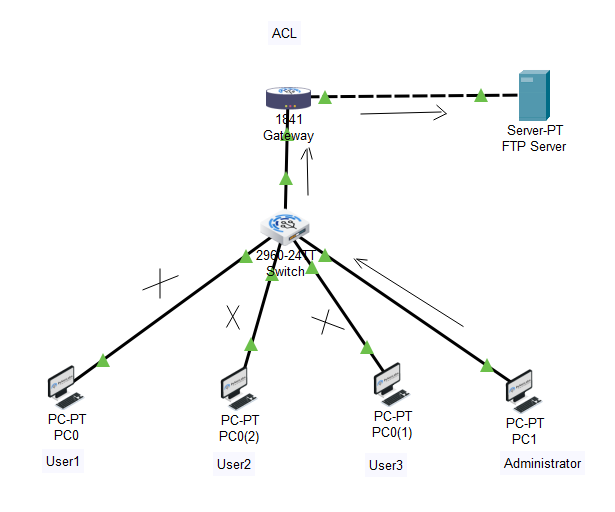
The Foundation of Network Access Control: Understanding ACLs
At its core, an Access Control List is a set of rules that dictate whether to permit or deny network traffic based on a variety of criteria. Think of it as a sophisticated digital bouncer at the entrance of a network or specific network resources. It examines each piece of data attempting to pass through and makes an informed decision based on predefined instructions. The primary objective of ACLs is to enforce security policies by segmenting networks, restricting access to sensitive data and services, and preventing unauthorized network intrusions.
How ACLs Function: The Packet Inspection Process
The operational mechanism of an ACL involves the inspection of individual network packets. When a packet arrives at a network device configured with an ACL, such as a router or a firewall, the device processes the packet against each rule in the list sequentially. These rules are typically ordered, and the first rule that matches the packet’s characteristics determines the action taken.
The criteria used for matching packets can be diverse and comprehensive, including:
- Source IP Address: The IP address from which the traffic originates. This allows administrators to permit or deny access based on the sender’s location or identity.
- Destination IP Address: The IP address to which the traffic is directed. This is useful for controlling access to specific servers or network segments.
- Source Port Number: The port number on the source device. This is particularly relevant for application-level traffic, as different applications use specific ports.
- Destination Port Number: The port number on the destination device. This is a crucial element for controlling access to specific services like web servers (port 80/443), email servers (port 25/143/993), or remote access services (port 22 for SSH).
- Protocol: The network protocol being used (e.g., TCP, UDP, ICMP). Different protocols have different security implications and can be selectively allowed or denied.
- Application Layer Information (in more advanced ACLs): Some sophisticated ACLs, often found in Next-Generation Firewalls (NGFWs), can inspect deeper into the packet payload to identify and control specific applications (e.g., blocking social media traffic while allowing business-critical applications).
When a packet matches a rule, the specified action is executed. The most common actions are:
- Permit: Allows the packet to pass through the network device.
- Deny: Discards the packet, preventing it from reaching its destination.
It’s important to note that ACLs often have an implicit “deny all” rule at the end. This means that if a packet does not match any explicit “permit” rule, it will be denied by default. This “default deny” posture is a cornerstone of robust network security, ensuring that only explicitly allowed traffic can traverse the network.
The Strategic Importance of ACLs in Network Design
ACLs are not merely technical mechanisms; they are strategic tools that underpin effective network security architecture. Their implementation allows for:
- Network Segmentation: ACLs enable administrators to divide a larger network into smaller, more manageable, and secure segments. This limits the “blast radius” of security breaches. If one segment is compromised, the ACLs can prevent the threat from spreading to other parts of the network.
- Access Control to Sensitive Resources: Critical servers, databases, and sensitive data repositories can be protected by ACLs that restrict access to authorized users and systems only.
- Traffic Filtering and Optimization: By blocking unnecessary or malicious traffic, ACLs can reduce network congestion and improve performance. For example, blocking certain UDP ports that are often exploited by denial-of-service (DoS) attacks can protect network resources.
- Compliance Enforcement: Many regulatory frameworks and industry standards (e.g., HIPAA, PCI DSS) mandate specific access control mechanisms. ACLs are instrumental in meeting these compliance requirements.
- Enhanced Security Posture: ACLs are a fundamental layer of defense in depth. They work in conjunction with other security measures like firewalls, intrusion detection systems, and antivirus software to create a comprehensive security ecosystem.
Types of Access Control Lists: Tailoring Security to Needs
ACLs are not a monolithic entity; they come in various forms, each designed to serve specific purposes and offer different levels of granularity. The most common types are Standard ACLs and Extended ACLs, distinguished by the criteria they can examine.
Standard Access Control Lists: Basic Source-Based Filtering
Standard ACLs are the simplest form of access control. They operate solely based on the source IP address of the network traffic.
- Functionality: A standard ACL can permit or deny traffic originating from a specific IP address or a range of IP addresses.
- Use Cases: They are typically used close to the destination of the traffic they are filtering. For instance, if you want to control access to a particular server, you would apply a standard ACL on the router interface directly connected to that server’s network segment. This prevents traffic from unauthorized sources from even reaching the subnet where the server resides.
- Limitations: Due to their limited filtering capabilities (only source IP), standard ACLs are less effective for granular control and are often used in conjunction with extended ACLs. They are best suited for broad policy enforcement rather than detailed application-level control.
Example Scenario: Imagine a small office network. A standard ACL could be configured on the router to deny all traffic originating from the IP address of a guest wireless network from accessing the internal corporate servers.
Extended Access Control Lists: Granular Traffic Management
Extended ACLs provide a much more comprehensive and granular approach to traffic control. They allow administrators to filter traffic based on a wider array of criteria, making them significantly more powerful and versatile.
-
Functionality: Extended ACLs can filter traffic based on:
- Source IP Address
- Destination IP Address
- Source Port Number
- Destination Port Number
- Protocol (TCP, UDP, ICMP, etc.)
- Optionally, specific flags within TCP packets (e.g., ACK, SYN)
-
Use Cases: Extended ACLs are ideal for implementing detailed security policies, such as:
- Allowing web traffic (HTTP/HTTPS) to a web server from any source but blocking Telnet or SSH access.
- Permitting email traffic to an email server only from specific trusted mail relay servers.
- Blocking all ICMP traffic except for ping requests from the IT management subnet.
- Creating specific rules for different applications that utilize various ports.
-
Placement: Extended ACLs are most effective when placed close to the source of the traffic they are intended to filter. This minimizes the amount of unnecessary traffic that needs to be processed by other network devices.
Example Scenario: In a corporate network, an extended ACL could be configured on the perimeter router to:
- Permit inbound TCP traffic on port 443 (HTTPS) from any source to the company’s public-facing web server.
- Deny all inbound TCP traffic on port 22 (SSH) from any source to any internal server.
- Permit inbound UDP traffic on port 53 (DNS) from specific trusted DNS servers to the internal DNS servers.
Named Access Control Lists: Enhanced Organization and Readability
While not a distinct filtering mechanism in terms of criteria, Named ACLs offer a significant advantage in terms of management and readability. Instead of using numerical identifiers (e.g., ACL 101, ACL 199), administrators can assign descriptive names to ACLs.
- Functionality: Named ACLs function identically to their numbered counterparts but are referenced by a meaningful name (e.g.,
WEB_SERVER_ACCESS,INTERNAL_RESOURCES_PROTECTION). - Benefits:
- Improved Readability: Names make it easier to understand the purpose of an ACL without having to refer to documentation.
- Enhanced Organization: Grouping related ACLs under a common naming scheme improves network management.
- Easier Modification: Modifying a named ACL is generally more straightforward than managing numerous numbered ACLs.
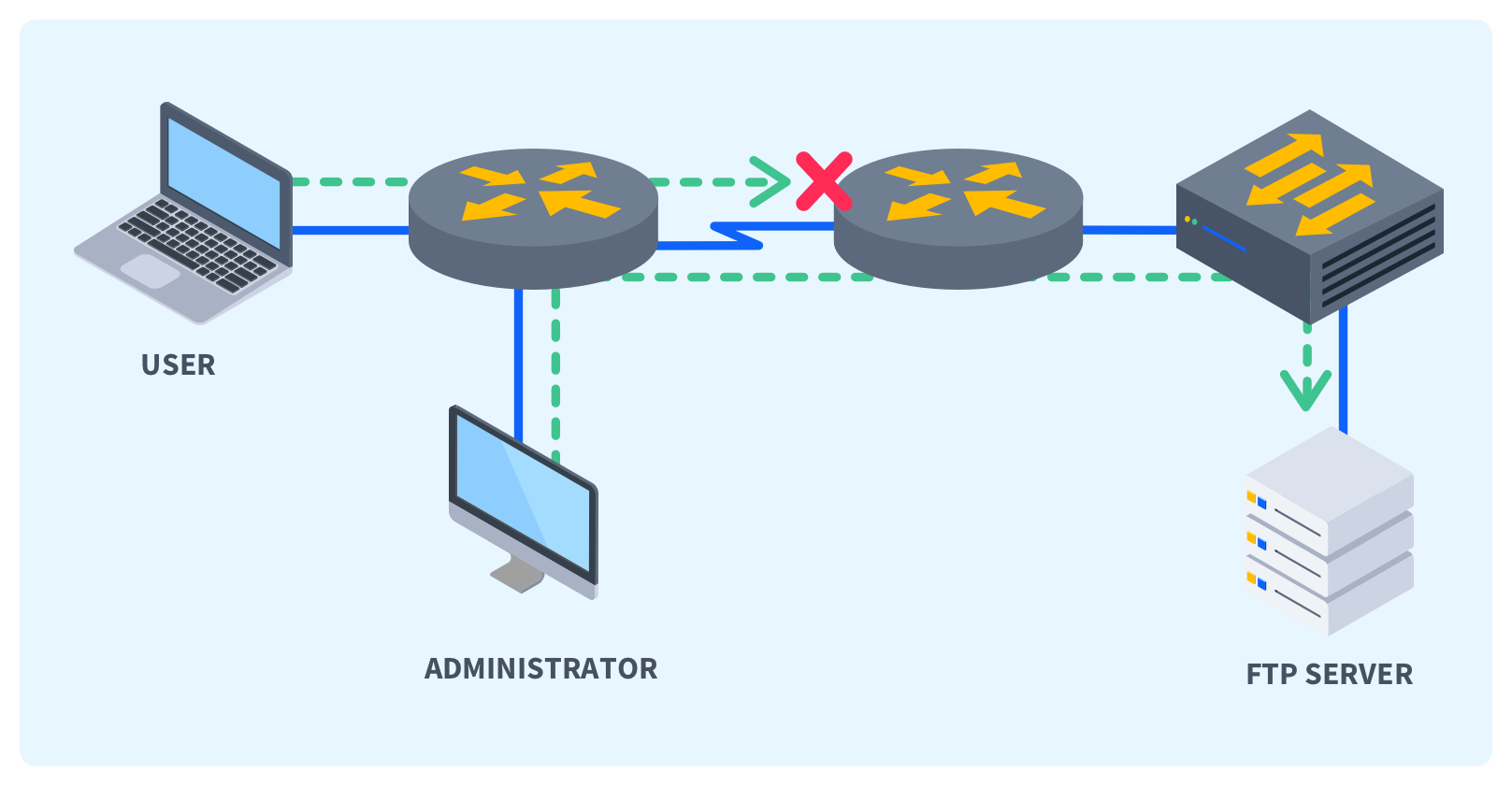
Most modern network devices support named ACLs, and it is considered a best practice for efficient network administration.
Implementing ACLs: Best Practices and Considerations
The effective implementation of ACLs is crucial for maximizing their security benefits while avoiding unintended network disruptions. Proper planning, careful configuration, and ongoing maintenance are key.
Placement Strategy: Where to Apply Your ACLs
The location where an ACL is applied has a significant impact on its effectiveness and the overall efficiency of the network.
- Standard ACLs: Typically applied closer to the destination. Applying them on an interface that is one hop away from the destination allows the router to filter out unwanted traffic before it consumes bandwidth on other links leading to the destination.
- Extended ACLs: Typically applied closer to the source. By filtering traffic at the source, extended ACLs prevent unnecessary traffic from entering the network altogether, conserving bandwidth and reducing the processing load on intermediate devices.
Example: If you want to restrict access to a specific server, apply an extended ACL on the interface where traffic from potentially unauthorized sources enters your network. If you want to allow only specific users from a particular subnet to access a specific resource, apply a standard ACL on the interface closest to that resource.
Rule Order and Implicit Deny: The Devil is in the Details
The order of rules within an ACL is critically important. Network devices process ACL rules sequentially, from top to bottom. The first rule that matches a packet’s characteristics determines the action taken, and the processing stops for that packet.
- Specific to General: It’s a best practice to place more specific rules before more general rules. For instance, a rule permitting access from a specific IP address should come before a broader rule denying access from an entire subnet.
- Implicit Deny: Remember the implicit “deny all” at the end of every ACL. If you only create “permit” rules, no traffic will be allowed through. You must explicitly permit the traffic you want to allow.
Example of Incorrect Order:
deny ip any any(This would block everything and subsequent permit rules would be ineffective)permit tcp any host 192.168.1.100 eq 80
Example of Correct Order:
permit tcp any host 192.168.1.100 eq 80(Allow HTTP to the web server)permit tcp any host 192.168.1.100 eq 443(Allow HTTPS to the web server)deny ip any any(Implicit deny handled by the system, but often explicitly included for clarity or if other general denies are needed)
Documentation and Auditing: Maintaining Control
As networks grow in complexity, meticulously documenting ACL configurations is essential.
- Clear Naming Conventions: Utilize descriptive names for named ACLs.
- Rule Descriptions: Many network devices allow adding comments to ACL rules, explaining their purpose.
- Regular Audits: Periodically review ACLs to ensure they are still relevant, effective, and aligned with current security policies. Remove obsolete rules and adjust existing ones as network requirements change.
Testing and Verification: Proactive Problem Solving
Before deploying new ACLs in a production environment, thorough testing is crucial.
- Staging Environment: If possible, test ACL configurations in a lab or staging environment that mirrors the production setup.
- Impact Analysis: Understand the potential impact of an ACL change on legitimate network traffic. A poorly configured ACL can inadvertently block essential services, leading to operational downtime.
- Verification Commands: Utilize device-specific commands to verify that ACLs are applied correctly and are functioning as expected. Monitor network traffic logs to identify any denied packets that should have been permitted.
Beyond the Basics: Advanced ACL Concepts and Future Trends
While standard and extended ACLs form the bedrock of network access control, the field continues to evolve with more sophisticated security needs.
Time-Based ACLs: Dynamic Access Control
Some advanced network devices support time-based ACLs. These ACLs can be configured to apply specific rules only during certain times of the day or days of the week.
- Use Cases: This is useful for scenarios where access needs to be restricted outside of business hours, such as allowing remote administration access only during the night shift or permitting specific batch job transfers only during off-peak hours.
Reflexive and Dynamic ACLs: Context-Aware Security
- Reflexive ACLs: These are stateful ACLs that allow return traffic for established connections. For example, if a host inside the network initiates an outbound connection to a web server, a reflexive ACL can automatically permit the inbound response traffic from the web server, without needing an explicit inbound permit rule for that response. This enhances security by only allowing response traffic for initiated sessions.
- Dynamic ACLs: These ACLs can be dynamically updated based on events. For instance, a dynamic ACL could be triggered by an intrusion detection system (IDS) flagging a malicious IP address. The IDS could then instruct the firewall to dynamically add a “deny” rule for that IP address to a specific ACL for a defined period.

The Evolution Towards Next-Generation Firewalls (NGFWs)
While traditional routers and basic firewalls rely on ACLs for packet filtering, modern security paradigms increasingly leverage Next-Generation Firewalls (NGFWs). NGFWs integrate ACL functionality with deeper packet inspection, application awareness, intrusion prevention, and threat intelligence.
- Application Control: NGFWs can identify and control specific applications (e.g., Facebook, BitTorrent, Skype) regardless of the ports they use, offering a much more granular level of control than traditional ACLs.
- User Identity Integration: NGFWs can tie access policies to user identities rather than just IP addresses, providing more robust and user-centric security.
- Threat Prevention: Integrated intrusion prevention systems (IPS) and advanced malware detection capabilities work in conjunction with access control policies to block a wider range of threats.
Despite these advancements, the fundamental principles of Access Control Lists remain relevant. The concepts of defining rules, specifying criteria, and enforcing actions are foundational to how NGFWs and other advanced security devices manage network traffic.
In conclusion, Access Control Lists are a cornerstone of network security. By understanding their functionality, types, and best practices for implementation, network administrators can build more secure, efficient, and resilient networks. As technology evolves, the methods of applying access control may become more sophisticated, but the fundamental role of ACLs in governing network access will undoubtedly persist.
aViewFromTheCave is a participant in the Amazon Services LLC Associates Program, an affiliate advertising program designed to provide a means for sites to earn advertising fees by advertising and linking to Amazon.com. Amazon, the Amazon logo, AmazonSupply, and the AmazonSupply logo are trademarks of Amazon.com, Inc. or its affiliates. As an Amazon Associate we earn affiliate commissions from qualifying purchases.