
For millions of high school students each year, the SAT serves as a pivotal gateway to higher education. While often perceived as a test of core academic skills, success on the SAT also hinges on strategic preparation, which includes understanding and optimally utilizing the allowed technological tools. Among these, the calculator stands out as a critical companion for the Math section. Far from being a mere number-crunching device, a calculator, when chosen wisely and used proficiently, can significantly enhance efficiency and accuracy on test day. However, not all calculators are created equal, nor are they all permitted. Navigating the College Board’s specific regulations regarding acceptable calculators is paramount to avoid disqualification and ensure a smooth testing experience. This comprehensive guide delves into the nuances of SAT calculator policies, exploring permitted models, prohibited devices, essential features, and strategies for making the most of your chosen device within the confines of the test rules.

The SAT Calculator Policy: A Crucial Overview
The College Board, the organization that administers the SAT, maintains stringent policies regarding the use of calculators during the exam. These rules are designed to ensure fairness, prevent cheating, and standardize the testing environment for all students. Ignoring or misunderstanding these guidelines can lead to severe consequences, including confiscation of the device, removal from the test, or even invalidation of scores. Therefore, the first step in preparing for the SAT Math section is not just learning the formulas but understanding the technological tools you are allowed to bring.
Understanding the College Board’s Guidelines
The College Board’s official policy categorizes calculators into three main types: graphing calculators, scientific calculators, and four-function calculators. While all three are generally permitted, there are specific models and features within each category that are explicitly disallowed. The core principle behind these guidelines is to permit calculators that facilitate computation without providing an unfair advantage through excessive memory, internet connectivity, or word processing capabilities. The goal is to test mathematical reasoning and problem-solving, not the ability to recall pre-programmed solutions or access external information. Students are always advised to check the most current official College Board website for the definitive and updated list of approved and prohibited calculators, as policies can occasionally be revised. It’s also important to remember that even if a calculator model is generally acceptable, specific features might need to be disabled or covered during the test.
Why Restrictions Exist
The rationale behind the strict calculator policies is multifaceted. Primarily, it’s about maintaining the integrity and fairness of the exam. Allowing devices with internet access, cameras, audio recording, or extensive programmable memory could enable cheating or provide an unfair advantage to students who might store formulas, notes, or even entire solutions. Such features could undermine the validity of the test as a measure of a student’s individual mathematical proficiency.
Secondly, the restrictions ensure that the test evaluates a student’s problem-solving skills rather than their reliance on advanced technology. While calculators are tools to aid computation, the SAT aims to gauge conceptual understanding and the ability to set up problems correctly. An overly powerful or feature-rich calculator could potentially bypass steps that are integral to demonstrating that understanding. The College Board carefully selects the types of calculators that are deemed acceptable, balancing the need for computational assistance with the objective of assessing genuine mathematical competence.
Permitted Calculator Types and Models
Within the framework of the College Board’s rules, a wide array of calculators are acceptable, broadly falling into three categories. Knowing the strengths and common uses of each can help students decide which device best suits their needs and comfort level.
Graphing Calculators: The Powerhouses
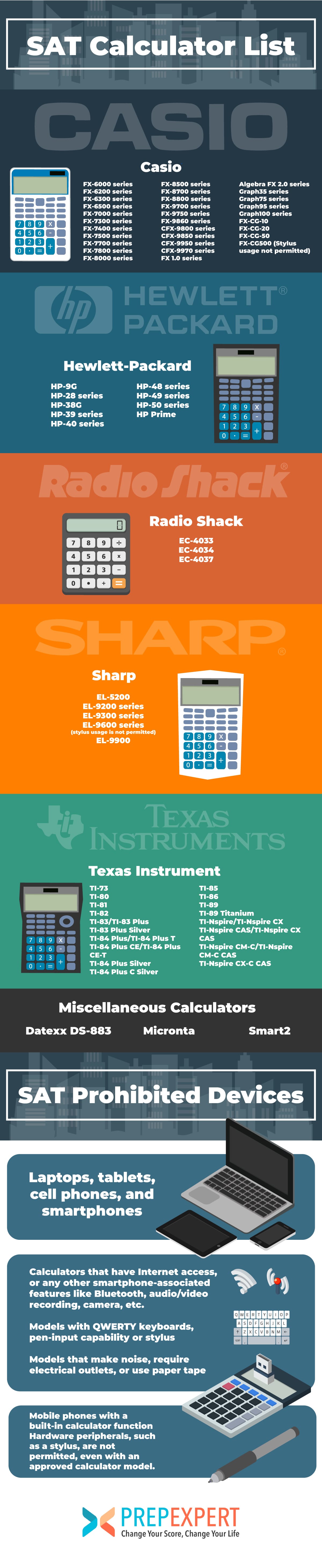
Graphing calculators are often the preferred choice for the SAT due to their advanced capabilities. These devices can display graphs of functions, perform complex statistical analyses, and handle advanced algebraic operations. Popular examples include the Texas Instruments (TI) series (e.g., TI-83 Plus, TI-84 Plus, TI-Nspire CX – non-CAS version) and certain Casio models (e.g., fx-9750GII, fx-9860GII).
Key Advantages:
- Visual Representation: Graphing capabilities are invaluable for visualizing functions, finding intercepts, and understanding slopes, which can be particularly helpful for geometry and algebra problems.
- Advanced Functions: They can handle matrices, calculus operations (though calculus is not directly tested on the SAT, some functions can aid in pre-calculus problems), and complex statistical calculations.
- Programmability (Limited): While extensive programming is forbidden, basic programming features for quick access to formulas or small programs are often allowed, provided they don’t store text or full solutions.
Students considering a graphing calculator should be thoroughly familiar with its functions. Merely owning one without understanding its operation can be more detrimental than helpful, as navigating complex menus can waste precious time during the exam.
Scientific Calculators: Reliable Workhorses
Scientific calculators are more compact and typically less expensive than graphing calculators but offer a robust set of functions suitable for the entire SAT Math section. They are designed for scientific, engineering, and mathematical problems, providing access to logarithms, trigonometric functions, exponents, roots, and basic statistical calculations. Common examples include the TI-30X IIS, Casio fx-115ES Plus, and Sharp EL-520WB.
Key Advantages:
- Sufficient Functionality: They possess all the necessary functions for the SAT Math content, including trigonometry, exponents, and basic statistics.
- Ease of Use: Generally less complex to operate than graphing calculators, making them a good option for students who prefer a straightforward interface.
- Affordability: They are a more budget-friendly option while still providing ample computational power.
For students who don’t feel the need for graphing capabilities or prefer a less cluttered interface, a scientific calculator is an excellent and fully capable choice for the SAT.
Four-Function Calculators: Basic but Permitted
The most basic type of calculator, a four-function calculator, can perform addition, subtraction, multiplication, and division. While technically permitted by the College Board, these calculators lack the advanced functions (like square roots, exponents, or trigonometry) that are highly beneficial, if not essential, for many SAT Math problems. Using only a four-function calculator would significantly disadvantage a test-taker, forcing them to perform complex calculations manually or rely on approximations that could lead to errors or wasted time. Therefore, while allowed, they are not recommended for the SAT.
Prohibited Devices and Features
Understanding what is not allowed is just as critical as knowing what is permitted. The College Board is very explicit about devices and features that will lead to disqualification.
Devices That Are Never Allowed
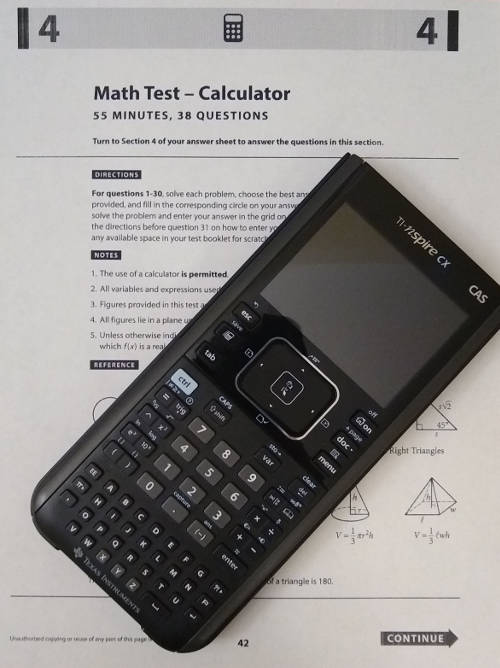
Several categories of devices are strictly prohibited in the SAT testing room. These include:
- Cell phones, smartphones, and smartwatches: Any device with internet access, communication capabilities, or camera functions is strictly forbidden.
- Laptops, tablets, and personal computers: These offer extensive functionality that goes far beyond simple computation.
- Any device with QWERTY keyboards: This includes calculators that resemble mini-computers with full alphanumeric keyboards, as they could be used for text entry or information storage. Examples include older TI-92 or Voyage 200 models.
- Calculators that make noise: Devices that beep or emit any sound could distract other test-takers.
- Calculators with paper tape: Devices that print out calculations are not allowed.
- Calculators that require an electrical outlet: Battery-operated devices are mandatory.
- Devices that can record audio or video: This includes dedicated recorders or devices with these features.
- Pocket organizers or devices with text-messaging capabilities: These fall under the general prohibition of communication devices.
Specific Features to Avoid
Even within generally acceptable calculator models, certain features must be disabled or covered during the exam. These include:
- Wireless communication features: Bluetooth, Wi-Fi, or cellular capabilities must be turned off.
- Camera functions: If a calculator has a camera (rare but possible in some advanced models), it must be disabled.
- Audio recording/playback: Any such feature is prohibited.
- CAS (Computer Algebra System) functionality: Calculators with CAS, such as the TI-Nspire CX CAS, are generally prohibited because they can perform symbolic algebra, differentiating and integrating equations, which could provide an unfair advantage by solving problems that are intended to test conceptual understanding. The non-CAS versions of these calculators are often allowed.
The Consequences of Non-Compliance
The penalties for violating calculator policies are severe. Test proctors are trained to identify prohibited devices and features. If a student is found using an unauthorized calculator or one with prohibited features enabled, their test scores may be canceled, they may be dismissed from the testing center, and they might be barred from taking future College Board exams. It is not worth risking your scores or future academic opportunities by bringing a questionable device. When in doubt, always err on the side of caution or consult the official College Board guidelines directly.
Choosing the Right Calculator: Features and Considerations
Selecting the best calculator involves more than just ensuring it’s acceptable; it’s about finding one that complements your study habits and test-taking style.
Essential Functions for the SAT Math Section
Regardless of whether you choose a graphing or scientific calculator, ensure it has the following fundamental capabilities:
- Basic Arithmetic Operations: Addition, subtraction, multiplication, division.
- Exponents and Roots: Square roots, cube roots, powers.
- Fractions: The ability to work with and simplify fractions.
- Trigonometric Functions: Sine, cosine, tangent, and their inverses (sin⁻¹, cos⁻¹, tan⁻¹).
- Logarithms: Base-10 and natural logarithms.
- Parentheses: Essential for correctly ordering operations.
- Memory Functions: For storing intermediate results.
- Statistical Functions: Basic mean, median, standard deviation for data analysis problems.
For graphing calculators, the ability to plot functions, find intercepts, and solve systems of equations graphically can be a significant time-saver.
User Experience and Practice
The “best” calculator is ultimately the one you are most comfortable and proficient with. It’s not enough to simply buy an approved model; you must practice extensively with it.
- Interface and Layout: Does the button layout feel intuitive? Are functions easily accessible?
- Display Clarity: Is the screen easy to read, especially under various lighting conditions?
- Key Responsiveness: Do the keys register presses reliably without needing excessive force?
Start using your chosen calculator during your SAT practice sessions and everyday math homework well in advance of the test. This familiarization will help you navigate its functions quickly and confidently, reducing stress and saving precious time on test day.
Battery Life and Reliability
This is often overlooked but critically important. Most test centers do not allow students to use electrical outlets.
- Fresh Batteries: Always insert fresh batteries (or ensure your rechargeable calculator is fully charged) the day before the SAT.
- Spare Batteries: Consider bringing spare batteries, especially if your calculator uses standard AAA or AA batteries. This is a simple precaution that can prevent a catastrophic failure mid-test.
- Calculator Reliability: Choose a reputable brand known for durability and consistent performance. A malfunctioning calculator on test day can be a significant setback.
Maximizing Your Calculator’s Potential on Test Day
Having an acceptable calculator is only half the battle; knowing how to use it strategically is the other.
Familiarization Through Practice
The most effective way to leverage your calculator is through consistent practice. Work through official SAT practice tests and sample questions with your chosen device. Pay attention to:
- Time Management: How quickly can you input complex equations? Can you switch between functions efficiently?
- Problem-Solving Techniques: Identify which types of problems are best solved or verified with a calculator, and which are quicker to solve by hand.
- Error Checking: Learn to use your calculator to double-check your manual calculations, especially for arithmetic-heavy problems.
Strategic Use for Efficiency
Not every math problem requires a calculator, and sometimes, using one can even slow you down. Develop a strategy:
- Know When to Use It: For simple calculations, mental math or quick jotting can be faster. Reserve the calculator for complex arithmetic, graphing, or statistical analysis.
- Avoid Over-Reliance: The SAT Math section includes problems where conceptual understanding is key, and a calculator offers no shortcut. Don’t fall into the trap of trying to force every problem into a calculator solution.
- Program Smartly (if allowed): If your graphing calculator allows for simple, non-text-based programs (e.g., quadratic formula solver), program it in advance and practice using it. Ensure it adheres to College Board guidelines.
Pre-Test Checklist
The night before the test, ensure your calculator is ready:
- Check Battery: Install fresh batteries or fully charge it.
- Clear Memory: If your calculator has extensive memory, clear it to prevent accidental storage of prohibited information.
- Disable Prohibited Features: Turn off Wi-Fi, Bluetooth, or any other communication features.
- Confirm Approved Model: Double-check against the latest College Board list.
- Practice One Last Time: Do a few quick calculations to ensure it’s working perfectly.
Conclusion
Choosing and mastering an acceptable calculator for the SAT Math section is a critical component of effective test preparation. By understanding the College Board’s precise guidelines, identifying permitted and prohibited devices, and committing to extensive practice with your chosen tool, you can transform your calculator from a potential source of anxiety into a powerful asset. Whether you opt for a versatile graphing calculator or a dependable scientific one, your goal should be seamless integration of technology with your mathematical prowess. Prioritize comfort, familiarity, and adherence to the rules, and you’ll be well-equipped to tackle the SAT Math section with confidence and precision. Remember, the calculator is a tool to support your intelligence, not replace it; use it wisely to showcase your full potential.
aViewFromTheCave is a participant in the Amazon Services LLC Associates Program, an affiliate advertising program designed to provide a means for sites to earn advertising fees by advertising and linking to Amazon.com. Amazon, the Amazon logo, AmazonSupply, and the AmazonSupply logo are trademarks of Amazon.com, Inc. or its affiliates. As an Amazon Associate we earn affiliate commissions from qualifying purchases.