
In the dynamic world of PC hardware, performance gains are often sought through intricate tweaks and optimizations. For years, unlocking the full potential of high-speed memory modules has been a rite of passage for enthusiasts, often involving tedious manual adjustments in the UEFI/BIOS. Enter AMD EXPO – a game-changing technology designed to simplify and democratize high-performance memory on AMD’s latest platforms. But what exactly is EXPO, and why should every AMD Ryzen 7000 series owner and prospective builder pay close attention?
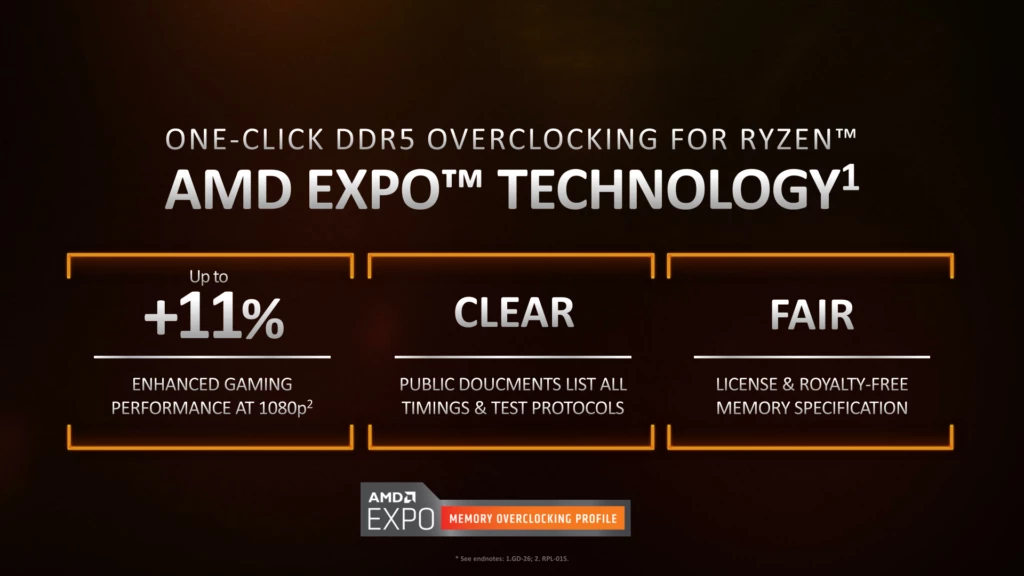
At its core, AMD EXPO (Extended Profiles for Overclocking) is a set of standardized memory profiles embedded directly onto DDR5 RAM modules. These profiles contain pre-optimized settings for frequency, timings, and voltage, specifically tuned for AMD’s AM5 platform. This means users can achieve the advertised, high-speed performance of their memory with a single click in their motherboard’s BIOS, bypassing the complexities of manual tuning. It’s a testament to AMD’s commitment to user experience, ensuring that even novice builders can effortlessly tap into the performance advantages offered by cutting-edge DDR5 memory.
Understanding the Memory Landscape: The Need for EXPO
To truly appreciate the significance of AMD EXPO, one must first grasp the critical role of memory in overall system performance and the challenges historically associated with pushing its limits.
The Role of RAM in System Performance
Random Access Memory (RAM) serves as the short-term memory of a computer, acting as a high-speed buffer between the CPU and slower storage devices. Its speed and efficiency directly impact how quickly the CPU can access data and instructions. In modern computing, particularly with multi-core processors and demanding applications like gaming, video editing, and 3D rendering, the speed at which RAM can deliver data to the CPU is paramount. A faster memory subsystem reduces latency and increases bandwidth, allowing the CPU to operate closer to its theoretical maximum potential, preventing it from waiting idly for data. This is especially true for AMD’s Ryzen processors, which are known to be particularly sensitive to memory speed and latency due to their Infinity Fabric interconnect.
The Challenge of High-Speed Memory
While memory manufacturers advertise increasingly higher speeds (e.g., DDR5-6000, DDR5-7200), these speeds are often not accessible “out of the box.” The JEDEC (Joint Electron Device Engineering Council) standard defines conservative base speeds (e.g., DDR5-4800) to ensure universal compatibility. Any speed above this baseline is considered an overclock. Historically, achieving these higher, advertised speeds required users to manually configure dozens of settings in the BIOS: memory frequency, various timing parameters (CL, tRCD, tRP, tRAS, etc.), and voltages for the DRAM, Memory Controller, and other relevant components. This process was time-consuming, often unstable, and required a deep understanding of memory architecture – a barrier for many users. Intel addressed this challenge years ago with their XMP (Extreme Memory Profile) technology, and now, AMD has introduced its own, platform-optimized solution: EXPO.
AMD EXPO Unveiled: Definition and Functionality
AMD EXPO is more than just a setting; it’s an ecosystem designed for seamless, high-performance memory integration on AMD platforms.
What EXPO Actually Does
EXPO profiles are essentially pre-tested configuration files stored on the DDR5 memory module itself. When you enable EXPO in your motherboard’s BIOS, the system reads these profiles and automatically applies the optimized settings for frequency, timings (like CAS Latency, Row Precharge Delay, etc.), and voltages (VDD, VDDQ, VSOC, etc.) that the memory manufacturer has validated for their module on an AMD platform. This ensures that your RAM runs at its advertised speed and timings, delivering the performance uplift you paid for, without the hassle and risk of manual tuning. Each EXPO-certified kit typically includes two profiles: one optimized for maximum speed (often labeled “Optimized” or “Fast”) and another for maximum stability (often labeled “Stable” or “Default EXPO).
How EXPO Differs from XMP
While AMD EXPO shares a similar goal with Intel’s XMP, there are crucial distinctions. XMP is Intel’s proprietary technology, primarily optimized for Intel platforms. EXPO, on the other hand, is an open standard developed by AMD, specifically tailored for their AM5 platform and Ryzen 7000 series (and future generations).
-
Platform Optimization: EXPO profiles are tuned and validated specifically with AMD Ryzen CPUs and chipsets in mind, potentially offering superior compatibility and stability on AMD systems compared to running an XMP profile on an AMD motherboard (though many AM5 boards do support XMP).
-
Open Standard: Being an open standard, EXPO potentially offers greater flexibility for memory manufacturers and may lead to broader adoption across the industry, fostering more competitive pricing and variety in EXPO-certified memory kits.
-
Targeted Voltages: EXPO can include optimized voltages for the CPU’s integrated memory controller (IMC) and other specific platform voltages that are distinct from those optimized for Intel platforms, ensuring better power delivery and stability for AMD systems.
In essence, while both XMP and EXPO aim to simplify memory overclocking, EXPO is AMD’s dedicated answer, promising a more refined and optimized experience for its users.
The Benefits of AMD EXPO
The advantages of AMD EXPO are manifold, impacting both user experience and system performance:
-
Ease of Use: This is perhaps the most significant benefit. Users no longer need to navigate complex BIOS settings; a single click is all it takes to activate high-performance memory.
-
Guaranteed Performance: EXPO certification ensures that the memory kit will reliably operate at its advertised speeds and timings on compatible AMD platforms, eliminating guesswork and potential compatibility issues.
-
Enhanced Stability: Since EXPO profiles are pre-tested and validated, they offer a higher degree of system stability compared to manual, often trial-and-error, overclocking attempts by inexperienced users.
-
Significant Performance Uplift: Enabling EXPO directly translates to tangible performance gains, especially in CPU-intensive tasks and gaming, where higher memory bandwidth and lower latency can lead to higher frame rates and faster load times.
-
Democratization of Overclocking: EXPO makes high-performance memory accessible to a wider audience, from seasoned enthusiasts to first-time PC builders, without requiring specialized knowledge.
Enabling EXPO: A Step-by-Step Guide
Activating AMD EXPO is a straightforward process, requiring just a few steps in your system’s UEFI/BIOS.
Pre-requisites for EXPO Activation
Before you begin, ensure your system meets these fundamental requirements:
-
AMD AM5 Motherboard: EXPO is exclusively for the AM5 platform.
-
AMD Ryzen 7000 Series CPU (or newer): Compatible with the AM5 socket.
-
DDR5 RAM with EXPO Certification: Look for the EXPO logo or explicit mention on the memory kit’s packaging and specifications.
-
Up-to-Date Motherboard BIOS/UEFI: Always ensure your motherboard’s BIOS is running the latest stable version, as updates often include improved memory compatibility and stability enhancements.
Navigating the UEFI/BIOS Interface

-
Enter BIOS: Power on your PC and repeatedly press the designated key to enter the BIOS/UEFI setup. This is typically
Del,F2, orF10, depending on your motherboard manufacturer. -
Locate Memory Settings: Once in the BIOS, navigate to the “Memory,” “Overclocking,” “AI Tweaker,” or a similarly named section. The exact path varies by manufacturer (ASUS, MSI, Gigabyte, ASRock, etc.).
-
Enable EXPO: Within the memory settings, you should find an option for “Memory Profile,” “DDR5 Profile,” or directly “AMD EXPO.” Select it. You might be presented with multiple EXPO profiles (e.g., “EXPO I” or “EXPO II”) or just one. Choose the one that matches your desired performance/stability balance.
-
Save and Exit: After selecting the EXPO profile, ensure you save your changes before exiting the BIOS. The system will then restart, applying the new memory settings.
Verifying EXPO Profile Activation
After restarting, it’s crucial to verify that EXPO has been successfully enabled and your RAM is running at its intended speed.
-
CPU-Z: Download and run CPU-Z, a popular freeware utility. Navigate to the “Memory” tab to see your current DRAM frequency (it will be half of your effective speed, e.g., 3000 MHz for DDR5-6000). Check the “SPD” tab to see the EXPO profiles programmed into your RAM module.
-
Task Manager (Windows): Open Task Manager (Ctrl+Shift+Esc), go to the “Performance” tab, and select “Memory.” Here you will see the “Speed” (effective clock speed) of your RAM.
-
AIDA64: For more in-depth analysis, AIDA64 Extreme can provide detailed memory benchmarks and information.
If the displayed speed matches your RAM kit’s advertised EXPO speed, congratulations – you’ve successfully enabled AMD EXPO!
The Performance Impact and Ecosystem
The impact of EXPO extends beyond mere convenience, significantly influencing the overall performance and reliability of AMD-based systems.
Gaming and Application Performance Gains
The “sweet spot” for DDR5 memory on AMD’s AM5 platform is often cited around DDR5-6000 with low CAS Latency (CL). EXPO profiles are meticulously crafted to hit these optimal configurations. For gamers, this translates to tangible improvements: higher minimum and average frame rates, smoother gameplay, and reduced stuttering, especially in CPU-bound scenarios where the CPU is waiting for data from memory. For professionals, faster memory means quicker load times for large files, accelerated rendering in creative applications, and more efficient data processing for scientific simulations or machine learning workloads. The difference between running at the JEDEC default of DDR5-4800 and an EXPO-enabled DDR5-6000 kit can be substantial, often representing a double-digit percentage increase in performance for many demanding tasks.
The EXPO Certified Advantage
When a memory kit carries the “EXPO Certified” badge, it signifies that it has undergone rigorous testing and validation by AMD and the memory manufacturer. This certification guarantees:
-
Compatibility: The module is designed to work seamlessly with AMD’s AM5 platform.
-
Reliability: The specified speeds and timings are stable under typical operating conditions.
-
Performance: The kit will deliver its advertised performance when EXPO is enabled.
This certification instills confidence in consumers, ensuring they invest in memory that will perform as expected without compatibility headaches or stability issues, which is invaluable in the complex world of PC building.
Future of Memory Overclocking on AMD Platforms
As DDR5 technology matures and future AMD platforms emerge, EXPO is poised to evolve. We might see even more granular control within EXPO profiles, perhaps dynamic adjustments based on workload, or even more advanced, user-selectable profiles offering different performance tiers. The open standard nature of EXPO suggests potential for greater community involvement and innovation, which could lead to even more optimized and accessible high-performance memory solutions for future generations of AMD hardware. It sets a foundation for continued simplification and optimization of memory performance.
Dispelling Myths and Maximizing Value
Despite its benefits, some common misconceptions about memory overclocking, even via profiles, persist. Addressing these can help users make informed decisions.
EXPO and System Stability
A common concern with any form of overclocking is reduced system stability. While manual, aggressive overclocking can indeed lead to instability, EXPO profiles are designed with stability as a primary consideration. Memory manufacturers extensively test these profiles to ensure they are stable at the specified speeds and timings. If you encounter instability after enabling EXPO, it’s usually due to a faulty memory module, an outdated BIOS, or a less common hardware incompatibility, rather than the EXPO profile itself being inherently unstable. Nevertheless, running a brief memory stability test (e.g., with MemTest86 or OCCT) after enabling EXPO is always a good practice to confirm everything is running smoothly.
Choosing the Right EXPO-Certified RAM
Selecting the ideal EXPO-certified RAM involves balancing performance, cost, and specific needs:
-
Speed: For Ryzen 7000 series, DDR5-6000 CL30 or CL32 is often considered the “sweet spot” for optimal performance-to-cost ratio. Higher speeds might offer diminishing returns or require more aggressive voltage.
-
Timings: Lower CAS Latency (CL) is generally better. For a given speed, a lower CL indicates faster access to data (e.g., CL30 is better than CL36 at DDR5-6000).
-
Capacity: Determine your needs (e.g., 16GB for basic gaming, 32GB for demanding games and productivity, 64GB+ for heavy professional workloads).
-
Motherboard QVL: Always check your motherboard manufacturer’s Qualified Vendor List (QVL) to ensure the specific EXPO kit you intend to purchase has been tested and validated by the motherboard vendor. This drastically reduces the chance of compatibility issues.
When Manual Overclocking Might Still Be an Option
While EXPO is an excellent solution for the vast majority of users, extreme enthusiasts or those seeking to squeeze every last bit of performance might still opt for manual memory overclocking. This involves diving deep into sub-timings, voltage adjustments, and extensive stability testing. This path is time-consuming, requires significant expertise, and can potentially void warranties or damage components if done incorrectly. For most users, the convenience, stability, and performance offered by EXPO profiles make manual tuning largely redundant and unnecessary.

Conclusion
AMD EXPO represents a significant leap forward in making high-performance DDR5 memory accessible and straightforward for the AM5 platform. By providing pre-validated, optimized memory profiles, AMD has eliminated the guesswork and complexity traditionally associated with achieving advertised RAM speeds. This not only empowers users to effortlessly unlock the full potential of their Ryzen 7000 series processors but also guarantees a more stable and reliable computing experience. For anyone building or upgrading an AMD AM5 system, choosing EXPO-certified RAM and enabling the profile is not just a recommendation—it’s an essential step towards maximizing performance and enjoying the cutting edge of modern PC hardware.
aViewFromTheCave is a participant in the Amazon Services LLC Associates Program, an affiliate advertising program designed to provide a means for sites to earn advertising fees by advertising and linking to Amazon.com. Amazon, the Amazon logo, AmazonSupply, and the AmazonSupply logo are trademarks of Amazon.com, Inc. or its affiliates. As an Amazon Associate we earn affiliate commissions from qualifying purchases.