
In the vast and ever-evolving landscape of computing, programming languages emerge, dominate, and sometimes recede into specialized niches. VBScript, or Visual Basic Scripting Edition, is a prime example of a scripting language that played a significant role in a specific era of software development and system administration. A VBScript file is essentially a plain text file containing instructions written in VBScript, designed to be executed by a host environment, most notably Microsoft’s Internet Explorer browser (for client-side scripting), Internet Information Services (IIS) for server-side scripting in Classic ASP, and the Windows Script Host (WSH) for desktop automation.
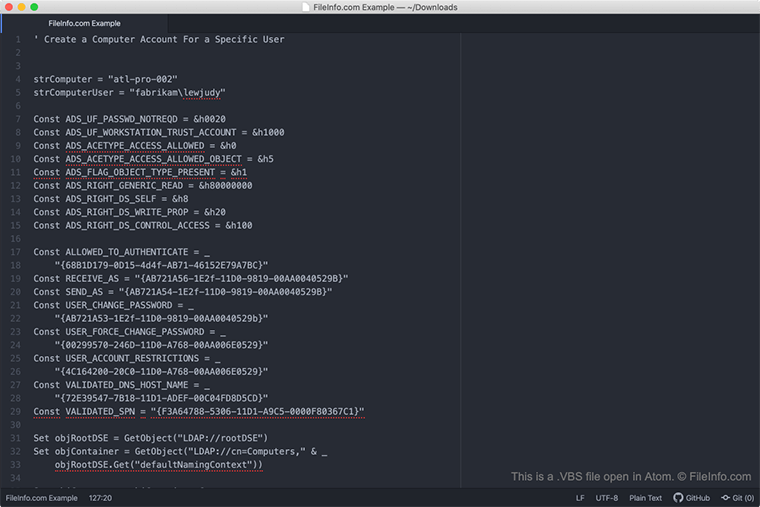
To understand what a VBScript file is, we must delve into its origins, its operational principles, and the contexts in which it thrived. Though its prevalence has waned in modern web and system development due to the rise of more versatile and cross-platform alternatives, VBScript files remain a part of legacy systems and occasionally crop up in niche automation tasks, making their understanding a valuable piece of historical and practical knowledge for anyone exploring the foundations of digital technology. This article will provide a comprehensive overview, shedding light on its technical aspects, historical significance, and eventual decline in favor of contemporary solutions.
Understanding VBScript: A Historical Perspective and Core Concepts
VBScript is more than just a collection of commands; it represents a philosophy of making scripting accessible and powerful within the Microsoft ecosystem. Its design was heavily influenced by Visual Basic, a highly successful event-driven programming language, bringing a familiar syntax and paradigm to scripting environments.
The Origins of VBScript
Developed by Microsoft in the mid-1990s, VBScript was introduced as a lightweight scripting language derived from Visual Basic for Applications (VBA), which itself was embedded within Microsoft Office applications. Its primary initial objective was to be a competitor to JavaScript (then known as LiveScript) for client-side scripting within web browsers, particularly Internet Explorer. The idea was to enable interactive web pages and dynamic content creation directly within the browser, responding to user actions and manipulating the Document Object Model (DOM).
Beyond the browser, VBScript quickly found a crucial role in server-side web development through Microsoft’s Active Server Pages (ASP), often referred to as Classic ASP. Here, VBScript allowed developers to create dynamic, database-driven web applications by executing code on the server before sending rendered HTML to the client. This capability made VBScript integral to many early enterprise web solutions built on Microsoft technologies. Furthermore, VBScript became a powerful tool for system administrators and power users on Windows operating systems through the Windows Script Host (WSH), enabling the automation of routine tasks and the creation of custom utilities directly on the desktop.
How VBScript Works
At its core, VBScript is an interpreted language. This means that unlike compiled languages (like C++ or Java), VBScript code is not translated into machine-readable executable files before it runs. Instead, a VBScript engine reads the script line by line and executes the instructions directly. This interpretation happens at runtime, offering flexibility and rapid development cycles.
A VBScript file is typically identified by its .vbs extension (e.g., myscript.vbs). When such a file is double-clicked on a Windows machine, or referenced by a web server, the operating system or server delegates its execution to the appropriate VBScript engine. For desktop scripts, this is usually wscript.exe or cscript.exe (command-line version of WSH). For server-side ASP, the IIS server’s ASP engine handles the interpretation. The engine then processes the VBScript commands, interacts with the operating system, other applications via COM objects, or the web server, and performs the specified actions.
Key Characteristics and Syntax Basics
VBScript’s syntax is highly readable and shares many characteristics with its Visual Basic lineage. It is largely case-insensitive, which can simplify coding but also lead to potential confusion if not managed carefully. Key characteristics include:
-
Loosely Typed Variables: VBScript uses a single data type called
Variant. While you can implicitly declare variables by simply using them, it’s good practice to declare them explicitly using theDimkeyword (e.g.,Dim myVariable). TheVarianttype can hold different kinds of information (numbers, strings, dates, objects) and VBScript automatically handles conversions, though this flexibility can sometimes lead to runtime errors if data types are mismatched unintentionally. -
Subroutines and Functions: Code is organized into reusable blocks.
Subprocedures perform actions but do not return a value, whileFunctionprocedures perform actions and return a value. -
Control Structures: VBScript provides standard control flow mechanisms such as
If...Then...Elsefor conditional logic,For...Next,Do While...Loop, andWhile...Wendfor iterative operations. -
Object-Oriented Capabilities (via COM): While not a fully object-oriented language itself, VBScript excels at interacting with Component Object Model (COM) objects. This allows VBScript to control other applications (like Microsoft Office), access system resources, manipulate databases (via ADO), and perform powerful operations by leveraging pre-existing software components.
Where VBScript Files Were (and Sometimes Still Are) Used
VBScript’s versatility within the Microsoft ecosystem allowed it to span multiple domains, becoming a go-to language for specific tasks in web development and desktop automation.
Web Development (Classic ASP)
Perhaps VBScript’s most significant historical impact was its role in Classic ASP. Before the advent of modern server-side frameworks and languages, Classic ASP, often paired with VBScript, provided a relatively straightforward way to build dynamic websites. Developers could embed VBScript code directly within HTML pages, using special delimiters (<% ... %>) to denote server-side script blocks.
This allowed for:
-
Dynamic Content Generation: Pages could display personalized greetings, generate data-driven reports, or show varying content based on user input or database queries.
-
Database Interaction: Using ActiveX Data Objects (ADO), VBScript in ASP could connect to databases (like SQL Server, Access), execute queries, retrieve results, and display them on web pages.
-
Session and Application Management: VBScript enabled the management of user sessions, allowing for login systems, shopping carts, and tracking user activity across multiple pages.
-
Form Processing: Data submitted via HTML forms could be processed on the server, validated, and stored in databases using VBScript.
Although Classic ASP sites are now considered legacy, many still exist and are maintained, particularly within older enterprise environments, demonstrating VBScript’s enduring, albeit diminished, presence in the web world.
Desktop Automation and Scripting (Windows Script Host)
The Windows Script Host (WSH) provided a robust environment for running VBScript files directly on Windows desktops and servers. This capability transformed VBScript into a powerful tool for system administrators and IT professionals. With WSH, VBScript files could:
-
Automate Administrative Tasks: This included managing user accounts, manipulating files and folders (copying, deleting, moving), configuring network settings, checking system status, and scheduling tasks.
-
Interact with System Components: Through COM objects, VBScript could communicate with the Windows operating system itself, registry, Event Log, Active Directory, and various installed applications.
-
Create Simple Utilities: From custom backup scripts to small programs that perform specific data processing or reporting, VBScript allowed non-developers to create bespoke solutions without needing a full development environment.
-
Batch File Enhancement: VBScript offered more sophisticated logic, string manipulation, and error handling capabilities compared to traditional Windows batch files, making it suitable for more complex automation.
Many businesses still rely on VBScript files for critical, albeit specialized, automation tasks, often running silently in the background or triggered by scheduled events.
Microsoft Office Applications (VBA Interoperability)
While VBScript is distinct from VBA (Visual Basic for Applications), the scripting language embedded within Microsoft Office applications (Word, Excel, Access, Outlook), they share a common ancestor and syntax. This means that a developer familiar with VBScript can often quickly pick up VBA, and vice-versa.
Although VBScript is not directly embedded within Office documents in the same way VBA is, VBScript files running under WSH can interact with Office applications via COM automation. For example, a VBScript could open an Excel workbook, populate cells with data, run a macro within Excel, or extract information from a Word document. This interoperability allowed for powerful cross-application automation workflows, bridging desktop scripts with productivity suites.
The Structure of a VBScript File
Creating and understanding a VBScript file is relatively straightforward, primarily because it’s a plain text file that follows a logical, human-readable structure.
Simple Script Structure
A VBScript file begins its life as a simple text document. Any text editor can be used to write VBScript code. Here’s how a basic script might look:
' This is a simple VBScript comment

Option Explicit ' Forces explicit declaration of all variables


' Declare a variable

Dim message


<p style="text-align:center;"><img class="center-image" src="https://www.wikihow.com/images/1/1d/229827-17.jpg" alt=""></p>


' Assign a value to the variable

message = "Hello, VBScript World!"


' Display a message box (for WSH)

MsgBox message


' Alternatively, output to console (for CScript)

WScript.Echo message


' Another example: performing a calculation

Dim num1, num2, sum

num1 = 10

num2 = 20

sum = num1 + num2

MsgBox "The sum is: " & sum
To run this, you would save it with a .vbs extension (e.g., hello.vbs) and then double-click the file. The Windows Script Host would execute it, displaying message boxes with the output. The Option Explicit statement is a best practice as it helps catch typos and ensures variables are intentionally used, leading to more robust scripts. Comments, denoted by a single apostrophe ('), explain the code and are ignored by the interpreter.
Variables, Data Types, and Operators
As mentioned, VBScript primarily uses the Variant data type. This means a variable can dynamically hold different types of data without explicit type declaration, though functions like CInt(), CStr(), CBool() can be used for explicit type conversion when needed.
Variables:
Dim myString
Dim myNumber
myString = "VBScript"
myNumber = 123
Operators:
-
Arithmetic:
+,-,*,/,Mod(modulo),^(exponentiation) -
Comparison:
=,<>,<,>,<=,>= -
Logical:
And,Or,Not,Xor,Eqv,Imp -
Concatenation:
&(for combining strings)
Understanding these fundamental elements allows developers to store data, perform calculations, and make decisions within their scripts.
Functions and Subroutines for Modularity
For larger, more complex VBScript files, organizing code into Sub procedures and Function procedures is crucial for maintainability and reusability.
Subroutine Example:
Sub GreetUser(userName)

    MsgBox "Welcome, " & userName & "!"

End Sub


' Call the subroutine

GreetUser "Alice"
Function Example:
Function AddNumbers(a, b)

    AddNumbers = a + b ' Assign the return value to the function name

End Function


' Call the function and store its return value

Dim result

result = AddNumbers(5, 7)

MsgBox "The result of adding 5 and 7 is: " & result
These modular blocks allow VBScript files to perform complex operations by breaking them down into smaller, manageable, and reusable pieces of code, making scripts easier to write, debug, and update.
Security Considerations and Modern Alternatives
While VBScript offered powerful capabilities, its direct access to the Windows operating system and its role in early web development also exposed it to significant security vulnerabilities, which contributed to its decline.
Potential Security Risks
The primary security risk associated with VBScript files stems from their ability to execute arbitrary commands on a system. A malicious VBScript, if opened or triggered, could:
-
Manipulate Files: Delete, modify, or encrypt user files, leading to data loss or ransomware attacks.
-
Network Activity: Access network resources, send emails, or download further malware.
-
System Configuration: Modify registry settings, create new users, or change system policies.
-
Spread Malware: VBScript was a common vector for early computer viruses and worms, which could self-replicate and spread rapidly across networks or via email attachments.
Because VBScript files are plain text, a user can inspect the code to understand its purpose. However, many users lack the technical expertise to do so, making them vulnerable to social engineering tactics that encourage them to run malicious scripts. Operating systems and email clients have since implemented stricter security measures, such as warning prompts for executable attachments and disallowing direct execution of scripts downloaded from the internet, but caution remains paramount.
Why VBScript’s Popularity Declined
Several factors contributed to VBScript’s diminishing role in mainstream development:
-
Rise of JavaScript: For client-side web scripting, JavaScript became the undeniable standard due to its cross-browser compatibility, faster evolution, and vast community support.
-
Server-Side Evolution: Classic ASP gave way to more robust and feature-rich server-side technologies like ASP.NET (using C# or VB.NET), PHP, Python (with frameworks like Django and Flask), and Node.js. These alternatives offered better performance, scalability, security, and modern architectural patterns.
-
Lack of Modern Features: VBScript evolved slowly and lacked many features common in modern languages, such as strong typing, advanced object-oriented paradigms, and comprehensive standard libraries.
-
Security Perceptions: The association with viruses and the inherent risks of executing untrusted scripts on Windows contributed to a perception of VBScript as a less secure option, even if the language itself wasn’t inherently insecure, but rather its usage context.
-
Platform Dependency: VBScript is inextricably linked to the Microsoft Windows ecosystem, limiting its applicability in cross-platform development environments.
Modern Alternatives for Scripting and Automation
For those seeking to perform tasks previously handled by VBScript, several powerful and widely adopted alternatives exist today:
-
PowerShell: For Windows system administration and automation, PowerShell is the official successor and preferred tool. It offers deep integration with Windows,
.NETframework access, and a powerful object-based pipeline for robust scripting. -
Python: A general-purpose language with exceptional versatility, Python is widely used for scripting, automation (including cross-platform), data science, web development, and more. Its vast ecosystem of libraries and readability make it an excellent choice for almost any scripting task.
-
JavaScript (with Node.js): While traditionally a client-side web language, Node.js brought JavaScript to the server and desktop, enabling server-side web applications, command-line tools, and automation scripts using a familiar C-like syntax.
-
C# / .NET: For enterprise-grade applications, including modern web development (ASP.NET Core) and robust desktop applications, C# with the .NET framework offers a compiled, strongly-typed, and highly performant environment.
These modern alternatives provide superior capabilities, broader platform support, enhanced security features, and vibrant communities, making them the preferred choices for today’s development and automation challenges.

Conclusion
A VBScript file represents a fascinating chapter in computing history, embodying Microsoft’s vision for scripting within its burgeoning ecosystem. From enabling dynamic web pages with Classic ASP to automating intricate system tasks via the Windows Script Host, VBScript played a crucial role in shaping the digital landscape of the late 20th and early 21st centuries. Its simple, Visual Basic-derived syntax made powerful scripting accessible to a broad audience, from web developers to IT administrators.
However, the rapid evolution of technology, the emergence of more versatile and secure cross-platform languages, and an increased focus on security ultimately led to VBScript’s decline in mainstream popularity. While it persists in legacy systems and niche automation, understanding what a VBScript file is, its structure, and its historical context provides invaluable insight into the foundations of modern software development and system management. For contemporary tasks, developers and administrators now gravitate towards languages like PowerShell, Python, and JavaScript, which offer more robust, secure, and future-proof solutions. VBScript remains a testament to the cycles of innovation, demonstrating how even powerful tools can give way to newer paradigms in the relentless march of technological progress.
aViewFromTheCave is a participant in the Amazon Services LLC Associates Program, an affiliate advertising program designed to provide a means for sites to earn advertising fees by advertising and linking to Amazon.com. Amazon, the Amazon logo, AmazonSupply, and the AmazonSupply logo are trademarks of Amazon.com, Inc. or its affiliates. As an Amazon Associate we earn affiliate commissions from qualifying purchases.