
In the ever-evolving landscape of web development and user interface design, understanding the fundamental building blocks is crucial for both aspiring developers and seasoned professionals. Among these building blocks, the <textarea> element stands out as a ubiquitous and essential component for collecting user input. While seemingly simple, its role in facilitating rich text entry and enhancing user experience is profound. This article delves into the core concepts of what a <textarea> is, its significance in web design, its technical implementation, and its practical applications.
The Fundamentals of a Textarea
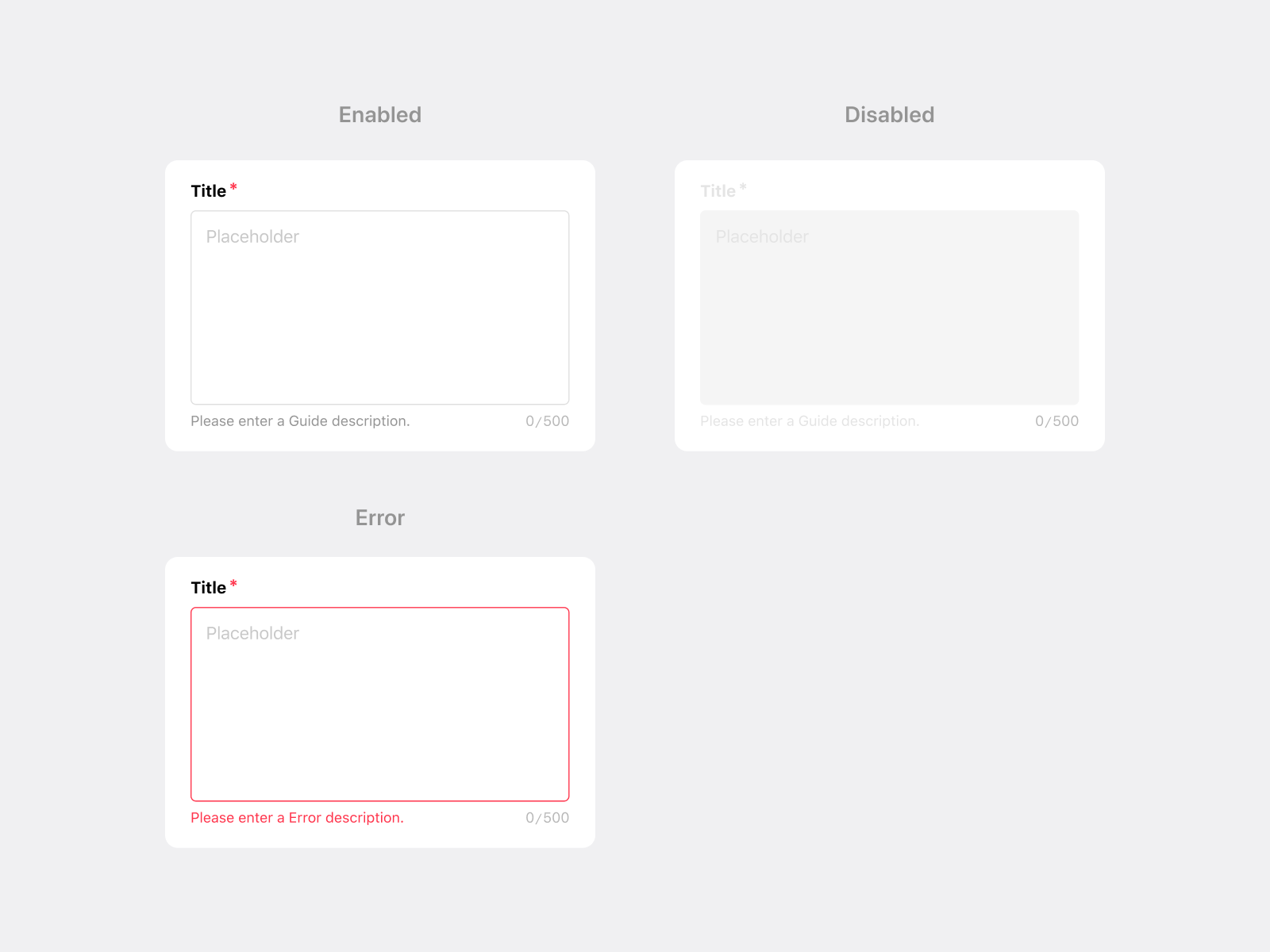
At its heart, a <textarea> is an HTML form control that allows users to input multiple lines of plain text. Unlike a single-line input field (like <input type="text">), a <textarea> provides a resizable, multi-line area where users can express themselves more comprehensively. This distinction is critical for various user interactions, ranging from composing emails and writing blog posts to submitting detailed feedback or filling out lengthy application forms.
Defining the <textarea> Element in HTML
The <textarea> element is a core part of the HTML specification, specifically designed for form submission. Its syntax is straightforward:
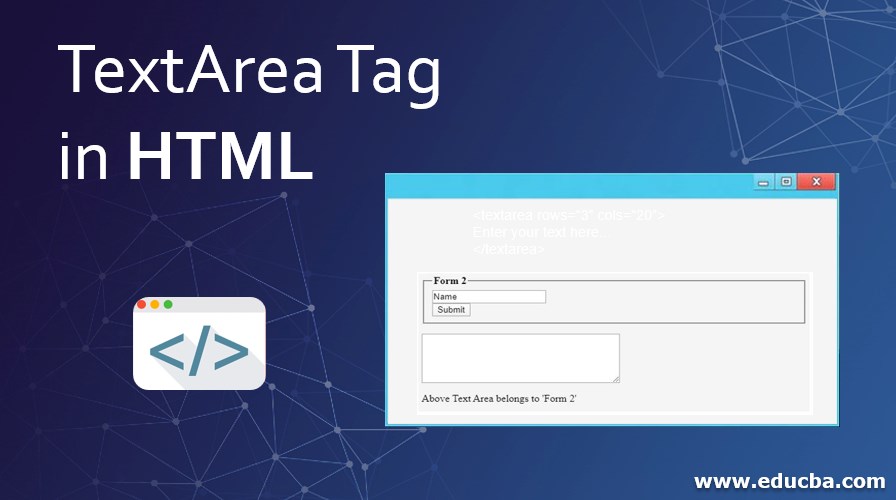
<textarea name="myTextarea" rows="4" cols="50">
  Enter your text here...
</textarea>
Let’s break down the key components:
<textarea>and</textarea>: These are the opening and closing tags that define the element.nameattribute: This attribute is essential for form submission. It provides a name for the data that will be sent to the server when the form is submitted, allowing the server-side script to identify and process the input.rowsattribute: This attribute specifies the visible height of the text area in terms of the number of text lines. While it sets an initial visual size, users can often resize the textarea if the browser or CSS allows.colsattribute: This attribute defines the visible width of the text area in terms of the average character width. Similar torows, this is an initial sizing attribute and can be overridden by CSS.- Content within the tags: Any text placed between the opening and closing
<textarea>tags will appear as the default or placeholder content within the text area when the page loads. This is useful for providing instructions or pre-filling information.
Distinguishing Textarea from Other Input Fields
The primary differentiator of a <textarea> is its capacity for multi-line input. Consider the contrast with:
<input type="text">: This element is designed for single-line text input, ideal for names, email addresses, or search queries. It lacks the vertical space for extensive writing.<input type="password">: Functionally similar toinput type="text", but it masks the entered characters, typically with asterisks, for security.- Rich Text Editors (RTEs): While a
<textarea>handles plain text, Rich Text Editors are more advanced JavaScript-based components that allow users to format text (bold, italics, lists, etc.) and embed media. These are often built around or in conjunction with a<textarea>, but they are not the<textarea>itself. The<textarea>serves as the underlying data storage for the formatted text, which is then processed by the RTE’s JavaScript.
The Role of Textarea in User Interface and User Experience
The <textarea> is more than just an HTML tag; it’s a critical element in designing intuitive and user-friendly interfaces. Its presence directly impacts how users interact with a website or application and the quality of information they can provide.
Facilitating User Expression and Input
The fundamental purpose of a <textarea> is to enable users to express themselves freely and provide detailed information. This is especially important in scenarios where:
- Communication: Composing emails, writing comments on blog posts, sending messages on social media platforms.
- Content Creation: Writing articles, crafting product descriptions, submitting forum posts.
- Feedback and Support: Providing detailed bug reports, offering customer reviews, submitting support requests.
- Data Entry: Filling out lengthy forms, entering addresses, submitting resumes.
Without a <textarea>, users would be limited to single-line inputs, which would severely hinder their ability to convey complex thoughts or provide comprehensive data.
Enhancing Usability and Accessibility
A well-implemented <textarea> contributes significantly to usability and accessibility:
- Visual Cues: The visible bounding box of a
<textarea>clearly indicates an area for input. Therowsandcolsattributes, along with CSS styling, can further guide users on the expected input length. - Resizability: Many modern browsers allow users to resize
<textarea>elements by dragging a handle in the corner. This empowers users to adjust the input area to their comfort and the length of their content, improving the overall user experience. This feature can be controlled via CSS (resizeproperty). - Keyboard Navigation: Like other form elements,
<textarea>elements are accessible via keyboard navigation (using the Tab key), making them usable for individuals who do not use a mouse. - Labels and Accessibility: Proper association with a
<label>element using theforattribute is crucial for screen readers and assistive technologies. This ensures that users understand the purpose of the<textarea>and what information is expected.
<label for="feedback">Your Feedback:</label>
<textarea name="feedback" rows="6" cols="80"></textarea>
In this example, the label‘s for attribute (feedback) matches the textarea‘s id attribute (feedback), creating a strong association.
Technical Implementation and Customization
Beyond its basic definition, the <textarea> element offers several attributes and can be extensively styled and manipulated using CSS and JavaScript to meet specific design and functional requirements.
Attributes for Control and Functionality
While name, rows, and cols are fundamental, other attributes offer further control:
-
placeholderattribute: This attribute provides a hint to the user about what kind of input is expected in the<textarea>. The placeholder text disappears when the user starts typing.<textarea name="message" placeholder="Type your message here..."></textarea> -
requiredattribute: This boolean attribute, when present, indicates that the user must fill in a value before submitting the form. The browser will typically prevent form submission if a required<textarea>is empty. -
readonlyattribute: This boolean attribute makes the<textarea>content uneditable but still selectable and copyable. It’s useful for displaying information that the user shouldn’t modify. -
disabledattribute: This boolean attribute makes the<textarea>completely inactive. It cannot be focused, edited, or submitted with the form. It’s often used to conditionally hide or disable input fields. -
maxlengthattribute: This attribute specifies the maximum number of characters that the user can enter into the<textarea>. -
wrapattribute: This attribute controls how whitespace within the<textarea>is handled during form submission. Common values aresoft(default, where line breaks are only transmitted if explicitly entered by the user) andhard(where line breaks are transmitted as CRLF characters).
Styling with CSS
CSS plays a vital role in transforming the default appearance of a <textarea> into a visually appealing and integrated part of a website’s design. Key CSS properties include:
widthandheight: These can be used to set precise dimensions, overridingcolsandrowsfor more control.border: To define the visual boundary of the text area.padding: To create space between the text content and the border.font-family,font-size,color: To control the typography of the input text.background-color: To set the background of the text area.resize: As mentioned earlier, this property controls whether and how the user can resize the<textarea>(e.g.,none,both,horizontal,vertical).outline: To style the focus indicator when the<textarea>is selected.
textarea {
  width: 100%;
  padding: 10px;
  border: 1px solid #ccc;
  border-radius: 4px;
  font-size: 16px;
  resize: vertical; /* Allows vertical resizing only */
}

textarea:focus {
  border-color: #007bff; /* Highlight on focus */
  outline: none; /* Remove default outline if desired */
}
Interacting with JavaScript
JavaScript unlocks dynamic behavior and advanced functionalities for <textarea> elements. This includes:
- Reading and Writing Content: Getting the current value of the
<textarea>and setting its content programmatically. - Event Handling: Responding to user actions like typing (
inputevent), focus changes (focusandblurevents), or form submission (submitevent of the form). - Validation: Implementing custom client-side validation logic beyond the built-in
requiredattribute. - Integration with Rich Text Editors: As mentioned, JavaScript libraries are used to enhance plain
<textarea>elements into sophisticated Rich Text Editors. These editors often use a hidden<textarea>to store the final HTML content.
const myTextarea = document.getElementById('myTextarea');
const submitButton = document.querySelector('button[type="submit"]');

myTextarea.addEventListener('input', () => {
  console.log('Current value:', myTextarea.value);
});

submitButton.addEventListener('click', (event) => {
  if (myTextarea.value.trim() === '') {
    alert('Please enter some text!');
    event.preventDefault(); // Prevent form submission
  }
});
Practical Applications and Advanced Use Cases
The <textarea> element finds its way into almost every corner of the web, enabling a wide array of functionalities.
Forms and Data Collection
This is the most common use case. <textarea> elements are integral to:
- Contact Forms: Allowing users to send detailed messages.
- Feedback Forms: Collecting detailed reviews, suggestions, or bug reports.
- Application Forms: Gathering personal information, essays, or detailed responses.
- Survey Forms: Providing open-ended questions for qualitative data.
- Order Forms: Allowing for special instructions or customization requests.
Content Management Systems (CMS) and Blogging Platforms
Websites powered by CMSs like WordPress, or blogging platforms, heavily rely on <textarea> elements (often enhanced with RTEs) for users to:
- Write and edit blog posts.
- Compose website pages.
- Add product descriptions in e-commerce platforms.
- Write comments on articles.
Communication Tools
Any application involving user-to-user communication will likely use <textarea>:
- Email Clients: Composing emails.
- Chat Applications: Sending messages.
- Forums and Message Boards: Posting replies and starting new threads.
Code Editors and Development Tools
While not always a direct visual <textarea> in the end-user interface, many development tools use <textarea> as a base for code editing. These are often highly specialized with syntax highlighting and other advanced features powered by JavaScript libraries. For example, a developer might encounter a <textarea> when:
- Editing configuration files.
- Writing scripts within a web application’s admin panel.
- Using browser developer tools to inspect and modify DOM elements.
Accessibility Enhancements
Beyond standard usability, <textarea> can be used in specific accessibility contexts:
- Scribe Tools: Providing a dedicated area for users to dictate text, which is then transcribed into the
<textarea>. - Assistive Technologies: Some assistive devices might interact with a
<textarea>as a primary input mechanism.
In conclusion, the <textarea> is a foundational element in web development, empowering users to provide rich, multi-line text input. Its simplicity in HTML, coupled with the flexibility offered by CSS for styling and JavaScript for interactivity, makes it an indispensable tool for creating engaging and functional web experiences across a vast spectrum of applications. Understanding its nuances allows developers to build more effective, user-friendly, and accessible web interfaces.