
In the vast, interconnected world of technology, data doesn’t just magically appear where it needs to be. Imagine sending a letter across the country; it doesn’t go directly from your mailbox to the recipient’s. Instead, it travels through a series of post offices, each making a decision about the next best route to ensure it reaches its destination efficiently. Similarly, in the digital realm, data packets embark on a journey across networks, guided by an invisible infrastructure that orchestrates their passage. At the heart of this intricate system lies the routing table.
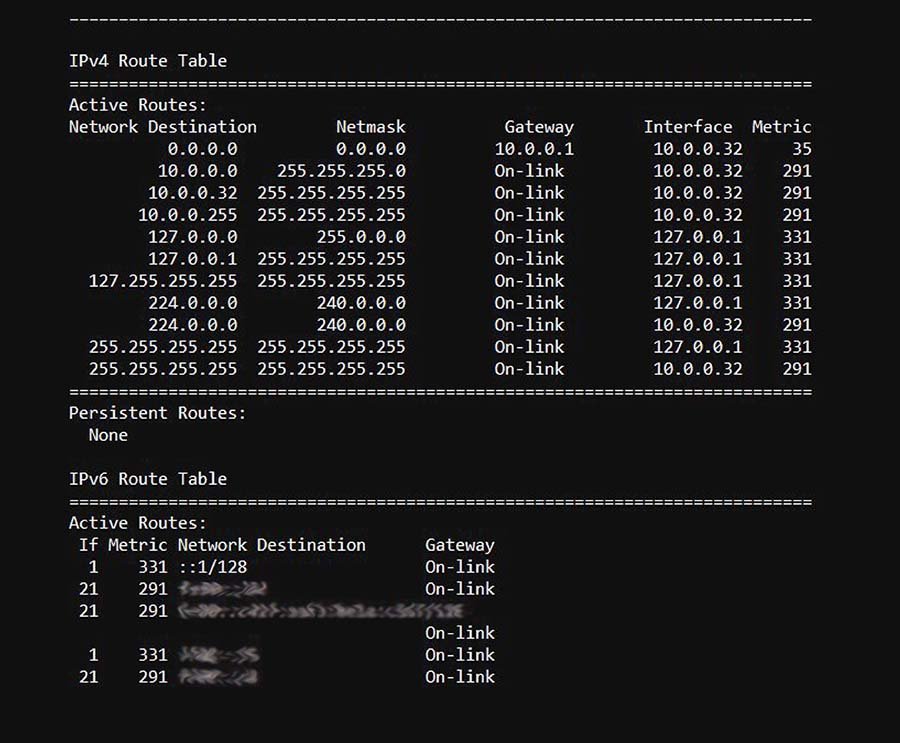
For anyone delving into the world of tech, whether it’s understanding how their favorite app connects to servers, safeguarding their digital footprint, or even building the next groundbreaking software, grasping the concept of a routing table is fundamental. It’s the unsung hero of network communication, quietly ensuring that emails arrive, websites load, and your video calls remain uninterrupted.
The Core Function: Directing the Digital Traffic
At its most basic, a routing table is a set of rules, stored in a router or a network device, that dictates where network traffic should be sent. Think of it as a meticulously organized address book and a set of instructions rolled into one. When a data packet arrives at a router, the router examines the packet’s destination IP address. It then consults its routing table, looking for a matching entry that provides the “best path” to reach that destination.
How Routers Use Routing Tables: A Step-by-Step Process
- Packet Arrival: A data packet, containing information like the source and destination IP addresses, arrives at the router’s interface.
- Destination Lookup: The router’s processor reads the destination IP address from the packet’s header.
- Table Consultation: The router compares this destination IP address against the entries in its routing table. Each entry typically consists of:
- Destination Network: The IP address range that the packet is intended for.
- Next Hop: The IP address of the next router or device on the path towards the destination.
- Outgoing Interface: The physical or logical port on the router through which the packet should be forwarded.
- Metric: A value representing the “cost” or “preference” of a particular route. Lower metrics usually indicate a more desirable path (e.g., faster, less congested).
- Best Path Selection: If multiple entries match the destination IP address, the router uses the metric to select the most optimal route. This selection process is governed by routing protocols.
- Packet Forwarding: Once the best path is identified, the router modifies the packet’s header (e.g., decrementing the Time-To-Live or TTL value) and forwards it out of the specified outgoing interface towards the next hop.
- Loop Prevention: Routing tables and protocols also employ mechanisms to prevent data packets from endlessly circulating within the network, a phenomenon known as a routing loop.
This seemingly simple process is the backbone of the internet and all private networks. Without routing tables, the internet would be an unnavigable chaos of disconnected devices, unable to exchange information.
The Anatomy of a Routing Table Entry
To truly appreciate the power of a routing table, it’s helpful to understand its constituent parts. While the exact format can vary slightly between different operating systems and router manufacturers, the fundamental components remain consistent.
Key Fields in a Routing Table Entry:
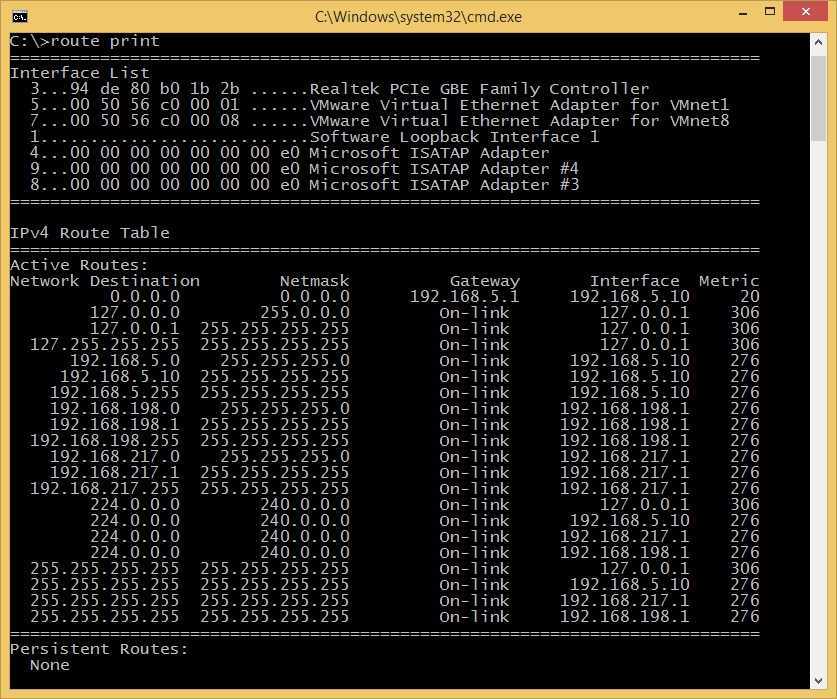
- Destination Network: This specifies the IP address and subnet mask that defines a range of IP addresses. For example,
192.168.1.0/24represents all IP addresses from192.168.1.0to192.168.1.255. - Subnet Mask: This is crucial for determining which part of the IP address represents the network and which part represents the host within that network. When combined with the destination IP address, it allows the router to match a packet’s destination to a specific network.
- Gateway (or Next Hop): This is the IP address of the next router or device that the packet should be sent to. If the destination network is directly connected to the router, this field might be null or indicate a direct connection.
- Interface: This indicates the physical or logical port on the router from which the packet will be sent. For example,
eth0,GigabitEthernet0/1, orVLAN10. - Metric: This is a numerical value used by routing protocols to determine the “cost” or preference of a route. Factors influencing the metric can include:
- Hop Count: The number of routers a packet must traverse to reach the destination.
- Bandwidth: The data carrying capacity of the link.
- Delay: The time it takes for a packet to travel across the link.
- Load: The current traffic congestion on the link.
- Reliability: The stability and uptime of the link.
- Cost: A manually configured value.
A lower metric generally signifies a more desirable route.
- Route Type/Flags: These often indicate how the route was learned (e.g., directly connected, static, or learned via a dynamic routing protocol) and its state (e.g., active, learned).
Types of Routes: Static vs. Dynamic
The entries within a routing table are not all created equal. They can be added manually or learned automatically. Understanding this distinction is key to managing and troubleshooting network paths.
Static Routes: The Manual Approach
Static routes are manually configured by a network administrator. They are fixed entries that do not change unless explicitly modified.
- Pros:
- Simplicity: For small, stable networks, static routes are easy to configure and understand.
- Security: They can enhance security by preventing unauthorized or unadvertised routes from being added.
- Predictability: The path for a given destination is always the same, which can be beneficial for specific applications.
- Resource Efficiency: They don’t require the overhead of dynamic routing protocols, making them ideal for resource-constrained devices.
- Cons:
- Scalability Issues: In large or rapidly changing networks, manually configuring and maintaining static routes becomes impractical and error-prone.
- Lack of Adaptability: If a network link fails, static routes will not automatically reroute traffic, leading to downtime.
- Maintenance Burden: Any network topology change requires manual updates to all affected routers.

Dynamic Routes: The Intelligent Learner
Dynamic routes are learned automatically by routers through the use of routing protocols. These protocols allow routers to exchange routing information with each other, building and updating their routing tables as the network topology changes.
-
Popular Dynamic Routing Protocols:
- RIP (Routing Information Protocol): An older, distance-vector protocol that uses hop count as its metric. Simple but can be slow to converge and prone to routing loops.
- OSPF (Open Shortest Path First): A link-state protocol that builds a complete map of the network and uses Dijkstra’s algorithm to find the shortest path. More complex but offers faster convergence and better scalability.
- EIGRP (Enhanced Interior Gateway Routing Protocol): Cisco’s proprietary hybrid protocol that combines features of both distance-vector and link-state protocols. Known for its speed and efficiency.
- BGP (Border Gateway Protocol): The routing protocol of the internet. It’s a path-vector protocol used to exchange routing and reachability information between autonomous systems (ASes) on the internet. Extremely scalable and complex.
-
Pros:
- Scalability: Easily handles large and complex networks.
- Adaptability: Automatically reroutes traffic around network failures, ensuring resilience and high availability.
- Reduced Administrative Overhead: Eliminates the need for manual route configuration for every network change.
-
Cons:
- Complexity: Understanding and configuring dynamic routing protocols requires specialized knowledge.
- Resource Consumption: Routing protocols consume CPU and memory resources on routers.
- Security Concerns: If not properly secured, dynamic routing protocols can be exploited to inject false routing information.
Routing Tables in Action: Beyond the Basics
The concept of routing tables extends beyond simple IP address forwarding. They play a crucial role in various networking technologies and have implications for digital security and even how we perceive online income.
Routing and Network Address Translation (NAT)
One common use of routing tables is in conjunction with Network Address Translation (NAT). NAT allows multiple devices on a private network to share a single public IP address when accessing the internet. The router, using its routing table and NAT rules, keeps track of which internal IP address corresponds to which outgoing connection, enabling return traffic to be directed to the correct device. This is a fundamental technology for home and small business networks.
Routing and Digital Security
Understanding routing tables is also vital for digital security professionals.
- Firewall Rules: Firewalls often integrate with routing decisions. Specific routing entries can direct traffic to firewall inspection points or block certain destinations altogether.
- Intrusion Detection/Prevention: Network security devices can monitor routing table changes for suspicious modifications that might indicate a network compromise.
- Access Control Lists (ACLs): ACLs, often applied at router interfaces, can filter traffic based on IP addresses and ports. These filters work in conjunction with the routing table’s decision-making process.
- Denial-of-Service (DoS) Mitigation: Sophisticated routing strategies can help reroute or drop malicious traffic before it overwhelms network resources.
Routing Tables and Your Online Experience
While you might not directly interact with routing tables, they profoundly impact your everyday online activities.
- Website Loading: When you type a website address, your computer performs a DNS lookup to get the IP address. Then, your router uses its routing table to find the fastest and most efficient path to the server hosting that website.
- Video Conferencing: Seamless video calls rely on low-latency, reliable paths. Routing tables ensure your data packets take the best route to minimize delays and disruptions.
- Online Gaming: For gamers, routing tables are critical for achieving low ping times and a smooth gaming experience.
- Cloud Services: Accessing your cloud storage, streaming services, or SaaS applications all depends on routers effectively navigating their way through the internet.
Implications for Online Income and Business
For businesses and individuals involved in online income streams, understanding network infrastructure, including routing, can offer a competitive edge.
- Website Performance: Businesses investing in robust network infrastructure and understanding routing principles can ensure their websites load quickly and reliably for customers, directly impacting conversion rates and revenue.
- SaaS Providers: Companies offering Software as a Service rely heavily on efficient routing to deliver their applications to users worldwide with minimal latency.
- Content Delivery Networks (CDNs): CDNs utilize advanced routing techniques to cache content closer to users, drastically improving load times and reducing bandwidth costs.
- E-commerce: Fast and reliable order processing, inventory management, and customer service are all underpinned by efficient network routing.
In conclusion, the routing table is far more than just a technical detail; it’s a fundamental component of modern communication. Whether you’re a budding software developer, a marketing guru fine-tuning your brand’s digital presence, or an entrepreneur building an online empire, a solid understanding of how data navigates the digital landscape, with the routing table as its compass, is an invaluable asset. It’s the invisible force that keeps our connected world spinning, enabling the seamless flow of information that powers our technology, our brands, and our financial endeavors.
aViewFromTheCave is a participant in the Amazon Services LLC Associates Program, an affiliate advertising program designed to provide a means for sites to earn advertising fees by advertising and linking to Amazon.com. Amazon, the Amazon logo, AmazonSupply, and the AmazonSupply logo are trademarks of Amazon.com, Inc. or its affiliates. As an Amazon Associate we earn affiliate commissions from qualifying purchases.