
In the ever-evolving landscape of digital security, password fatigue and the constant threat of data breaches have become unwelcome companions. For years, we’ve relied on complex strings of characters, often reused across multiple platforms, as our primary line of defense. However, this system is fundamentally flawed, leaving us vulnerable to sophisticated attacks. Enter the passkey, a revolutionary new authentication method poised to fundamentally change how we log in to our online accounts.
The Dawn of a Passwordless Future: Understanding Passkeys
At its core, a passkey represents a significant leap forward from traditional passwords. Instead of memorizing a unique, secret string of text, passkeys utilize a pair of cryptographic keys: a public key and a private key. This system, rooted in public-key cryptography, offers a more secure and user-friendly approach to verifying your identity online.

How Passkeys Differ from Traditional Passwords
The fundamental distinction lies in their nature. Passwords are a secret you know. They are typically stored on servers in a hashed or encrypted form, making them susceptible to database breaches. If a service’s database is compromised, your password can be exposed, even if it was a strong one.
Passkeys, on the other hand, are a secret you have and are. They are not stored in a central database in a way that can be easily compromised. Instead, a private key is securely stored on your device (e.g., your smartphone, laptop, or tablet), and a corresponding public key is registered with the online service you’re trying to access. This cryptographic pairing ensures that only your specific device can authenticate you for that particular service.
The Technological Foundation: Public-Key Cryptography Explained
To truly grasp the power of passkeys, a basic understanding of public-key cryptography is helpful. This system works with a pair of mathematically linked keys:
- Public Key: This key is freely shared and is used to encrypt information or verify a digital signature. In the context of passkeys, the public key is sent to the website or app you are logging into.
- Private Key: This key is kept secret and is used to decrypt information encrypted by the public key or to create a digital signature. Your passkey’s private key resides securely on your device.
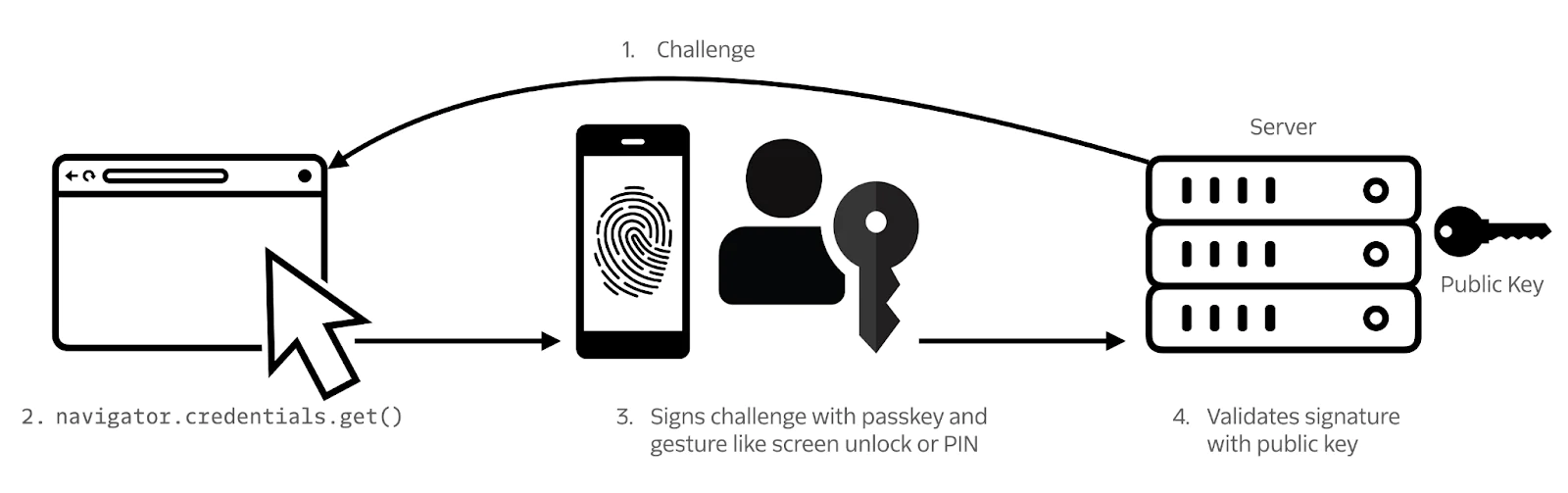
When you attempt to log in with a passkey, the service challenges your device. Your device uses its private key to cryptographically sign this challenge. The service then uses your registered public key to verify this signature. If the signature is valid, it proves that the request originated from a device possessing the correct private key, thus authenticating you without ever transmitting your secret information. This means no secret is ever sent over the network, making it virtually impossible for attackers to intercept and steal.
The Mechanics of Passkey Authentication: A Step-by-Step Breakdown
The process of using a passkey might seem complex under the hood, but from a user’s perspective, it’s designed to be remarkably simple and intuitive. Here’s how it typically unfolds:
Creating a Passkey: The Initial Setup
- Initiation: When you encounter a website or app that supports passkeys, you’ll usually see an option to “Create a passkey” or “Sign up with a passkey.”
- Device Prompt: Your device (e.g., your smartphone) will then prompt you to create a passkey. This might involve selecting which account or service you want to associate it with.
- Biometric or PIN Authentication: To secure your private key, you’ll be asked to authenticate using your device’s built-in security features. This typically means using your fingerprint (Touch ID or equivalent), facial recognition (Face ID or equivalent), or your device’s PIN or password.
- Key Generation and Registration: Your device generates the cryptographic key pair (public and private). The private key is securely stored on your device, often within a hardware-backed secure enclave. The public key is then sent to the online service and associated with your account.
- Confirmation: Once registered, the passkey is ready for use.
Logging In with a Passkey: A Seamless Experience
- Initiation: When you return to the website or app, you’ll typically select the “Log in with passkey” option or be automatically prompted if passkeys are the primary authentication method.
- Device Prompt: Your device will detect the login attempt and prompt you to authenticate using your chosen method (fingerprint, face scan, PIN).
- Cryptographic Challenge and Response: Behind the scenes, the service sends a cryptographic challenge to your device. Your device uses its private key to sign this challenge.
- Verification: The signed challenge is sent back to the service, which uses your registered public key to verify the signature.
- Access Granted: If the signature is valid, you are automatically logged into your account.
This entire process is significantly faster and more secure than typing a password, and it eliminates the need to remember complex credentials.
The Advantages of Passkeys: Security, Convenience, and Beyond
The shift to passkeys isn’t just a minor tweak; it’s a fundamental improvement in online security and user experience. The benefits are far-reaching, impacting individuals and businesses alike.
Enhanced Security Against Common Threats
- Phishing Resistance: Passkeys are inherently resistant to phishing attacks. Since no secret information is ever transmitted or displayed, attackers cannot trick you into revealing your credentials. Even if you’re tricked into clicking a malicious link, the passkey will only work on the legitimate website or app it was created for.
- Protection Against Credential Stuffing: This common attack vector involves attackers using lists of stolen usernames and passwords from one breach to try and access other accounts. Because passkeys are unique to each service and device, this method becomes ineffective.
- Elimination of Weak Passwords: The need for strong, unique passwords is removed, eradicating the problem of users creating weak or reused credentials.
- Reduced Risk of Data Breaches: Since your private keys are stored locally and securely on your device, there’s no central database of secrets for attackers to target. This significantly reduces the risk associated with massive data breaches that plague many online services.
Unparalleled Convenience and User Experience
- Passwordless Login: The most obvious benefit is the elimination of passwords. No more struggling to remember them, no more password reset requests.
- Faster Logins: The authentication process is significantly quicker. A quick fingerprint scan or facial recognition is much faster than typing out a lengthy password.
- Seamless Cross-Device Synchronization: Passkeys are designed to be synchronized across your devices. This means you can create a passkey on your phone and use it to log in on your laptop, or vice-versa, without re-creating it. This synchronization is typically handled securely through cloud services tied to your operating system or device manufacturer (e.g., iCloud Keychain for Apple devices, Google Password Manager for Android and Chrome).
- Improved Accessibility: For individuals who struggle with memory or typing, passkeys offer a more accessible way to manage their online accounts.
Broader Implications for Digital Security
The adoption of passkeys has the potential to revolutionize digital security on a systemic level:
- For Businesses: Implementing passkeys can significantly reduce support costs associated with password resets and security incidents. It also demonstrates a commitment to user security, enhancing brand reputation.
- For the Tech Industry: The widespread adoption of passkeys, championed by organizations like the FIDO Alliance and supported by major tech players, signals a unified push towards a more secure and user-friendly internet. This interoperability is crucial for widespread success.
- For the Future of Identity: Passkeys are a stepping stone towards a future where digital identity is more robust, secure, and convenient, paving the way for even more advanced authentication and authorization methods.

The Future is Passkey-Enabled
While the concept of passkeys might sound like science fiction, it’s rapidly becoming a reality. Major browsers, operating systems, and countless online services are already integrating passkey support. The transition from password-dependent systems to a passkey-driven ecosystem is well underway. As more users and businesses embrace this technology, the internet will become a safer and more streamlined place for everyone. The days of password overload are numbered, and a more secure, convenient digital future is being unlocked, one passkey at a time.
aViewFromTheCave is a participant in the Amazon Services LLC Associates Program, an affiliate advertising program designed to provide a means for sites to earn advertising fees by advertising and linking to Amazon.com. Amazon, the Amazon logo, AmazonSupply, and the AmazonSupply logo are trademarks of Amazon.com, Inc. or its affiliates. As an Amazon Associate we earn affiliate commissions from qualifying purchases.