
In the world of modern computing, we often take the simple act of saving a file for granted. We drag a document into a folder, give it a name, and expect it to be there when we return. However, beneath the surface of the user interface lies a complex and highly organized system that manages how data is stored, retrieved, and identified. For anyone working with Linux, Unix, or macOS servers, understanding the “inode” is fundamental to mastering system administration and digital storage.
An inode, short for “index node,” is a data structure on a filesystem that stores information about a file or directory. While users interact with filenames, the operating system interacts with inodes. Without them, the logical connection between a physical sector on a hard drive and the name “budget_2024.xlsx” would not exist. This article explores the technical nuances of inodes, why they are critical for system performance, and how to manage them effectively.
What is an Inode? Defining the Index Node
To understand an inode, one must first separate the concept of a “file” into two distinct parts: the metadata and the actual data. The actual data consists of the contents of the file—the text, the code, or the pixels. The metadata, however, is the “data about the data.” This is where the inode lives.
The Anatomy of a File
In a Unix-style filesystem (like EXT4, XFS, or Btrfs), every file is assigned an inode. Think of an inode as a library card in a massive, invisible catalog. The card tells you who wrote the book, how many pages it has, and which shelf it is located on, but the card itself does not contain the story.
When you create a file, the filesystem assigns it a unique inode number within that specific partition. This number is the true identity of the file from the perspective of the kernel. If you rename a file, the inode number stays the same. If you move a file to a different directory on the same partition, the inode number stays the same. The name is merely a human-friendly label pointing to that index node.
Metadata vs. Data: What an Inode Stores
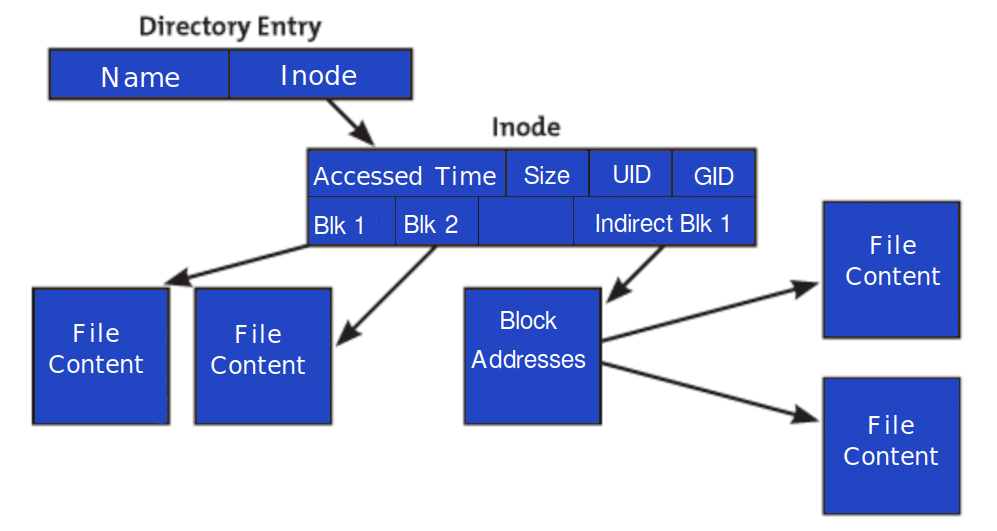
It is a common misconception that inodes store the name of the file. In reality, the filename is stored in a directory file, which acts as a simple lookup table linking names to inode numbers. The inode itself contains almost everything else:
- File Size: The total bytes the file occupies.
- Device ID: The ID of the device containing the file.
- User ID (UID): The owner of the file.
- Group ID (GID): The group associated with the file.
- Permissions: Read, write, and execute bits for the owner, group, and others.
- Timestamps: This includes the “ctime” (change time), “atime” (access time), and “mtime” (modification time).
- File Type: Whether it is a regular file, a directory, a symbolic link, or a character device.
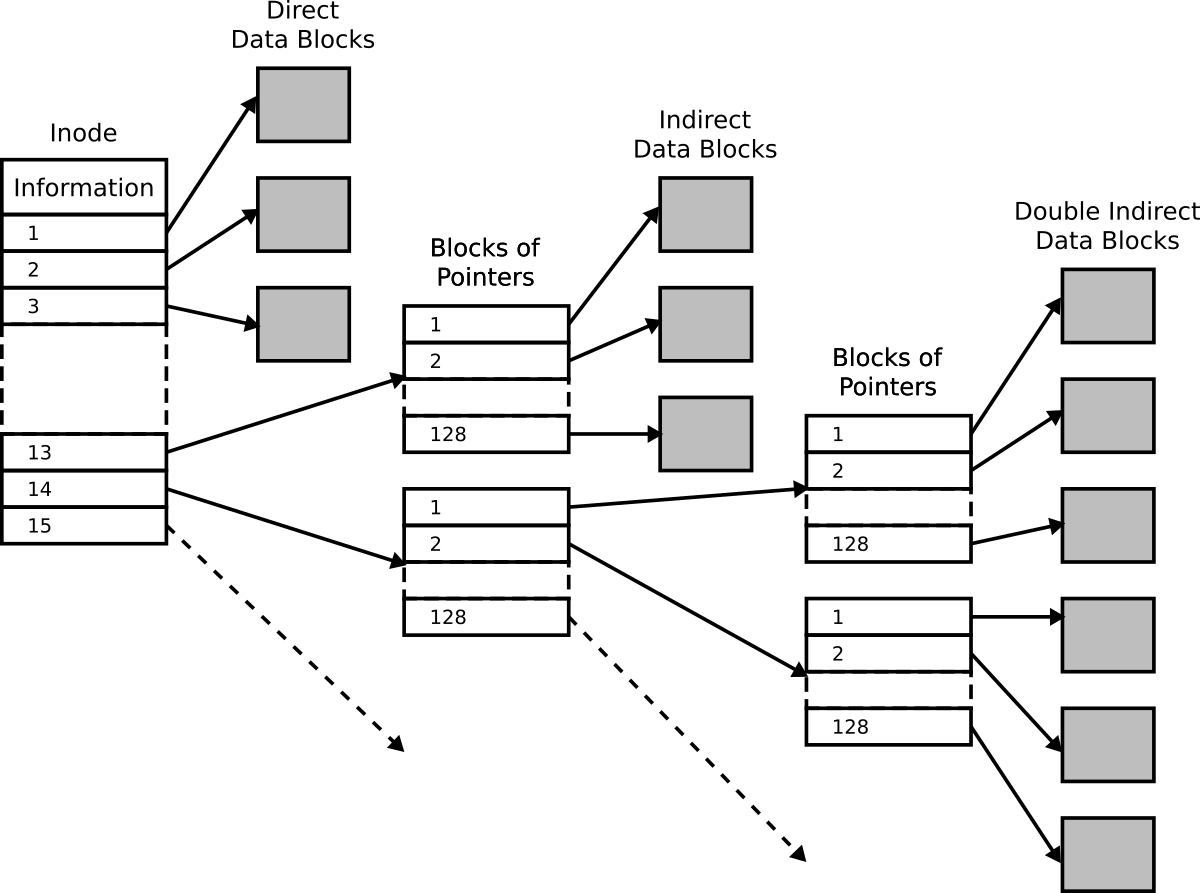
- Pointers: These are addresses that point to the physical blocks on the disk where the actual data is stored.
How Inodes Work: The Mechanics of File Retrieval
The process of opening a file is a multi-step journey through the filesystem’s hierarchy. When you type a command like cat notes.txt, the operating system doesn’t immediately know where the bits of “notes.txt” are located on the physical platter or flash cells of your drive.
The Relationship Between Filenames and Inodes
The operating system first looks at the directory where the file is located. In Unix, a directory is actually a special type of file that contains a list of filenames and their corresponding inode numbers.
Once the OS finds the filename “notes.txt” in the directory’s list, it retrieves the associated inode number (e.g., inode 50234). The OS then goes to the “Inode Table,” a reserved area of the disk, to look up the entry for 50234. Within that entry, it finds the permissions to ensure the user is allowed to read the file. If permission is granted, it follows the pointers to the specific data blocks on the disk to read the actual content.
How the OS Uses Inode Numbers
The use of unique numbers instead of strings (names) makes the operating system significantly more efficient. Numbers are fixed-width and easy for a CPU to process and index. This architecture also allows for one of the most powerful features of Unix-like systems: the hard link.
A hard link is simply an additional filename entry in a directory that points to an existing inode number. Because both filenames point to the same inode, they share the same metadata and the same data blocks. If you change the content of the file using one name, the changes appear when you open it using the other name. The file is only truly deleted from the disk when the “link count” in the inode reaches zero, meaning no filenames are pointing to it anymore.
The Critical Importance of Inode Limits
One of the most perplexing issues a system administrator can face is a “Disk Full” error message when the drive clearly shows gigabytes of available space. This phenomenon is almost always caused by inode exhaustion.
“Disk Full” Errors When Space is Available
Every filesystem has a finite number of inodes. This limit is usually determined when the filesystem is first formatted. For example, if you format a 100GB partition, the system might allocate enough space for 6 million inodes.
If you happen to be running an application that creates millions of tiny files—such as a web server storing session files, a mail server with thousands of small messages, or a complex cache system—you can run out of inodes long before you run out of actual disk space. Once every available inode is assigned, the filesystem cannot create any new files, regardless of how much physical storage remains.
Managing Inode Exhaustion in Web Hosting and Servers
Inode management is a major concern in cloud computing and shared hosting environments. Many hosting providers place “inode limits” on accounts to prevent a single user from overwhelming the filesystem’s metadata capacity.
To prevent exhaustion, developers and admins should:
- Monitor Inode Usage: Regularly check how many inodes are being consumed using the
df -icommand. - Clear Cache Regularly: Implement automated scripts to purge old session files or temporary thumbnails.
- Consolidate Files: Instead of storing 100,000 small text files, consider using a database or an archive format (like TAR) to group them into a single file, which uses only one inode.
Advanced Inode Management and Troubleshooting
For those managing Linux environments, knowing how to interact with inodes directly is a vital skill. It allows for deeper troubleshooting of performance bottlenecks and file corruption.
Commands to Check Inode Usage
The most common tool for checking inode health is the df command with the -i flag.
df -i: This displays the total number of inodes, how many are used, and the percentage of usage for every mounted partition.ls -i: If you want to see the specific inode number of a file, you can use the-iflag with the list command. This is particularly useful when trying to identify if two files are hard links to the same data.stat [filename]: This command provides a comprehensive look at a file’s metadata, including its inode number, link count, and all three timestamps.
Hard Links vs. Soft Links (Symlinks)
Understanding inodes is key to distinguishing between hard and soft links.
- Hard Links: As mentioned, these point directly to the inode. They cannot span across different filesystems because inode numbers are only unique within a single partition.
- Soft Links (Symbolic Links): These are different. A symlink is a special file that contains the path to another filename. It does not point to the inode directly. If you delete the original file, the symlink becomes “broken” because the path it points to no longer exists, even though the inode number might eventually be reused by a new file.

Future-Proofing Your File System Strategy
As we move toward larger storage capacities and more complex data structures, the way we handle inodes is evolving. Traditional filesystems like EXT4 require a fixed number of inodes decided at the time of creation. However, newer filesystems like XFS and Btrfs utilize dynamic inode allocation.
In a dynamic system, the filesystem can grow the inode table as needed, provided there is free space on the disk. This effectively eliminates the “Disk Full” error caused by inode exhaustion, making these filesystems much more resilient for modern, file-heavy workloads like machine learning datasets or large-scale containerized environments (Docker/Kubernetes).
In conclusion, while the inode operates behind the scenes, it is the backbone of digital organization. It acts as the bridge between the logical way humans perceive data and the physical way machines store it. By understanding how inodes function, how they are limited, and how to monitor them, tech professionals can ensure their systems remain stable, efficient, and scalable in an increasingly data-driven world.
aViewFromTheCave is a participant in the Amazon Services LLC Associates Program, an affiliate advertising program designed to provide a means for sites to earn advertising fees by advertising and linking to Amazon.com. Amazon, the Amazon logo, AmazonSupply, and the AmazonSupply logo are trademarks of Amazon.com, Inc. or its affiliates. As an Amazon Associate we earn affiliate commissions from qualifying purchases.