
In the dynamic and often complex world of computer networking, understanding the foundational components is crucial. Long before the sophisticated switches and routers that power today’s internet and enterprise networks, a simpler device played a pivotal role in connecting multiple computers within a local area network (LAN): the networking hub. While largely obsolete in modern, high-performance networks, the hub represents an essential stepping stone in the evolution of network technology. Grasping its fundamental principles offers valuable insight into how networks function and how they have advanced over time.
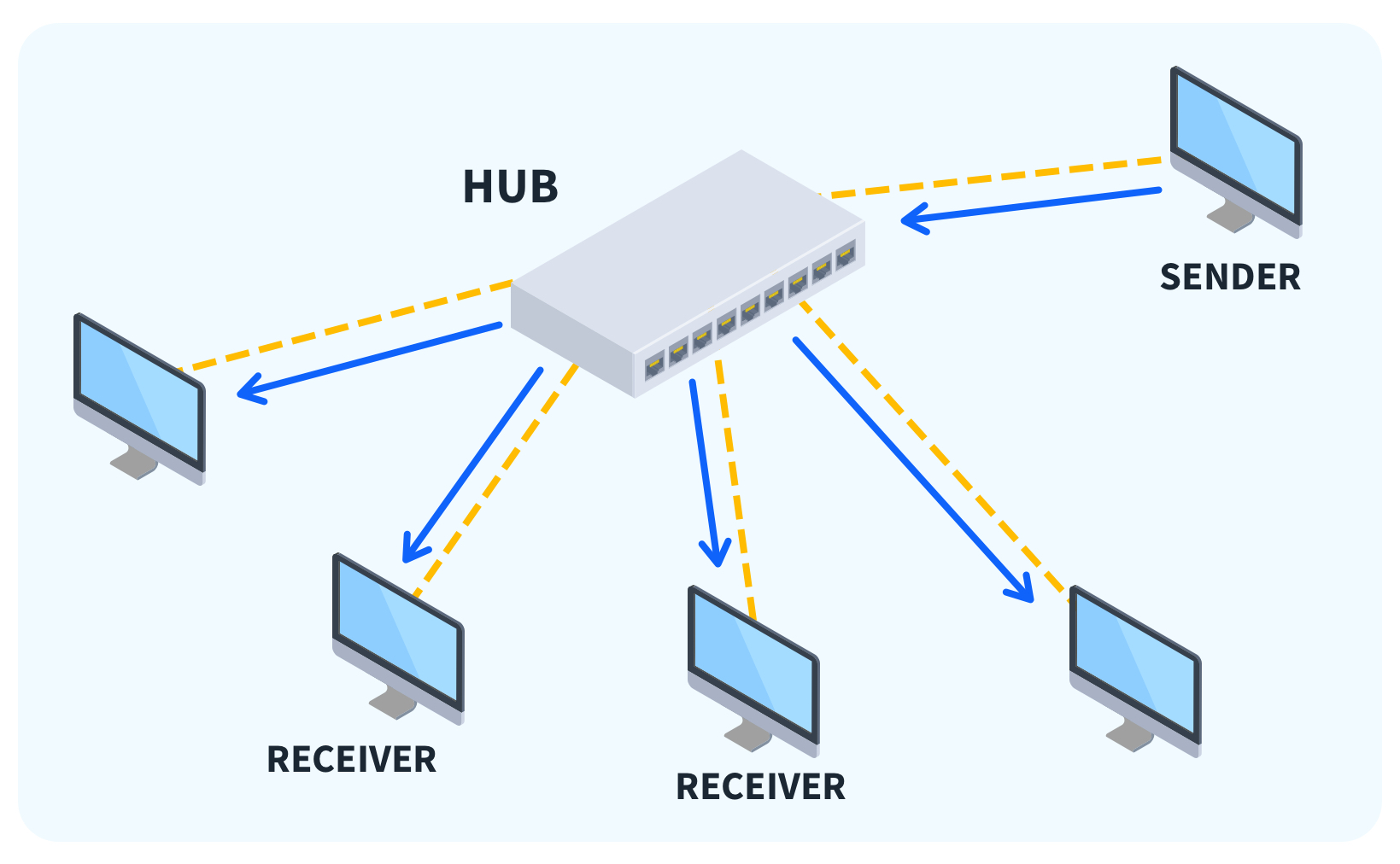
At its core, a networking hub is a physical layer device (Layer 1 of the OSI model) that connects multiple Ethernet devices together, making them act as a single network segment. Its primary function is remarkably straightforward: when a data packet arrives at one of its ports, the hub simply regenerates the signal and broadcasts it to all other connected ports. This indiscriminate broadcasting mechanism defines much of its operation, its advantages in simplicity, and ultimately, its limitations in performance and security.

The Core Functionality of a Networking Hub
To truly understand a networking hub, one must delve into its operational mechanics, which are both simple and, from a modern perspective, highly inefficient. Unlike intelligent devices that process data packets, a hub acts as a basic conduit, forwarding everything it receives without any form of analysis or direction.
A Simple Repeater
Imagine a central meeting room where every conversation is shouted so that everyone present hears it, regardless of whether it’s intended for them. This analogy perfectly encapsulates how a networking hub operates. When a device connected to a hub sends data, the hub acts as a simple repeater. It receives the electrical signal, amplifies it (in the case of active hubs), and then retransmits it out of every other port on the hub. This means that if you have four computers connected to a hub, and computer A sends data to computer D, computers B and C will also receive a copy of that data, even though it’s not intended for them. They will simply discard the packets after realizing the MAC address doesn’t match theirs.
This “broadcast to all” approach contrasts sharply with more advanced devices like switches, which learn the MAC addresses of connected devices and forward data only to the intended recipient. The hub’s lack of intelligence makes it easy to deploy but severely limits its scalability and efficiency.
Physical Layer Operation
A key characteristic of a networking hub is its operation at the physical layer (Layer 1) of the OSI (Open Systems Interconnection) model. The OSI model is a conceptual framework that standardizes the functions of a telecommunication or computing system into seven distinct layers. Layer 1, the physical layer, deals with the electrical and physical specifications for devices, including voltage levels, physical data rates, and connection types.
Because a hub operates at this fundamental layer, it doesn’t understand data packets, MAC addresses, or IP addresses. It merely deals with raw electrical signals (bits) and ensures their propagation. This low-level operation is why hubs are often referred to as “dumb” devices. They don’t perform any error checking, packet filtering, or routing. Their sole purpose is to extend the reach of a network segment by repeating signals. This makes them significantly less capable than devices like switches (Layer 2, Data Link Layer) and routers (Layer 3, Network Layer), which possess greater intelligence for managing and directing network traffic.
Collision Domains and Bandwidth Sharing
One of the most significant implications of a hub’s design is its impact on network performance, specifically regarding collision domains and bandwidth sharing. A collision domain is a network segment where data packets can “collide” with one another, corrupting the data and requiring retransmission. In Ethernet networks, when two devices attempt to transmit data simultaneously within the same collision domain, a collision occurs.
Every port on a networking hub shares a single collision domain. This means that if multiple devices connected to a hub try to send data at the same time, a collision is highly probable. To manage this, Ethernet networks operating with hubs use a protocol called CSMA/CD (Carrier Sense Multiple Access with Collision Detection). Devices listen to the network before transmitting, and if they detect a collision, they back off for a random period before attempting to retransmit. This process significantly reduces network efficiency and throughput, especially as more devices are added or traffic increases.
Furthermore, a hub shares its total bandwidth among all connected devices. For example, if you have a 10 Mbps Ethernet hub with five devices connected, that 10 Mbps bandwidth is not available to each device individually; it’s shared among them. If two devices are actively communicating, they effectively split the available bandwidth. This limitation makes hubs unsuitable for any network requiring sustained high-speed data transfer or supporting numerous active users.
Types of Networking Hubs
While the core functionality of a hub is consistent, variations existed based on their capabilities and power requirements. These types primarily differentiate themselves by how they handle the signal and whether they require an external power source.
Passive Hubs
Passive hubs are the simplest form of networking hubs. They do not amplify or regenerate the incoming electrical signal. Instead, they merely act as a junction box, allowing the signal to pass through to all other connected ports. Because they do not perform any signal processing, they do not require an external power source.
Their primary advantage lies in their low cost and simplicity. However, this simplicity comes with significant limitations. Without signal regeneration, passive hubs can only connect devices over very short distances. The signal strength naturally degrades over cable length, and a passive hub does nothing to counteract this. Consequently, they were typically used in very small, localized networks where cable runs were minimal, and performance demands were extremely low.
Active Hubs
Active hubs, in contrast to passive hubs, require an external power source to operate. This power allows them to regenerate and amplify the electrical signal received on one port before transmitting it to all other ports. By regenerating the signal, active hubs can extend the maximum length of a network segment and help to maintain signal integrity over longer cable runs.
Many active hubs also incorporated some basic network management features, such as status lights for each port, indicating link status or activity. This made them slightly more sophisticated and robust than their passive counterparts, enabling the creation of larger local networks within the constraints of shared bandwidth and collision domains. The ability to strengthen the signal was a critical improvement, allowing for more flexible network layouts within buildings.
Smart Hubs
Smart hubs represent an evolutionary step beyond basic active hubs, often considered a bridge technology towards switches. While still operating primarily at Layer 1 of the OSI model and sharing the broadcast nature of traditional hubs, smart hubs included additional diagnostic and management capabilities.
These capabilities might include the ability to detect and isolate faulty ports, providing network administrators with basic insights into network issues. Some smart hubs could also aggregate traffic statistics or perform rudimentary network segmenting, though they lacked the full intelligence of a switch. They were designed to offer a bit more control and troubleshooting ease in environments where a full-fledged switch was either too expensive or considered overkill at the time. Their “smart” features, though basic by today’s standards, offered early glimpses into the managed network devices that would eventually dominate the market.

Advantages and Disadvantages of Using a Hub
The adoption and eventual decline of networking hubs were dictated by a clear set of pros and cons that weighed simplicity and cost against performance and security.
The Upsides: Simplicity and Cost-Effectiveness
One of the most appealing aspects of networking hubs, especially in the early days of LANs, was their unparalleled simplicity. They were essentially plug-and-play devices; connect your computers, and they would immediately be able to communicate within the shared network segment. There was no complex configuration, no IP addressing to worry about, and no software to install. This ease of setup made them ideal for individuals or small businesses establishing a rudimentary network without specialized IT knowledge.
Coupled with simplicity was their low cost. Hubs were significantly cheaper to manufacture and purchase than the more intelligent network devices that would eventually replace them. This made them an accessible solution for expanding a small network, allowing more computers to share resources like printers or file servers without a substantial investment. For very small, low-traffic environments—such as a home network with only two or three computers that rarely exchanged large files—a hub provided a perfectly adequate, economical solution.
The Downsides: Performance Bottlenecks and Security Concerns
The broadcast nature and shared collision domain of hubs, while contributing to their simplicity, also led to significant performance bottlenecks. As the number of devices on a hub-based network increased, or as the amount of data traffic grew, the likelihood of collisions skyrocketed. Each collision meant a delay while devices waited to retransmit, leading to a drastic reduction in the effective bandwidth available to individual users. A 10 Mbps hub, under heavy load, might only deliver a fraction of that speed to each device, making network operations frustratingly slow. This half-duplex communication (data can only flow in one direction at a time) further compounded the issue, as devices couldn’t send and receive simultaneously.
From a security standpoint, hubs were notoriously vulnerable. Because every packet was broadcast to every connected device, any machine on the network could “listen in” on all traffic flowing through the hub. With readily available network sniffers (software tools designed to capture and analyze network traffic), an attacker could easily intercept sensitive data, including passwords, unencrypted communications, and proprietary information. There was no way to segment traffic or provide any level of privacy between devices connected to the same hub. This lack of security made hubs wholly unsuitable for environments requiring data confidentiality or integrity.
Hubs vs. Switches vs. Routers: A Comparative Overview
Understanding the limitations of hubs becomes clearer when comparing them to their more intelligent successors: switches and routers. These devices operate at different layers of the OSI model and offer distinct functionalities that have shaped modern networking.
Hubs vs. Switches
The most direct comparison is between a hub and a network switch. While both connect multiple devices within a LAN, their operational intelligence sets them miles apart. A hub is a Layer 1 device that broadcasts all incoming data to all ports. A switch, conversely, is a Layer 2 (Data Link Layer) device that is “smart.” It learns the MAC addresses (unique physical addresses) of the devices connected to each of its ports.
When a switch receives a data packet, it reads the destination MAC address and forwards the packet only to the port where the intended recipient is located. This intelligent forwarding drastically improves network efficiency. Each port on a switch typically constitutes its own collision domain, meaning devices can communicate simultaneously without collisions (full-duplex communication), effectively providing dedicated bandwidth to each connection. This intelligence allows switches to deliver significantly higher throughput, reduce network congestion, and enhance security by limiting data exposure to only the intended recipient.
Hubs vs. Routers
The comparison between hubs and routers highlights their fundamentally different roles. A hub connects devices within a single local area network segment. A router, on the other hand, is a Layer 3 (Network Layer) device designed to connect different networks together, such as a local network to the internet, or two separate LANs.
Routers use IP addresses to make intelligent decisions about how to forward data packets across disparate networks. They can filter traffic, manage network security, and ensure data takes the most efficient path. They are essential for inter-network communication and are the backbone of the internet. A hub has no concept of IP addresses, network boundaries, or routing protocols; it simply broadcasts within its single segment. While a hub might be part of a small LAN, that LAN would still need a router to connect to the outside world.
The Decline and Legacy of Networking Hubs
The transition from hubs to switches marks a pivotal moment in networking history, driven by an insatiable demand for greater speed, efficiency, and security.
Technological Advancements and Obsolescence
As computing power increased and networks became more integral to both business and personal use, the limitations of hubs became increasingly intolerable. The bottleneck created by shared bandwidth and collision domains was simply incompatible with the growing data traffic generated by applications, multimedia, and more users. The need for faster, more reliable, and secure data transfer became paramount.
The development of network switches provided the perfect solution. As manufacturing processes improved, the cost of switches decreased, eventually making them almost as affordable as hubs, while offering vastly superior performance and features. The full-duplex communication, dedicated bandwidth, and ability to eliminate collision domains offered by switches made hubs obsolete for all but the most niche applications. Today, finding a hub in a modern production network is exceedingly rare, replaced almost entirely by gigabit (or even 10-gigabit) Ethernet switches.
Niche Uses and Educational Value Today
Despite their obsolescence in mainstream networking, hubs still occasionally find a place in very specific, controlled environments, primarily for educational purposes or network monitoring. Because a hub broadcasts all traffic to every port, it can be useful in a lab setting where an administrator or student wants to capture and analyze all network traffic from multiple devices using a packet sniffer tool like Wireshark. By connecting the sniffer to a hub port, one can easily monitor all communications without requiring complex port mirroring configurations on a switch.
This educational value is perhaps the most enduring legacy of the networking hub. It serves as a fantastic illustration of fundamental networking concepts: collision domains, broadcast domains, bandwidth sharing, and the hierarchical nature of the OSI model. Understanding the “why” behind the hub’s inefficiencies makes the “how” of switches and routers all the more insightful, providing a solid foundation for comprehending advanced network architectures and protocols.
Conclusion: The Enduring Lesson of the Networking Hub
The networking hub, a seemingly simple device, played a crucial role in the early days of local area networks. Its straightforward “broadcast to all” mechanism facilitated easy connectivity at a low cost, making it accessible for nascent network deployments. However, its inherent limitations—a single collision domain, shared bandwidth, half-duplex communication, and a lack of intelligence—ultimately paved the way for more sophisticated devices.
While hubs have been largely supplanted by intelligent switches and powerful routers, their historical significance and pedagogical value remain. They offer a tangible example of technological evolution, illustrating how the demand for efficiency, speed, and security drives innovation in infrastructure. For anyone seeking to grasp the fundamentals of network architecture, understanding “what is a hub in networking” is not just a lesson in obsolete technology, but a vital insight into the foundational principles that continue to shape the digital world.
aViewFromTheCave is a participant in the Amazon Services LLC Associates Program, an affiliate advertising program designed to provide a means for sites to earn advertising fees by advertising and linking to Amazon.com. Amazon, the Amazon logo, AmazonSupply, and the AmazonSupply logo are trademarks of Amazon.com, Inc. or its affiliates. As an Amazon Associate we earn affiliate commissions from qualifying purchases.