
The Hypertext Transfer Protocol (HTTP) serves as the backbone of data communication on the World Wide Web, dictating how clients and servers exchange information. Among its various methods, POST stands out as a crucial verb, fundamentally enabling the internet’s interactive nature. Understanding POST is not merely about recognizing a term; it’s about grasping a core mechanism that allows users to submit data, interact with applications, and drive dynamic web experiences. It’s a cornerstone for everything from submitting a login form to uploading a complex file, representing a client’s intention to send data to a server for processing or storage.

The HTTP Protocol: An Overview
Before diving deep into POST, it’s essential to contextualize it within the broader HTTP framework. HTTP operates on a request-response model, where a client (typically a web browser or application) sends a request to a server, and the server processes that request, sending back a response. This stateless protocol defines several “methods” or “verbs” that indicate the desired action to be performed on the identified resource.
Request-Response Model
Every interaction over HTTP follows a precise pattern:
- Client initiates connection: The client establishes a TCP/IP connection to the server.
- Client sends HTTP request: This request includes a method (like
GET,POST,PUT,DELETE), a URL, HTTP version, and optional request headers and body. - Server processes request: The server receives the request, identifies the resource, and performs the specified action.
- Server sends HTTP response: The response includes a status code (e.g., 200 OK, 404 Not Found), HTTP version, response headers, and an optional response body (e.g., HTML, JSON, images).
- Client closes connection (or keeps alive): The connection is typically closed after the transaction, though persistent connections can keep it open for subsequent requests.
This cyclical exchange is what powers virtually every click, form submission, and data retrieval action across the internet.
Common HTTP Methods
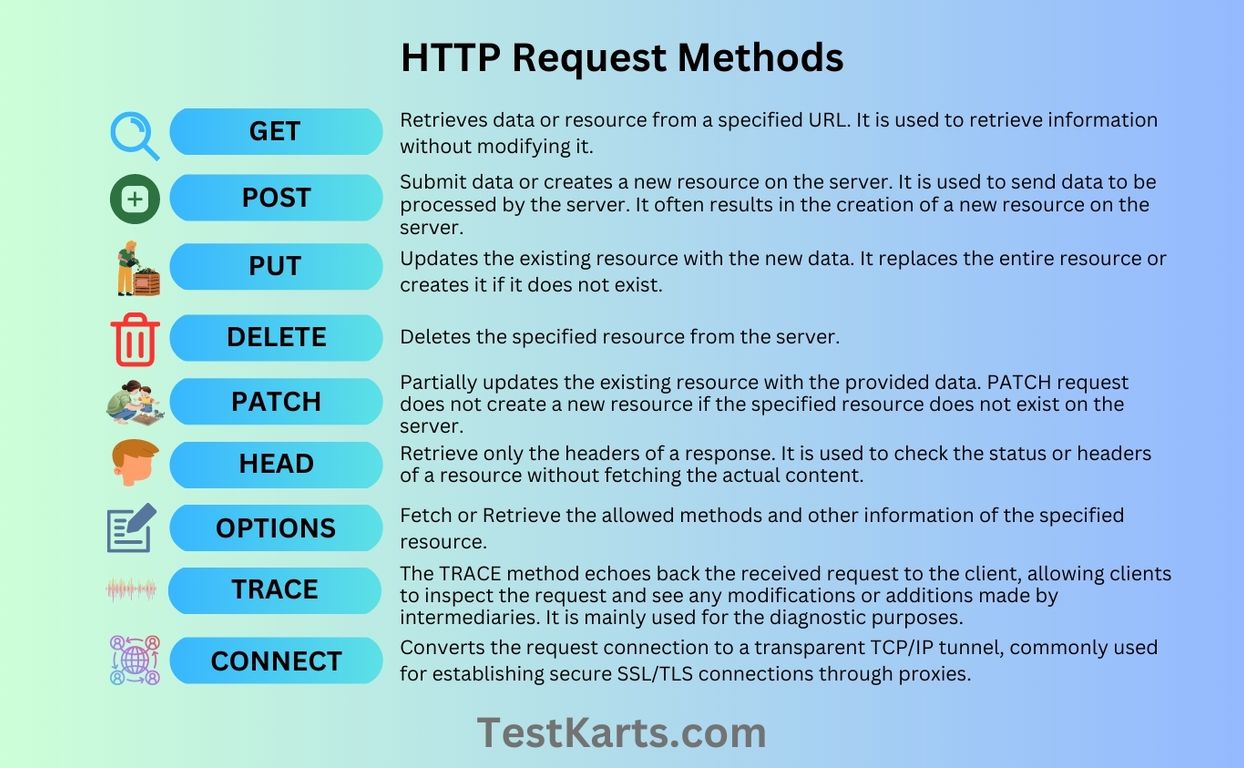
While POST is our focus, other methods are vital for a complete understanding:
- GET: Used to request data from a specified resource. It should only retrieve data and have no other effect on the data.
GETrequests can be cached and remain in the browser history. Parameters are sent in the URL query string. - PUT: Used to submit data to a specified resource, often for updating or creating a resource at a specific URI. If the resource already exists,
PUTreplaces it; otherwise, it creates a new one.PUTis idempotent, meaning multiple identical requests have the same effect as a single one. - DELETE: Used to delete the specified resource. Like
PUT,DELETEis idempotent. - PATCH: Used to apply partial modifications to a resource. It’s non-idempotent, meaning repeated
PATCHrequests may produce different results. - HEAD: Similar to
GET, but it requests only the headers and not the body of the response. Useful for checking resource existence or metadata without downloading the entire content. - OPTIONS: Used to describe the communication options for the target resource. Clients can use
OPTIONSto determine the capabilities of a web server or an individual resource.
Each method serves a distinct purpose, designed for specific interactions with server resources.
Deconstructing the POST Method
The POST method is specifically designed to send data to a server to create or update a resource. Unlike GET, which appends data to the URL, POST encapsulates data within the request body. This fundamental difference has significant implications for how data is handled, its security, and its application.
Purpose and Use Cases
The primary purpose of POST is to submit an entity to the specified resource, often causing a change in state or creating a new resource on the server. Common scenarios include:
- Submitting web forms: User registration, login credentials, contact forms, or any form where data needs to be saved or processed by the server.
- Uploading files: Sending images, documents, or other media files to a server.
- Sending complex data: Transmitting large amounts of data, JSON objects, XML payloads, or binary data that wouldn’t fit practically or securely in a URL.
- API interactions: Many RESTful APIs use
POSTto create new records or resources.
In essence, whenever a client needs to provide data to a server for storage, processing, or to trigger a server-side action that has side effects, POST is the appropriate method.
Distinguishing POST from GET
The differences between POST and GET are critical for web development and security:
| Feature | GET | POST |
|---|---|---|
| Data Location | In the URL query string (e.g., ?name=value&key=val) |
In the request body |
| Data Size | Limited by URL length (browser and server dependent) | No practical limits (depends on server configuration) |
| Visibility | Visible in browser history, server logs, referrer headers | Not visible in URL; only in network traffic inspection |
| Caching | Can be cached | Not cacheable by default |
| Idempotence | Idempotent (multiple identical requests have same effect) | Not idempotent (multiple identical requests may have different effects) |
| Security | Less secure for sensitive data (visible in URL) | More secure for sensitive data (not in URL, though still requires HTTPS) |
| Bookmarks | Can be bookmarked | Cannot be bookmarked |
| Purpose | Retrieve data | Submit data, create/update resources, cause side effects |
The “side effects” aspect of POST is paramount. A GET request should never alter server state; it’s read-only. A POST request, conversely, is explicitly designed to alter state.
Anatomy of a POST Request
A typical POST request comprises several parts:
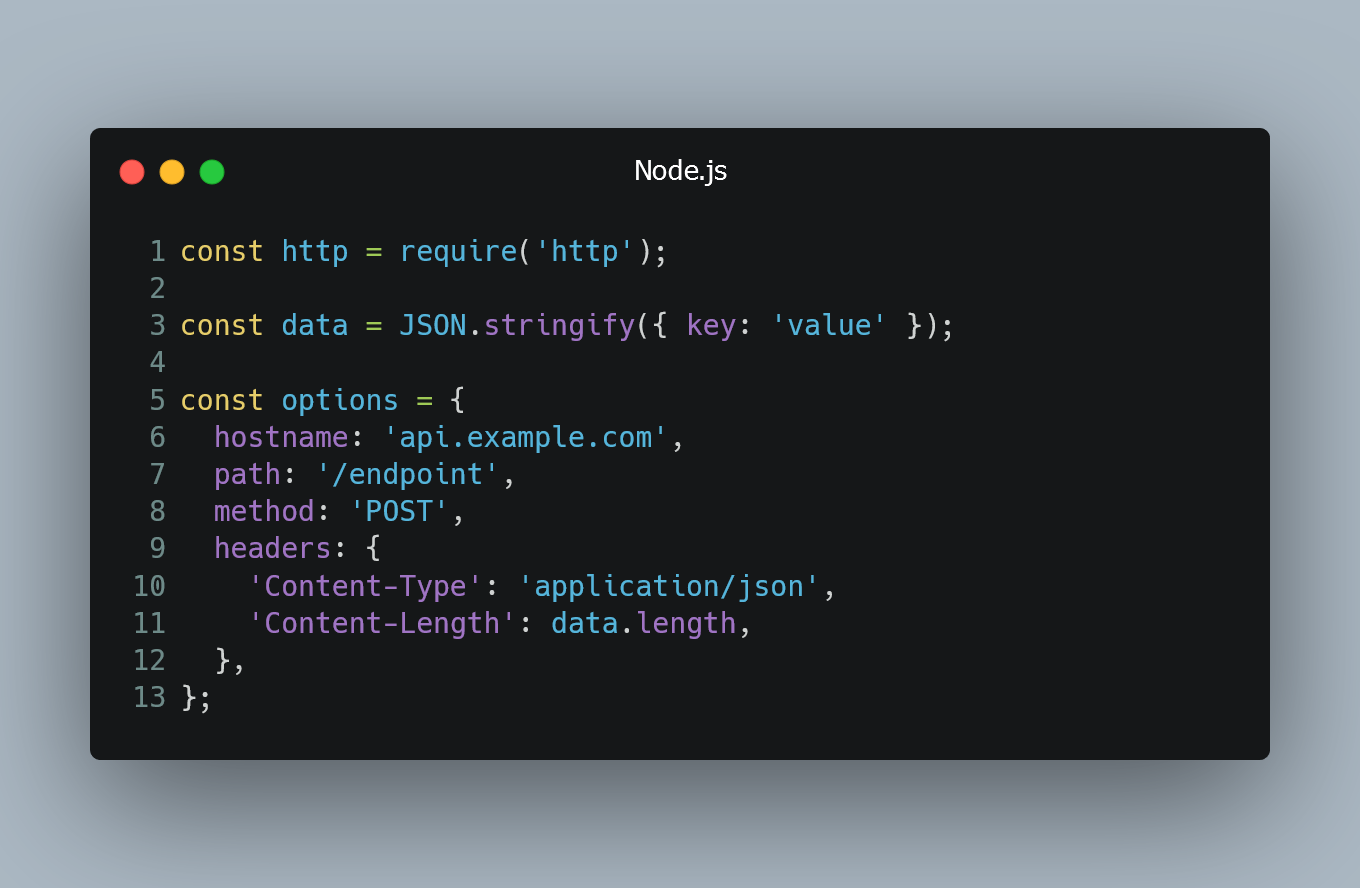
- Request Line:
POST /resource HTTP/1.1(method, path, HTTP version) - Headers:
Host: example.com(domain of the target server)Content-Type: application/x-www-form-urlencodedorapplication/jsonormultipart/form-data(indicates the format of the data in the request body)Content-Length: 123(the size of the request body in bytes)Accept: text/html(specifies what content types the client can handle)User-Agent: Mozilla/5.0...(identifies the client software)- Other custom or standard headers for authentication, caching, etc.
- Blank Line: Separates headers from the body.
- Request Body: The actual data being sent, formatted according to the
Content-Typeheader.- For
application/x-www-form-urlencoded, it might look likeusername=john.doe&password=securepass. - For
application/json, it would be a JSON string:{"username": "john.doe", "password": "securepass"}. - For
multipart/form-data, it’s structured for sending files and mixed data.
- For
The server parses these components to understand what action to perform and with what data.
Security and Idempotence Considerations
While POST offers advantages over GET for data submission, it comes with its own set of security and architectural considerations.
Data Handling and Encryption
Although POST hides data from the URL, it does not inherently encrypt it. The data sent in a POST request’s body is transmitted in plain text over the network unless the connection itself is secured. This is why HTTPS (HTTP Secure) is crucial. HTTPS uses TLS/SSL encryption to secure the entire communication channel between the client and server, protecting not only the request body but also headers and the URL itself from eavesdropping and tampering. When dealing with sensitive information like passwords, financial data, or personal details, POST over HTTPS is the industry standard.
Furthermore, servers must implement robust input validation and sanitization for all incoming POST data. Without proper validation, malicious data could lead to vulnerabilities like SQL injection, Cross-Site Scripting (XSS), or other forms of data corruption and unauthorized access.
Idempotence Explained
A key characteristic differentiating POST from methods like GET, PUT, and DELETE is its non-idempotent nature.
- Idempotent: An operation is idempotent if executing it multiple times produces the same result as executing it once.
GETrequests are idempotent because retrieving data multiple times doesn’t change the server state.PUT(update/replace a resource) andDELETE(remove a resource) are also considered idempotent because applying them multiple times has the same final state. - Non-Idempotent:
POSTis generally non-idempotent because each identicalPOSTrequest can potentially create a new resource or trigger a new action on the server. For example, submitting the same form data twice (two identicalPOSTrequests) might create two identical records in a database, or charge a credit card twice.
This non-idempotent behavior is why browsers typically warn users before resubmitting POST data (e.g., “Are you sure you want to resend this form?”). Developers must implement mechanisms like tokens, unique transaction IDs, or server-side checks to handle duplicate POST submissions gracefully and prevent unintended side effects.
Real-World Applications of HTTP POST
The versatility of the POST method makes it indispensable across various modern web and application architectures.
Web Forms and User Input
This is arguably the most common and intuitive use of POST. Anytime a user fills out a registration form, a login page, a comment section, or an order checkout, the browser typically packages that data into a POST request and sends it to the server. The server then processes this information—creating a new user account, authenticating credentials, storing the comment, or finalizing a purchase. The enctype attribute in an HTML form dictates how the data is encoded in the POST request body:
application/x-www-form-urlencoded: The default, simple key-value pairs.multipart/form-data: Used for forms that include file uploads, allowing binary data to be sent alongside text.text/plain: A legacy and less common option.
API Interactions
Modern web services, particularly those following the REST (Representational State Transfer) architectural style, heavily rely on POST for creating new resources. For example, in an API designed for managing articles:
- A
GET /articlesrequest retrieves all articles. - A
GET /articles/123request retrieves article with ID 123. - A
POST /articlesrequest with a JSON body containing article data (title, content, author) would create a new article on the server. The server would typically respond with a201 Createdstatus and potentially the URI of the newly created resource.
This clear distinction between reading (GET) and creating (POST) resources is fundamental to clean API design and facilitates predictable client-server communication.
File Uploads
Uploading files—images, videos, documents—is another major application of POST. When you upload a profile picture to a social media site, attach a document to an email client, or submit a resume through a job portal, your browser constructs a POST request with the Content-Type: multipart/form-data. This allows the browser to send the file’s binary data along with other form fields (like a description or metadata) within a single request, properly segmented for server-side processing. The server-side application then extracts and saves the uploaded file.
Best Practices for Implementing POST Requests
Effective and secure implementation of POST requests is critical for any robust web application.
Validating Input
Every piece of data received via a POST request must be rigorously validated on the server-side. This includes:
- Type checking: Ensuring numbers are numbers, strings are strings, etc.
- Format validation: Checking if email addresses are valid, dates are in correct formats, and phone numbers conform to expected patterns.
- Length constraints: Limiting string lengths to prevent buffer overflows or database issues.
- Range checks: Ensuring numerical values fall within acceptable ranges.
- Sanitization: Removing or escaping potentially malicious characters (e.g., HTML tags, SQL keywords) to prevent XSS or SQL injection attacks.
Client-side validation (in JavaScript) is useful for user experience, but server-side validation is mandatory for security.
Error Handling
When a POST request fails for any reason (e.g., invalid input, server error, database issue), the server should return an appropriate HTTP status code and a descriptive error message.
400 Bad Request: For malformed syntax or invalid request parameters.401 Unauthorized: For requests requiring authentication that was not provided or was invalid.403 Forbidden: For valid requests that the server refuses to fulfill.404 Not Found: If the target resource doesn’t exist.409 Conflict: If the request conflicts with the current state of the resource (e.g., trying to create a resource that already exists with a unique identifier).422 Unprocessable Entity: (Common in REST APIs) When the server understands the content type of the request entity, and the syntax is correct, but it was unable to process the contained instructions.500 Internal Server Error: For unexpected server-side issues.
Clear error handling improves debugging for developers and provides better feedback to client applications.
Securing Sensitive Data
As discussed, while POST hides data from the URL, it doesn’t encrypt it. Always use HTTPS for any POST request involving sensitive data. Additionally:
- Never store plain-text passwords: Always hash and salt passwords before storing them in a database.
- Implement access control: Ensure only authorized users or systems can
POSTto specific endpoints. - Utilize CSRF tokens: Implement Cross-Site Request Forgery (CSRF) protection to ensure that
POSTrequests are originating from your own application and not from a malicious third-party site. This typically involves a unique, unpredictable token included in forms that the server validates upon submission. - Rate limiting: Prevent brute-force attacks or excessive resource consumption by limiting the number of
POSTrequests from a single source within a given timeframe.
HTTP POST is an indispensable tool in the web developer’s arsenal, foundational to creating interactive, data-driven applications. By understanding its mechanics, distinctions, and best practices, developers can leverage POST effectively to build secure, robust, and user-friendly digital experiences.