
In an increasingly digital world, the efficiency with which we interact with technology is paramount. From sending emails and writing reports to coding complex software and managing vast databases, our ability to input information quickly and accurately directly impacts productivity and success. At the heart of this digital fluency lies Words Per Minute (WPM), a fundamental metric that measures typing speed. But what exactly constitutes a “high” WPM, and why does it remain a critical skill in an era of voice commands and AI-driven interfaces? This article delves into the technical definition of WPM, benchmarks what is considered high across various contexts, explores the technological tools and methodologies for improvement, and underscores its enduring relevance in the contemporary tech landscape.
Understanding WPM: The Core Metric of Digital Fluency
WPM is more than just a number; it’s a direct indicator of one’s proficiency in human-computer interaction, specifically through a keyboard. It quantifies the rate at which an individual can type words, taking into account both speed and accuracy.
The Mechanics of WPM Calculation
The calculation of WPM is deceptively simple yet critically important for standardized measurement. Typically, online typing tests and software platforms calculate WPM by counting the number of correctly typed words within a specific timeframe, usually one minute. A “word” is often standardized as five characters, including spaces and punctuation. For instance, if you type 250 characters correctly in one minute, your gross WPM would be 50 (250 / 5).
However, true WPM usually incorporates an accuracy component. Errors, such as typos or incorrectly capitalized letters, are deducted from the gross WPM to arrive at a net WPM. This is crucial because raw speed without accuracy is counterproductive; time spent correcting errors negates the benefit of fast typing. Therefore, a high WPM inherently implies both speed and a low error rate, reflecting genuine efficiency in digital input. The best typing software and tools provide detailed analytics, breaking down gross WPM, net WPM, and error rates, giving users a comprehensive view of their performance and areas for improvement.
Why WPM Matters in the Tech Landscape
The relevance of a high WPM extends across virtually every facet of the tech world. In an environment where information is constantly processed, created, and disseminated, typing speed directly correlates with operational efficiency. For software developers, faster typing means quicker coding, debugging, and documentation. For data entry specialists, a high WPM translates to processing more data in less time, minimizing backlogs and improving turnaround. System administrators, IT support professionals, and digital content creators all benefit immensely from efficient keyboarding, as it reduces the friction in daily tasks, allowing them to focus more on problem-solving, strategic thinking, and creative output rather than the mechanics of input.
Furthermore, in an age of distributed teams and remote work, clear and rapid communication through text-based platforms (email, chat, documentation systems) is the norm. Individuals with higher WPM can articulate their thoughts more fluidly and respond more promptly, enhancing collaboration and responsiveness within digital ecosystems. While voice-to-text technologies are advancing, the precision, privacy, and flexibility of keyboard input mean that typing remains an indispensable skill, particularly for complex or sensitive tasks.
Defining “High” WPM Across Different Contexts
What constitutes a “high” WPM is not a universal constant; it’s a dynamic benchmark that varies significantly based on individual experience, professional requirements, and specific industry demands. Understanding these contextual differences is key to setting realistic goals and assessing one’s own digital proficiency.
Average WPM vs. Professional Benchmarks
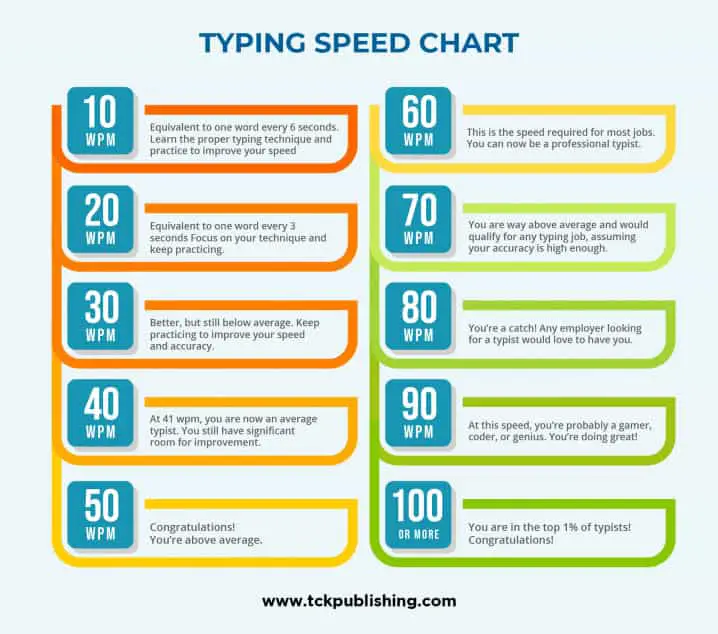
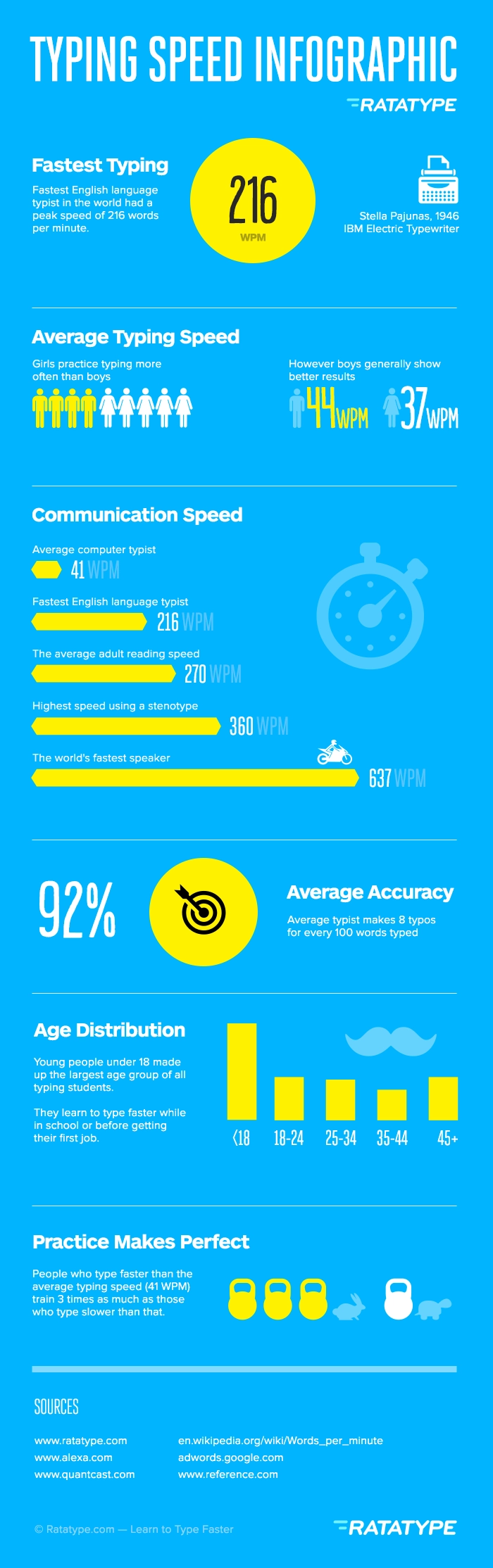
For the general computer user, an average typing speed typically falls between 30 to 40 WPM. This speed is sufficient for casual use, such as sending personal emails or browsing the web. However, when we talk about digital professionals, these figures quickly become inadequate. A “good” WPM for someone whose job involves regular computer use might be around 50-60 WPM. This speed allows for efficient task completion without feeling bottlenecked by typing.
For roles where typing is a core function, such as administrative assistants, paralegals, or data entry clerks, professional benchmarks are significantly higher, often starting at 60-75 WPM. At this level, individuals can handle heavy typing loads with ease, process information rapidly, and maintain high levels of productivity throughout the workday. A WPM in this range often distinguishes candidates in competitive job markets and is frequently a prerequisite for employment in these sectors.
Industry-Specific Expectations
Certain tech-intensive industries and roles have even more demanding WPM expectations.
-
Transcriptionists and Medical Coders: These professionals often need to transcribe audio or input complex codes with extreme accuracy and speed. WPM requirements can be as high as 80-100 WPM, as their work directly impacts the volume and quality of patient records or legal documents. Specialized software tools aid them, but raw typing speed remains fundamental.
-
Programmers and Developers: While coding involves logical thinking and problem-solving, the act of writing code, commenting, and using various command-line interfaces still heavily relies on typing. Although a programmer might not need to hit 100 WPM consistently, an ability to type efficiently (e.g., 60-80 WPM with high accuracy) reduces cognitive load and allows for a more fluid translation of thought into executable code. The use of IDEs (Integrated Development Environments) with auto-completion features aids this, but core typing speed remains a foundational skill.
-
Journalists and Content Creators: For those who write extensive articles, reports, or creative content, a high WPM (70-90+ WPM) is invaluable. It enables them to capture ideas quickly, maintain a flow of thought, and meet tight deadlines without the physical act of typing becoming a barrier to creativity. Word processing software and digital drafting tools become extensions of their thought processes.
The Nuance of Accuracy vs. Speed
While speed is often highlighted, accuracy is arguably more critical, especially in professional contexts. A typist achieving 80 WPM with 99% accuracy is far more efficient than one hitting 100 WPM with only 90% accuracy. The time spent identifying and correcting errors can quickly negate any initial speed advantage. Modern typing software provides detailed accuracy reports, often highlighting common errors and suggesting drills to improve specific key strokes or finger movements. The ideal “high WPM” is therefore a harmonious balance: rapid input coupled with minimal mistakes, leading to clean, error-free digital output on the first attempt.
The Technology Behind WPM Improvement and Measurement
Improving WPM is no longer solely about brute-force practice. Modern technology offers a sophisticated array of tools, software, and hardware designed to facilitate faster and more accurate typing. These innovations transform the learning process from a tedious chore into an engaging and data-driven journey.
Typing Tutors and Software
The most accessible and widely used tools for WPM improvement are typing tutor software and online platforms. These applications leverage various technical approaches to enhance learning:
-
Gamification: Many modern tutors integrate game-like elements, turning typing practice into engaging challenges. Users earn points, unlock levels, and compete on leaderboards, motivating consistent practice. This is particularly effective for younger learners but also keeps adults engaged.
-
Adaptive Learning Algorithms: Advanced typing software can analyze a user’s typing patterns, identify common errors or slow keys, and then generate personalized lessons focused on those specific weaknesses. This ensures that practice is always targeted and efficient, rather than generic.
-
Structured Lessons: From basic home row drills to complex paragraph typing, these tools offer structured curricula that progressively build skills. They often include lessons on proper finger placement, posture, and keyboard familiarity, essential foundations for high WPM.
-
Real-time Feedback and Analytics: A core feature of these tools is instant feedback on WPM, accuracy, and error types. Detailed reports track progress over time, showing improvement trends, average speeds, and areas needing more attention, allowing users to make data-informed adjustments to their practice.
Ergonomic Keyboards and Input Devices
Hardware plays a significant role in WPM, particularly in sustained professional use. Ergonomics, the science of designing equipment to maximize productivity by reducing discomfort and fatigue, is crucial.
-
Ergonomic Keyboard Designs: Split keyboards, curved layouts, and negative tilt designs aim to reduce strain on wrists and hands, promoting a more natural typing posture. This can prevent repetitive strain injuries (RSIs) and allow for longer, more comfortable typing sessions, indirectly contributing to higher sustained WPM.
-
Mechanical Keyboards: Favored by many professionals and gamers, mechanical keyboards offer tactile feedback and distinct keypresses. Different switch types (e.g., Cherry MX Blue for clicky feedback, Red for linear) cater to individual preferences, potentially leading to faster and more confident typing due to the clear actuation point.
-
Alternative Layouts (Dvorak, Colemak): While QWERTY is dominant, alternative keyboard layouts like Dvorak and Colemak are designed to optimize finger movement and reduce travel distance for common letter combinations. Adopting these can lead to significantly higher WPM and reduced strain for dedicated users, although the learning curve can be steep. These layouts are a prime example of applying computational linguistics and ergonomic principles to keyboard design.
-
Specialized Input Devices: Beyond traditional keyboards, niche devices like stenotype machines used in court reporting can achieve astounding speeds (200-300 WPM) by typing phonetically, demonstrating the peak of specialized input technology.
AI-Powered Feedback and Analytics
The integration of Artificial Intelligence and Machine Learning is taking WPM improvement to the next level. AI can process vast amounts of typing data to offer insights that go beyond simple WPM scores.
-
Predictive Analysis: AI can predict potential errors before they occur, offering subtle suggestions or highlighting patterns in misstrokes.
-
Contextual Feedback: Instead of just marking an error, AI can provide context-aware feedback, explaining why a certain finger combination is difficult or suggesting alternative fingerings based on millions of data points from other users.
-
Personalized Training Paths: AI algorithms can dynamically adjust training modules in real-time based on a user’s current performance, fatigue levels, and long-term goals, creating a truly bespoke learning experience. This machine learning approach ensures optimal challenge and progression.
-
Biometric Integration: Future developments might involve integrating biometric data (e.g., eye-tracking, muscle strain sensors) to further refine ergonomic advice and typing technique, making the improvement process even more personalized and effective.
Achieving and Maintaining a High WPM: A Tech-Driven Journey
Developing a high WPM is a continuous process that leverages consistent practice and strategic use of available technology. It’s not just about raw speed but about integrating efficient typing into one’s overall digital workflow.
Structured Practice with Digital Tools
The most effective way to achieve a high WPM is through regular, structured practice using the advanced typing tutors and online platforms discussed previously.
-
Consistency is Key: Short, daily practice sessions (15-30 minutes) are more effective than infrequent, long sessions. Many typing apps have built-in reminders and progress tracking to encourage this consistency.
-
Focus on Accuracy First: Initially, prioritize typing without errors, even if it means typing slowly. Speed will naturally increase as muscle memory develops and finger placement becomes automatic. Digital tools often penalize errors heavily in WPM calculations, reinforcing this focus.
-
Gradual Progression: Start with basic drills (home row, common letter combinations) and gradually move to words, sentences, and paragraphs. Most software guides users through this logical progression.
-
Utilize Analytics: Regularly review the performance reports provided by typing software. Identify specific keys or letter combinations where you struggle and use targeted drills to overcome these weaknesses. This data-driven approach is essential for efficient improvement.
Beyond Speed: Enhancing Digital Productivity
A high WPM is a fantastic foundation, but true digital productivity extends beyond just typing speed. Integrating other tech-savvy habits maximizes the impact of fast typing:
-
Master Keyboard Shortcuts: Learning operating system and application-specific keyboard shortcuts (e.g., Ctrl+C/V for copy/paste, Alt+Tab for switching windows, Ctrl+S for save) drastically reduces reliance on the mouse, keeping hands on the keyboard and maintaining typing momentum. This minimizes context switching and boosts efficiency.
-
Text Expanders and Automation Tools: Software like TextExpander, AutoHotkey, or built-in OS text replacement features allow users to type short abbreviations that automatically expand into longer phrases or sentences. This is incredibly useful for frequently used email responses, code snippets, or common phrases, essentially “typing” at speeds far exceeding manual WPM.
-
Effective File Management: A well-organized digital workspace means less time searching for files and more time typing relevant content. Efficient navigation and folder structures complement rapid input.
-
Cloud Collaboration Tools: Leveraging platforms like Google Docs, Microsoft 365, or Notion means that your high WPM contributes directly to collaborative document creation and real-time team productivity, with changes instantly synchronized across multiple users.
Future Trends: Voice-to-Text and Predictive Input
While voice-to-text (STT) and predictive input technologies are rapidly advancing and certainly have their place, they are more likely to complement rather than fully replace keyboard-based WPM.
-
Voice-to-Text: Excellent for hands-free operation, dictating long passages, or accessibility. However, it can struggle with technical jargon, specific formatting, privacy in open office environments, and requires careful proofreading. Editing and correcting errors often still revert to keyboard input.
-
Predictive Text/Autocompletion: Highly effective in mobile typing and coding IDEs, speeding up input by suggesting words or code snippets. While it reduces keystrokes, it still relies on a base level of typing proficiency to select or input the initial characters.
-
The Enduring Need for Precision: For tasks requiring absolute precision, such as coding, legal documents, data entry, or secure communications, direct keyboard input remains superior. The tactile feedback, direct control, and ability to type in silence without disturbing others ensure that high WPM will continue to be a valuable and sought-after skill in the digital age.
In conclusion, “high WPM” is not merely about how fast one’s fingers can fly across a keyboard; it’s a testament to digital literacy, efficiency, and a foundational skill that underpins productivity in nearly every tech-driven profession. While technological advancements continue to evolve how we interact with computers, the ability to type quickly and accurately remains a cornerstone of effective human-computer interaction, empowering individuals to navigate the digital landscape with confidence and competence.
aViewFromTheCave is a participant in the Amazon Services LLC Associates Program, an affiliate advertising program designed to provide a means for sites to earn advertising fees by advertising and linking to Amazon.com. Amazon, the Amazon logo, AmazonSupply, and the AmazonSupply logo are trademarks of Amazon.com, Inc. or its affiliates. As an Amazon Associate we earn affiliate commissions from qualifying purchases.