
In an era where digital transactions dominate our daily commerce, the ability to instantly “lock” a debit card via a mobile banking application has become a fundamental feature of personal financial management. This function serves as a critical safety net, offering a high-tech solution to the age-old problem of misplaced plastic. However, while the mechanism is straightforward—a simple toggle switch in your banking app—the downstream effects on your financial life are comprehensive. Understanding exactly what happens when you engage this feature is essential for protecting your assets and maintaining your financial momentum.
The Mechanics of the Digital Lock
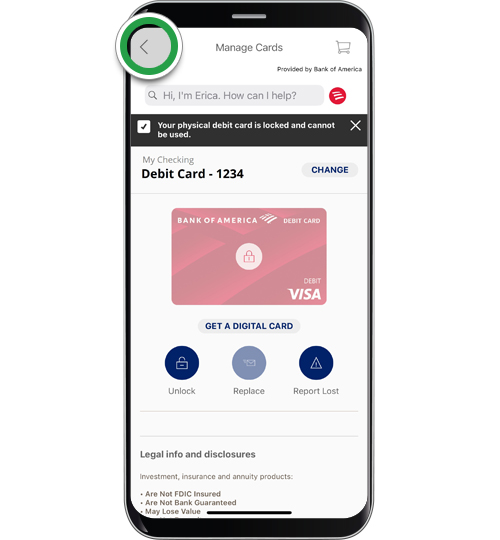
When you tap that “lock card” button in your banking portal, you are not merely placing a physical barrier on your wallet; you are triggering a sophisticated series of commands within the payment processing ecosystem. The action creates an immediate, temporary suspension of authorization for any new transaction attempts linked to that specific card number.
Immediate Transaction Suspension
The moment your card is locked, the card’s status in the payment network’s database changes to “inactive.” When a merchant attempts to charge the card, the payment terminal sends a request to the issuing bank. The bank’s server checks the current status of the card, sees the “locked” flag, and immediately sends back a decline code. This happens in milliseconds, ensuring that no unauthorized purchases can proceed.
Distinction Between Locking and Canceling
It is vital to distinguish between locking a card and canceling it entirely. Locking is a reversible, administrative state. It essentially puts your card into a “paused” mode, allowing you to reactivate it if you find it under a sofa cushion or inside a jacket pocket. Canceling or reporting a card as stolen, conversely, results in the permanent deactivation of the card number and the issuance of a new plastic card with a new CVV and expiry date. The lock feature is designed for convenience; the cancellation process is designed for terminal security breaches.
What Happens to Your Recurring Payments?
One of the most frequently asked questions regarding locked debit cards concerns the fate of automated bills and subscriptions. Many users assume that locking a card will stop all activity, but the reality is more nuanced and often depends on the specific bank’s internal processing protocols.
Subscription Services and “Card-on-File”
Generally, a locked debit card will block new, manual transactions, such as an in-store purchase at a grocery store or an online order on a new retail site. However, many recurring subscriptions utilize “tokenization” or “continuing authority” agreements. In some banking systems, the lock feature applies strictly to the primary authorization gateway, which may inadvertently allow some pre-authorized, recurring charges from known merchants—like your streaming services or utility bills—to continue processing.
Why Some Charges Still Go Through
This occurs because some billing systems are flagged by the bank as “trusted” or “recurring” entities. By locking the card, you are signalling that you fear unauthorized use by a third party, not necessarily that you wish to breach your own contractual obligations to your service providers. If you are locking your card because you believe your account has been compromised, you should contact your bank to ensure that all transactions, including recurring ones, are suspended. Relying on the app’s “lock” function may not be a 100% guarantee that a subscription service won’t be able to push a charge through if that merchant has existing tokenized credentials on file.
The Impact on Your Financial Security
The primary purpose of the lock feature is fraud prevention, acting as a “kill switch” for your financial exposure. By understanding how this affects your security posture, you can make better decisions regarding when to use it.
Protecting Against Physical Theft
If your wallet is stolen, the most immediate danger is the rapid depletion of your bank account. By locking the card the moment you realize it is missing, you effectively neuter the thief’s ability to use the physical card. Unlike the process of calling a bank to cancel a card—which can sometimes involve long hold times or frustrating automated menus—the mobile app lock is instantaneous. It provides a vital window of opportunity to assess the situation without allowing further damage.
Preventing “Friendly Fraud” and Impulse Spending
Beyond traditional theft, the lock feature is increasingly used as a tool for behavioral finance. Some individuals lock their cards to prevent impulsive online shopping. By requiring an extra step—opening the app and toggling the switch—to unlock the card before making a purchase, users introduce “friction” into their spending habits. This delay can provide enough time for the buyer to reconsider a non-essential purchase, effectively serving as a digital guardrail against overspending.
The Limitation of the Lock
It is important to understand that locking your debit card does not prevent fraudulent activity that has already occurred. If a bad actor has already compromised your card details and successfully initiated a transaction that has settled, locking the card will not reverse that transaction. In such instances, you must move beyond the “lock” feature and formally dispute the charge through your bank’s fraud department. The lock is a preventative measure for future attempts; it is not a tool for retrospective transaction recovery.
Returning to Normal: The Reversal Process
Re-enabling your debit card is typically as seamless as the locking process. Once you are confident that your card is secure or that you have regained possession of it, you simply return to the banking app and toggle the lock to the “off” position.
Instant Restoration of Functionality
In most modern banking environments, the restoration of card functionality is instantaneous. Once the toggle is switched to “unlocked,” the “inactive” flag is removed from the payment network’s database. Your card is immediately ready to be used at ATMs, point-of-sale terminals, and online storefronts. There is no waiting period, no verification phone call, and no need to update your payment information with your merchants, provided you are using the same physical card.
Best Practices for Responsible Use
To get the most out of this feature, consider these best practices:
- Enable Push Notifications: Ensure your banking app sends you a push notification whenever your card status changes. This ensures that if the card is unlocked by someone else, you are alerted immediately.
- Audit Your Transactions: After unlocking your card, take thirty seconds to review your transaction history. If you see any pending charges that you do not recognize, do not unlock the card. Instead, contact your bank’s fraud department immediately to report a potential compromise.
- Use the Lock as a Travel Essential: When traveling, it is a prudent strategy to keep your card locked when you are not actively using it. This minimizes your risk of exposure in high-traffic, tourist-dense areas where skimming devices may be present.
The “lock” feature has revolutionized the way we interact with our financial institutions. It has shifted the power dynamic, giving the cardholder immediate, authoritative control over their spending power. By recognizing that this tool is a temporary “pause” rather than a permanent security solution, and by remaining vigilant regarding which merchants might still have access to your account via tokenized recurring payments, you can leverage this feature to create a robust and flexible security strategy. In the digital age, your greatest financial asset is the ability to exert control over your money in real-time, and the debit card lock is the most efficient tool you have at your disposal to do exactly that.
aViewFromTheCave is a participant in the Amazon Services LLC Associates Program, an affiliate advertising program designed to provide a means for sites to earn advertising fees by advertising and linking to Amazon.com. Amazon, the Amazon logo, AmazonSupply, and the AmazonSupply logo are trademarks of Amazon.com, Inc. or its affiliates. As an Amazon Associate we earn affiliate commissions from qualifying purchases.