
In the ever-evolving landscape of social media, platforms like Instagram continually introduce features designed to give users greater control over their digital presence. Among these, the “Archive” function stands out as a deceptively simple yet profoundly useful tool. For many users, the concept of archiving might seem straightforward – a quick way to hide a post without deleting it. However, beneath this surface simplicity lies a nuanced mechanism with specific technical implications and practical benefits. Understanding precisely what happens when you archive a post on Instagram is crucial for anyone looking to manage their content strategically, maintain a curated profile, or simply understand the underlying technology that powers their digital interactions. This article delves into the technical underpinnings, practical applications, and overall impact of Instagram’s archive feature, ensuring you wield this tool with informed precision.

The Core Mechanism: How Instagram’s Archive Works
At its heart, Instagram’s archive feature is a sophisticated content management system designed to offer users flexibility beyond a binary “public or delete” choice. It introduces an intermediate state for your posts, allowing for a temporary removal from public view without permanent data loss. This distinction is critical and underpins the utility of the feature.
Archiving vs. Deleting: A Fundamental Distinction
The primary difference between archiving and deleting a post on Instagram lies in permanence and data retention. When you delete a post, you are essentially instructing Instagram’s servers to permanently remove that specific piece of content from their databases. While there might be a short grace period (often 30 days in a “Recently Deleted” folder) before permanent deletion, the intent is final removal. All associated data—likes, comments, views—are typically purged with the post.
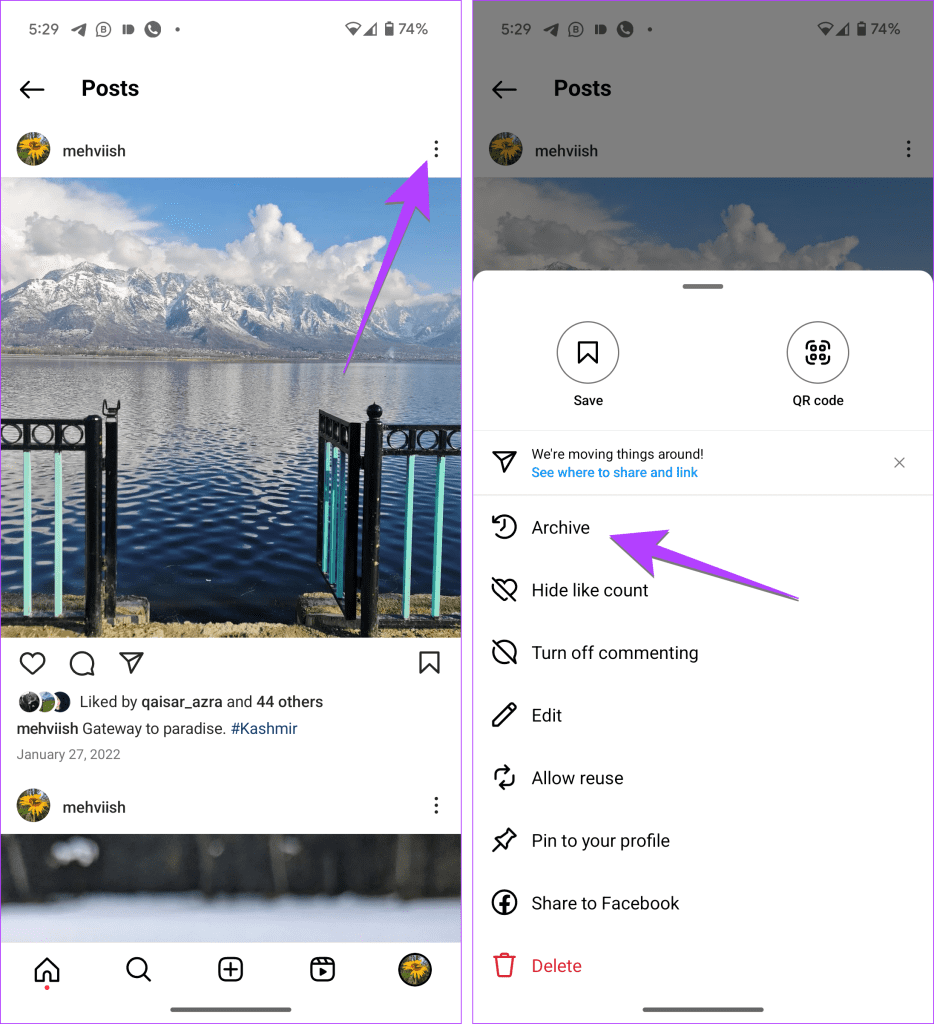
In contrast, when you archive a post, you are not deleting it. Instead, you are moving it from the public-facing section of your profile to a private, accessible “Archive” folder unique to your account. The post, along with all its metadata (likes, comments, timestamps, captions, hashtags), remains stored on Instagram’s servers. It simply loses its public visibility on your main feed and profile grid. This technical distinction means that an archived post is merely hidden, not eradicated, preserving its integrity for potential future restoration.
The User Experience: Hiding Content from Your Public Profile
From a user experience perspective, archiving is designed to be seamless and intuitive. When you select a post and choose “Archive,” the content instantly disappears from your public profile grid, your followers’ feeds, and any places it might have appeared, such as location or hashtag feeds. It effectively vanishes from the public eye as if it never existed on your profile, yet it remains fully intact within your account’s backend.
This action does not notify your followers, nor does it affect existing likes or comments. If a user had previously liked or commented on the post, those interactions remain associated with the post within your archive. Should you choose to unarchive the post, all these engagements will reappear exactly as they were before. This immediate, silent removal provides a clean, efficient way to manage the aesthetic and content flow of your profile without resorting to permanent deletion.
Behind the Scenes: Where Archived Data Resides
Technically, when a post is archived, its status flag in Instagram’s database is updated from “public” to “archived” (or a similar internal designation). The actual image or video files and associated text data don’t physically move to a different server location; rather, their visibility permissions are altered. They continue to reside on Instagram’s expansive network of servers, ensuring quick retrieval if you decide to unarchive them.
This server-side processing means that archived posts consume storage space, just like active posts. However, this storage is managed by Instagram and does not impact your device’s local storage. The system is designed for high availability and redundancy, meaning your archived content is backed up and protected, similar to your live content. This robust infrastructure guarantees that even if you haven’t seen a post in your archive for years, it remains securely preserved until you explicitly delete it.
Practical Benefits & Use Cases for the Savvy User
The archive feature transcends mere content hiding; it’s a powerful utility for strategic profile management, content optimization, and personal privacy. Understanding its practical applications can significantly enhance your Instagram experience, whether you’re a casual user or a serious content creator.
Decluttering Your Digital Feed: Enhancing Profile Aesthetics
One of the most immediate and appreciated benefits of archiving is its ability to declutter your profile. Over time, a user’s feed can become a sprawling collection of posts, some of which may no longer align with their current aesthetic, personal brand, or content strategy. Old, low-quality photos, out-of-date promotions, or simply posts that no longer “spark joy” can be quickly moved to the archive.
This allows users to maintain a fresh, cohesive, and visually appealing profile grid without losing the memories or data associated with older posts. For individuals, this might mean hiding embarrassing teenage photos. For businesses or influencers, it could involve curating a professional portfolio, removing seasonal content, or ensuring their top 9/12 posts always reflect their best and most relevant work. The archive acts as a digital attic, storing items that are valuable but not necessarily for public display.
Content Strategy & Re-evaluation: Temporary Removal for Review
Beyond simple decluttering, the archive feature serves as an invaluable tool for content strategists. It enables the temporary removal of posts that might be underperforming, controversial, or simply require re-evaluation. A brand might archive a post that received unexpected negative feedback to analyze the situation away from public scrutiny, or an influencer might temporarily hide content that no longer fits a new campaign direction.
This temporary removal allows for a period of review without the finality of deletion. Content creators can reassess a post’s effectiveness, consider re-editing its caption, or even plan to repost it at a more opportune time. The ability to pull content back from the public eye, hold it in a private repository, and then potentially reinstate it offers a dynamic approach to content management, facilitating A/B testing, audience feedback analysis, and iterative content improvement.
Privacy & Control: Managing Sensitive or Outdated Information
In an era increasingly focused on digital privacy and the right to be forgotten, Instagram’s archive feature empowers users with granular control over their digital footprint. Life changes, opinions evolve, and what was once acceptable to share publicly might become sensitive or irrelevant later. The archive provides a safe haven for such content.
This includes posts containing personal information that you no longer wish to be public, content shared during a specific life phase that has since passed, or even posts that simply feel too vulnerable or expose too much about your private life after reflection. Instead of deleting these memories forever, archiving allows you to retain them for personal remembrance while removing them from public access. This balance between personal memory preservation and public privacy is a cornerstone of the archive’s utility, giving users more agency over their narrative without permanent loss.
Retrieving Your Content: The Unarchive Process Explained
The true power of the archive feature lies not just in its ability to hide content, but also in the ease with which that content can be retrieved. This bidirectional functionality makes it a versatile tool for dynamic profile management.
Step-by-Step Guide to Restoring Archived Posts
Restoring an archived post is as straightforward as archiving one, ensuring that users can quickly bring content back to their live profile whenever needed. The process typically involves these steps:
-
Navigate to Your Profile: Open the Instagram app and tap on your profile icon in the bottom right corner.
-
Access the Archive: Tap the three horizontal lines (hamburger menu) in the top right corner of your profile screen.
-
Select “Archive”: From the menu, choose “Archive.” By default, this usually opens your “Posts Archive.” If it opens to “Stories Archive,” you can tap the dropdown menu at the top to switch to “Posts Archive.”
-
Find the Desired Post: Scroll through your archived posts to locate the one you wish to restore.
-
Restore the Post: Tap on the post, then tap the three dots (more options menu) in the top right corner of the post.
-
Choose “Show on Profile”: Select this option, and the post will instantly reappear on your main profile grid in its original chronological position.
This seamless process underlines Instagram’s commitment to user control and content flexibility, making the archive a truly reversible action.
Post-Restoration: What Stays and What Changes (Likes, Comments, Dates)
When you unarchive a post and choose “Show on Profile,” it returns to your public feed exactly as it was at the moment of archiving. This means:
-
Likes and Comments: All likes, comments, and views that the post had accumulated before archiving are fully restored and become publicly visible again. There is no reset of engagement data.
-
Original Date and Timestamp: The post reappears in its original chronological position on your profile grid, maintaining its original publication date. It does not get treated as a new post published on the unarchiving date. This is crucial for maintaining the integrity of your feed’s timeline.
-
Caption and Hashtags: The original caption, including all hashtags, mentions, and location tags, is fully restored.
-
Discovery: The post becomes discoverable again through hashtags, location tags, and if applicable, the Explore page, depending on its original engagement and relevance.
Essentially, unarchiving reverses the archiving process completely, restoring the post to its previous public state with all its associated metadata intact.
Considerations and Limitations When Unarchiving
While powerful, the unarchive feature does come with a few considerations:
-
No “New Post” Boost: Since unarchived posts retain their original timestamp, they do not receive the algorithmic “new post” boost that freshly uploaded content might get. They simply slide back into their historical position.
-
Follower Notification: Unarchiving a post does not send a notification to your followers, as it’s not considered a new upload. They will only see it if they actively browse your profile or if it appears in their feed if they scroll back to its original publication date.
-
Multiple Archiving/Unarchiving: There are no apparent limitations to how many times you can archive and unarchive a post. This flexibility allows for dynamic content strategies over extended periods.
-
Data Integrity: Instagram’s system is designed to maintain data integrity, so it’s highly improbable for a post to lose its engagement data upon archiving or unarchiving. The metadata is deeply linked to the post ID on their servers.
These points highlight that the archive/unarchive functionality is primarily about managing public visibility and profile aesthetics rather than manipulating algorithmic reach for “new” content. It’s a tool for curation, not for gaming the system.
Technical Implications and Digital Footprint Management
Beyond the immediate user experience, the archive feature has broader technical implications for data management, digital footprint, and even the platform’s overall strategy concerning user-generated content.
Data Preservation and Server-Side Storage
From a technical standpoint, the archive feature is a sophisticated data preservation mechanism. Instagram, like many large tech companies, operates immense data centers globally. When you archive a post, the data associated with it (image/video file, metadata) remains stored on these servers, likely within redundant systems to prevent loss. This is why archived content is not susceptible to being lost if your device breaks or you log out.
This level of data preservation aligns with Instagram’s business model, which relies on user-generated content. By providing an archive, they offer a convenient way for users to retain content, indirectly ensuring more data stays on their platform rather than being permanently deleted. It reduces the friction of removing content by offering a less permanent alternative, thereby contributing to the vast ocean of data Instagram manages. The secure storage of archived posts underscores the platform’s commitment to managing substantial volumes of diverse user content efficiently and reliably.
Impact on Analytics and Engagement Metrics (Pre and Post Archiving)
For creators and businesses leveraging Instagram’s analytics tools (Insights), understanding the archive’s impact on metrics is crucial. When a post is archived, it disappears from public view, and consequently, it will no longer accrue new engagement (likes, comments, saves, shares). However, its historical engagement data (from before archiving) remains intact within your Insights dashboard.
If you unarchive a post, its historical data is restored, and it can once again start accruing new engagement. However, due to its old timestamp, it typically won’t suddenly reappear at the top of followers’ feeds, meaning organic discovery and new engagement might be limited unless actively promoted again. The archive feature, therefore, offers a clear separation between active content influencing current metrics and historical content that contributes to cumulative analytics but not ongoing performance. It enables a more accurate assessment of current content strategies by allowing older, less relevant posts to be sequestered without permanently skewing historical data.

The Role of Archiving in Digital Well-being and Content Hygiene
Finally, on a broader level, the archive feature plays a subtle yet significant role in digital well-being and content hygiene. For individuals, it offers a pressure-release valve, allowing them to manage social anxieties related to past posts without the regret of permanent deletion. It encourages a healthier relationship with one’s digital self, knowing that past versions of oneself can be preserved privately.
For the platform, it contributes to overall content hygiene. Users are more likely to hide problematic or outdated content than to go through the irreversible step of deleting it, which means the collective public face of Instagram benefits from users having this option. It’s a soft moderation tool, empowering users to self-curate their profiles and, by extension, the platform’s public image. This feature demonstrates Instagram’s understanding of user psychology and the evolving demands for more flexible content management in our increasingly digital lives.
In conclusion, archiving a post on Instagram is far more than just a simple click. It’s a technologically sound, user-centric feature designed to offer granular control over one’s digital narrative. From secure server-side preservation to seamless public-private transitions and robust data integrity, the archive function stands as a testament to the sophistication underlying popular social media applications, empowering users to curate their digital presence with confidence and precision.
aViewFromTheCave is a participant in the Amazon Services LLC Associates Program, an affiliate advertising program designed to provide a means for sites to earn advertising fees by advertising and linking to Amazon.com. Amazon, the Amazon logo, AmazonSupply, and the AmazonSupply logo are trademarks of Amazon.com, Inc. or its affiliates. As an Amazon Associate we earn affiliate commissions from qualifying purchases.