
In recent years, you may have noticed a subtle change in the status bar of your smartphone, tablet, or laptop. Next to the familiar curved bars of the Wi-Fi icon, a small number “6” has appeared. For many users, this was a sudden update that arrived without much fanfare, yet it represents one of the most significant leaps in wireless communication technology in over a decade. This icon is the visual indicator for Wi-Fi 6, the latest generation of wireless networking standard, officially known as 802.11ax.
The appearance of this number marks a shift not just in technology, but in how the Wi-Fi Alliance—the organization that oversees wireless standards—communicates with the public. By moving away from cryptic alphanumeric codes like “802.11ac” and toward a simplified generational numbering system, the industry has made it easier for consumers to understand the capabilities of their hardware. If you see that “6,” your device is currently communicating using a protocol designed for the high-density, high-speed demands of the modern digital era.
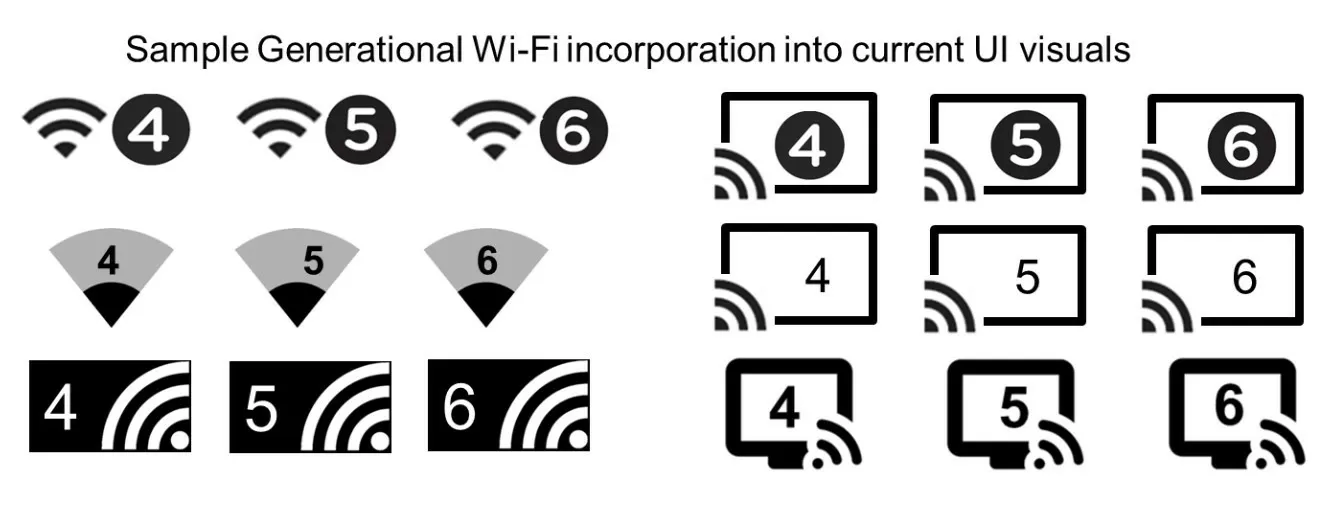
Decoding the Icon: The Shift to Generational Wi-Fi
For decades, wireless standards were identified by the IEEE (Institute of Electrical and Electronics Engineers) naming convention. We had 802.11b, 802.11g, 802.11n, and 802.11ac. While technically accurate, these names were confusing for the average consumer. In 2018, the Wi-Fi Alliance decided to simplify this by introducing “Wi-Fi 6” as the consumer-facing name for the 802.11ax standard.
The New Naming Convention
The transition to generational numbering was designed to mirror the simplicity of cellular technology (like 4G and 5G). Under this new system, older standards were retroactively renamed: 802.11n became Wi-Fi 4, and 802.11ac became Wi-Fi 5. When you see the “6” on your device, it serves as a badge of performance, indicating that both your device and the router it is connected to are utilizing the sixth generation of Wi-Fi technology. This transparency allows users to quickly identify if they are getting the best possible connection in a public space or at home.
From 802.11ax to Wi-Fi 6
While the name is simple, the underlying technology, 802.11ax, is incredibly complex. Wi-Fi 5 (802.11ac) was primarily focused on delivering faster speeds to a single device. However, as the number of devices in the average household exploded—including smart TVs, thermostats, refrigerators, and multiple smartphones—the old standards began to buckle under the pressure. Wi-Fi 6 was built from the ground up to handle high-density environments, prioritizing network efficiency over raw peak speed, although it offers plenty of the latter as well.
Why the “6” Matters: Performance and Speed
The most common question users ask when they see the “6” is: “Is my internet faster?” The answer is a nuanced “yes,” but the benefits go far beyond just a higher number on a speed test. Wi-Fi 6 is designed to improve the experience of every device on the network simultaneously.
Increased Throughput and Bandwidth
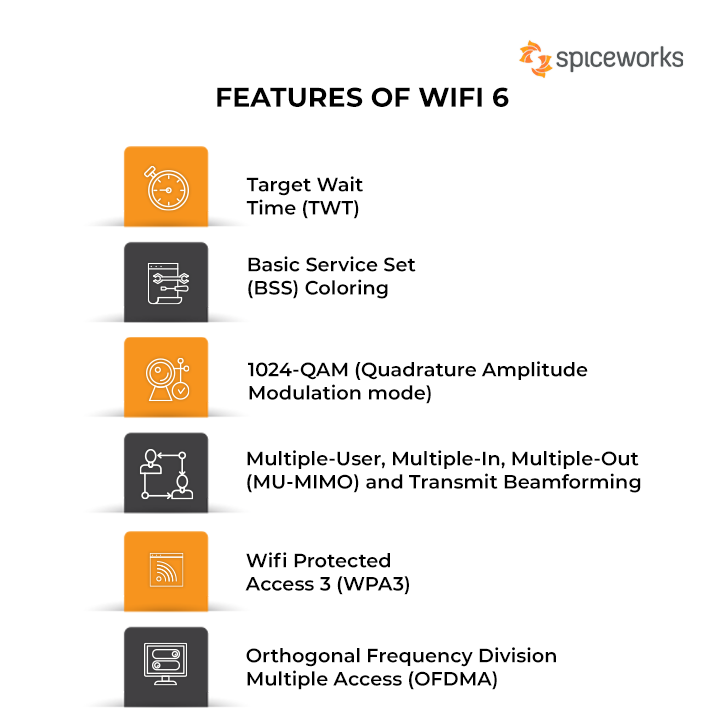
On paper, Wi-Fi 6 offers a theoretical maximum speed of 9.6 Gbps, compared to 3.5 Gbps on Wi-Fi 5. While you are unlikely to ever hit those speeds in a real-world home environment (as your internet service provider is likely the bottleneck), this increased ceiling matters. It means that the router has more “room” to distribute data. Even if your ISP only provides 500 Mbps, Wi-Fi 6 ensures that that bandwidth is delivered more reliably and with less overhead to your devices.
Improved Efficiency in Crowded Spaces
The true strength of Wi-Fi 6 is its ability to maintain performance in “congested” areas. If you have ever been at a crowded airport or a busy coffee shop and found the Wi-Fi unusable despite having “full bars,” you have experienced network congestion. Wi-Fi 6 uses advanced signaling to ensure that the router can talk to dozens of devices at once without them “tripping” over each other’s signals. This makes the “6” especially valuable in smart homes where twenty or thirty devices might be competing for airtime.
Reduced Latency for Gaming and Streaming
For gamers and those who use video conferencing tools like Zoom or Microsoft Teams, latency (or “ping”) is more important than raw download speed. Latency is the delay between sending a command and getting a response. Wi-Fi 6 reduces latency by up to 75% compared to previous generations. This is achieved by packing data more tightly into the signal, ensuring that small packets of information—like a command in a video game—don’t have to wait in line behind a large 4K video stream.
The Technology Behind the Number
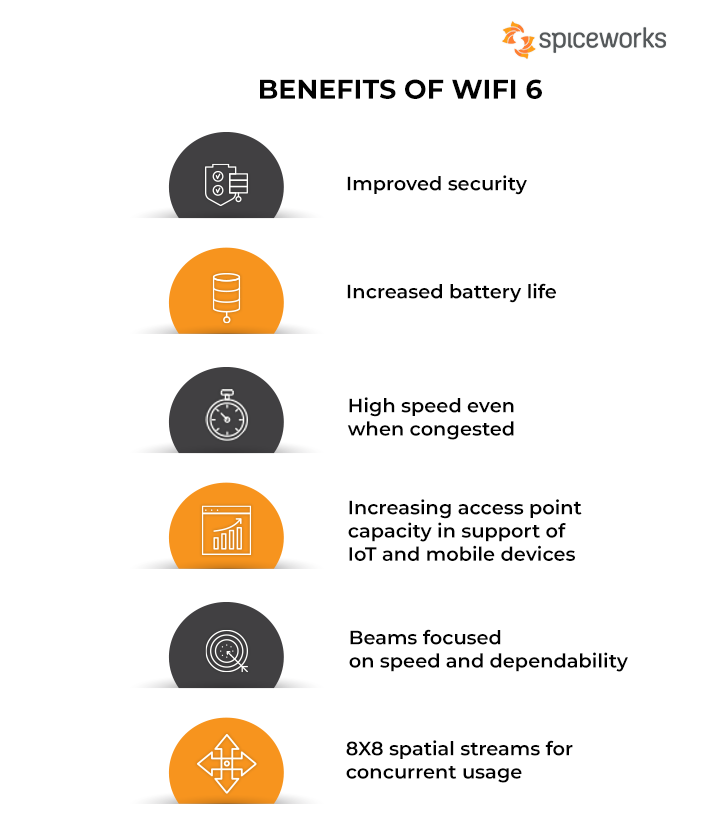
To understand why the “6” is such a breakthrough, we have to look at the engineering feats hidden within the standard. Wi-Fi 6 introduces several key technologies that fundamentally change how data is transmitted through the air.
OFDMA: The Traffic Controller
One of the most significant additions to Wi-Fi 6 is OFDMA (Orthogonal Frequency Division Multiple Access). Think of your Wi-Fi connection as a fleet of delivery trucks. In older versions of Wi-Fi, a truck could only carry a package for one device at a time. If your laptop needed a tiny bit of data and your TV needed a huge movie file, the laptop would have to wait for its own dedicated truck. OFDMA allows the “truck” to be split into sub-sections, carrying packages for multiple devices in a single trip. This drastically increases efficiency and reduces the waiting time for every device on the network.
MU-MIMO: Multi-User Communication
While MU-MIMO (Multi-User, Multiple Input, Multiple Output) existed in Wi-Fi 5, it only worked for downloading data. Wi-Fi 6 upgrades this to “Eight-Stream MU-MIMO,” which works for both uploads and downloads. This allows a router to communicate with up to eight devices at the exact same time on the same frequency. It’s the difference between a grocery store with one checkout lane and a store with eight lanes open simultaneously.
Target Wake Time (TWT) for Battery Life
Wi-Fi 6 isn’t just about speed; it’s also about sustainability. A feature called Target Wake Time (TWT) allows the router and the device to negotiate when and how often the device will wake up to send or receive data. In older standards, devices had to stay “awake” to keep the connection alive, which drained the battery. With TWT, a smartphone or an IoT sensor can “sleep” for longer intervals, significantly extending battery life. This is a game-changer for smart home devices like Wi-Fi-connected cameras and doorbells that run on batteries.
Upgrading to Wi-Fi 6: Hardware and Security
Seeing the “6” on your screen confirms that you are already reaping the benefits, but if you don’t see it, you might be wondering what is required to get there. It is important to note that Wi-Fi 6 is a hardware-dependent standard; you cannot simply download an app to “get” Wi-Fi 6.
Is Your Hardware Compatible?
To see the “6,” both the “sender” and the “receiver” must support the 802.11ax standard. This means you need a Wi-Fi 6-capable router and a Wi-Fi 6-capable device (such as an iPhone 11 or newer, a Samsung Galaxy S10 or newer, or most laptops released after 2020). If you have an old router but a new phone, you will still connect, but you will only get Wi-Fi 5 or Wi-Fi 4 speeds, and the icon will not show the “6.”
WPA3: Enhanced Digital Security
Security is a massive part of the Wi-Fi 6 ecosystem. Wi-Fi 6 certification requires the use of WPA3 (Wi-Fi Protected Access 3), the latest security protocol. WPA3 makes it much harder for hackers to crack your password using “brute force” attacks, where they try millions of combinations per second. It also provides better encryption for public Wi-Fi networks, ensuring that even if you are on an open network at a mall, your data remains more secure from “snooping” by other users on the same network.
The Arrival of Wi-Fi 6E and Beyond
While you are just getting used to the “6,” the technology is already evolving. Wi-Fi 6E is an extension of Wi-Fi 6 that opens up a brand-new 6GHz frequency band. Think of it as adding a massive new highway next to a congested road. This 6GHz band is exclusive to 6E-capable devices, meaning there is zero interference from older legacy devices. Beyond that, Wi-Fi 7 is already on the horizon, promising even more lanes and faster speeds.
Future-Proofing Your Digital Environment
The “6” on your Wi-Fi icon is more than just a symbol; it is an assurance that your hardware is ready for the future. As we move toward a world of 8K streaming, virtual reality (VR), augmented reality (AR), and a “Smart Everything” philosophy, the demands on our home networks will only increase.
The Smart Home Ecosystem
In a modern household, it is not uncommon to have 30 to 50 connected devices. From smart bulbs and smart plugs to security cameras and game consoles, every device adds “noise” to the network. Wi-Fi 6 is the first standard specifically designed to thrive in this environment. By choosing Wi-Fi 6-compliant hardware, you are ensuring that adding a new smart speaker in the kitchen won’t cause your Netflix stream in the living room to buffer.
When Should You Upgrade?
If you see the “6,” you are already set. If you don’t, and you find your internet feels sluggish despite paying for a high-speed plan, it might be time to look at your router. Upgrading to a Wi-Fi 6 system—particularly a Mesh Wi-Fi 6 system—can eliminate dead zones and provide a more stable, faster connection across your entire home. It is a foundational upgrade for any modern digital lifestyle, providing the invisible infrastructure that allows all your other tech gadgets to shine.
In conclusion, that small “6” signifies a revolution in wireless communication. It represents a shift from a focus on “how fast can one device go” to “how well can the network serve everyone.” It means better security, longer battery life, and a more seamless connection to the digital world. So, the next time you glance at your phone and see that number, you can rest assured that you are using the gold standard of modern connectivity.
aViewFromTheCave is a participant in the Amazon Services LLC Associates Program, an affiliate advertising program designed to provide a means for sites to earn advertising fees by advertising and linking to Amazon.com. Amazon, the Amazon logo, AmazonSupply, and the AmazonSupply logo are trademarks of Amazon.com, Inc. or its affiliates. As an Amazon Associate we earn affiliate commissions from qualifying purchases.