
In the rapidly evolving landscape of digital data, understanding storage capacity is paramount. Whether you’re a casual user backing up photos, a gamer installing the latest AAA titles, or a business managing vast datasets, the term “TB” is a ubiquitous marker of how much information your devices can hold. But what exactly does TB signify, and why is it such a crucial metric in the realm of technology? This article delves into the meaning of TB in storage, its implications, and how it influences our digital lives.
The Fundamental Units of Digital Storage
Before we can fully appreciate the significance of a Terabyte (TB), it’s essential to grasp the foundational building blocks of digital storage. Data, at its core, is represented by bits, which are binary digits that can be either a 0 or a 1. These bits are the smallest units of information in computing. However, a single bit is too small to be practically useful for storing meaningful data. Therefore, bits are grouped together to form larger, more manageable units.
From Bits to Bytes: The First Layer of Organization
The most fundamental grouping of bits is the byte. A byte consists of 8 bits. This seemingly simple grouping is incredibly significant because it’s generally accepted that a byte can represent a single character, such as a letter, a number, or a symbol. This standard is deeply ingrained in computer architecture and software. Think of it as the alphabet of the digital world; without bytes, we couldn’t form words, sentences, or any complex information.
Scaling Up: Kilobytes, Megabytes, and Gigabytes
As our digital needs grew, so did the requirement for larger storage units. The progression follows a hierarchical pattern based on powers of 1024 (or, for simplicity in common usage, powers of 1000, though technically it’s 1024).
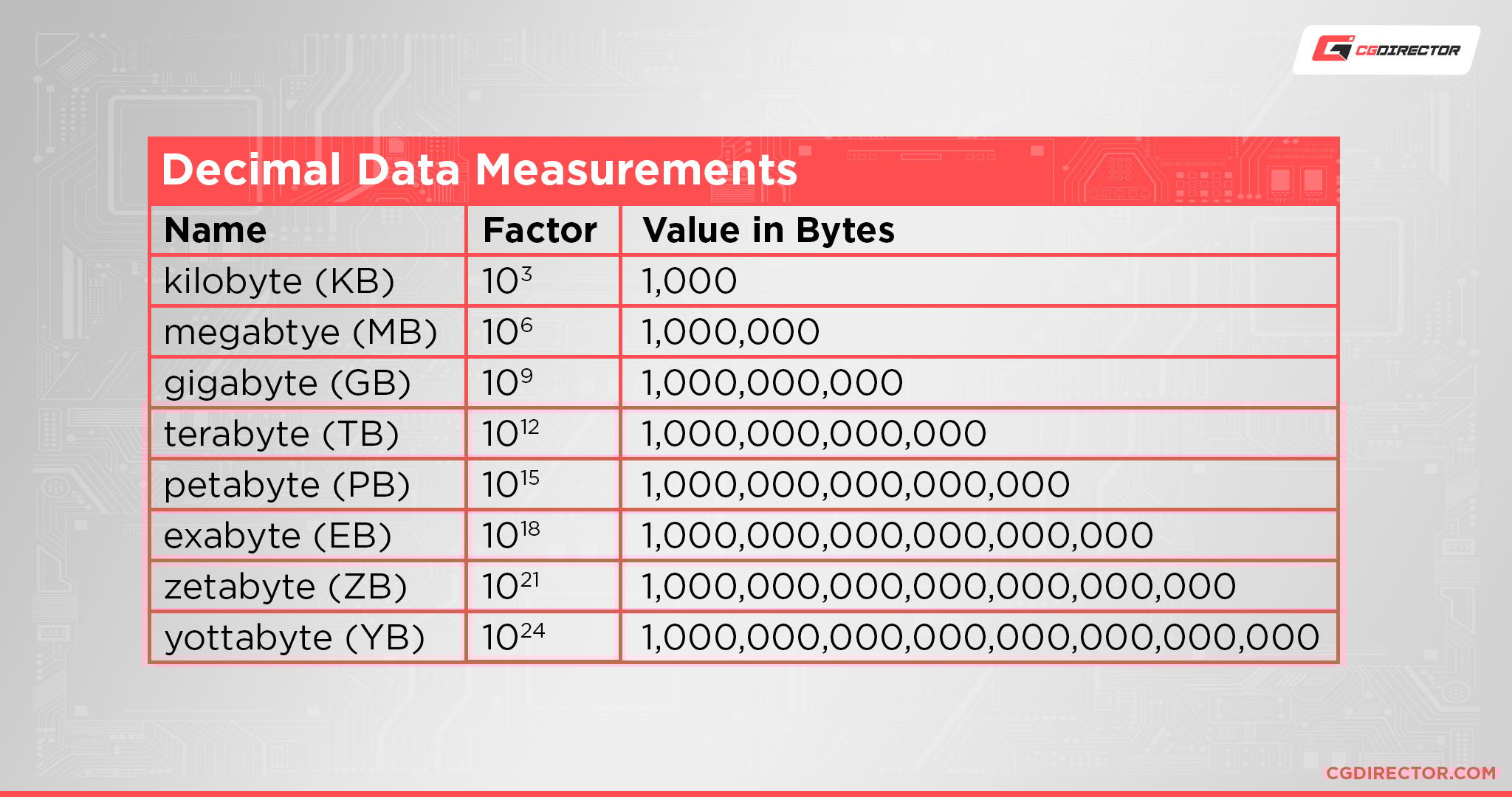
- Kilobyte (KB): Approximately 1,000 bytes. In the early days of computing, a few kilobytes could store entire programs or documents. Today, a KB is often used to measure the size of small text files or simple images.
- Megabyte (MB): Approximately 1,000 kilobytes, or about 1 million bytes. MP3 audio files, standard-definition photos, and smaller application files are often measured in megabytes.
- Gigabyte (GB): Approximately 1,000 megabytes, or about 1 billion bytes. This is a unit many are familiar with today, often used for the storage capacity of smartphones, USB drives, and the RAM in computers. A single movie in standard definition can easily be a few gigabytes.
These units represent the stepping stones that have led us to the current era of massive storage, where terabytes have become the norm for many devices and applications.
Unpacking the Terabyte (TB): A Quantum Leap in Storage
The Terabyte (TB) represents a significant leap in storage capacity. It is the next step in the progression after Gigabyte.
The Magnitude of a Terabyte
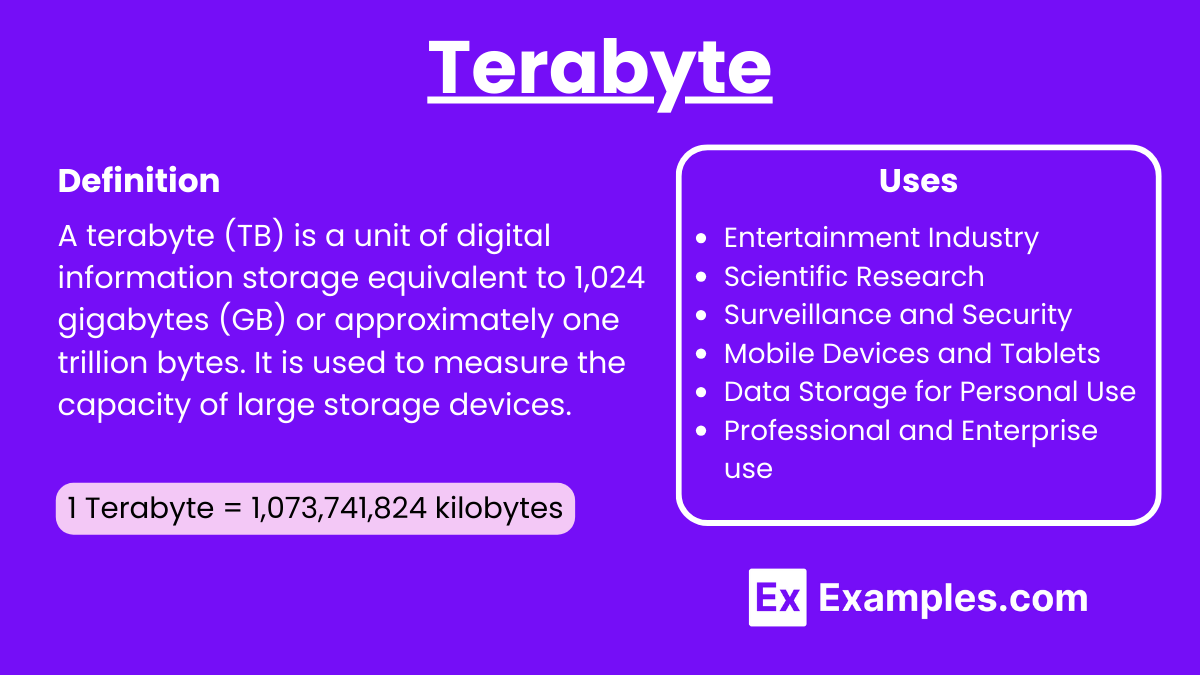
- Terabyte (TB): Defined as approximately 1,000 gigabytes, or roughly 1 trillion bytes. To put this into perspective, 1 TB is equivalent to 1,000,000 megabytes or 1,000,000,000 kilobytes.
The sheer scale of a terabyte is difficult to conceptualize in everyday terms, but consider this:
- Photos: If you have a collection of 10-megapixel photos, each around 5 MB in size, you could store approximately 200,000 of them on a 1 TB drive.
- Movies: A high-definition movie can range from 5 GB to 15 GB or more. On a 1 TB drive, you could store between 65 and 200 full-length HD movies.
- Music: If an average MP3 song is 5 MB, you could store approximately 200,000 songs on a 1 TB drive.
- Documents: Even with extensive word processing documents, spreadsheets, and presentations, it would take a lifetime for most individuals to fill a 1 TB drive with them alone.
The advent of the terabyte marked a turning point in how we approach data storage. Suddenly, the limitations that once dictated how much data we could keep locally began to fade.
The Decimal vs. Binary Distinction: A Technical Nuance
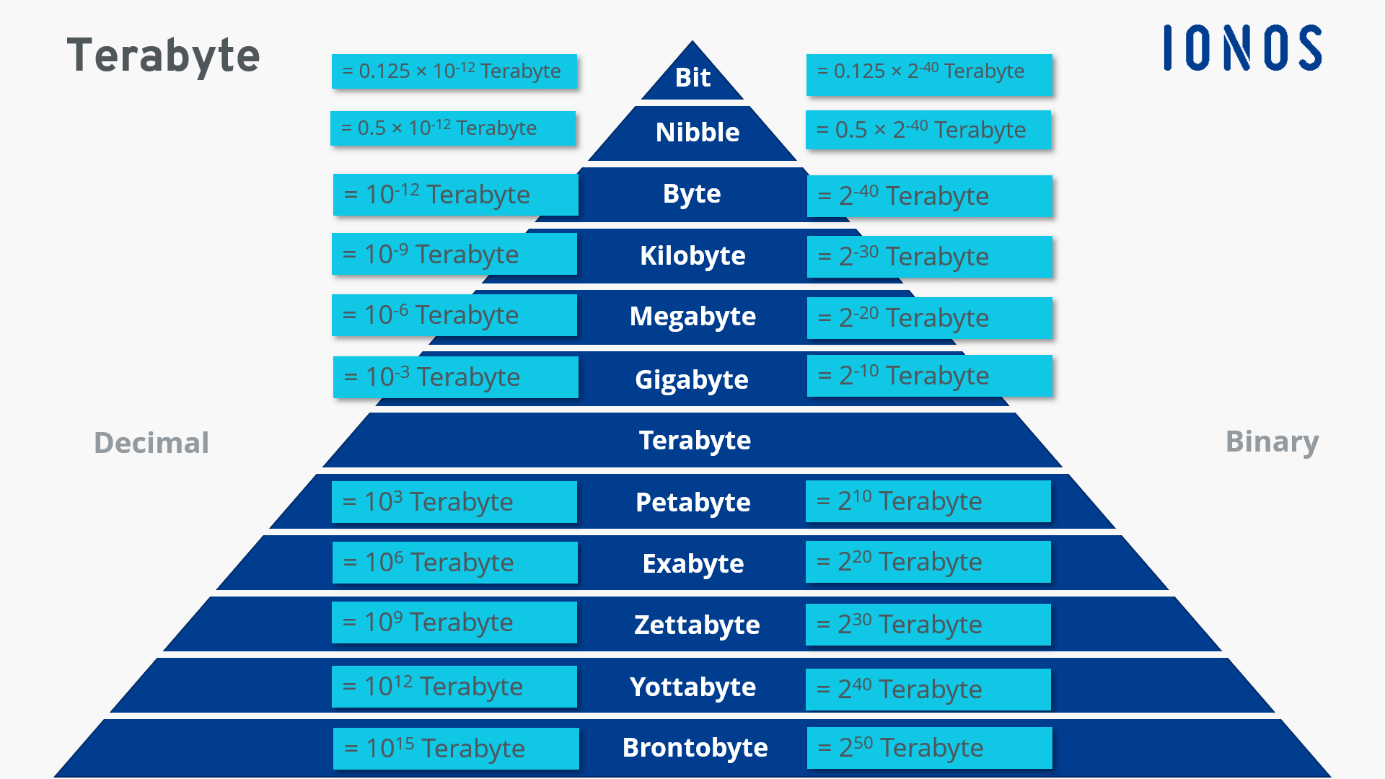
It’s worth noting a common point of confusion regarding storage measurement: the difference between decimal (base-10) and binary (base-2) interpretations.
- Decimal (SI) Prefixes: In marketing and general consumer understanding, prefixes like kilo, mega, giga, and tera are often used with their standard decimal meanings. So, 1 TB = 1000 GB, 1 GB = 1000 MB, and so on. This is what manufacturers typically use when advertising storage capacity.
- Binary (IEC) Prefixes: In computing, especially when referring to RAM or file sizes reported by operating systems, binary prefixes are technically used. Here, 1 Tebibyte (TiB) = 1024 Gibibytes (GiB), 1 GiB = 1024 MiB, and 1 TiB = 1024 GiB.
This distinction can lead to slight discrepancies. For example, a hard drive advertised as 1 TB (1,000,000,000,000 bytes) might show up in your operating system as approximately 0.91 TiB (909,494,701,773 bytes), because the OS is reporting the capacity using binary calculations. While both are technically correct in their own contexts, understanding this can help clarify why a drive might appear to have slightly less capacity than advertised once formatted and used.
The Practical Implications of Terabyte Storage
The widespread availability of terabyte-scale storage has fundamentally reshaped our relationship with digital information and technology. It has driven innovation in hardware, software, and user expectations.
Consumer Devices: From Necessity to Standard
For consumers, terabytes are no longer a luxury; they are increasingly becoming a standard feature.
- Personal Computers: Modern desktop and laptop computers often come with hard drives (HDDs) or solid-state drives (SSDs) in the 1 TB to 4 TB range as a baseline. This allows users to store large operating system files, a vast library of applications, extensive multimedia collections, and significant amounts of personal data without immediate concern for space limitations.
- External Hard Drives and SSDs: For backups, media libraries, or expanding the storage of devices with limited internal capacity, external TB-sized drives are incredibly popular. They offer a cost-effective way to acquire massive amounts of portable storage.
- Gaming Consoles: With modern video games often exceeding 100 GB, terabyte drives are essential for gaming consoles like PlayStation and Xbox to accommodate multiple AAA titles.
- Smartphones and Tablets: While internal storage on mobile devices still often starts in the hundreds of gigabytes, higher-end models and options now reach 1 TB. This enables users to capture high-resolution videos (like 4K and 8K), download extensive offline content, and store vast photo libraries directly on their devices.
Professional and Business Applications: The Data Deluge
In professional and enterprise environments, terabytes are not just useful; they are often the minimum requirement for many operations.
- Video Production and Editing: High-resolution video files are massive. A single minute of 4K footage can consume several gigabytes of space. Professional video editors, studios, and content creators rely heavily on multi-terabyte storage solutions, often in the tens or even hundreds of terabytes, to manage raw footage, project files, and final renders.
- Data Archiving and Backup: Businesses need to store historical data for compliance, legal, or analytical purposes. Terabyte-scale drives and network-attached storage (NAS) devices are fundamental for creating robust backup and archiving strategies.
- Scientific Research and Big Data: Fields like genomics, climate modeling, astronomy, and artificial intelligence generate colossal amounts of data. These scientific endeavors require petabyte-scale storage (1 PB = 1000 TB), but the underlying technology often starts with terabyte-sized components.
- Cloud Storage Services: When you use cloud storage services like Google Drive, Dropbox, or iCloud, the underlying infrastructure supporting these services is built upon vast arrays of terabyte (and petabyte) drives. Your personal cloud storage allotment, often measured in gigabytes or terabytes, is just a fraction of this immense capacity.
The Future of Storage: Beyond the Terabyte
While the terabyte is a cornerstone of modern digital life, the relentless growth of data means that the quest for even greater storage capacity continues.
The Next Frontiers: Petabytes and Beyond
Following the terabyte, the next major unit is the Petabyte (PB), which is 1,000 terabytes. Petabytes are already common in large data centers, scientific research, and enterprise storage solutions. Beyond petabytes lie Exabytes (EB), Zettabytes (ZB), and Yottabytes (YB), representing unimaginably vast quantities of data.
- Technological Advancements: Innovations in storage media, such as advancements in NAND flash technology for SSDs, new forms of magnetic storage, and even emerging technologies like DNA data storage, are constantly pushing the boundaries of density and speed.
- Data Compression and Efficiency: Alongside increased capacity, advancements in data compression algorithms and more efficient file systems also play a crucial role in managing the ever-growing volume of digital information.
- The Role of Cloud: Cloud computing will continue to be a dominant force, abstracting the underlying physical storage from the end-user. However, the demand for storage at the data center level will only intensify, requiring continued innovation in terabyte-scale and beyond solutions.
In conclusion, the “TB” in storage represents a Terabyte, a unit signifying approximately one trillion bytes. This capacity has become a fundamental metric in the digital age, powering everything from our personal devices to the massive infrastructure of the internet. Understanding what a TB means allows us to make informed decisions about our technology needs, manage our digital footprints effectively, and appreciate the remarkable advancements that have made our data-rich lives possible. As data continues to proliferate, the terabyte will remain a critical benchmark, while the industry pushes towards even greater capacities to meet future demands.
aViewFromTheCave is a participant in the Amazon Services LLC Associates Program, an affiliate advertising program designed to provide a means for sites to earn advertising fees by advertising and linking to Amazon.com. Amazon, the Amazon logo, AmazonSupply, and the AmazonSupply logo are trademarks of Amazon.com, Inc. or its affiliates. As an Amazon Associate we earn affiliate commissions from qualifying purchases.