
The term “page” is a foundational concept across the technological landscape, carrying diverse yet interconnected meanings that define how we interact with information and digital systems. From the screens of our web browsers to the intricate workings of a computer’s memory, understanding “page” is crucial for anyone navigating or building within the digital realm. It signifies a distinct unit of content, a segment of data, or a discrete interface, each playing a vital role in the functionality and user experience of modern technology.
The Ubiquitous Web Page: Your Digital Gateway
Perhaps the most common understanding of “page” in everyday tech usage is the web page. This is the primary unit of information and interaction on the World Wide Web, serving as a digital document accessed via a web browser. Each time you click a link, type a URL, or navigate an online application, you are typically engaging with one or more web pages.

Anatomy of a Web Page
A web page is fundamentally a structured document, typically written in HyperText Markup Language (HTML). HTML provides the skeletal structure and content—text, images, links, forms—that define the information presented. To make this information visually appealing and responsive, Cascading Style Sheets (CSS) are employed. CSS dictates the page’s layout, colors, fonts, and overall design, transforming raw HTML into an aesthetically pleasing and brand-consistent interface. For dynamic behavior, interactivity, and complex functionalities, JavaScript is the crucial component. It enables features like animated menus, interactive forms, real-time updates, and client-side data validation, making the web page a dynamic application rather than a static document. Together, these three core technologies form the backbone of virtually every web page you encounter.
Types of Web Pages
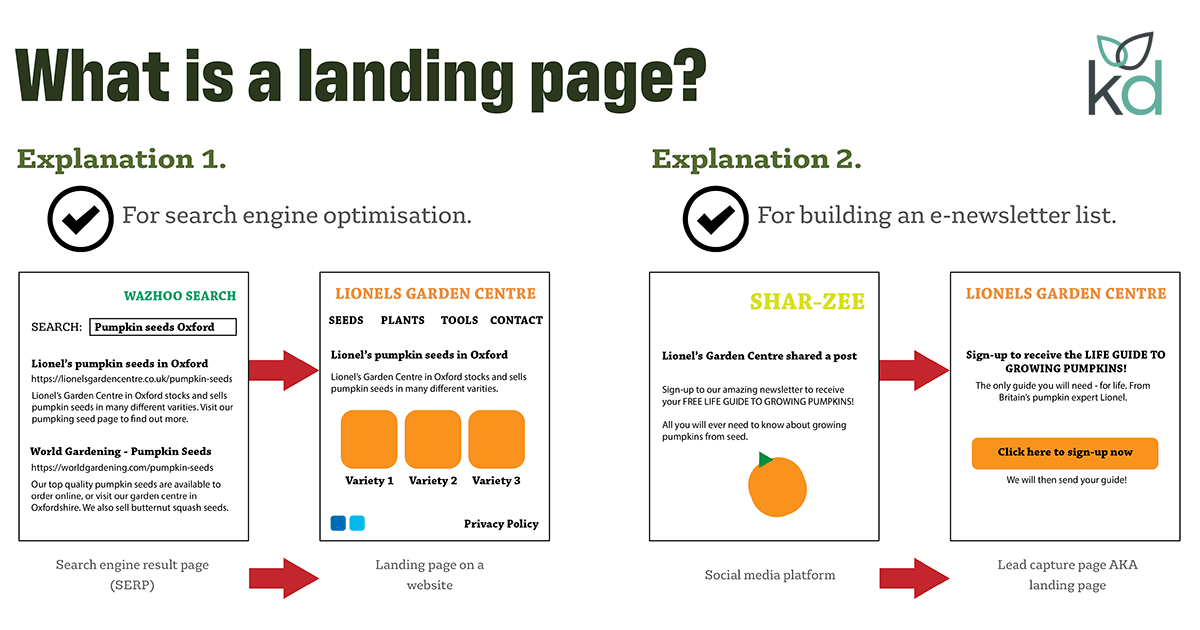
Web pages come in various forms, each designed for a specific purpose. A homepage serves as the primary entry point for a website, offering an overview and navigation. Landing pages are meticulously crafted to capture leads or drive specific actions, often featuring a single, clear call to action. Product pages provide detailed information about an item for sale, complete with descriptions, images, and purchasing options. Blog posts are content-rich pages designed for informational or entertainment purposes, often organized chronologically. There’s also a distinction between static pages, which display the same content to all users and are often pre-rendered, and dynamic pages, which generate content on the fly based on user input, database queries, or server-side logic, offering personalized experiences.
Importance in the Digital Ecosystem
Web pages are the foundational elements of the internet’s vast information network. They are the conduits through which businesses conduct e-commerce, individuals share ideas, news organizations disseminate information, and services are delivered globally. For businesses, a well-designed and optimized web page is crucial for online visibility, customer engagement, and conversion. Search Engine Optimization (SEO) heavily relies on the structure, content, and performance of individual web pages to rank higher in search results, thereby driving organic traffic. Moreover, web pages facilitate user interaction through forms, comments, and social sharing features, fostering communities and feedback loops that are vital for digital growth.
Deeper Dive: Pages in Computer Memory
Beyond the visual interface of the web, the concept of “page” takes on a far more technical and fundamental meaning within the internal architecture of a computer system, particularly concerning memory management. Here, a page refers to a fixed-size block of memory, a critical component of how operating systems manage and allocate resources.
Virtual Memory and Paging
Modern operating systems utilize a technique called virtual memory to create an abstraction layer between a program’s perceived memory space (virtual addresses) and the actual physical memory (RAM). This allows programs to operate as if they have access to a contiguous, large memory space, even if the physical RAM is fragmented or smaller than the program’s requirements. Paging is the core mechanism that enables virtual memory. It involves dividing a program’s virtual address space into fixed-size blocks called virtual pages, and dividing physical RAM into similarly sized blocks called physical frames (or page frames). When a program needs to access data, the operating system maps the virtual page containing that data to a physical frame in RAM.
If a requested virtual page is not currently in physical RAM, a page fault occurs. The operating system then retrieves the required page from a secondary storage device (like an SSD or HDD) where it has been temporarily stored (this process is called swapping or paging out), loads it into an available physical frame, and updates the page table to reflect the new mapping. This allows the system to run programs larger than the available physical memory, albeit with potential performance overhead.
Memory Management Units (MMUs)
The complex task of translating virtual addresses to physical addresses is handled by specialized hardware called the Memory Management Unit (MMU). Located within the CPU, the MMU uses page tables—data structures maintained by the operating system—to perform these translations in real-time. Each entry in a page table maps a virtual page number to its corresponding physical frame number. This hardware acceleration is crucial for the efficiency of virtual memory, ensuring that address translation is fast enough not to significantly degrade system performance. The MMU also enforces memory protection, preventing one program from accidentally or maliciously accessing the memory space of another, thereby enhancing system stability and security.
Impact on Performance
While paging provides immense flexibility and allows for multitasking, it comes with performance implications. Frequent page faults, especially if the system has insufficient physical RAM to hold all actively used pages, can lead to a state known as thrashing. In thrashing, the system spends more time swapping pages between RAM and disk than it does executing actual program instructions, leading to a dramatic slowdown. Understanding paging is therefore critical for system administrators optimizing server performance and for developers writing memory-efficient applications, as it directly impacts how quickly programs can access the data they need.
Beyond Browsers: Pages in Software and Applications
The concept of a “page” extends beyond web browsers and core operating system functions, permeating various other forms of software and user interfaces. In these contexts, “page” often refers to a distinct screen, view, or segment of content within an application, designed to manage complexity and improve user navigation.
Application Interfaces
In desktop and mobile applications, “page” is frequently used to describe a specific screen or section accessible to the user. For instance, a mobile banking app might have a “dashboard page,” an “accounts page,” a “transfer page,” and a “settings page.” Each page serves a specific function, presenting relevant information and controls. Similarly, in word processing software, a “page” refers to the individual sheets of a document, defining print layout and content flow. Even within more complex enterprise software, “pages” might represent distinct modules or views, allowing users to focus on particular tasks without being overwhelmed by the entire system’s functionality at once. This modular approach improves usability and user experience by breaking down complex applications into manageable, task-oriented sections.
Pagination in Data Display
When dealing with large datasets, such as search results, product catalogs, or lists of emails, it’s impractical and inefficient to display all items at once. This is where pagination comes into play. Pagination involves dividing a large list of items into discrete “pages” of a fixed number of entries. Users can then navigate through these pages (e.g., “Page 1 of 10,” “Next,” “Previous”) to view the entire dataset in manageable chunks. This approach significantly improves performance by reducing the amount of data that needs to be loaded and rendered at any given time, leading to a faster and smoother user experience. It also provides a clear sense of progression and location within a large collection of items.
Database Paging
Related to data display, databases also employ paging mechanisms when retrieving large result sets. Instead of fetching millions of records in a single query, which can consume excessive memory and time, database systems and application frameworks often implement database paging. This involves constructing queries that retrieve only a specific “page” of results at a time, often using clauses like LIMIT and OFFSET in SQL. This method is essential for building scalable applications that interact with large databases, preventing resource exhaustion on both the server and client sides, and ensuring responsive data retrieval.
The Evolving Role of the Page: Dynamic and Interactive
The definition and function of a “page” continue to evolve with technological advancements, moving towards more dynamic, immersive, and personalized experiences. The static document paradigm is increasingly being replaced by interactive and intelligent interfaces.
Single-Page Applications (SPAs)
A significant evolution in web technology is the rise of Single-Page Applications (SPAs). Unlike traditional multi-page websites where clicking a link triggers a full page reload from the server, SPAs load all necessary HTML, CSS, and JavaScript once. Subsequent user interactions (like navigating to a different section) dynamically update only parts of the page, fetching new data rather than entirely new page documents. This creates a much faster, fluid, and app-like user experience, blurring the lines between web pages and native desktop applications. Frameworks like React, Angular, and Vue.js are popular tools for building SPAs, fundamentally redefining what a “page” means on the web.
The Metaverse and Immersive Experiences
Looking further into the future, the concept of a “page” is likely to transform dramatically with the advent of the metaverse and more immersive digital environments. Instead of flat, 2D interfaces, future “pages” might manifest as navigable 3D spaces, interactive virtual rooms, or augmented reality overlays. Users won’t just view content on a page; they will inhabit it, interacting with data and other users in a spatial context. This shift could redefine digital interaction, moving from simply accessing information to experiencing it within a simulated reality, where a “page” becomes a portal to an entire virtual world or a specific location within it.

Personalization and AI
Artificial intelligence and machine learning are increasingly influencing how “pages” are presented. Personalized pages adapt their content, layout, and even calls to action based on an individual user’s browsing history, preferences, demographics, and real-time behavior. E-commerce sites, news feeds, and social media platforms are prime examples where AI curates and optimizes the “page” experience for each unique visitor. This continuous adaptation makes pages more relevant and engaging, enhancing user satisfaction and driving desired outcomes. The future promises even more intelligent pages that learn and evolve with user interaction, offering highly tailored and anticipatory digital experiences.
In summary, “page” in technology is a multifaceted term. It represents a visible unit of content on the web, a foundational block of memory in computing, and a distinct section within an application. As technology advances, the “page” continues to evolve, promising more dynamic, personalized, and immersive ways to interact with the digital world.
aViewFromTheCave is a participant in the Amazon Services LLC Associates Program, an affiliate advertising program designed to provide a means for sites to earn advertising fees by advertising and linking to Amazon.com. Amazon, the Amazon logo, AmazonSupply, and the AmazonSupply logo are trademarks of Amazon.com, Inc. or its affiliates. As an Amazon Associate we earn affiliate commissions from qualifying purchases.