
In the rapidly evolving landscape of enterprise technology, the term “on-prem” (shorthand for on-premises) has shifted from being the default standard to a specific strategic choice. For decades, if a company wanted to run software or store data, they had to own the physical hardware to do it. With the explosive growth of cloud computing providers like AWS, Azure, and Google Cloud, the definition of on-prem has sharpened. It now represents a localized approach to IT infrastructure where software is installed and run on computers on the premises of the person or organization using the software, rather than at a remote facility such as a server farm or cloud.
Understanding what on-prem means in a modern context is essential for IT professionals, CTOs, and developers. It is no longer just about “the server in the closet”; it is about data sovereignty, security architecture, and the fundamental way a business manages its digital assets.
The Core Architecture of On-Premises Computing
To understand on-prem, one must first look at the physical and structural requirements of local hosting. Unlike the cloud, where the underlying hardware is abstracted away, on-prem demands a deep investment in tangible assets and human expertise.
Hardware and Physical Infrastructure
At the heart of an on-premise setup is the data center or server room. This involves more than just buying a powerful computer. It requires a stack of rack-mounted servers, storage arrays (SAN or NAS), and sophisticated networking equipment like switches, routers, and firewalls.
Beyond the computing power, the physical environment must be managed. This includes uninterruptible power supplies (UPS), backup generators for power outages, and precision cooling systems to prevent hardware failure due to heat. In an on-prem environment, the organization is responsible for the entire physical “stack,” from the silicon in the processors to the locks on the server room door.
Local Networking and Data Sovereignty
On-premise systems operate primarily within a Local Area Network (LAN). This offers a level of speed and reliability that external internet connections often cannot match. Because the data does not have to travel across the public internet to reach a distant data center, internal latency is virtually non-existent.
Furthermore, on-prem is the ultimate solution for data sovereignty. In industries where data must remain within a specific building or geographic border for legal reasons, local hosting ensures that the organization maintains 100% physical custody of their information. There is no ambiguity about where the data resides or who has physical access to the drives.
Internal Maintenance and Lifecycle Management
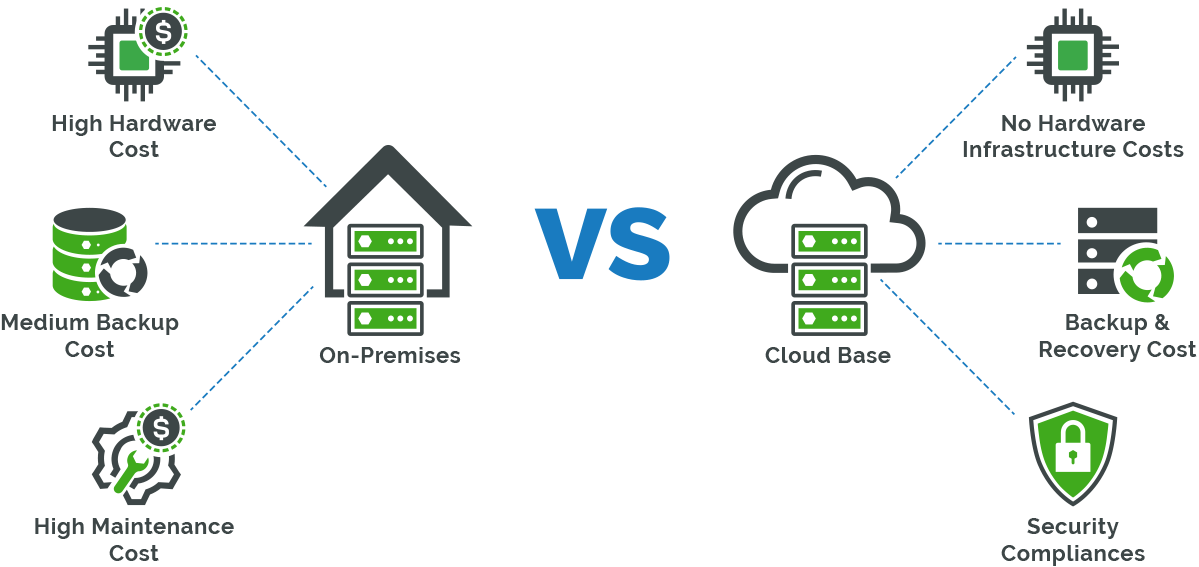
One of the defining characteristics of on-prem tech is the responsibility of maintenance. When a hard drive fails in the cloud, the provider replaces it without the user ever knowing. In an on-premise environment, the internal IT team must monitor hardware health, perform routine upgrades, and manage the lifecycle of the equipment.
Typically, hardware has a 3-to-5-year lifecycle before it becomes obsolete or prone to failure. This requires a continuous cycle of auditing, decommissioning old gear, and provisioning new servers—a process known as “racking and stacking.”
On-Prem vs. Cloud: A Strategic Comparison
The debate between on-prem and cloud is rarely about which is “better” in a vacuum, but rather which is more appropriate for a specific workload. The differences involve financial models, performance metrics, and operational control.
The CAPEX vs. OPEX Model
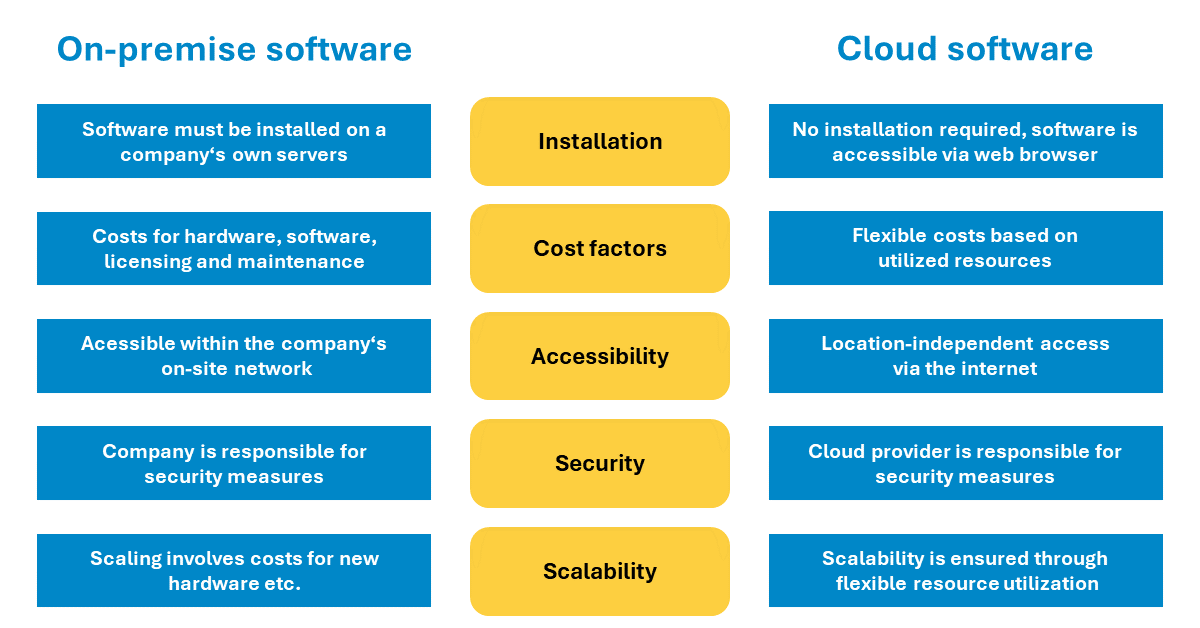
The most immediate difference between on-prem and cloud is the financial structure. On-premise infrastructure is characterized by CAPEX (Capital Expenditure). A company must spend a significant amount of money upfront to purchase hardware, licenses, and installation services. While this is a heavy initial burden, the ongoing costs are relatively low, consisting mainly of electricity, cooling, and staff wages.
In contrast, cloud computing follows an OPEX (Operating Expenditure) model. There is little to no upfront cost, but the organization pays a monthly subscription or “pay-as-you-go” fee. Over a long enough timeline, for steady-state workloads that don’t fluctuate, on-prem can actually be more cost-effective than the cloud, which often charges a premium for its flexibility and convenience.
Control and Customization Capabilities
On-premise environments offer a level of “granular control” that public clouds cannot provide. When you own the hardware, you can tune the BIOS settings, choose specific NVMe drive configurations, and customize the kernel of the operating system to squeeze out every drop of performance.
This is particularly important for proprietary legacy applications. Many older enterprise software systems were designed to run on specific hardware configurations and may perform poorly or break entirely when moved to a virtualized cloud environment. On-prem allows companies to maintain the “status quo” for mission-critical systems that are too risky or expensive to refactor for the cloud.
Latency and Performance in Local Environments
For certain high-tech industries, milliseconds matter. In manufacturing, high-frequency trading, or professional video editing, the “round-trip” time it takes for data to reach a cloud server and return can create a bottleneck.
On-premise systems provide “wire-speed” performance. When a workstation is connected directly to a local server via 10Gbps or 100Gbps fiber, the throughput is immense. This makes on-prem the preferred choice for edge computing scenarios where data needs to be processed at the source of generation without the lag of an internet hop.
Security and Compliance in Private Data Centers
Security is perhaps the most cited reason why organizations choose to stay on-prem. While cloud providers invest billions in security, the “shared responsibility model” of the cloud means that the user is still responsible for much of the configuration.
Meeting Strict Regulatory Requirements
Certain sectors, such as healthcare (HIPAA), finance (SEC/FINRA), and defense (ITAR), are governed by strict regulations regarding how sensitive data is handled. While cloud providers have made strides in compliance, some organizations find it simpler and safer to demonstrate compliance by pointing to a locked server room they own.
Having an on-premise setup allows for “physical isolation.” For the most sensitive data, organizations can ensure that their servers are not shared with any other “tenants,” eliminating the theoretical risk of side-channel attacks that can occur in multi-tenant cloud environments.
The Air-Gapped Advantage
The ultimate level of digital security is the “air gap.” This refers to a computer or network that is physically isolated from unsecured networks, such as the public internet. On-premise infrastructure allows for the creation of entirely offline environments. This is a common practice in research labs, nuclear power plants, and high-security government facilities. Since the cloud is, by definition, an internet-connected service, true air-gapping is only possible with an on-premise architecture.
Shared Responsibility vs. Total Ownership
In the cloud, security is a partnership. The provider secures the “cloud,” and you secure what you put “in the cloud.” Misconfigurations (like leaving an S3 bucket public) are the leading cause of cloud data breaches.
On-premise shifts the entire burden—and the entire control—to the organization. While this increases the pressure on the internal IT team, it eliminates the “black box” element of cloud security. You know exactly which firewall is in place, exactly who has the keys to the server racks, and exactly how the data is encrypted at rest on physical disks.
The Modern Evolution: Hybrid Cloud and Private Cloud
The binary choice between “all cloud” and “all on-prem” is fading. Most modern enterprises are moving toward a middle ground that utilizes the strengths of both worlds.
Bridging the Gap with Hybrid Architectures
Hybrid cloud is a tech environment that mixes on-premise infrastructure with public cloud services. Data and applications can move between the two as needs change. For example, a company might keep its highly sensitive customer database on-prem for security reasons but use the cloud’s massive computing power to run temporary analytical workloads.
Technologies like Kubernetes and Docker have made this easier by allowing applications to be “containerized.” A container runs the same way whether it is on a local server or an AWS instance, providing a level of portability that was impossible a decade ago.
When to Stay On-Prem (Use Cases)
Despite the “cloud-first” trend, on-prem remains the logical choice for several specific use cases:
- Legacy Systems: Applications that are too old to be migrated but too essential to be turned off.
- Predictable Workloads: For apps that run 24/7 with the same resource usage, on-prem is often cheaper over 5 years.
- Heavy Data Egress: Cloud providers often charge “egress fees” to move data out of their network. For companies that move petabytes of data, these fees can be ruinous, making local storage a financial necessity.

Future Outlook for Local Hardware
The definition of on-prem is continuing to evolve with the rise of “Private Cloud.” This is essentially on-prem hardware that utilizes cloud-like software (such as OpenStack or VMware vSphere) to provide internal users with self-service and automation.
Furthermore, cloud providers are now selling “on-prem cloud” hardware—like AWS Outposts or Azure Stack—where the provider ships a rack of their own hardware to your data center. You get the cloud management experience, but the data never leaves your building. This represents the final blurring of the lines, proving that “on-prem” isn’t a dying concept, but a foundational pillar of tech infrastructure that is simply finding new ways to exist in a connected world.
aViewFromTheCave is a participant in the Amazon Services LLC Associates Program, an affiliate advertising program designed to provide a means for sites to earn advertising fees by advertising and linking to Amazon.com. Amazon, the Amazon logo, AmazonSupply, and the AmazonSupply logo are trademarks of Amazon.com, Inc. or its affiliates. As an Amazon Associate we earn affiliate commissions from qualifying purchases.