
In the era of the smart home, consumer appliances have evolved from simple mechanical devices into sophisticated pieces of hardware integrated with complex software and diagnostic sensors. Samsung, a global leader in the tech industry, has been at the forefront of this transition, equipping their washing machines with advanced digital displays and error-reporting systems.
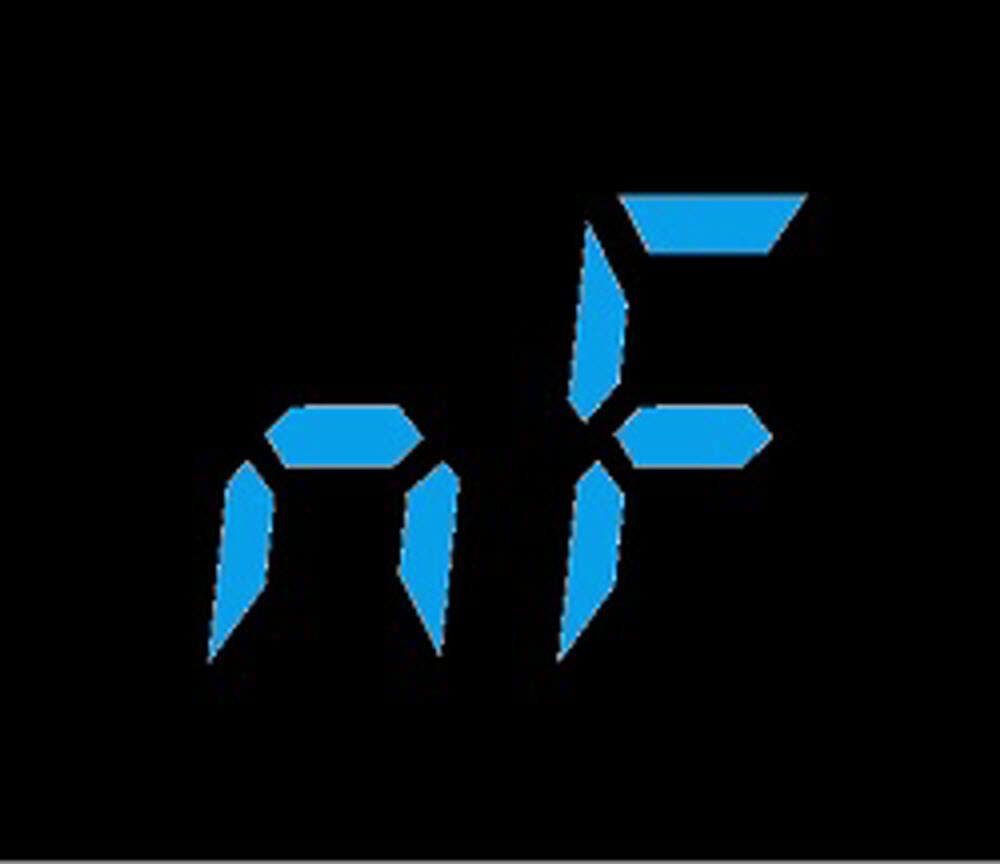
One of the most common—yet often misunderstood—readouts on a Samsung washer is the “nf” error code. While a flashing code on a digital display can be intimidating, understanding the technical logic behind the hardware allows homeowners and tech enthusiasts alike to diagnose and resolve the issue without a costly service call. In this guide, we will break down the “nf” code, the components involved in the water delivery system, and the step-by-step technical procedures to restore your appliance to peak performance.
Understanding the “nf” Error Code: The Tech Behind the Display
The “nf” code is a specific diagnostic signal that stands for “No Fill.” In the internal logic of a Samsung washer’s control board, this code is triggered when the machine’s sensors fail to detect a sufficient rise in water levels within a predetermined timeframe.
The Logic of the Control Board
Every modern Samsung washer operates via a Main Control Unit (MCU). When you start a cycle, the MCU sends a signal to the water inlet valves to open. Simultaneously, it begins monitoring the water pressure sensor (also known as a pressure switch). If the sensor does not report a change in atmospheric pressure within the drum—indicating that water is filling the tub—within approximately 30 to 40 minutes, the MCU halts the cycle as a safety precaution and displays the “nf” code.
“nf” vs. “4C”: A Note on Firmware Updates
Depending on the age and firmware version of your Samsung washer, you may see different variations of this code. Older models primarily use “nf,” while newer models, especially those integrated with Samsung’s SmartThings ecosystem, have transitioned to the “4C” or “4E” error codes. Technically, these codes are identical in meaning; they all point to a failure in the water supply sequence. Understanding this nomenclature is the first step in digital appliance diagnostics.
Diagnosing the Root Causes: From Sensors to Solenoid Valves
When a “nf” error appears, the hardware failure usually resides in one of three areas: the external supply, the intake filtration, or the internal electronic valves. By taking a systematic approach to diagnostics, you can isolate the malfunctioning component.
Evaluating the Water Inlet Valves
The water inlet valve is an electromechanical component that acts as the gatekeeper for water entering the machine. It contains solenoids—coils of wire that create a magnetic field when energized—which pull a plunger to allow water flow. Over time, these solenoids can suffer from electrical continuity failure. If the MCU sends a 120V signal to the valve but the solenoid fails to actuate, the machine will remain dry, triggering the “nf” alert.
The Role of the Pressure Transducer
The pressure transducer is the “eyes” of the washer. It is connected to the drum via a thin plastic tube. As water fills the drum, air is pushed up the tube, increasing the pressure on the transducer’s diaphragm. This physical pressure is converted into an electrical frequency that the MCU interprets as a specific water level. If the tube is pinched or the transducer is faulty, the machine may actually be full of water, but the “nf” code will still trigger because the “brain” isn’t receiving the data.
External Connectivity Issues
Before diving into internal hardware, one must consider the simplest tech failure: the supply lines. High-efficiency (HE) washers require specific ppsi (pounds per square inch) levels to operate correctly. If the home’s water pressure is too low, or if the “FloodSafe” hoses have been triggered (a common mechanical failure in “smart” hoses), the inflow will be too slow to satisfy the MCU’s programmed timing.
Step-by-Step Technical Solutions for Modern Samsung Washers
Once you have diagnosed the likely culprit, you can proceed with a technical intervention. These steps move from the least invasive to more complex hardware repairs.
1. Resetting the Control Interface
Sometimes, a “nf” code is the result of a temporary software glitch or a “phantom” error in the MCU’s memory.
- Power Cycle: Unplug the washer from the 120V outlet and wait for at least 60 seconds. This allows the capacitors on the control board to discharge fully, clearing the volatile memory.
- Restart: Plug the unit back in and attempt a “Rinse + Spin” cycle. If the code persists, the issue is hardware-related.
2. Cleaning the Mesh Filter Screens
Samsung washers utilize fine mesh filters located inside the intake thermistors to prevent sediment from entering the delicate internal components.
- Procedure: Turn off the water supply and disconnect the hot and cold hoses from the back of the machine. Use a pair of needle-nose pliers to gently remove the plastic mesh filters.
- Technical Tip: Look for mineral “scaling” or calcium buildup. Soak the filters in a descaling solution or white vinegar to restore flow. A restricted filter is the most common cause of the “nf” code in regions with hard water.
3. Testing the Solenoid Continuity
If the filters are clean, you must test the electrical integrity of the inlet valves. This requires a digital multimeter.
- Safety First: Disconnect the power.
- Testing: Remove the top panel of the washer to access the valve assembly. Set your multimeter to the Ohms (Ω) setting. Touch the probes to the terminals of each solenoid. A functional solenoid should typically read between 500 and 1,500 Ohms. A reading of “OL” (Open Loop) indicates a burnt-out coil that necessitates a component replacement.
Leveraging Smart Features and Diagnostic Tools
Samsung has integrated several “Smart Care” features into their appliance lineup to assist in troubleshooting. If your washer supports these features, you can bypass much of the manual guesswork.
Samsung Smart Care App
By using the Samsung Smart Care app on your smartphone, you can use your camera to scan the error code on the washer’s display. The app performs a digital handshake with the machine’s diagnostic output and provides a detailed breakdown of the “nf” error, often suggesting specific parts that need attention based on the machine’s internal logs.
Entering Diagnostic Mode
For those comfortable with a deeper tech dive, most Samsung washers have a hidden “Service Mode” or “Test Mode.” By pressing a specific combination of buttons (usually “Delay Start” and “Extra Rinse” simultaneously), you can enter a menu that allows you to manually activate the water valves one by one. This is an invaluable tool for determining if the issue is a specific valve (e.g., the cold valve works, but the hot valve triggers the “nf” code).
Firmware and SmartThings Integration
For the latest “AI-powered” Samsung washers, ensure your machine is connected to Wi-Fi and the SmartThings app. Samsung occasionally pushes firmware updates that recalibrate sensor sensitivity. If your “nf” code is triggered by high-sensitivity sensors misinterpreting water turbulence, a software update may be the official fix provided by Samsung engineering.
Preventative Maintenance: Ensuring Hardware Longevity
The best way to handle an “nf” error is to prevent the mechanical and electronic wear that causes it. High-tech appliances require a different maintenance schedule than the analog machines of the past.
- Install a Water Softener: Since the “nf” code is often caused by debris in the intake filters, treating your home’s water at the point of entry protects the solenoid valves from internal erosion and scaling.
- Replace Hoses Every Five Years: Over time, the internal lining of rubber hoses can degrade, sending small black particles into the washer’s filters. Upgrading to high-quality stainless steel braided hoses ensures a consistent flow rate.
- Regular Calibration: After moving the washer or performing a repair, run the “Calibration Mode.” This is a software routine where the washer spins the empty drum to detect its weight and sets the baseline for the pressure sensors.
Conclusion
The “nf” error code on a Samsung washer is not a sign of appliance failure, but rather a sophisticated safety protocol designed to protect the hardware from running dry or overheating. By understanding the intersection of the machine’s software logic and its mechanical components—from the MCU and pressure transducers to the solenoid valves—you can approach the problem with the mindset of a technician.
Whether it’s a simple matter of cleaning a mesh filter or a more involved process of testing electrical continuity with a multimeter, the “nf” code is a solvable challenge. In the modern world of smart technology, being an informed user means moving beyond frustration and utilizing the diagnostic tools at your fingertips to keep your home’s tech ecosystem running smoothly.
aViewFromTheCave is a participant in the Amazon Services LLC Associates Program, an affiliate advertising program designed to provide a means for sites to earn advertising fees by advertising and linking to Amazon.com. Amazon, the Amazon logo, AmazonSupply, and the AmazonSupply logo are trademarks of Amazon.com, Inc. or its affiliates. As an Amazon Associate we earn affiliate commissions from qualifying purchases.