
Modern smart home ecosystems rely heavily on the integration of life-safety devices. While we often focus on the connectivity of lighting, thermostats, and security cameras, the humble smoke alarm remains the most critical gadget in your digital home architecture. Understanding the specific diagnostic signals—or “beeps”—emitted by these devices is a fundamental skill for any tech-conscious homeowner. These auditory codes are not random; they are sophisticated status indicators triggered by the device’s internal firmware and sensor array.
Decoding the Acoustic Patterns of Smart and Standard Alarms
The primary reason for confusion regarding smoke alarm behavior is that users often treat all beeps as identical. In reality, modern hardware follows a standardized language of audio pulses designed to communicate specific system needs. Whether you are dealing with a hard-wired unit or a battery-operated smart sensor, identifying the pattern is the first step in troubleshooting.

The Single Chirp: Low Battery or System Maintenance
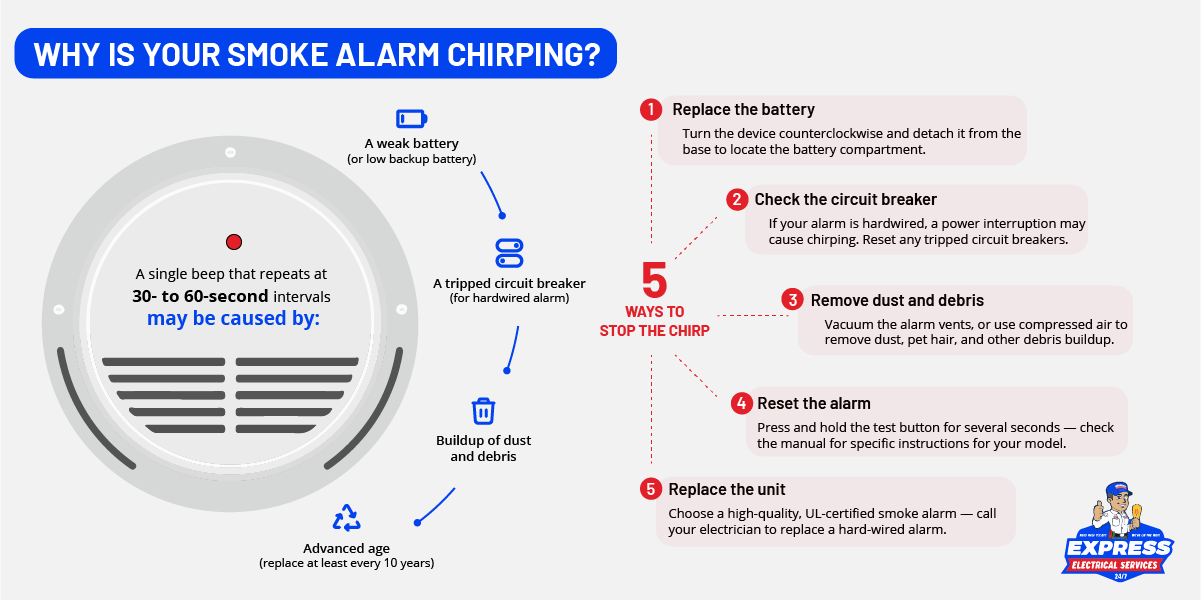
The most common sound encountered by homeowners is a single, intermittent chirp, usually occurring every 30 to 60 seconds. This is the device’s way of communicating a “Low Power State.” In traditional hardware, this is a literal signal that the electrochemical potential of the battery has dropped below a threshold required to sustain the sensing circuit.
In the context of modern smart home hardware, this chirp can also indicate a connectivity failure. If your device is integrated into a Zigbee, Z-Wave, or Wi-Fi mesh network, a periodic chirp may indicate that the device has lost its handshake with the hub or gateway. When the device enters a power-save mode due to a failing battery, it may drop its radio frequency (RF) connection, resulting in this diagnostic chirp.
The Rapid Pulse: Emergency Activation
A rapid, continuous pulse—the familiar “T-3” pattern (three loud beeps, a pause, then repeat)—is the universal signal for a detected hazard. This is distinct from a chirp. The T-3 pattern is hard-coded into the device’s non-volatile memory to comply with fire safety standards. When this occurs, the device is essentially bypassing its background monitoring loop and moving into “Active Alarm” mode. If you are using smart smoke detectors that integrate with your smartphone or smart display, this event will simultaneously push a high-priority notification to your devices via the cloud.
The Persistent Chirp After Battery Replacement
A common frustration occurs when a user replaces the batteries, yet the chirping persists. This is rarely a fault of the new battery; rather, it is a residual charge issue or a “dirty” contact point. Capacitors within the smoke alarm circuitry hold a charge even after the power source is removed. To perform a hard reset, users should remove the batteries and hold the “Test/Silence” button down for 15 to 20 seconds. This drains the internal storage, clearing the cache of the device’s onboard processor, and allows it to recalibrate to the fresh power source upon reboot.
Sensor Sensitivity and the Science of False Positives
Modern smoke alarms utilize two primary types of sensing technology: Ionization and Photoelectric. Understanding which type you have installed is essential for interpreting the “false alarm” behavior of your smart home hardware.
Ionization Sensors
Ionization sensors are highly effective at detecting fast-flaming fires. They contain a tiny amount of radioactive material that ionizes the air, creating a current. When smoke enters the chamber, it disrupts this current. Because these sensors are hyper-sensitive to microscopic particulates, they are notoriously prone to false triggers from steam, high humidity, or even cooking aerosol spray. If your alarm is chirping or sounding in a kitchen environment, it is likely a sensor interference issue caused by airborne particles rather than a malfunctioning unit.
Photoelectric Sensors
Photoelectric sensors use a light source and a light-sensitive sensor set at an angle. When smoke enters the chamber, light reflects onto the sensor, triggering the alarm. These are generally better at detecting smoldering fires. In a smart home environment, these are often preferred because they are less prone to “nuisance alarms” caused by toast or steam. If a photoelectric unit is chirping inconsistently, it is often due to the accumulation of dust or small insects within the sensing chamber, which reflects the infrared light incorrectly, triggering a diagnostic fault signal.
The Role of Firmware and Connectivity in Alarm Management
As we move toward the era of the Internet of Things (IoT), smoke detectors have evolved from standalone sensors to node-based peripherals. This shift introduces a new layer of complexity regarding how we interpret alarms.
Integration Latency and Hub Syncing
In high-end smart homes, smoke alarms are often grouped. If one unit detects a potential issue—even a minor one—it can trigger a synchronized alarm across all connected devices in the home. If you hear a series of beeps, check your central smart home dashboard or companion app. Often, the app will provide a specific status code or text description (e.g., “Sensor Fault,” “Low Battery,” or “Smoke Detected in Hallway”) that eliminates the guesswork.
Over-the-Air (OTA) Updates
One of the most overlooked features of modern smart smoke detectors is the ability to receive OTA firmware updates. Occasionally, a device may begin chirping not because of a physical failure, but because it has entered a bootloader state during an update. If your device is connected to a stable Wi-Fi network, allow the update to complete. Interruption of the power supply during an OTA update can lead to a “bricked” state, requiring a physical factory reset via the manufacturer’s specific sequence.
Life Cycle Management: When to Retire Your Hardware
Even the most advanced smart smoke alarm has a finite shelf life. Most manufacturers recommend full replacement every 10 years, though many smart units suggest replacement after 7 to 8 years due to the degradation of the integrated sensor components.
The End-of-Life Chirp
Do not confuse an end-of-life signal with a low-battery chirp. Most modern detectors are programmed with an internal timer. Once the device reaches its maximum operational lifespan, it will emit a unique sound pattern—usually a double-chirp or a persistent, non-silenceable beep—that cannot be resolved by changing the batteries. This is a critical security feature. At this stage, the sensor elements (the ion chamber or the light-sensing array) have likely oxidized or become too degraded to reliably detect smoke in an emergency. In this instance, the only correct action is to replace the unit entirely.
Environmental Considerations
The longevity of your device is heavily dictated by its environment. Installing a high-tech smart smoke detector in a non-climate-controlled garage or an attic with extreme temperature fluctuations will significantly reduce the lifespan of both the battery and the internal circuitry. Excessive heat can cause internal components to expand and contract, leading to micro-fractures in the board and causing “ghost” alerts or chirping sounds that mimic sensor failure.
Final Best Practices for the Tech-Savvy Home
To maintain the integrity of your life-safety system, adopt a proactive digital maintenance schedule:
- Monthly Testing: Use the “Test” button on your smart app or the physical device. This verifies that the horn, the battery, and the Wi-Fi/mesh radio are all functioning within expected parameters.
- Vacuuming: Once every six months, use the soft brush attachment of a vacuum cleaner to clear dust from the vents of your alarm. This prevents the “false positive” chirping caused by debris within the sensor chamber.
- Firmware Audits: Log into your smart home app monthly to ensure all safety devices are on the latest firmware version. This ensures that you have the most current patches for connectivity and sensor calibration.
- Battery Discipline: Even if your smart alarm reports 30% battery life, consider replacing them once a year. The cost of a few lithium batteries is negligible compared to the reliability of your safety infrastructure.
By treating your smoke alarm as an essential piece of critical networking hardware, you can interpret its warnings with precision, ensuring that the device remains a helpful guardian rather than a source of home-automation frustration.
aViewFromTheCave is a participant in the Amazon Services LLC Associates Program, an affiliate advertising program designed to provide a means for sites to earn advertising fees by advertising and linking to Amazon.com. Amazon, the Amazon logo, AmazonSupply, and the AmazonSupply logo are trademarks of Amazon.com, Inc. or its affiliates. As an Amazon Associate we earn affiliate commissions from qualifying purchases.