
In the intricate world of Java programming, every symbol and keyword holds a specific purpose, contributing to the language’s robust and versatile nature. Among these, the unassuming colon (:) is a surprisingly versatile punctuation mark that plays several distinct and crucial roles. Far from being a mere decorative element, the colon in Java acts as a separator, a signal, and an enabler of more concise or specific code constructs. Understanding its various applications is not just about mastering syntax; it’s about unlocking more expressive coding patterns, writing cleaner code, and ultimately becoming a more proficient Java developer.

This article delves into the primary meanings and uses of the colon in Java, exploring how it contributes to conditional logic, streamlined iteration, flow control, and even robust debugging. We’ll also briefly touch upon related constructs, such as the double colon, to provide a comprehensive understanding of these syntactical tools and their impact on modern Java development.
The Ternary Operator: A Concise Conditional Expression
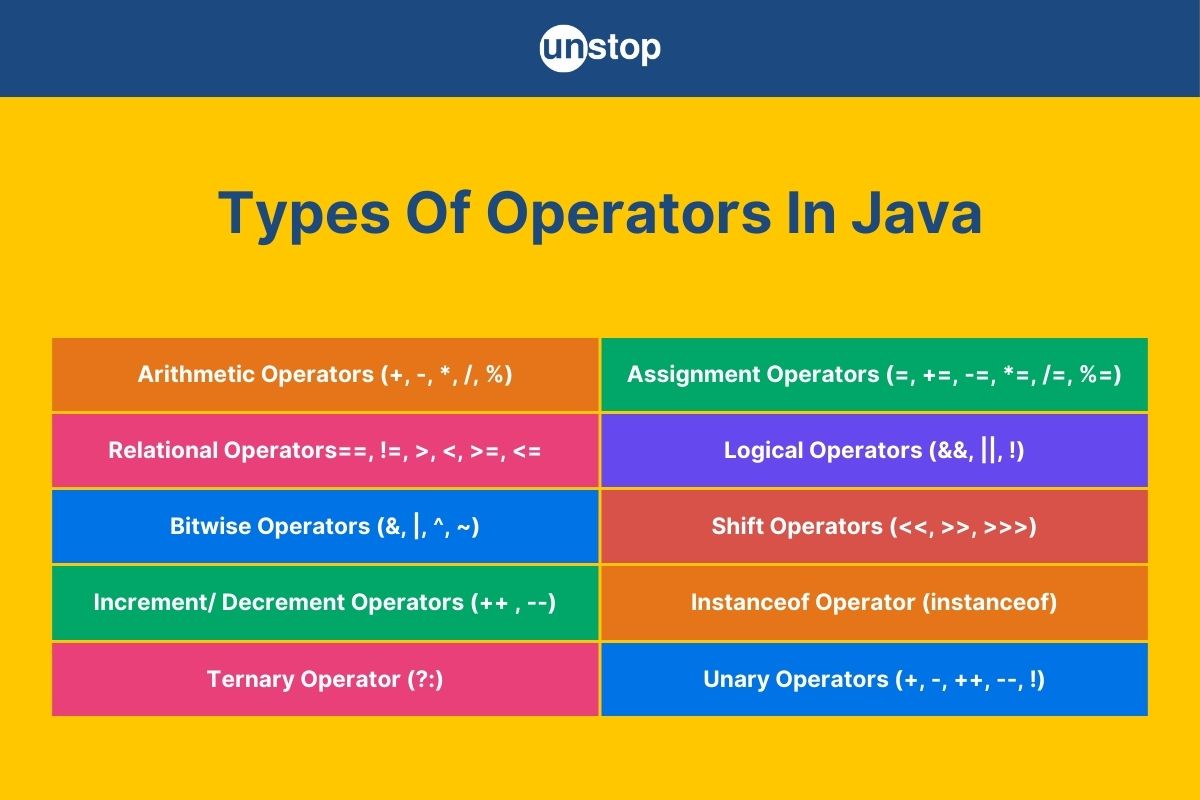
One of the most common and perhaps the most iconic uses of the colon in Java is within the ternary operator. Often referred to as the conditional operator, it provides a compact way to write simple if-else statements, making your code more concise and sometimes more readable for straightforward conditions.
Syntax and Basic Usage
The ternary operator takes three operands (hence “ternary”) and has the following structure:
condition ? expressionIfTrue : expressionIfFalse;
Here’s how it breaks down:
condition: A boolean expression that evaluates to eithertrueorfalse.?: The question mark separates the condition from the potential results.expressionIfTrue: The value or expression that is returned or executed if theconditionistrue.:: The colon separates theexpressionIfTruefrom theexpressionIfFalse.expressionIfFalse: The value or expression that is returned or executed if theconditionisfalse.
The ternary operator acts as an expression, meaning it evaluates to a single value, which can then be assigned to a variable, used in another expression, or passed as an argument to a method.
Example:
Consider a scenario where you want to determine the maximum of two numbers:
int a = 10;
int b = 20;
int max;

// Using a traditional if-else statement
if (a > b) {
    max = a;
} else {
    max = b;
}
System.out.println("Max (if-else): " + max); // Output: 20

// Using the ternary operator
max = (a > b) ? a : b;
System.out.println("Max (ternary): " + max); // Output: 20
Another common use is assigning a default value or displaying different messages based on a condition:
String status = (userLoggedIn) ? "Welcome back!" : "Please log in.";
System.out.println(status);
Benefits and Best Practices
The primary benefit of the ternary operator is its conciseness. It can significantly reduce the lines of code required for simple conditional assignments, leading to a more compact codebase. This can sometimes improve readability, especially when the conditions and expressions are short and clear. It’s particularly useful for inline assignments or when passing conditional values directly into method calls.
However, discretion is key. While powerful, overuse or misuse of the ternary operator can lead to code that is harder to read and debug. Nesting multiple ternary operators or using complex expressions within them can quickly turn a concise statement into a cryptic one.
Best Practices:
- Keep it simple: Use the ternary operator for straightforward, single-line conditions.
- Avoid nesting: Deeply nested ternary operators are often a sign that an
if-elsestatement would be more readable. - Ensure type consistency: Both
expressionIfTrueandexpressionIfFalseshould result in values of compatible types, as the result of the ternary operator will have a single type.
Adhering to these practices ensures that the ternary operator remains a tool for enhancing clarity rather than hindering it.
Iterating with Ease: The Enhanced For Loop
Java 5 introduced a revolutionary change for iterating over collections and arrays: the enhanced for loop, often called the “for-each” loop. This construct significantly simplifies the process of traversing elements, and central to its syntax is the colon.
Simplifying Collection Iteration
The enhanced for loop provides a more readable and less error-prone way to iterate over elements of arrays and objects that implement the Iterable interface (like ArrayList, HashSet, LinkedList, etc.). Its structure is elegantly simple:
for (ElementType element : collectionOrArray)
Here’s a breakdown:
for: The keyword indicating a loop.ElementType: The data type of the elements you are iterating over.element: A temporary variable that will hold each element during each iteration.:: The colon separates the declaration of the element variable from the collection or array it will iterate over.collectionOrArray: The array orIterableobject whose elements you want to traverse.
Example:
Consider iterating through an array of strings or a list of integers:
// Iterating over an array
String[] names = {"Alice", "Bob", "Charlie"};
System.out.println("Names in array:");
for (String name : names) {
    System.out.println(name);
}

// Iterating over a list
List<Integer> numbers = Arrays.asList(1, 2, 3, 4, 5);
System.out.println("Numbers in list:");
for (int num : numbers) {
    System.out.println(num);
}
This is a significant improvement over the traditional for loop, which would require managing an index:
// Traditional for loop for comparison
for (int i = 0; i < names.length; i++) {
    System.out.println(names[i]);
}
Advantages and Limitations
The enhanced for loop offers several compelling advantages:
- Readability: The syntax
for (element : collection)reads almost like natural language, “for each element in collection,” making the code easier to understand at a glance. - Reduced boilerplate: It eliminates the need to declare and manage an index variable, reducing the chances of off-by-one errors or forgetting to increment the index.
- Focus on the elements: It shifts the focus from the mechanics of iteration (indices, boundaries) to the actual data being processed.
However, the enhanced for loop also has limitations:
- No index access: You cannot directly access the index of the current element within the loop. If you need the index, a traditional
forloop is necessary. - Cannot modify the collection: You cannot add or remove elements from the collection being iterated over using the enhanced for loop. Doing so would lead to a
ConcurrentModificationException. If modification is needed, anIteratorwith itsremove()method or a traditionalforloop (for arrays) is required. - Single pass: It’s designed for a simple, forward pass over all elements.
Despite these limitations, the enhanced for loop is the preferred way to iterate over collections and arrays when you only need to access the elements and do not require their index or modifications to the collection during iteration. It promotes cleaner, more expressive code, which is a hallmark of good software design.
Labeling Code Blocks: A Niche but Powerful Feature
While less frequently used than the ternary operator or enhanced for loop, the colon also serves as a crucial element in Java for defining labels. Labeled statements provide a mechanism to break out of or continue specific nested loops or blocks of code, offering a fine-grained control over flow execution.
Controlling Flow with Labeled break and continue
In Java, you can place a label before a statement (typically a loop or a block) using the syntax labelName: statement;. This label can then be referenced by break or continue statements to target a specific outer loop or block, rather than just the innermost one.
Syntax:
labelName: loopOrBlockStatement { ... }
Example:

Consider nested loops where you need to exit both loops based on a condition in the inner loop:
outerLoop:
for (int i = 0; i < 3; i++) {
    for (int j = 0; j < 3; j++) {
        if (i * j == 4) {
            System.out.println("Breaking out of outerLoop at i=" + i + ", j=" + j);
            break outerLoop; // Exits both loops
        }
        System.out.println("i=" + i + ", j=" + j);
    }
}
System.out.println("Finished with outerLoop.");
Without the outerLoop label, break would only exit the inner for (int j ...) loop, and the outer loop would continue. Similarly, continue labelName; would skip the rest of the current iteration of the labeled loop and proceed to its next iteration.
When and Why to Use Labels (and When Not To)
Labeled break and continue statements offer a precise way to alter control flow, which can be immensely useful in specific, complex scenarios involving deeply nested loops. They can prevent the need for additional boolean flags or complex logic to manage loop exits.
However, they are often viewed with caution by experienced developers. The primary reason is that they can introduce complexity and make code harder to follow, reminiscent of the much-maligned goto statement found in older languages. Overuse of labels can lead to “spaghetti code,” where the flow of execution jumps around unpredictably.
When to consider labels:
- Breaking out of multiple nested loops: This is the most common and justifiable use case.
- When refactoring to methods is not feasible or would overcomplicate the design: Sometimes, extracting the nested loops into a separate method with an early
returnis a cleaner alternative.
When to avoid labels:
- For simple loop control: The regular
breakandcontinueare sufficient for single loops. - As a general-purpose
gotoreplacement: Avoid using labels to jump around arbitrary blocks of code, as it severely impacts readability and maintainability.
In modern Java development, especially with the advent of Streams API and functional programming constructs, the need for labeled statements has further diminished. They remain a part of the language for backward compatibility and those rare edge cases where they genuinely simplify control flow without sacrificing clarity.
Assertions for Robust Development
Another significant application of the colon in Java is within assertion statements. The assert keyword, introduced in Java 1.4, allows developers to declare an assumption about the state of their program at a particular point. If this assumption proves false, an AssertionError is thrown, indicating a potential bug.
assert Keyword and Its Use
Java assertions come in two forms, both of which can utilize the colon:
assert condition;assert condition : messageExpression;
Here’s how the second form, using the colon, works:
assert: The keyword to initiate an assertion.condition: A boolean expression that is expected to betrue.:: The colon separates theconditionfrom an optional error message.messageExpression: An expression (e.g., a string literal, a method call, or a variable) whose result will be passed as the detail message to theAssertionErrorif theconditionisfalse.
Example:
Consider a method that should never receive a null argument for a critical parameter:
public class Calculator {
    public int divide(int numerator, int denominator) {
        // Assert that the denominator is not zero before proceeding
        assert denominator != 0 : "Denominator cannot be zero!";
        return numerator / denominator;
    }

    public static void main(String[] args) {
        Calculator calc = new Calculator();
        System.out.println("Result: " + calc.divide(10, 2)); // Output: Result: 5
        // This will throw AssertionError if assertions are enabled
        System.out.println("Result: " + calc.divide(10, 0));
    }
}
When the denominator is 0, and assertions are enabled, an AssertionError will be thrown with the message “Denominator cannot be zero!”. The messageExpression provides valuable context during debugging.
Enabling Assertions and Production Considerations
A critical aspect of Java assertions is that they are disabled by default at runtime for performance reasons. To enable them, you must use a JVM flag when running your Java application:
-enableassertionsor-ea: Enables assertions in all classes (except system classes).-enableassertions:package.Classor-ea:package.Class: Enables assertions in a specific class or package.-disableassertionsor-da: Disables assertions (default).
Important considerations:
- Debugging tool, not input validation: Assertions are primarily intended for developers to verify internal invariants and assumptions within the code. They are not a substitute for robust input validation (e.g., checking user input, external data) or handling anticipated error conditions, which should be done with standard
if-elsechecks and exception handling (try-catch). - Performance overhead: Since
assertstatements can include complexmessageExpressioncalculations, they can introduce a performance overhead if enabled in production. This is why they are typically disabled in production environments. The JVM completely ignoresassertstatements if they are disabled, incurring no runtime cost. - Documentation: Assertions can serve as a form of executable documentation, clarifying the assumptions that the developer holds about the state of the program at certain points.
Using assertions effectively can significantly improve the robustness and debuggability of your software during development and testing phases, helping to catch bugs early that might otherwise be subtle and hard to trace.
Beyond the Single Colon: Related Constructs
While this article primarily focuses on the single colon, it’s worth briefly mentioning a related construct that also uses colons and has become central to modern Java development: the double colon (::).
The Double Colon (::) for Method References
Introduced in Java 8 as part of the functional programming features, the double colon operator is used to create method references. Method references provide a concise way to refer to methods without executing them, treating them as first-class functions. They are closely tied to lambda expressions and functional interfaces.
Syntax forms:
ClassName::staticMethod: Reference to a static method.object::instanceMethod: Reference to an instance method of a particular object.ClassName::instanceMethod: Reference to an instance method of an arbitrary object of a particular type (the first parameter of the functional interface becomes the target object).ClassName::new: Reference to a constructor.
Example:
List<String> names = Arrays.asList("apple", "banana", "cherry");

// Using a lambda expression
names.forEach(s -> System.out.println(s));

// Using a method reference (more concise)
names.forEach(System.out::println); // Reference to the println method of the System.out object
While not a single colon, the double colon is a logical extension in the journey of using colon-like symbols to achieve greater conciseness and functional expressiveness in Java, particularly in the context of streams and lambda programming. Understanding its role is essential for working with modern Java APIs.
Why Understanding Colon Usage Matters for Your Tech Career
For aspiring and seasoned developers alike, a deep understanding of Java’s syntactical elements, including the nuanced uses of the colon, is more than just academic knowledge. It directly impacts the quality of your code, your professional standing, and your career trajectory in the competitive tech landscape.
Boosting Code Quality and Professionalism
Writing clean, efficient, and idiomatic Java code is a hallmark of a professional developer. When you correctly apply constructs like the ternary operator for concise logic, the enhanced for loop for readable iteration, and assertions for robust development, you demonstrate mastery over the language. This proficiency translates into:
- Higher Code Readability: Clearer code is easier for others (and your future self) to understand, reducing cognitive load and accelerating maintenance.
- Reduced Bugs: Correctly using language features helps prevent common errors. Assertions, in particular, are powerful tools for catching bugs early in the development cycle.
- Maintainability: Well-structured and idiomatic code is easier to modify, extend, and debug, which significantly lowers long-term project costs.
Your ability to write high-quality code directly reflects on your personal brand as a developer, showcasing your attention to detail and commitment to best practices.
Career Advancement and Market Value
In today’s dynamic job market, strong Java skills are consistently in high demand. Recruiters and hiring managers look for candidates who not only know the basics but also understand the subtleties and best practices of the language.
- Interview Success: Demonstrating knowledge of the colon’s various uses, including appropriate contexts for each, can differentiate you in technical interviews. Discussing when to use a ternary versus an
if-else, or the advantages of an enhanced for loop, shows depth of understanding. - Senior Roles: As you advance to senior or lead developer positions, you’ll be expected to design robust systems and mentor junior team members. A comprehensive understanding of Java’s features allows you to make informed architectural decisions and guide others effectively.
- Employability: Staying updated with modern Java features, such as method references (using
::), ensures your skills remain relevant and highly marketable. Companies are constantly seeking developers who can leverage the latest language enhancements to build more efficient and maintainable applications.
Ultimately, investing time in mastering these syntactic elements is an investment in your career, enhancing your market value and opening doors to more challenging and rewarding opportunities.
Enhancing Productivity and Team Collaboration
The benefits of understanding the colon’s roles extend beyond individual skill to impact team dynamics and project efficiency:
- Improved Team Velocity: When all team members understand and consistently apply idiomatic Java constructs, code reviews become faster, and integration issues are minimized. There’s less time spent deciphering ambiguous code and more time spent building features.
- Reduced Technical Debt: Code that is clear, concise, and robust naturally accumulates less technical debt. This translates into less time spent fixing old problems and more time innovating, directly impacting project budgets and timelines.
- Effective Communication: Consistent coding style and understanding of standard language features foster better communication among team members. Everyone speaks the same “code language,” reducing misunderstandings and improving collaborative problem-solving.
In conclusion, the humble colon in Java is far more than a simple punctuation mark. It is a key player in multiple powerful language constructs that empower developers to write more expressive, concise, and robust code. From elegant conditional logic to streamlined iteration, and from precise flow control to critical assertions, mastering its uses is fundamental to becoming a highly effective and respected Java professional. For anyone working with Java, a thorough understanding of these features is indispensable for building high-quality software, advancing their career, and contributing positively to their teams and organizations.
aViewFromTheCave is a participant in the Amazon Services LLC Associates Program, an affiliate advertising program designed to provide a means for sites to earn advertising fees by advertising and linking to Amazon.com. Amazon, the Amazon logo, AmazonSupply, and the AmazonSupply logo are trademarks of Amazon.com, Inc. or its affiliates. As an Amazon Associate we earn affiliate commissions from qualifying purchases.