
Navigating the demands of academic and professional writing often involves mastering specific citation styles. Among these, Chicago style stands out for its flexibility and comprehensive approach, particularly in humanities and some social sciences. In an increasingly digital academic landscape, understanding how Chicago style manifests – and how technology aids its implementation – is crucial for producing polished, credible work. This isn’t just about placing commas correctly; it’s about integrating sources seamlessly into a digital workflow.
Navigating the Digital Landscape of Academic Citation
Chicago style, officially known as The Chicago Manual of Style (CMOS), offers two primary documentation systems: “Notes and Bibliography” (NB) and “Author-Date.” While both serve the same purpose of attributing sources, their appearance and application differ significantly. In a digital environment, the choice between these systems can influence the tools and features writers utilize in their word processors and research management software.
The Core Principles of Chicago Style in a Digital Age
At its heart, Chicago style emphasizes clarity, consistency, and thoroughness. For the Notes and Bibliography (NB) system, its hallmark is the use of footnotes or endnotes for citations within the text, complemented by a comprehensive bibliography at the end of the document. This system is preferred in fields like history, literature, and the arts, where detailed commentary or extensive source notes might be necessary. Digitally, this translates to leveraging automated footnote/endnote features in word processing software like Microsoft Word, Google Docs, or LaTeX editors, which manage numbering and placement effortlessly. The bibliography, a distinct alphabetical list of all sources cited, serves as a complete reference list, easily generated and updated by citation management tools.
The Author-Date system, conversely, employs parenthetical citations within the text (e.g., “Smith 2020, 45”), directing readers to an alphabetical “References” list at the end of the document. This system is common in social sciences, physical sciences, and business, where conciseness in in-text citations is often preferred. Digital tools excel here too, automating the insertion and formatting of these parenthetical citations and maintaining the corresponding reference list. Regardless of the system chosen, the fundamental appearance of a Chicago-style citation is one of precision, providing all necessary information for readers to locate the original source.
Footnotes/Endnotes: Seamless Integration with Word Processors
The Notes and Bibliography system’s visual appeal largely stems from its elegant handling of in-text citations. A small, superscript number after a quotation or paraphrase signals a footnote or endnote, which appears at the bottom of the page (footnote) or at the end of the chapter/document (endnote).
A typical footnote/endnote entry looks like this:
- Author’s Full Name, Title of Book (Place of Publication: Publisher, Year of Publication), Page Number.
- Jane Doe, “Article Title,” Journal Title Volume, no. Issue (Year): Page Number, DOI or URL.
Example for a book:
- Michael Pollan, The Omnivore’s Dilemma: A Natural History of Four Meals (New York: Penguin Press, 2006), 99.
Example for a journal article:
- Sara R. Farris, “The Headscarf and the European Union: The Limits of Feminism,” European Journal of Women’s Studies 17, no. 1 (2010): 9–22, https://doi.org/10.1177/1350506809355793.
Word processors are indispensable for managing these. Their built-in features automatically renumber notes as you add or delete them, ensuring accuracy across lengthy documents. This technological aid transforms what could be a painstaking manual process into an efficient component of academic writing, allowing writers to focus on content rather than constant formatting adjustments.
Bibliography Management with Modern Software Tools
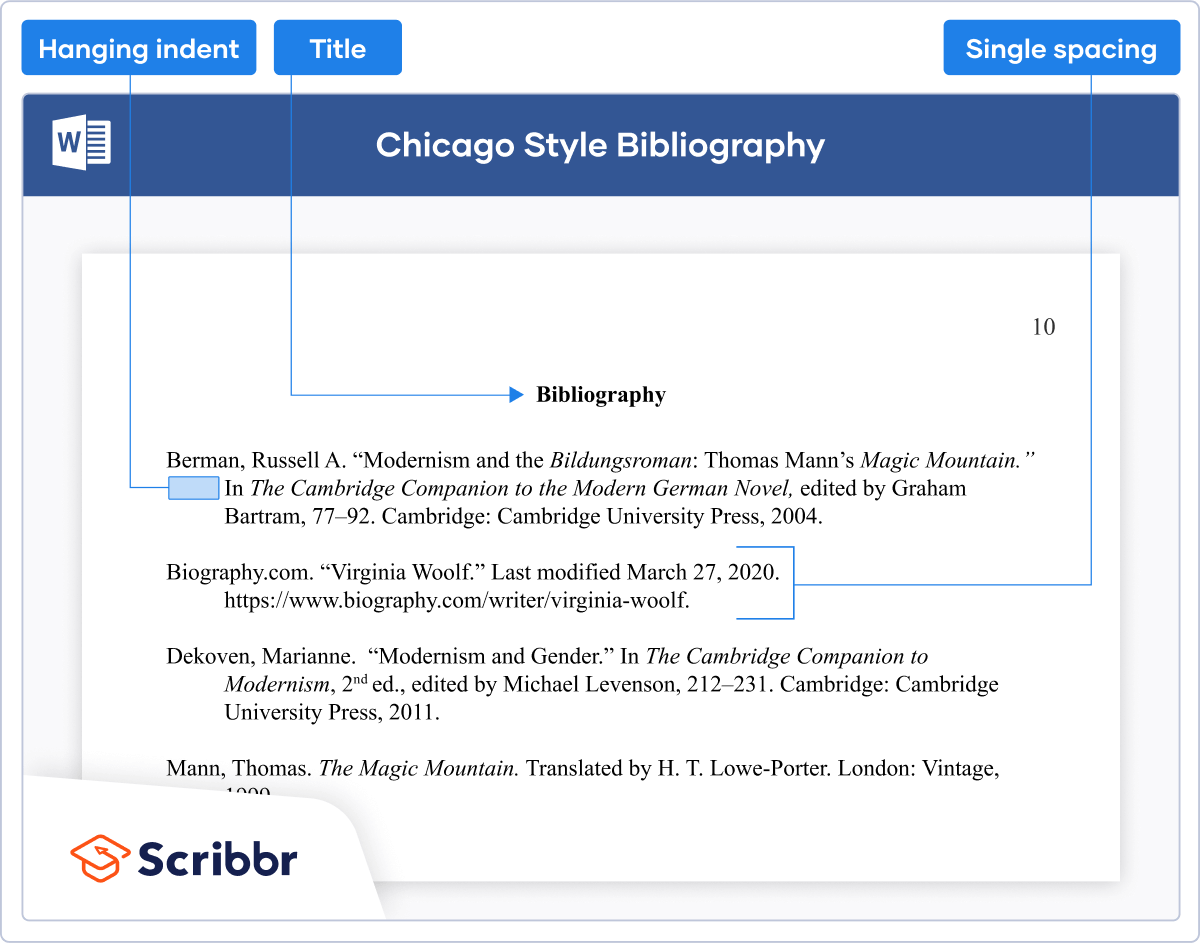
Beyond the individual citation, Chicago style requires comprehensive lists of all sources. For NB, this is the “Bibliography”; for Author-Date, it’s the “References” list. The digital age has revolutionized how these lists are compiled and maintained, moving far beyond manual card indexes to sophisticated software solutions.
Leveraging Citation Managers (Zotero, Mendeley, EndNote)
Citation management software represents a significant leap in academic productivity. Tools like Zotero, Mendeley, and EndNote allow researchers to collect, organize, and manage their research sources digitally. These platforms can import citation data directly from databases, websites, and PDFs, greatly reducing manual data entry errors.
Once a source is added to the library, these managers can generate citations and bibliographies in a vast array of styles, including both Chicago NB and Author-Date. When integrated with word processors, they enable seamless “cite-as-you-write” functionality. As you insert citations into your document, the software builds and updates the bibliography in the background, ensuring consistency and accuracy. This significantly streamlines the process, allowing writers to focus on the intellectual task of synthesis and analysis.
Automated Bibliography Generation
The true power of these digital tools lies in their ability to generate complete bibliographies or reference lists instantly. When you select Chicago style (either NB or Author-Date), the software formats every entry according to the style’s intricate rules.

A bibliography entry for a book might look like this:
Pollan, Michael. The Omnivore’s Dilemma: A Natural History of Four Meals. New York: Penguin Press, 2006.
A bibliography entry for a journal article might look like this:
Farris, Sara R. “The Headscarf and the European Union: The Limits of Feminism.” European Journal of Women’s Studies 17, no. 1 (2010): 9–22. https://doi.org/10.1177/1350506809355793.
Note the distinct formatting differences between footnotes/endnotes and bibliography entries (e.g., full author name vs. inverted for first author, punctuation, initial page numbers in notes vs. full range in bibliography for articles). Automated tools handle these nuances flawlessly, presenting a perfectly formatted list with appropriate indentation (hanging indent) and alphabetical order. This automation is particularly invaluable for long research papers or theses with hundreds of sources.
Mastering Source Integration and Digital Formatting
Chicago style’s appearance is also defined by how effectively sources are integrated into the narrative and how consistently the formatting is applied across different types of media.
Shortened Citations and Cross-Referencing
A common feature of the Chicago NB system is the use of shortened citations after the first full note. This streamlines the text and avoids redundancy. Digitally, some citation managers can assist with this, automatically using the shortened form (e.g., Author, Shortened Title, Page Number) for subsequent citations of the same source.
First note:
- Michael Pollan, The Omnivore’s Dilemma: A Natural History of Four Meals (New York: Penguin Press, 2006), 99.
Subsequent note: - Pollan, Omnivore’s Dilemma, 105.
Cross-referencing within digital documents is another key aspect. If a document references figures, tables, or sections, word processors provide tools to link these dynamically. While not strictly part of citation style, this enhances the overall professional appearance and navigability of a Chicago-formatted document, particularly in its digital form.
Handling Diverse Digital Sources
The internet has introduced a plethora of new source types, from blog posts and social media to podcasts and online videos. Chicago style has evolved to provide clear guidelines for citing these digital-native sources. The fundamental principle remains the same: provide enough information for a reader to locate the source.
Example of an online article in a note:
- John Smith, “Title of Online Article,” Website Name, Month Day, Year of Publication, URL.
Example of an online article in a bibliography:
Smith, John. “Title of Online Article.” Website Name, Month Day, Year of Publication. URL.
Modern citation managers are increasingly adept at capturing metadata from web pages and other digital assets, often needing just a URL to extract key information. This capability ensures that even ephemeral online sources can be systematically cited, maintaining the integrity of academic work in the digital age.
Ensuring Accuracy and Consistency with Digital Aids
The meticulous nature of Chicago style demands accuracy and consistency, which can be challenging to maintain manually. Digital tools not only automate formatting but also provide resources for verification and guidance.
Online Style Guides and Resource Platforms
While The Chicago Manual of Style Online is the definitive digital resource, numerous universities and academic institutions provide free online guides summarizing Chicago style rules. These platforms often include interactive examples, quick reference charts, and frequently asked questions, serving as invaluable digital complements to the official manual. When in doubt about a specific citation format, these online resources offer immediate, searchable answers, ensuring adherence to the most current guidelines.
The Role of AI in Citation Assistance
Emerging AI tools are beginning to play a role in academic writing, including citation. Some AI-powered writing assistants can suggest citations, check for formatting errors, or even help structure bibliographies based on contextual analysis. While these tools are still developing and should always be used with human oversight, they represent a futuristic direction where AI might further streamline the mechanical aspects of citation, allowing writers to focus on the intellectual contribution of their work. However, the critical judgment of the writer remains paramount for ensuring ethical and accurate citation.

Beyond the Basics: Advanced Digital Practices
For large-scale projects like dissertations or books, advanced digital practices become essential. Version control systems, collaborative writing platforms (like Overleaf for LaTeX, or even Google Docs’ robust features), and advanced PDF annotation tools all contribute to a comprehensive digital workflow that supports complex Chicago-style documentation. The appearance of Chicago style, therefore, is not merely static text on a page; it’s the output of an integrated digital ecosystem designed for scholarly rigor and efficient production. Mastering these tools means not just knowing what Chicago style looks like, but knowing how to consistently and effortlessly produce it in any digital medium.
aViewFromTheCave is a participant in the Amazon Services LLC Associates Program, an affiliate advertising program designed to provide a means for sites to earn advertising fees by advertising and linking to Amazon.com. Amazon, the Amazon logo, AmazonSupply, and the AmazonSupply logo are trademarks of Amazon.com, Inc. or its affiliates. As an Amazon Associate we earn affiliate commissions from qualifying purchases.